
Scalable Workflow Design Principles for Ops Teams

Scalable workflow design rests on ten core principles: modularity, bounded execution, durable state, idempotency, retry/backoff, observability, ownership, versioning, testing, and security/governance. Get those right from day one and you avoid the most expensive retrofits. Three things to do right now: map your production objective and success metrics, identify one long-running process to decompose into a bounded subworkflow, and add idempotency keys to every step that writes data.
- Modularity: Break work into subworkflows with explicit input/output contracts.
- Bounded execution: Cap concurrency, branching depth, and history size per workflow instance.
- Durable state: Persist only minimal state; offload large artifacts to object storage.
- Idempotency: Every write operation must be safe to replay without side effects.
- Retry/backoff: Classify errors early; apply exponential backoff with jitter and hard caps.
- Observability: Instrument every step; alert on queue depth, DLQ rate, and SLO drift.
- Ownership: Assign a named owner and runbook to every workflow before it ships.
- Versioning: Pin in-flight runs to their definition; use semantic versioning for changes.
- Testing: Unit-test step logic, integration-test with real queues, soak-test at peak load.
- Security/governance: Enforce access controls, data-residency rules, and change-approval gates.
Key Takeaways
Scalable workflow design requires modularity, bounded execution, and observability defined before the first step ships — not retrofitted after the first incident.
| Point | Details |
|---|---|
| Define objectives first | Write a testable objective (throughput, latency, DLQ rate) before designing any step. |
| Partition early | Break work into bounded subworkflows at ownership and SLA boundaries from day one. |
| Bound agentic execution | Limit concurrent branching to 5–10 branches and execution depth to 10–15 steps. |
| Instrument every step | Alert on DLQ rate above 1%, queue age above SLO window, and per-step success below 99%. |
| EasyFlow for execution | EasyFlow runs modular workflows with durable state, magic-link external handoffs, and real-time blocker detection. |
Table of Contents
- What are the core scalable workflow design principles?
- How do you break a workflow into modular stages?
- How do you preserve context and manage workflow payloads?
- How do you design workflows for branching, reuse, and composability?
- What metrics and tests validate workflow scalability?
- How should you handle errors and retries in scalable workflows?
- Orchestration vs. choreography: which pattern fits your workflow?
- How do you scale workflows with parallelism and partitioning?
- Operational practices: who owns the workflow and what do they own?
- Implementation checklist and anti-patterns to avoid
- What does recent field research say about workflow limits and patterns?
- How do you assign roles and define dependencies clearly?
- Which design principles should you prioritize first?
- What are the real trade-offs in scalability approaches?
- How do you monitor and alert after deployment?
- The gap most teams miss when scaling workflows
- EasyFlow puts these principles into practice for your team
- Sources
- FAQ
What are the core scalable workflow design principles?
Define the production objective before writing a single step. That single discipline shortens iteration time more than any framework choice, because every subsequent decision — what to measure, where to partition, how much state to keep — flows from a concrete target.
A well-formed objective names a throughput figure, a latency bound, and a consistency requirement. “Process 10,000 events per hour with no more than 2 seconds per-request latency” is a design constraint. “Onboard 100 new hires per week with zero manual reminders” is equally concrete and equally useful. Vague objectives like “handle more volume” produce vague architectures that break at the first real load spike.
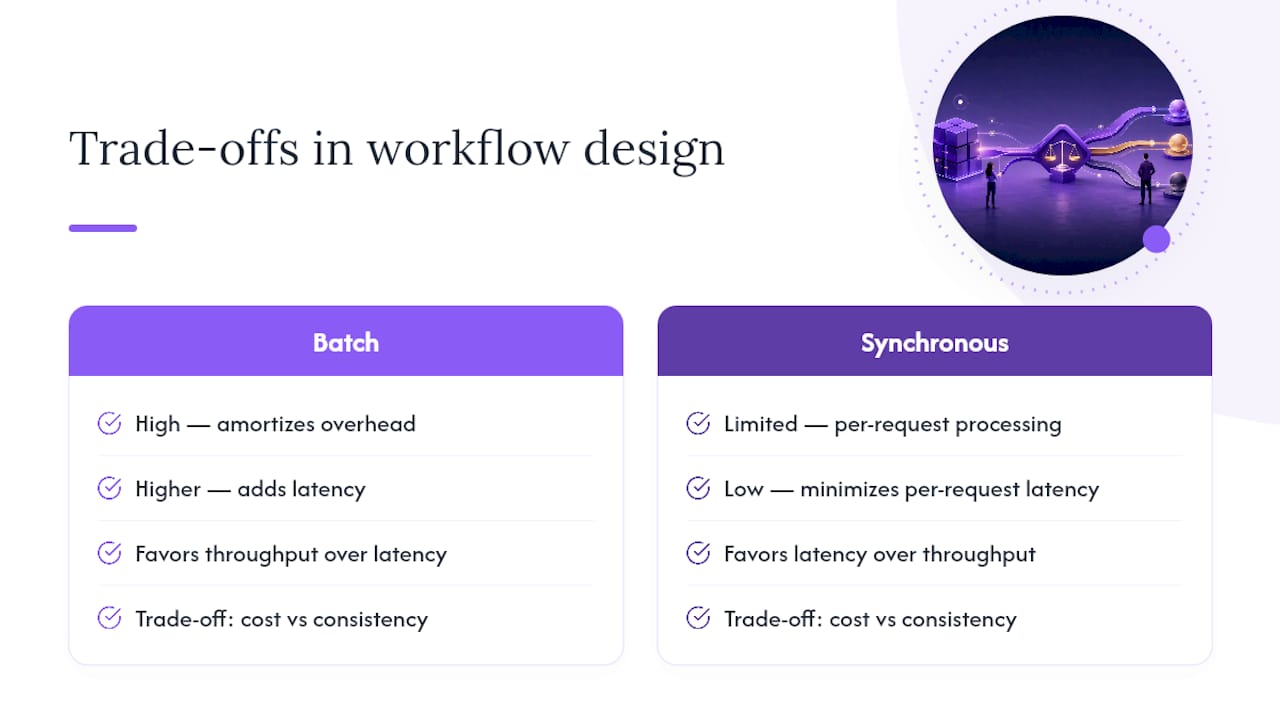
Objectives also force trade-offs into the open early. High throughput and low per-request latency pull in opposite directions: batch processing amortizes overhead but adds latency; synchronous per-request processing minimizes latency but limits throughput. Cost and consistency create a similar tension. Capturing those trade-offs in a one-page design brief, before any code is written, prevents the most common form of rework: discovering that the architecture optimized for the wrong axis.
Constraints belong in the same document. Payload size limits (many platforms cap individual event payloads at 256 KB or less), external SLA windows, data-retention requirements, and regulatory data-residency rules all shape which patterns are available to you. A workflow that ignores a 90-day retention window will eventually fail a compliance audit; one that ignores a downstream SLA will cascade failures upstream.
Pro Tip: Write your objective as a testable assertion: “The workflow must process X units per hour, with Y% of runs completing within Z seconds, and a DLQ rate below W%.” That assertion becomes your load-test pass/fail criterion.
Pair every objective with a small set of KPIs. Per-step success rate, end-to-end latency percentiles (p50, p95, p99), queue depth, and SLO attainment give you the signal you need to know whether the design is working. Workflow automation’s role in team alignment matters most when those metrics are visible to the whole team, not just the platform engineer.
How do you break a workflow into modular stages?
Design for subworkflow boundaries from day one. Retrofitting modularity onto a monolithic workflow is painful; the event history is already entangled, the state is shared, and every change risks breaking something unrelated.
A module boundary has four properties: a defined input schema, a defined output schema, an SLA (how long it is allowed to run), and an idempotency contract (what happens if it runs twice). Without all four, the module is not truly bounded — it is just a named section of a larger monolith.
Common subworkflow patterns worth knowing:
- Approval subworkflow: Pauses execution, sends a notification, waits for an asynchronous resume signal. Keeps the parent workflow clean and allows the approval logic to be reused across multiple parent flows.
- Enrichment subworkflow: Fetches data from external systems, normalizes it, and returns a typed result. Isolates external dependencies so they can be mocked in tests.
- Batch-processing subworkflow: Accepts a partition of a larger dataset, processes it independently, and reports completion. Enables parallel execution across partitions.
Workflow mapping is the practical first step: draw the process end-to-end, identify natural handoff points, and draw a boundary wherever the state, SLA, or ownership changes.
Pro Tip: For long-running workflows that accumulate large event histories, use Continue-As-New (Temporal) or child-workflow partitioning to reset the history counter. A workflow that runs for weeks without this pattern will eventually hit platform history-size limits and fail.
Scalable process discovery research demonstrates that divide-and-conquer decomposition scales to event logs of 100 million traces while preserving model quality — the same partitioning logic that makes process mining tractable makes runtime workflows manageable.
How do you preserve context and manage workflow payloads?
Store only minimal durable state in the workflow itself. Every byte you persist in the workflow’s event history costs you in replay time, storage, and platform limits. The pattern is simple: store a pointer, not the payload.

Large artifacts — file contents, API responses over a few kilobytes, ML model outputs, document blobs — belong in object storage (Amazon S3, Azure Blob Storage, Google Cloud Storage) or a secondary data store (DynamoDB, Cosmos DB). The workflow holds a reference: a bucket key, a record ID, a signed URL. When a downstream step needs the artifact, it fetches it directly rather than reading it from workflow state.
Why this matters in practice:
- Most durable-workflow platforms impose hard limits on event-history size (Temporal’s default is 50,000 events; Azure Durable Functions caps orchestration history at similar thresholds).
- Large payloads in workflow state increase replay time linearly. A workflow with 10 MB of embedded state takes significantly longer to replay after a failure than one with 10 KB.
- Schema changes to embedded payloads break replay of in-flight runs unless you version the schema explicitly.
Store only what the workflow needs to make its next decision. Everything else is an artifact — and artifacts belong in artifact storage, not in your workflow’s event log.
Recommended storage pattern: write the artifact to S3 (or equivalent), store the object key and a checksum in workflow state, and validate the checksum on read. When the schema changes, version the key prefix (e.g., v2/artifacts/...) so old and new runs can coexist without collision.
Google Cloud Workflows best practices explicitly recommend keeping memory consumption low, storing only required variables, and using subworkflows for repeated logic. Azure Durable Functions provides orchestration and timer patterns that complement this approach for teams on the Microsoft stack.
When a workflow is approaching platform limits, the signal is usually a payload-size error or a slow-replay warning in your observability layer.
How do you design workflows for branching, reuse, and composability?
Prefer loose coupling and high cohesion for every module. A step that does one thing well and exposes a clean interface can be reused across a dozen workflows. A step that reaches into shared mutable state or depends on the internal structure of another step cannot.
Three patterns that deliver composability in practice:
- Router pattern: A step that inspects the current payload and dispatches to one of several named subworkflows. The router owns no business logic; it only routes. This keeps branching logic centralized and testable.
- Strategy module: A step that accepts a strategy name as a parameter and delegates to the corresponding implementation. New strategies can be added without modifying the calling workflow.
- Shared activity library: A set of versioned, independently deployable activity functions (fetch-customer, send-notification, validate-schema) that any workflow can call. The library is the reuse mechanism; the workflow is the orchestration.
Semantic versioning for workflows prevents the most common composability failure: a change to a shared activity breaking in-flight runs. Pin each workflow definition to the activity versions it was tested against. When you release a new activity version, new workflow runs pick it up; existing runs continue against the pinned version until they complete.
Pro Tip: When migrating payload schemas, use an adapter step that reads both the old and new schema formats (dual-read). Deploy the adapter before retiring the old schema. This gives you a safe migration window without forcing a hard cutover that breaks in-flight runs.
Reusable steps also reduce the surface area for bugs. A notification step tested once and shared across ten workflows is safer than ten slightly different notification implementations, each with its own edge cases.
What metrics and tests validate workflow scalability?
Observability drives safe scale. Define your primary workflow KPIs before you write the first step, because you cannot alert on a metric you never instrumented.
| KPI | Target / Alert Threshold | What It Tells You |
|---|---|---|
| Per-step success rate | Alert below 99% | Identifies fragile steps before they cascade |
| Queue depth | Alert above 2× expected peak | Signals consumer lag or downstream bottleneck |
| Oldest message age | Alert above SLO window | Detects stalled consumers or poison messages |
| DLQ rate | Alert above 1% | Indicates unhandled error classes |
| End-to-end SLO attainment | Alert below 99% | Top-line health signal for the whole workflow |
| Replay latency | Alert on regression vs. baseline | Flags growing event-history size |
Testing a workflow for scale requires more than unit tests. A complete testing strategy covers four layers:
- Unit tests for step logic: Test each activity function in isolation with mocked dependencies. Verify idempotency by running the same input twice and asserting identical outputs with no duplicate side effects.
- Integration tests with real infrastructure: Run the workflow against real queues, timers, and databases in a staging environment. Verify that retry policies fire correctly and that DLQ routing works.
- Soak tests at expected peak: Run the workflow at its target throughput for a sustained period (typically 30–60 minutes minimum). Watch for memory leaks, connection pool exhaustion, and queue depth drift.
- Chaos tests for transient faults: Inject failures (network timeouts, downstream 503s, partial database failures) and verify that the workflow recovers without data loss or duplicate processing.
How should you handle errors and retries in scalable workflows?
Classify errors before you write a single retry policy. Retryable errors are transient: network timeouts, rate-limit responses (HTTP 429), temporary downstream unavailability. Terminal errors are permanent: invalid input, authentication failures, schema violations. Retrying a terminal error wastes resources and delays the DLQ routing that would actually fix the problem.
For retryable errors, Google Cloud Workflows best practices recommend exponential backoff with jitter, maximum attempt caps, and total retry duration limits. A practical policy looks like this:
- Initial interval: 1 second
- Backoff multiplier: 2×
- Jitter: ±20% of the computed interval (prevents thundering-herd on recovery)
- Max attempts: 5
- Max total retry window: 5 minutes
Beyond 5 minutes of retrying, route to the DLQ and alert. Do not let a retry loop run indefinitely.
The Saga pattern handles the harder problem: what happens when a multi-step transaction partially succeeds across services? Each step in a Saga has a corresponding compensating transaction that undoes its effect. If step 3 fails after steps 1 and 2 have committed, the Saga executes the compensating transactions for steps 2 and 1 in reverse order. This gives you distributed consistency without two-phase commit, which is notoriously fragile at scale.

Use Saga when: you have two or more services that each own their own database, you need eventual consistency rather than strict atomicity, and you can define a meaningful compensating action for each step.
Pro Tip: Attach an idempotency key to every write operation and use upsert semantics on the receiving end. This makes at-least-once delivery safe: if a step retries after a network failure, the second attempt is a no-op rather than a duplicate write.
Orchestration vs. choreography: which pattern fits your workflow?
Pick the pattern that matches your ownership model, latency requirements, and observability needs. Neither orchestration nor choreography is universally better; the right choice depends on what you are building.
Orchestration (a central coordinator directs each step):
- Full visibility into workflow state at any point
- Durable state and replay on failure
- Easier to debug because the execution path is explicit
- Best for: long-running human-approval workflows, multi-step onboarding, client implementations
Choreography (services react to events without a central coordinator):
- Loose coupling between services
- Eventual consistency; no single point of failure
- Harder to trace end-to-end without distributed tracing
- Best for: high-throughput event streams, microservice coordination where teams own independent services
Queues (message brokers as the communication layer):
- Natural backpressure control: producers slow down when consumers lag
- Decouples producer and consumer deployment cycles
- Best for: high-throughput ETL, async task dispatch, rate-limiting downstream calls
| Use Case | Recommended Pattern |
|---|---|
| Long-running human approvals | Orchestration with async resume |
| High-throughput ETL | Choreography + queues |
| Multi-service transaction | Orchestration + Saga |
| Microservice event fan-out | Choreography |
| Mixed: approvals + high-volume processing | Hybrid: orchestrator + event-driven subworkflows |
Hybrid approaches are common in production. An orchestrator manages the human-approval and state-tracking layer; event-driven subworkflows handle the high-volume processing underneath. Workflow orchestration for operations teams covers when to adopt a dedicated workflow engine versus building on top of a message broker. Temporal’s workflow engine design principles recommend treating each workflow as a bounded unit and scaling by partitioning work across workflows and shards rather than scaling up a single instance.
How do you scale workflows with parallelism and partitioning?
Scale by partitioning work across bounded subworkflows and controlling concurrency through queues and throttles. Scaling up a single workflow instance hits platform limits fast; scaling out across many bounded instances is both cheaper and more resilient.
Four concrete scaling recipes:
- Parallel map/reduce with child workflows: For a batch of N items, spawn N child workflows (or a bounded pool of them) in parallel, collect results, and reduce. Cap the pool size to avoid overwhelming downstream services.
- Sharding by key: Partition work by a natural key (customer ID, region, product category). Each shard runs independently, which eliminates cross-shard contention and allows per-shard scaling.
- Autoscale triggers based on queue depth: Scale consumer instances up when queue depth exceeds a threshold and down when it drops below a floor. This keeps latency stable without over-provisioning.
- Throttled fan-out: When dispatching to a rate-limited downstream API, use a queue with a fixed consumer count as a throttle. The queue absorbs bursts; the consumers drain at a controlled rate.
For agentic and LLM-based steps, the AWS Well-Architected Agentic AI lens recommends bounding concurrent branching to roughly 5–10 branches and execution depth to about 10–15 steps. Beyond those bounds, runaway loops and performance degradation become likely. Keep deterministic pipeline steps separate from LLM reasoning steps; the two have very different latency and retry profiles.
Pro Tip: Set explicit concurrency caps in your workflow configuration rather than relying on downstream services to absorb bursts. A concurrency cap of 50 parallel child workflows is a design decision; discovering the limit at 500 is an incident.
A short configuration example for a bounded parallel map in a Temporal-style workflow:
max_concurrent_activities: 50
activity_retry_policy:
  initial_interval: 1s
  backoff_coefficient: 2.0
  maximum_attempts: 5
  maximum_interval: 30s
Operational practices: who owns the workflow and what do they own?
Explicit ownership and runbook discipline prevent the scale-related failures that no amount of good architecture can fix. A workflow without a named owner is a workflow that nobody fixes at 2 AM.
| Role | Responsibility |
|---|---|
| Workflow owner | Maintains runbook, approves schema changes, monitors KPIs |
| Platform/infra lead | Manages engine upgrades, capacity, and shard configuration |
| Change approver | Reviews and gates version releases; signs off on rollout plan |
| On-call engineer | Responds to alerts, executes runbook mitigation steps |
A minimal runbook covers three things: the symptoms that trigger it (alert name, what the metric shows), the mitigation steps in order (check DLQ, inspect stalled runs, roll back if needed), and the rollback plan (which version to pin, how to drain in-flight runs safely).
Governance checkpoints to build into every release:
- Version bump with a changelog entry
- Staged rollout: 5% of traffic, then 25%, then 100%, with a hold period at each stage
- Change-approval sign-off before production promotion
- Access-control review: who can trigger, pause, or cancel the workflow
- Data-residency check: does the new version move any payload data across a jurisdictional boundary?
Security belongs in the governance checklist, not as an afterthought. Workflows that handle PII, financial data, or health records need explicit controls on who can read workflow state, which services can signal a workflow, and how long payload data is retained. Audit logs for workflow state changes are non-negotiable in regulated industries.
Implementation checklist and anti-patterns to avoid
A rollout checklist for teams shipping a new workflow to production:
- Define the production objective and success metrics (throughput, latency, DLQ rate).
- Map the process end-to-end; draw subworkflow boundaries at ownership and SLA changes.
- Enforce idempotency keys on every write operation.
- Add observability: per-step metrics, queue depth, DLQ routing, and alerting rules.
- Write unit tests for step logic and integration tests with real queues and timers.
- Run a soak test at expected peak throughput for at least 30 minutes.
- Deploy with a staged rollout (5% → 25% → 100%) and hold at each stage.
- Assign a named owner and publish the runbook before go-live.
Anti-patterns that commonly block scale, and how to fix them:
- Monolithic state: All workflow data in a single large object. Fix: decompose into typed, minimal fields; offload blobs to object storage.
- Runaway retries: No max-attempt cap or total retry window. Fix: add explicit caps and route to DLQ on exhaustion.
- Hard-coded limits: Concurrency caps or batch sizes baked into code. Fix: move to configuration so they can be tuned without a deployment.
- Over-persisting transient state: Caching intermediate results in workflow state instead of recomputing. Fix: store only what the next step needs to make a decision.
- Missing DLQ: Failed messages disappear silently. Fix: every queue needs a DLQ and an alert on DLQ depth.
- Synchronous waits on human approvals: Blocking the workflow thread while waiting for a human. Fix: use asynchronous resume signals and alert on stalled approvals.
Automating task handoffs without manual intervention covers the practical patterns for eliminating the synchronous-wait anti-pattern in team workflows. Cross-company workflow challenges addresses the governance gaps that appear when workflows span organizational boundaries.
What does recent field research say about workflow limits and patterns?
Field research and vendor guidance converge on a consistent set of limits and patterns that teams should treat as defaults rather than aspirational targets.
The shift from “workflow as a script” to “workflow as a system” is the defining architectural move. Scalable design focuses on resilience and self-recovery from transient faults, not just on throughput.
Key findings from recent guidance:
- Agentic step bounding: The AWS Well-Architected Agentic AI lens sets concrete bounds: 5–10 concurrent branches, 10–15 steps of execution depth. These are not soft suggestions; exceeding them correlates with runaway loops and degraded performance.
- Artifact offloading: Durable execution platforms confirm that keeping large intermediate artifacts in workflow state is the primary driver of replay latency and history-size limit violations. Offloading to object storage is the standard fix.
- Saga adoption: For cross-service consistency, the Saga pattern with compensating transactions is the recommended alternative to two-phase commit. The transactional outbox pattern complements Saga by ensuring that events are published reliably when workflow state is partitioned across databases.
- Process discovery at scale: Research on scalable process discovery shows that divide-and-conquer decomposition handles event logs of 100 million traces on standard hardware, validating the modular decomposition approach at the analysis layer as well as the runtime layer.
- Durable execution for agents: Platforms that compile agent graphs into durable workflows preserve state outside the process, support human-approval pauses, and provide replay primitives — the same properties that make production workflows resilient.
How do you assign roles and define dependencies clearly?
Every workflow needs a dependency map alongside its runbook. A dependency map lists every external service, database, queue, and human actor the workflow touches, the SLA each dependency provides, and what the workflow does when that dependency is unavailable.
Dependencies without explicit failure modes become surprises at scale. A downstream service that is available 99.9% of the time will be unavailable for roughly 8.7 hours per year. If your workflow has no defined behavior for that unavailability, those 8.7 hours become incidents.
Assign ownership at the dependency level, not just the workflow level. The team that owns the downstream service owns its SLA. The workflow owner owns the retry and fallback policy that handles SLA violations. That split prevents the blame-shifting that delays incident resolution.
For human-in-the-loop steps, treat approvals as backpressure points. An approval that takes longer than expected does not just delay one workflow run; it can back up an entire queue. Set explicit timeout thresholds, route timed-out approvals to a named escalation path, and dead-letter them if the escalation path also fails.
Which design principles should you prioritize first?
Prioritization depends on two variables: the dominant failure mode of your current system and the primary constraint of your use case.
For high-throughput, low-latency pipelines (ETL, event processing), prioritize in this order: bounded execution, partitioning, idempotency, observability. Modularity and versioning matter but are secondary to getting the throughput and latency right first.
For long-running, human-in-the-loop workflows (onboarding, approvals, client implementations), the order shifts: durable state, ownership, error handling, observability, then modularity. A workflow that loses state on failure or has no owner is more dangerous than one that lacks perfect modularity.
For agentic and LLM-driven workflows, bounding execution depth and branching is the first priority, followed by artifact offloading and deterministic/non-deterministic separation. The other principles apply but are secondary to preventing runaway execution.
A useful heuristic: fix the principle that, if violated, causes data loss or unrecoverable failures first. Idempotency and durable state fall into that category for almost every use case. Observability is a close second — you cannot fix what you cannot see.
What are the real trade-offs in scalability approaches?
Every scalability technique has a cost. Knowing the cost in advance lets you make an informed choice rather than discovering it during an incident.
Partitioning reduces contention and enables parallel scale, but it adds coordination complexity. Cross-partition queries become expensive; cross-partition transactions require the transactional outbox or Saga pattern. The more you partition, the harder it is to get a consistent global view of state.
Orchestration gives you visibility and durable state, but it introduces a central coordinator that can become a bottleneck. A single orchestrator handling millions of concurrent workflows needs careful capacity planning and sharding.
Choreography removes the central bottleneck but makes end-to-end tracing harder. Without distributed tracing (OpenTelemetry, Jaeger, or equivalent), debugging a choreography-based system at scale is genuinely difficult.
Aggressive retries improve resilience against transient faults but amplify load on a recovering downstream service. Exponential backoff with jitter mitigates this, but it does not eliminate it. A downstream service that is struggling will receive a burst of retries from every upstream caller simultaneously if jitter is not applied correctly.
Durable state makes workflows resilient to process crashes but adds storage cost and replay overhead. The trade-off is explicit: more durability costs more money and more replay time. Right-size your durability to your actual recovery requirements.
The process synthesis and optimization research from OSTI reinforces a related point: co-designing product and process from the start reduces operational debt. Workflows retrofitted onto unsuitable architectures create brittle systems that are expensive to scale.
How do you monitor and alert after deployment?
Post-deployment monitoring is where the design either proves itself or reveals its gaps. The metrics you defined in the objective phase become your production dashboard.
Set up three tiers of alerting:
Trend alerts (weekly review): gradual DLQ rate increase over 7 days, slow growth in average workflow duration, increasing p99 latency without a corresponding increase in throughput.
Dashboards should show per-step metrics, not just end-to-end metrics. Per-step visibility catches that before it becomes a production incident.
Workflow execution implementation guidance covers the practical setup for monitoring and alerting in production workflow systems.
The gap most teams miss when scaling workflows
The most common implementation gap is not a missing retry policy or a wrong orchestration pattern. It is the absence of early partitioning combined with no observability until something breaks.
Teams ship a workflow that works fine at 100 runs per day. At 10,000 runs per day, the event history bloats, the single-instance orchestrator becomes a bottleneck, and the DLQ fills up silently because nobody set an alert. The fix is always the same: partition earlier, instrument earlier, and treat the DLQ as a first-class signal rather than a cleanup mechanism.
A few rules worth keeping:
- Measure before optimizing. A slow workflow with good metrics is fixable. A fast workflow with no metrics is a time bomb.
- Pin in-flight runs to their definition version before releasing any schema change. One missed pin causes a replay failure that is hard to diagnose and harder to explain to stakeholders.
- Treat human approvals as backpressure points, not as simple wait states. An approval queue that backs up will stall the entire workflow tier above it.
- Never let a retry loop run without a cap. “Retry until success” is not a policy; it is a denial-of-service attack on your downstream services.
- Build the runbook before the workflow ships, not after the first incident.
The teams that scale workflows successfully are not the ones with the most sophisticated platform. They are the ones who defined their objective clearly, partitioned early, and made their failure modes visible before they became production problems.
EasyFlow puts these principles into practice for your team
Most teams know the principles. The gap is execution: who actually enforces idempotency keys, who owns the DLQ alert, who sends the magic link to the external collaborator waiting on step 4?

EasyFlow handles the execution layer. It runs modular workflows with durable state, sends automatic notifications and blocker alerts so nothing stalls silently, and lets external collaborators complete their steps via magic links without creating an account. That last point eliminates the most common human-approval bottleneck: the external reviewer who never logs into your internal tool. For onboarding workflows and client implementations, where external handoffs are the norm, that friction reduction is measurable.
EasyFlow also ships with pre-built workflow templates, visual Gantt and timeline diagrams, and AI-powered workflow generation so teams can go from objective to running workflow without building from scratch. The observability layer surfaces per-step status and blockers in real time, which maps directly to the per-step success rate and DLQ alerting principles covered above.
Start a free trial and run your first modular workflow in under a day.
Sources
- AWS Well-Architected — Agentic AI lens (agentperf05-bp01)
- Google Cloud Workflows — Best practices
- Workflow engine design principles with Temporal
- Scalable process discovery and conformance checking (PubMed)
FAQ
What are the key principles of scalable system design?
Scalable system design rests on modularity, bounded execution, durable state, idempotency, retry/backoff with jitter, observability, explicit ownership, semantic versioning, layered testing, and security/governance. Apply them in that order of priority: idempotency and durable state prevent data loss; observability makes everything else fixable.
What are scalable workflows?
Scalable workflows are process designs that maintain performance and reliability as volume, complexity, or team size grows, achieved by partitioning work into bounded subworkflows, controlling concurrency through queues and throttles, and instrumenting every step for visibility.
What are the five key elements of workflow planning?
Workflow planning consistently requires a clear production objective with measurable KPIs, a process map with explicit module boundaries, defined ownership and runbooks, an error-handling policy (retry caps, DLQ routing), and a testing plan covering unit, integration, and soak tests.
What are the best practices for designing a workflow?
Define a testable objective first, decompose into modular subworkflows with idempotency contracts, store only minimal durable state and offload large artifacts to object storage, classify errors as retryable or terminal before writing retry policies, and instrument every step with per-step success rate and queue-depth metrics before going to production.