
Workflow Orchestration Explained for Operations Teams

Workflow orchestration is the coordinated, stateful control of multi-step work across systems, people, and services so that every process runs predictably, can be audited, and recovers cleanly when something breaks. The core promise: your process does not lose its place. Consider a new-hire onboarding flow that provisions accounts, waits for a manager approval, sends equipment requests to an external vendor via a magic link, and resumes exactly where it left off once that vendor responds. No one chases anyone. No step gets skipped. That is orchestration.
Key properties that separate it from simpler automation:
- Stateful execution: the orchestrator remembers where a run is, even across failures or long waits
- Dependency tracking: step B does not start until step A completes and passes its output forward
- Observability: every step logs its output, so you can see exactly what happened and when
- Human-in-the-loop support: runs pause for approvals and resume deterministically, which matters for SOC 2 audit trails
- Error handling: retries, fallbacks, and alerts fire automatically rather than silently dropping work
EasyFlow applies these principles to operations workflows, letting external collaborators participate via magic links without creating accounts, which cuts onboarding friction significantly.
Table of Contents
- Why does workflow orchestration matter for your team?
- What are the core components of a workflow orchestration system?
- How does orchestration differ from automation, workflow engines, and BPM?
- What are the most common orchestration use cases?
- Implementation checklist: what to verify before you build or buy
- Common pitfalls and how to avoid them
- How EasyFlow handles a real operations workflow
- A 30–90 day plan for teams new to orchestration
- Key Takeaways
- The part most teams get wrong
- EasyFlow runs the workflows your team keeps doing manually
- FAQ
Why does workflow orchestration matter for your team?
The operational wins are concrete. Workflow orchestration goes beyond automation by coordinating ordering, state sharing, approvals, and recovery across systems and people, which means fewer manual handoffs and a shorter path from “process started” to “process done.”
- Reliability: deterministic runs mean the same input produces the same outcome every time, reducing surprises in production
- Faster incident recovery: because every step is logged, your team finds the failure point in minutes rather than hours
- Fewer manual follow-ups: automated retries and notifications replace the “did you do that yet?” messages that eat up ops bandwidth
- Audit trails: step-level logs and run history satisfy compliance requirements without extra documentation work
- Better compliance posture: versioned workflow definitions let you evolve processes without disrupting live runs, a requirement for frameworks like SOC 2
A mature orchestration strategy emphasizes observability because “everything fails eventually” — visibility into every task reduces the time spent maintaining brittle scripts and accelerates troubleshooting.
Pro Tip: Pick two leading metrics before you launch your first orchestrated workflow: time-to-complete for the full process and the number of manual follow-ups per run. Baseline them now. You will want that number in 60 days.
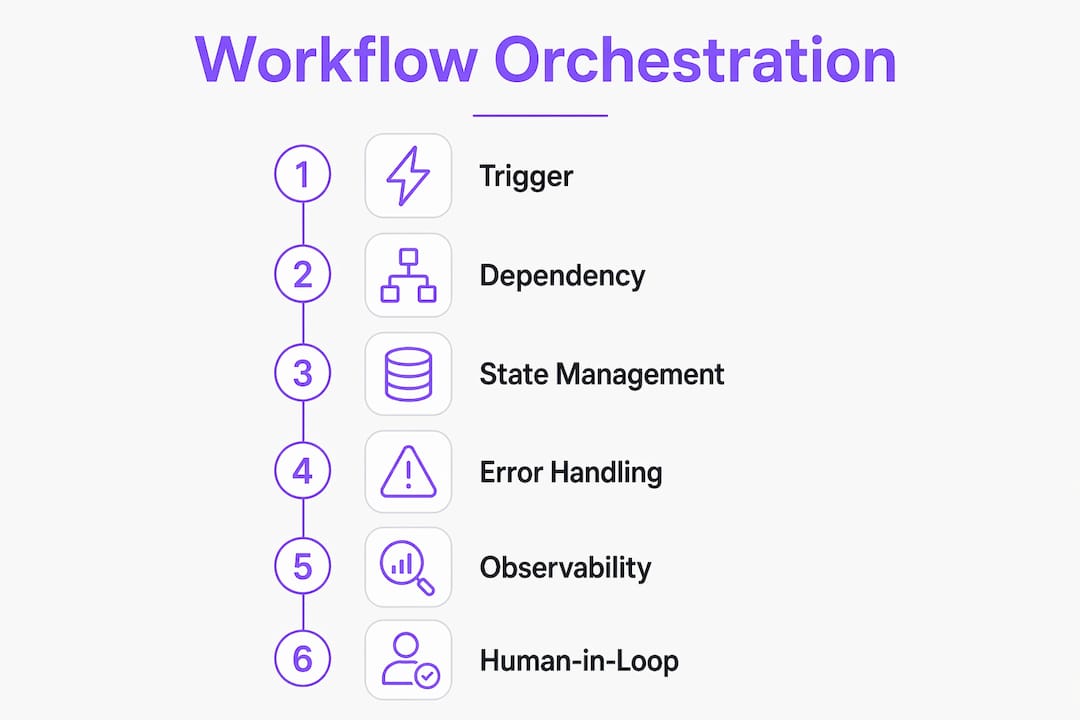
What are the core components of a workflow orchestration system?
Triggers, dependency tracking, state management, and error handling are the functional components that let processes be audited, paused, and recovered predictably. Here is what each one does in practice.
Treat state as a first-class concept, not an afterthought. A workflow that cannot pause, resume, or roll back is not an orchestration — it is a script with ambitions.
| Component | What it does | Operational impact | Question to ask a vendor |
|---|---|---|---|
| Triggers | Fires a run on a schedule, webhook, event, data arrival, or user action | Eliminates polling and manual starts | Does it support webhooks and external callbacks? |
| Dependency tracking | Enforces step order and passes outputs between steps | Prevents race conditions and data loss | Can steps fan out and merge back? |
| State management | Persists run context so paused workflows resume with full context | Enables long-running and human-in-loop flows | Can a run be paused, resumed, and rolled back? |
| Error handling | Retries, fallbacks, and dead-letter queues for failed steps | Reduces silent failures and manual recovery | Are retries idempotent and configurable? |
| Observability | Step logs, outputs, run history, and alerts | Cuts mean time to resolution (MTTR) | Is run history queryable and exportable? |
| Access controls | Role-based permissions, credential vaults, approval gates | Supports compliance and least-privilege access | How are secrets stored and rotated? |
Modern orchestrators respond to schedules, webhooks, data arrivals, alerts, user actions, or model outputs, not just time-based schedules. That trigger variety is what makes them useful across operations, engineering, and data teams simultaneously.
Pro Tip: When evaluating any orchestration tool, ask specifically: “Can a run be paused mid-flight, handed off to a human for approval, and then resumed with its original state intact?” If the answer is vague, the tool is probably a scheduler wearing an orchestrator’s name.
How does orchestration differ from automation, workflow engines, and BPM?
These terms get used interchangeably, but they describe different scopes of control.
- Simple automation executes a single task or a linear chain with no state and no recovery. A Zapier-style trigger-action is automation.
- A workflow engine manages step sequencing and routing, often with branching logic, but typically within a single system and without long-running state across external services. See the workflow engine explainer for a deeper comparison.
- Workflow orchestration coordinates tasks across multiple systems, persists state, handles failures, and supports human approvals. It is the right layer when a process spans days, involves external parties, or requires an audit trail.
- BPM (Business Process Management) adds process modeling, simulation, and governance on top of orchestration, typically for enterprise-wide process standardization.
| Situation | Right tool |
|---|---|
| Send a Slack message when a form is submitted | Simple automation |
| Route a document through three internal approvers | Workflow engine |
| Onboard a client across five systems with external vendor steps | Orchestration |
| Model and govern all company processes with compliance reporting | BPM |
A scheduler is enough when your job runs on a fixed cadence and failure just means “try again tomorrow.” An orchestrator is required the moment a failure needs context, a human needs to approve something, or two systems need to hand off data reliably.
What are the most common orchestration use cases?
Workflow orchestration applies well beyond data pipelines. Operations teams use it wherever a process spans multiple systems, involves waiting, or requires a paper trail.
- Employee onboarding: triggered on an HRIS event, provisions accounts, routes equipment requests to external vendors, waits for manager sign-off, and closes the loop with IT. Long-running state required.
- Client implementations: kicks off on contract signature, assigns tasks to internal and external stakeholders, tracks completion, and escalates overdue steps automatically. Long-running state required.
- Data pipelines: ingests, transforms, and loads data across sources with dependency enforcement and failure alerts. Can be stateless for short runs; stateful for multi-hour jobs.
- CI/CD workflows: builds, tests, and deploys code with parallel steps, gate approvals, and rollback on failure. Mostly stateless but benefits from run history for debugging.
- Approvals and compliance checkpoints: routes requests through defined approvers, logs every decision with a timestamp, and blocks downstream steps until approval is confirmed. Long-running state required.
The workflow automation role in team alignment matters most in the first two categories, where handoffs between people are the primary source of delay.
Implementation checklist: what to verify before you build or buy
Before committing to a tool or architecture, run through these criteria.
Integration and execution:
- Does it connect to your existing APIs, webhooks, and data sources without custom middleware?
- Are tasks idempotent — safe to retry without duplicating side effects?
- Can retry behavior (count, backoff, dead-letter) be configured per step?
- Is state persisted externally, or does it live only in memory?
Observability and governance: 5. Are step-level logs, outputs, and run history queryable and exportable? 6. Does it support workflow versioning so live runs are not broken by definition changes? 7. Are role-based permissions and credential vaults built in, or bolted on? 8. Can approval gates pause a run and notify an external party?
Scalability and reliability: 9. What happens to a run if the orchestrator restarts mid-execution? 10. Does it support parallel branches without manual thread management? 11. What SLAs and backup/restore options does the vendor provide?
For a rollout plan, follow this sequence:
- Days 1–14 (Discovery): map one high-friction process, identify all systems and humans involved, and define success metrics (MTTR, follow-up rate, time-to-complete).
- Days 15–30 (Pilot design): build the workflow in a sandbox, write failure-mode tests, and get sign-off on the state and approval design.
- Days 31–60 (Run pilot): go live with a limited scope, monitor run success rate and manual intervention rate daily.
- Days 61–90 (Iterate and scale): fix failure paths, document lessons, and expand to a second process only after the first hits target metrics.
Cost factors that push a pilot budget up: long-running VMs for stateful workflows, external approval integrations, and enterprise security add-ons. Check the workflow execution implementation guide for a fuller breakdown.
Common pitfalls and how to avoid them
The most expensive mistake is treating orchestration as “set and forget.” Processes change, dependencies shift, and without versioning and monitoring, a workflow that worked in January silently fails in March.
- Brittle retries: retrying a non-idempotent step creates duplicate records or charges. Always verify idempotency before enabling retries.
- Ignoring statefulness: workflows that do not persist state force manual recovery after any failure. State persistence and rollback are non-negotiable for long-running processes.
- Insufficient failure-mode testing: test what happens when step 3 of 7 fails, not just the happy path.
- No versioning: changing a live workflow definition mid-run corrupts in-flight state. Version every definition before deploying changes.
- Over-automating without observability: adding more steps without adding more visibility creates a black box that is harder to debug than the manual process it replaced.
Best practices that hold up in production: deterministic runs, explicit dependency rules, idempotent tasks, robust error paths with configurable retries and fallbacks, clear audit logs, and role-based access controls on every sensitive step.
Pro Tip: Design every failure mode before you design the happy path. Ask: “If this step fails at 2 AM, what does the on-call engineer see, and what can they do without touching the database directly?”
How EasyFlow handles a real operations workflow
Consider a client implementation workflow: a new customer signs a contract, which triggers EasyFlow to create a project, assign internal tasks, and send external collaborators a magic link to complete their onboarding steps without creating an account. The orchestrator waits for each external response, escalates overdue steps automatically, and logs every action with a timestamp for the compliance record.
The outcomes from this pattern are consistent: fewer follow-up messages from the operations team, faster time-to-complete for the full implementation, and a clean audit trail that satisfies SOC 2 requirements without extra documentation work.
The orchestration engine acts as a governor: it waits for approvals, routes notifications, and resumes exactly where it left off — essential for compliance and audit trails.
Two lessons other operations teams can apply directly:
- Eliminate account creation friction for external parties. Any step that requires an external collaborator to create an account adds days of delay. Magic links or token-based access remove that barrier entirely.
- Log every state transition, not just the final outcome. When a client asks “where did this get stuck?”, step-level logs answer the question in seconds rather than requiring a manual audit of email threads.
A 30–90 day plan for teams new to orchestration
Start narrow. One process, fully instrumented, beats five processes half-built.
- Week 1–2: audit your highest-friction manual process. Count follow-ups per run and measure average time-to-complete.
- Week 3–4: design the orchestrated version. Map every trigger, dependency, approval gate, and failure path before writing a single line of configuration.
- Week 5–8: run the pilot with real data in a limited scope. Track run success rate, MTTR, and manual intervention rate weekly.
- Week 9–12: review metrics against your baseline. If run success rate is above 95% and manual interventions dropped, you are ready to expand.
Signals that indicate readiness to scale: the pilot process runs without daily monitoring, failure alerts fire before users notice problems, and the team can update the workflow definition without breaking live runs. Track workflow efficiency metrics throughout to keep the pilot honest.
Key Takeaways
Workflow orchestration requires stateful execution, dependency tracking, observability, and human-in-the-loop design to deliver reliable, auditable operations at scale.
| Point | Details |
|---|---|
| State is the foundation | Workflows that cannot pause, resume, or roll back are scripts, not orchestrations. |
| Observability cuts MTTR | Step-level logs and run history let teams find failures in minutes, not hours. |
| Triggers go beyond schedules | Modern orchestrators fire on webhooks, events, data arrivals, and user actions. |
| Test failure modes first | Design and test every failure path before the happy path reaches production. |
| EasyFlow for operations teams | EasyFlow runs stateful workflows with magic-link external collaboration and built-in approval gates. |
The part most teams get wrong
Most teams I see adopt orchestration for the right reasons and then undermine it with the same mistake: they instrument the happy path and leave failure modes as an afterthought. The workflow runs beautifully in the demo, ships to production, and then silently stalls on a Tuesday when an external API times out. Nobody notices for three days because there are no alerts on that step.
The conservative rollout mindset that actually works is this: treat your first orchestrated workflow as a monitoring project, not an automation project. Your primary deliverable in the first 30 days is not a working workflow. It is a working workflow with observable failure modes. Once you can see every failure clearly, you can fix them fast. Without that visibility, you are just moving the manual work from “doing the task” to “figuring out why the task did not run.”
Over-automating without observability is worse than the manual process it replaces. At least with manual work, someone notices when it stops.
EasyFlow runs the workflows your team keeps doing manually
If the checklist above describes problems your team is living with right now — follow-ups, missed handoffs, external collaborators who ghost because the process is too complicated — EasyFlow is built for exactly that.

EasyFlow executes stateful workflows with approval gates, external collaborator access via magic links, and step-level observability, so your operations team spends time on exceptions, not on chasing status. For employee onboarding, the entire sequence from account provisioning to equipment delivery runs without a single manual nudge. For client implementations, every external step is tracked, escalated if overdue, and logged for compliance. No accounts required for external parties. No lost state when something stalls.
Start your first workflow and have a pilot running within two weeks.
FAQ
What is workflow orchestration in simple terms?
Workflow orchestration is the coordinated, stateful control of multi-step processes across systems, people, and services so that each step runs in the right order, failures are handled automatically, and the process can be audited end to end.
How does workflow orchestration differ from workflow automation?
Automation executes individual tasks or linear chains without persistent state. Orchestration coordinates tasks across multiple systems, persists state between steps, handles failures with retries and fallbacks, and supports human approval gates — making it the right choice for long-running or cross-system processes.
What are the core components of a workflow orchestration system?
The core components are triggers, dependency tracking, state management, error handling, observability (logs, run history), and access controls. Together they ensure processes run predictably, recover from failures, and produce an auditable record.
How long does it take to implement workflow orchestration?
A focused pilot on one process typically runs 30–90 days: two weeks for discovery and design, four to six weeks for the live pilot, and a final review period to validate metrics before scaling.
Can EasyFlow handle external collaborators in an orchestrated workflow?
Yes. EasyFlow lets external collaborators complete assigned steps via magic links without creating an account, which removes onboarding friction and keeps the workflow moving without manual follow-up.