
Best Workflow Management Software Freeware for Teams

For operations teams that need actual workflow execution, not just task tracking, EasyFlow’s free plan is the clearest starting point. It runs automated handoffs, sends reminders, and lets external collaborators complete tasks through magic links — no account creation required on their end.
Quick TL;DR:
- Best for: Ops teams running onboarding, client implementations, or vendor handoffs with external participants
- Core capability: Executes workflows end-to-end; guests join via magic link, not a login screen
- Primary trade-off to watch: Free tiers across all tools cap run volume and workflow count — know your monthly execution numbers before you commit
Start EasyFlow’s free plan and run a live workflow in under 15 minutes.
Pro Tip: Before signing up for anything, count your actual monthly workflow runs. A tool that throttles at 100 runs/month will stall a team processing 50 client onboardings.

Table of Contents
- What does workflow management software freeware actually do for ops teams?
- What free plans typically limit — and why it matters
- What features should ops teams insist on in free workflow software?
- How do you evaluate free workflow plans before committing?
- When should you upgrade from a free plan?
- How to set up your first EasyFlow workflow with external collaborators
- Real ops use cases where free workflow software delivers
- Key Takeaways
- Why execution-first tooling is the only honest choice for ops teams
- EasyFlow runs workflows your team actually needs to execute
- Useful sources
- FAQ
What does workflow management software freeware actually do for ops teams?
Workflow management software executes a defined sequence of steps, triggers, and handoffs automatically. That is different from a task tracker, which shows you what needs doing but leaves the actual routing, reminders, and handoffs to humans.
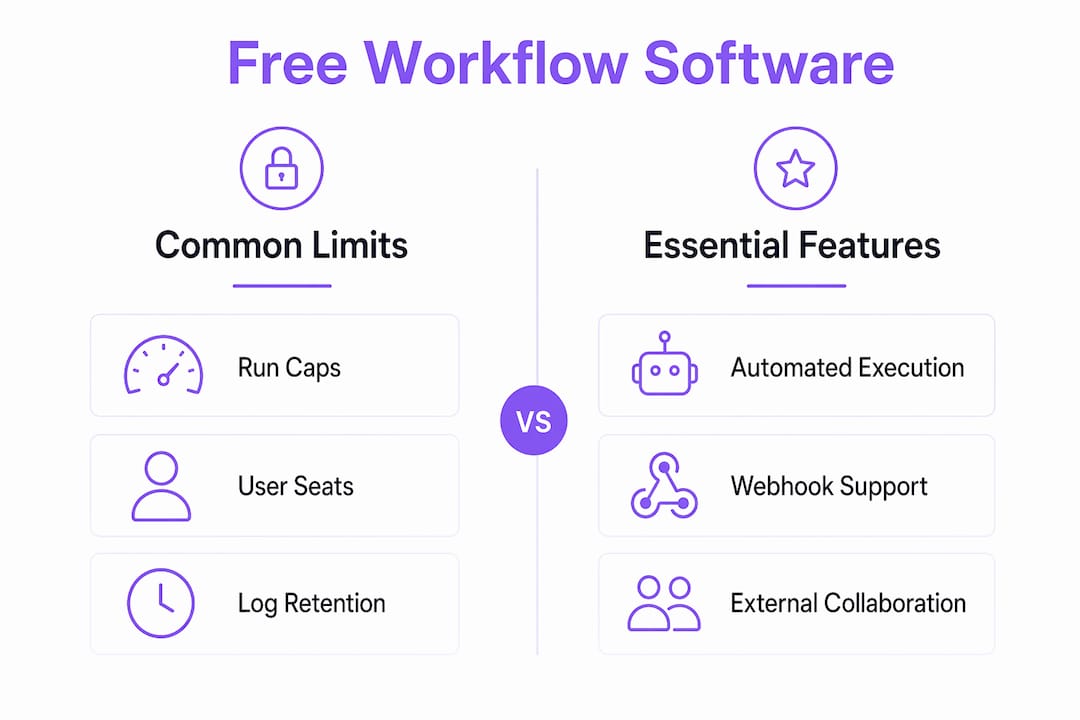
For operations teams, execution vs. tracking is the critical distinction. An execution-capable tool fires a webhook when a form is submitted, assigns the next task to the right person, sends a reminder if it stalls, and notifies a manager when something blocks. A tracker just shows a card on a board.
Core capabilities ops teams should look for in free workflow software:
- Webhook triggers and integrations — receive events from Stripe, Shopify, or any form tool without manual intervention
- Visual workflow canvas — build and edit process diagrams without writing code
- Run observability — per-step traces so you can see exactly where a workflow stalled
- Guest/magic-link access — external collaborators complete tasks without creating accounts
- Pre-built templates — start from a working process instead of a blank canvas
- Execution controls — retry logic, deduplication, and replay for reliable processing
Webhook-native workflow builders reduce friction for external integrations by providing built-in HMAC verification, deduplication, and replay controls — features that matter the moment you connect a payment processor or a client-facing form.
Pro Tip: Webhook-first design is not just a technical nicety. If your free tool treats webhooks as an afterthought (no HMAC, no replay), one duplicate event from Stripe can trigger a workflow twice and create a billing or onboarding error.
What free plans typically limit — and why it matters
Free tiers are real products, but they come with constraints that can bite ops teams at the worst moment.
Common free-plan limits to audit before committing:
- Workflow count — most free tiers cap at a limited number of active workflows
- Run/execution volume — monthly caps vary; hitting the ceiling mid-month pauses automation
- User seats — some tools restrict free plans to 1–3 internal users
- Integration depth — webhook triggers may be locked to paid tiers on some platforms
- Run history retention — free plans typically store logs for a limited number of days only
- Support — community forums only; no SLA or live chat
The operational risk is not just inconvenience. Throttled runs create backlogs. Missing run history means you cannot diagnose a failed handoff after the fact. A client who never received their onboarding task link will not tell you the workflow silently failed.
On security, even free plans should show basic signals: TLS encryption in transit, data residency clarity, and some form of audit log. Self-hostable platforms like n8n give full data control but add hosting and maintenance overhead — a real trade-off for a lean ops team.
Also worth noting: some freeware is desktop-only. Automation Workshop Free Edition targets Windows desktop automation and is free for non-commercial use, but it does not support cloud workflow execution or external collaboration. That distinction matters when your process involves clients or vendors outside your building.
What features should ops teams insist on in free workflow software?
Not every feature list is equal. Here is what separates table-stakes from nice-to-have for operations work.
Must-have execution features:
- Reliable trigger types (webhook, schedule, email, form)
- Per-step run tracing and error visibility
- Retry logic and dead-letter handling for failed steps
- Deduplication so duplicate events do not fire duplicate workflows
External collaboration (non-negotiable for ops):
- Magic links or anonymous guest task URLs — guest access raises completion rates because external collaborators skip the account-creation step entirely
- Guest approvals without requiring a paid seat
- Anonymized or scoped webhook URLs for partner integrations
Integration methods:
- Webhook-first design with HMAC verification
- Native connectors for common tools (Slack, email, Google Workspace)
- Email parsing to trigger workflows from inbound messages
- Ability to call external APIs from within a workflow step
Operational controls:
- Role-based access (RBAC) so external guests cannot see internal workflows
- Audit logs, even basic ones, for compliance review
- Encryption at rest and in transit
- Run history long enough to support post-incident review
AI capabilities in 2026: Some free tiers now include AI classify and text-generation nodes. Hosted free betas have begun bundling AI nodes without requiring separate API keys, which removes a real barrier for experimentation. Useful, but secondary to reliability.
Pro Tip: Prioritize predictable failure handling — retries, dead-letter queues, alerting — over AI features when your SLAs depend on it. A workflow that silently drops a step is worse than one without AI.
How do you evaluate free workflow plans before committing?
Run this checklist during any free-plan pilot, before you build anything production-critical.
Evaluation checklist:
- Real-world scenario test — build one actual workflow from your ops playbook, not a toy example
- Run volume test — fire 20–30 test runs and confirm the tool handles them without throttling or errors
- External collaborator flow test — send a magic link or guest task to an email outside your domain and confirm the recipient can complete it without signing up
- Integration test — connect one real external trigger (a webhook from your form tool or payment processor) and verify HMAC validation and deduplication work
- Security review — confirm TLS, check where data is stored, and verify you can export run logs
Vendor questions worth asking before upgrading:
- How is run overage billed — hard stop or automatic upgrade?
- Can I export all workflow definitions and run history if I leave?
- What is the SLA on paid plans, and does it cover webhook delivery?
- Are audit logs available on the free tier or only on paid?
Red flags to walk away from: opaque rate limits with no dashboard visibility, no guest access or magic-link feature at any tier, recycled webhook URLs that could route another customer’s events to your workflow, and zero run-history retention on the free plan.
Open-source engines like Wexflow offer extensibility and MIT licensing but typically lack built-in human-task workflows or guest collaboration abstractions — strong for technical automation jobs, not for ops teams running client-facing processes.
When should you upgrade from a free plan?
Free plans are pilots, not permanent infrastructure. Watch for these triggers.
Concrete upgrade signals:
- Monthly run volume consistently approaches the free cap
- You need run history beyond 30 days for compliance or audit purposes
- Team size exceeds the free seat limit or multiple people share credentials
- A production workflow requires a guaranteed delivery SLA
- A client or enterprise partner requires a security review or SOC 2 documentation
Pricing structures vary. Per-run models favor teams with predictable, low-volume automation. Per-user models favor small teams running complex workflows. Tiered flat-rate plans are often the best fit for ops teams because costs stay predictable as automation scope grows.
When you reach consistent, predictable scale, negotiate: ask for overage caps, annual commit discounts, and a written SLA before signing. Self-hosting is an option for teams with strict data residency requirements, but factor in the engineering time to maintain it.
How to set up your first EasyFlow workflow with external collaborators
You can have a working, guest-accessible workflow running in six steps.
- Create your free account at teameasyflow.com — no credit card required
- Pick a template — choose from onboarding, client implementation, or approval workflows to skip the blank-canvas start
- Add your trigger — connect a webhook URL, an inbound email address, or a scheduled trigger depending on your process entry point
- Build your execution steps — assign internal tasks, add automated notifications, and configure retry behavior for any step that calls an external system
- Enable a magic-link guest task — designate one or more steps as guest tasks; EasyFlow generates a unique link the external collaborator receives by email, no account required
- Run a test — fire a test event, follow the per-step trace in the run log, confirm the guest link arrives and works, and check that a failed step retries correctly
Before rolling out to production:
- Validate that duplicate webhook events do not create duplicate workflow runs
- Confirm the guest link expires or becomes inactive after task completion
- Check that internal team members cannot see guest-only task content unless explicitly granted access
- Review reusable workflow templates to standardize the process across clients or cohorts
Real ops use cases where free workflow software delivers
New-hire onboarding automation: An ops team replaces a 12-step manual checklist with a triggered workflow. IT provisioning, manager intro, and policy sign-off each become discrete steps with automatic reminders. The new hire completes their portion via a magic link before their first day. Result: fewer missed steps, no manual follow-up emails.
Client implementation handoffs: A SaaS company uses EasyFlow to run client onboarding after a deal closes. The CRM fires a webhook, EasyFlow creates the workflow instance, and the client receives a magic link to complete their setup tasks. Internal steps route automatically to the implementation team. The client never needs a login.
Invoice and reconciliation notifications: Finance triggers a webhook when an invoice is approved in the accounting system. EasyFlow routes the notification to the relevant vendor contact via a guest task link, collects confirmation, and logs the response. No email thread, no manual status check.
The pattern across all three: the workflow executes the process rather than just recording it. External participants complete their steps without friction, and the ops team sees exactly where each instance stands in real time.
Key Takeaways
Free workflow management software freeware is only useful for operations teams when it executes processes end-to-end, supports external collaborators without account friction, and provides enough run volume and observability to handle real workloads.
| Point | Details |
|---|---|
| Execution beats tracking | Choose tools that run handoffs and fire triggers automatically, not just display task boards. |
| Guest access is non-negotiable | Magic links raise external completion rates; forcing account creation slows every client-facing process. |
| Audit free-plan limits early | Cap your monthly runs, seat count, and log retention before building production workflows on a free tier. |
| Upgrade triggers are predictable | Move to a paid plan when run volume approaches the free cap, retention needs exceed 30 days, or an SLA is required. |
| EasyFlow free plan | Executes workflows with magic-link guest tasks, webhook triggers, and per-step observability at no cost to start. |
Why execution-first tooling is the only honest choice for ops teams
The conventional wisdom in ops tooling has always been “start with what the team will actually use.” That usually means a familiar task board. The problem is that task boards do not run processes. They record them.
Every manual follow-up email, every Slack ping asking “did you get that link?”, every missed handoff that nobody noticed for three days — those are not communication failures. They are execution failures. The tool was tracking instead of doing.
The shift that actually shortens cycle time is not switching from one tracker to another. It is moving to a tool where the workflow itself sends the reminder, routes the next step, and notifies the right person when something stalls. External collaborators are the hardest part: the moment you require a client or vendor to create an account, you have introduced a drop-off point that no amount of follow-up recovers cleanly.
When evaluating any free plan, the three questions that matter most are: Does it execute or just track? Can external participants act without an account? And when something fails, can you see exactly where and why? Everything else — AI nodes, integrations, templates — is secondary to those three.
EasyFlow runs workflows your team actually needs to execute
Most free tools track. EasyFlow executes. The free plan gives operations teams a full workflow engine: automated handoffs, webhook triggers, magic-link guest tasks for external collaborators, per-step run tracing, and pre-built templates for onboarding and client implementations.

The sharpest difference from a task board: your clients and vendors complete their steps through a link in their inbox. No account, no friction, no chasing. Internal steps route automatically, reminders fire on schedule, and you see every run’s status in real time.
Start your free workflow and run your first guest-collaborator flow today. A good first test: pick your current onboarding checklist, build it as a template, and send a magic link to one external contact.
Useful sources
- EasyFlow — Free Workflow Management Software for Teams — Product page covering the free plan, features, and case studies for operations teams.
- EasyFlow Getting Started — Signup and onboarding flow; the fastest path to a live workflow.
- Requex — Webhook-Native Workflow Automation — Covers HMAC verification, deduplication, replay, and AI nodes in a free beta; useful for understanding webhook-native design standards.
- n8n GitHub README — Fair-code self-host platform with 1,500+ integrations; reference for self-hosting trade-offs and enterprise control.
- Wexflow — Open Source Workflow Engine — MIT-licensed engine with 100+ activities; strong for technical automation, limited on human-task and guest-collaboration features.
- RunaWFE Free Workflow System — LGPL open-source BPMS supporting up to 10,000 users; covers LDAP, role assignment, and bot-based task execution.
- Automation Workshop Free Edition — Windows desktop automation freeware; useful contrast to cloud-hosted, collaboration-capable tools.
- Collaborative Workflow Explained — EasyFlow blog post on external-collaboration patterns and magic-link flows.
FAQ
What is workflow management software freeware?
Workflow management software freeware is a no-cost tool that automates the execution of business processes, including task routing, triggers, and handoffs, without requiring a paid license. It differs from project trackers by actually running the process rather than just displaying it.
Does EasyFlow’s free plan support external collaborators?
Yes. EasyFlow’s free plan includes magic-link guest tasks, which let external collaborators complete assigned steps through a unique link without creating an account.
What limits should I expect on a free workflow plan?
Most free tiers cap active workflows, monthly run volume, user seats, and log retention (typically for a limited number of days). Integration depth and support channels are also typically restricted on free tiers.
When should an ops team upgrade from a free workflow plan?
Upgrade when monthly runs consistently approach the free cap, when compliance requires longer log retention, when team size exceeds the seat limit, or when a production SLA is needed.
Is open-source workflow software a good free alternative?
Open-source engines like Wexflow or RunaWFE offer extensibility and full data control, but they require self-hosting, technical setup, and ongoing maintenance. For ops teams without dedicated engineering support, a hosted free tier is usually faster to deploy and easier to maintain.