
Assign Tasks Without Manual Intervention: A Practical Guide

You can assign tasks without manual intervention by defining event-driven routing rules (trigger → rule → action), pairing them with fallback logic, and enforcing field-level data hygiene before you flip the switch. The fastest first step: pick one repeatable process, map its trigger (say, a new intake form submission), and configure a single “Make Assignment” rule in a sandbox. That one change eliminates the most common manual handoff in most operations teams.
What you need to start:
- A defined trigger (record creation, status change, incoming email)
- A populated assignment group with active users
- A fallback rule (manager review or round-robin catch-all) for when the primary rule fails
- An audit log to capture which rule fired and why
Expected immediate benefit: fewer missed handoffs, faster time-to-first-action, and SLA adherence you can actually measure.
Table of Contents
- How does automated task assignment actually work?
- Why should you automate task assignment?
- What triggers and routing rules should you use?
- 12 techniques to auto-assign tasks reliably
- How to roll out automatic assignment without breaking things
- How do you keep automated assignments transparent and auditable?
- Why process stability comes before automation, and how EasyFlow handles it
- Key Takeaways
- The part most playbooks get wrong
- EasyFlow cuts the manual routing work your team shouldn’t be doing
- Useful sources and further reading
- FAQ
How does automated task assignment actually work?
Automated task assignment is event-driven automation that writes an assignee to a task the moment a trigger fires, based on routing rules you define in advance. No human decides who gets the work. The system does.
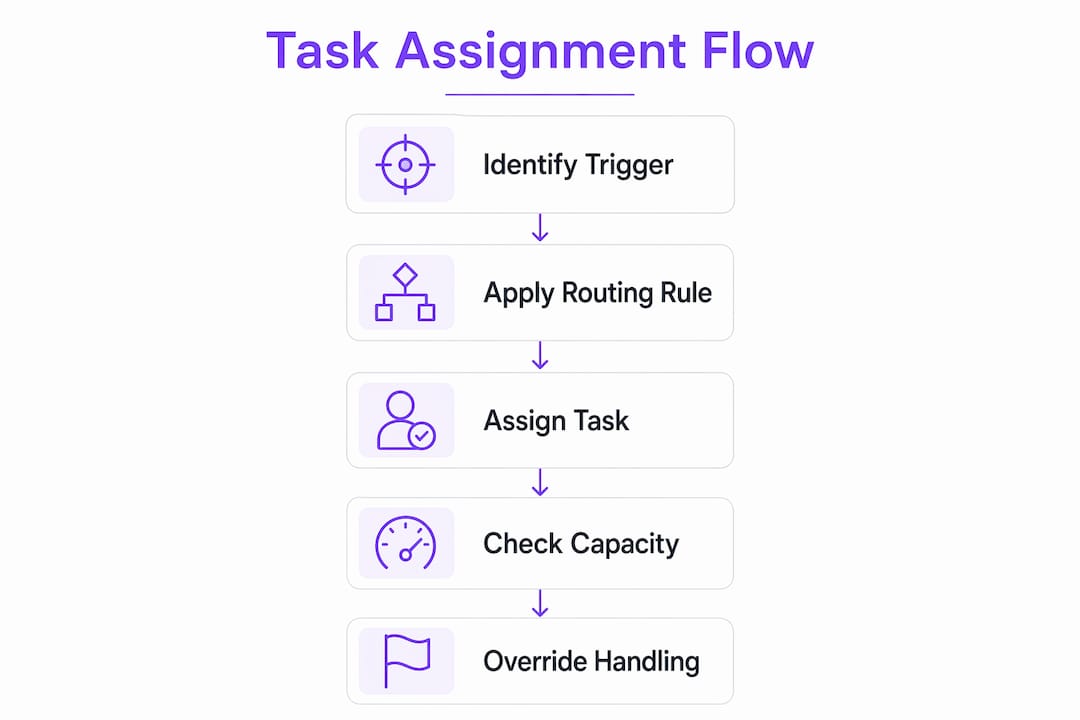
The building blocks are straightforward. A trigger is the event that starts the process: a form submitted, a record status changing from “open” to “in review,” an email arriving in a shared inbox. A routing rule evaluates the task’s data fields (priority, category, region, skill tag) and selects an assignee or group. The assignment action writes that assignee to the task and fires a notification. According to Elementum’s assignment rule documentation, common routing strategies include distributed (even spread), round-robin, and skill-based selection.
One thing most guides skip: automation changes who sees work first. If your permissions model restricts task visibility by assignee, a mis-fired rule can make a task invisible to the right person. Map your notification and permission settings before you go live, not after.
Why should you automate task assignment?
The operational case is simple. Every manual handoff is a decision that takes time, introduces inconsistency, and creates a gap where tasks can fall through. Automating that decision removes the gap.
The metrics that matter most: assignment success rate (what percentage of tasks get assigned without a manual override), reassignment rate (a high rate signals bad routing rules), SLA adherence (time-to-first-action after assignment), average time-to-assign, and number of manual overrides per week. Track these from day one.

The shift for your team is real. Managers stop spending time on routing and start spending it on exception handling and rule improvement. For HR onboarding automation, that means a new hire intake form triggers the full onboarding task sequence automatically. For support routing, a high-priority ticket reaches the senior on-call without anyone checking a schedule. For procurement intake, a purchase request above a threshold routes directly to the approver tier. The workflow automation benefits for project managers extend beyond speed: consistent routing means consistent accountability.
What triggers and routing rules should you use?
The table below maps the most dependable triggers to the routing rules that fit them best. Per BMC Helix documentation, manual or template assignments always take precedence over automatic mapping rules, so design your rule hierarchy accordingly.
| Trigger | Best-fit routing rule | Fallback |
|---|---|---|
| Form / record creation | Template-based or role-based | Round-robin catch-all |
| Status or stage change | Priority-tier or skill-based | Manager review queue |
| Incoming email or webhook | Category or label mapping | Default group assignment |
| Due-date arrival | Capacity-based or round-robin | Escalation to manager |
| SLA breach | Escalation tier (senior role) | On-call group |
| Calendar event | Availability-based | Round-robin |
Always include a fallback. Missing fallback logic is the most common reason tasks go unassigned and workflows stall. A round-robin catch-all costs almost nothing to configure and prevents the worst-case outcome.
12 techniques to auto-assign tasks reliably
-
Template-based auto-assign. A task template pre-populates the assignee field at creation. Best for recurring processes with fixed owners. Low maintenance. Tip: version your templates when roles change.
-
Status-triggered assignment. A rule fires when a task moves to a new stage. Best for multi-step workflows (review → approve → close). Low maintenance once configured.
-
Dependency-triggered assignment. Task B is assigned automatically when Task A completes. Best for sequential handoffs. Medium maintenance — dependencies must stay mapped.
-
Round-robin distribution. The system cycles through a group in order. Best for evenly distributing inbound requests. Low maintenance; requires an active, up-to-date group.
-
Capacity-based assignment. Routes to the team member with the fewest open tasks. Best for support or service queues. Medium maintenance — requires accurate open-task counts.
-
Skill or tag matching. Matches task tags to user skill profiles. Best for technical or specialized work. Medium-to-high maintenance; skill data must stay current.
-
Calendar-sync assignment. Checks availability against a calendar before assigning. Best for field service or time-sensitive tasks. High maintenance; calendar integration must be reliable.
-
Recurring task auto-creation and assignment. Generates and assigns tasks on a schedule. Best for compliance checks, weekly reports, or maintenance cycles. Low maintenance after setup.
-
SLA-driven escalation. Reassigns or escalates if a task is unclaimed past a threshold. Best for support SLAs and incident routing, consistent with ITIL incident-routing patterns. Low maintenance.
-
AI or dynamic scoring. Real-time capacity and performance data route work to the best available person, human or automated agent. Best for high-volume queues where staffing fluctuates. Reduces rule-churn over time but requires clean historical data to start.
-
External collaborator magic links. Assigns a task step to someone outside your team without requiring them to create an account. Best for client onboarding, vendor approvals, or contractor handoffs. Low maintenance; EasyFlow supports this natively.
-
Auto-reassign on failure. If an assignee is inactive or the assignment fails, the system retries or routes to a fallback group. Best as a safety net for any automated workflow. Low maintenance once the fallback group is defined.
A chained example: New client intake form submitted → template assignment fires (account manager) → capacity check confirms availability → task assigned with SLA timer started → if unclaimed in 4 hours, escalation rule routes to team lead.
Techniques 1, 2, 4, and 8 work with minimal setup. Techniques 6, 7, and 10 require clean master data (skill tags, calendars, historical performance) before they produce reliable results. For teams exploring AI-assisted workflow generation, starting with rule-based techniques and layering in dynamic scoring later is the lower-risk path.

How to roll out automatic assignment without breaking things
Step-by-step checklist:
- Pick one process with a clear, repeatable trigger.
- Map every step, data field, and role involved.
- Define acceptance criteria and SLA thresholds for that process.
- Choose a routing strategy (start with round-robin or template-based).
- Build the rules in a sandbox with synthetic and historical records.
- Add fallback and escalation rules before testing anything else.
- Test boundary cases: empty assignment group, missing fields, simultaneous triggers. Per Elementum’s documentation, an empty Assignment Group field is the single most common cause of automation failure.
- Pilot with one team for two weeks. Collect override tickets separately.
- Monitor assignment success rate, reassignment rate, and SLA adherence daily.
- Iterate on rules, then expand to additional processes.
Schedule a short freeze window for cutover so rule edits don’t collide with live traffic. Train your team on how to override safely — they need to know the override won’t break the automation, just log an exception.
Do not automate tasks with high variability or non-deterministic decision logic until the process is stable. Automating a messy process scales the mess.
How do you keep automated assignments transparent and auditable?
Every automated assignment should write a decision record: which trigger fired, which rule evaluated, which data values drove the decision, and who was assigned. That record belongs on the task itself, visible to the assignee. Transparent decision logs reduce confusion and make automation trustworthy — assignees who understand why they received work are far less likely to route it back manually.
For exceptions, define explicit retry logic for transient failures (network timeout, group temporarily empty) and a hard fallback for persistent ones. Appoint one person as the rule owner for each automated process. Require a change review before any rule edit goes live. Schedule quarterly rule audits tied to your SLA metrics.
Pro Tip: Keep a short, searchable “decision log” field on each task that records the rule name and the key data values used for routing. A single line like “Assigned by: Priority-Tier Rule | Priority: High | Group: Senior Support” saves hours of debugging when an assignment looks wrong.
Why process stability comes before automation, and how EasyFlow handles it
Operations practitioners are consistent on one point: automating an unstable process scales the problems, not the efficiency. Before you configure a single rule, document the manual workflow, confirm roles are defined, and verify that your assignment group fields contain active users. That upfront work is what separates a pilot that sticks from one that gets abandoned after two weeks.
EasyFlow is built for exactly this sequence. You start with pre-built workflow templates that map to common operations processes (onboarding, client implementation, procurement intake), configure assignment rules in a sandboxed environment, add fallback and escalation logic, and test before going live. External collaborators join via magic links without creating accounts, which removes the friction that kills vendor and client-facing workflows. Audit logs capture every assignment decision with full rationale.
EasyFlow’s workflow automation platform supports assignment groups, capacity checks, AI-assisted routing, and override controls — the four features operations managers need most when moving from manual to automatic task distribution.
Key Takeaways
Automating task assignment requires clean data, explicit fallback rules, and a stable process before you configure a single routing rule.
| Point | Details |
|---|---|
| Start with one trigger | Pick one repeatable process and automate its assignment rule before expanding. |
| Fallback rules are mandatory | Missing fallback logic causes unassigned tasks; always add a round-robin catch-all. |
| Data hygiene prevents failures | Empty assignment group fields are the most common cause of automation failures. |
| Three metrics to monitor | Track assignment success rate, reassignment rate, and SLA adherence from day one. |
| EasyFlow accelerates rollout | Pre-built templates, audit logs, magic links, and a 14-day trial let you pilot in an afternoon. |
The part most playbooks get wrong
Most automation guides jump straight to tool selection. The harder problem is process clarity. If your team can’t describe who should receive a task and under what conditions in plain English, no routing rule will figure it out for you.
The practical tip that actually changes outcomes: freeze rule edits during your pilot period and log every manual override as a ticket. After two weeks, those override tickets tell you exactly which rules need refinement. It’s a faster feedback loop than any dashboard.
On the rules-versus-AI question: use rule-based routing when the decision logic is deterministic (priority tier, region, role). Move to dynamic scoring when staffing fluctuates enough that static rules require constant manual tuning. Most teams don’t need dynamic scoring on day one. They need clean data and a working fallback.
EasyFlow cuts the manual routing work your team shouldn’t be doing
If you’ve read this far, you know the playbook. The gap between knowing it and running it is usually one afternoon of setup time.

EasyFlow gives operations teams a ready-to-run assignment engine with pre-built templates for onboarding, approvals, and client implementations. External collaborators join via magic links with no account required, audit logs capture every assignment decision, and fallback rules are built into the configuration flow so you can’t accidentally leave a process without a catch-all. The 14-day trial includes sandbox access, so you can test boundary cases before anything touches live work.
Start your free trial and run your first automated assignment pilot today.
Useful sources and further reading
- Assignment Rules — Elementum Documentation: Covers Make Assignment flow, routing strategies, and the empty-group failure mode. Use for triggers and rules configuration.
- Automatic Task Assignment — BMC Helix Documentation: Mapping rules, round-robin method, fallback logic, and rule precedence. Use for implementation and governance.
- What Is Automated Task Assignment? — Solum Health: Plain-language explanation of event-driven logic, escalation, and decision transparency. Use for foundational concepts.
- Microsoft Power Automate: Cloud and desktop flow automation with 1,400+ prebuilt connectors. Use for enterprise integration context.
- EasyFlow — Workflow Automation That Runs Team Handoffs: Product landing page with trial access, templates, and magic link documentation.
- EasyFlow Blog: Practical articles on workflow automation, onboarding, and approval chains for operations teams.
- Automated Task Assignment — SpinFlow: Capability overview of trigger-based creation and smart assignment filters.
- AI Work Orchestration — Assign.sh: Dynamic scoring, real-time capacity routing, and AI-plus-human orchestration for advanced teams.
FAQ
What process assigns tasks automatically without human input?
Event-driven automation uses a trigger (form submission, status change, or incoming email), evaluates routing rules (role, priority, capacity), and writes an assignee to the task with no human decision required. Tools like EasyFlow execute this sequence end-to-end.
How do you assign tasks effectively in an automated workflow?
Define the trigger, populate your assignment groups with active users, set a routing strategy (round-robin, skill-based, or capacity-based), and always configure a fallback rule. Clean field data before enabling any automation — an empty assignment group is the most common failure point.
What does it mean to assign tasks in a workflow context?
Task assignment writes a responsible party to a work item so it has a clear owner, a start point, and accountability. In automated workflows, the system performs this action based on predefined rules rather than a manager’s manual decision.
When should you use rule-based routing versus AI-driven assignment?
Use rule-based routing when the decision logic is deterministic: priority tier, region, or role. Switch to dynamic scoring when team capacity fluctuates enough that static rules require constant manual updates to stay accurate.