
Workflow Automation’s Role in Team Alignment: 2026 Guide

Workflow automation is the process of using software to automatically coordinate tasks, approvals, and notifications so teams stay aligned without manual intervention. The role of workflow automation in team alignment goes far beyond saving time. It removes the human memory failures, missed handoffs, and inconsistent processes that quietly destroy coordination across departments. Tools like Teameasyflow, along with platforms such as Paycor and Teamwork, show that automation can cut repetitive task time by 60–95% while improving data accuracy by up to 88%. That kind of performance shift does not just speed up work. It fundamentally changes how teams communicate and execute together.
How does workflow automation improve team visibility?
Coordination overhead is the silent productivity killer in most teams. When task status lives in someone’s inbox or memory, the whole team operates on incomplete information. Workflow automation solves this by centralizing task tracking and triggering automatic notifications at every stage of a process.
Automated notifications replace human memory as the mechanism for keeping teams informed. This matters because manual handoffs fail precisely when people are busy, distracted, or simply forget. A system-triggered alert does not forget. It fires the moment a condition is met, whether that is a form submission, an approval, or a deadline crossing.

The practical result is fewer missed handoffs and fewer errors. Project managers stop spending hours chasing status updates. Team members know exactly what is waiting on them and what comes next.
Manual vs. automated coordination: a direct comparison
| Coordination Factor | Manual Process | Automated Process |
|---|---|---|
| Task status visibility | Requires asking or checking manually | Centralized dashboard, updated in real time |
| Handoff notifications | Dependent on individual memory | System-triggered at defined conditions |
| Error rate | Higher due to human oversight | Reduced by up to 88% accuracy improvement |
| Time on status reporting | Significant, recurring overhead | Near zero with automated updates |
| Missed deadlines | Common in high-volume workflows | Minimized through proactive alerts |
Pro Tip: Set up a centralized workflow dashboard before you automate individual tasks. Visibility at the process level reveals where bottlenecks actually live, not just where people think they live.
The impact of automation on teams is most visible in coordination-heavy roles. Operations managers and project leads report the biggest gains because their work is almost entirely about moving information between people and stages. Automation handles that movement reliably, every time.
Does automation prevent team silos and process inconsistency?
Silos form when different teams apply different rules to the same process. Sales handles approvals one way. Finance handles them another. The result is confusion, rework, and misalignment that compounds over time. Workflow automation addresses this directly by acting as what SysGenPro describes as an operational intelligence layer that standardizes decision logic across every department.
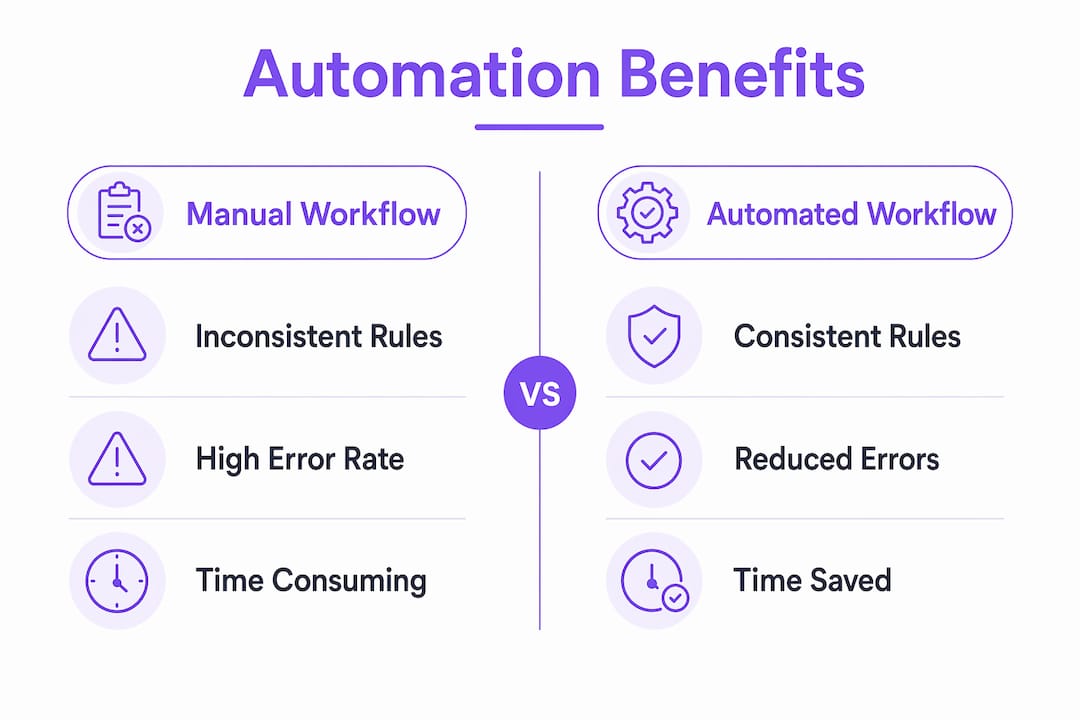
When a workflow is automated, the rules are explicit and consistent. Every approval follows the same path. Every exception triggers the same escalation. There is no version of the process that lives only in one person’s head.
Siloed manual workflows vs. standardized automated workflows
| Process Dimension | Siloed Manual Workflow | Standardized Automated Workflow |
|---|---|---|
| Decision rules | Vary by team or individual | Defined once, applied universally |
| Process documentation | Informal, often outdated | Embedded in the automation logic |
| Cross-team handoffs | Inconsistent, prone to gaps | Governed by explicit triggers and states |
| Exception handling | Ad hoc, unpredictable | Defined escalation paths built in |
| Onboarding new staff | Dependent on tribal knowledge | Guided by the workflow itself |
The benefits of workflow automation here are structural, not just operational. When a new hire joins, they do not need to learn an undocumented process from a colleague. The workflow guides them through it. When a process changes, you update the automation once and every team immediately works from the new version.
Automating team processes also forces clarity that manual workflows never require. You cannot automate an ambiguous process. You have to define who owns each step, what triggers the next action, and how exceptions are handled. That act of definition alone reduces misalignment before the automation even runs.
Pro Tip: Before building any automation, write out the process as a simple flowchart with named owners at each step. If you cannot draw it clearly, you are not ready to automate it.
How does automation connect daily tasks to strategic goals?
The most dangerous form of misalignment is not chaos. It is efficiency pointed in the wrong direction. Teams can execute flawlessly on tasks that do not serve the company’s actual priorities. Automation helps align tasks with strategic goals by making prioritization visible and enforceable at the workflow level.
Consider a product team that automates its feature request intake process. If the automation routes high-priority requests directly to the sprint planning queue and deprioritizes others, it encodes strategic logic into daily execution. Every team member works from the same priority framework without needing a manager to intervene.
The risk runs the other way too. Automating unstandardized processes accelerates errors rather than fixing them. If the underlying process is misaligned with business goals, automation just makes the misalignment faster and harder to reverse.
To avoid this, team leaders should build regular process reviews into their governance calendar. Here is a practical framework for keeping automation aligned with strategy:
- Map current workflows against your top three business objectives before automating anything.
- Identify misaligned steps where teams are executing tasks that do not connect to a strategic outcome.
- Redesign first, automate second. Fix the process logic before encoding it in software.
- Set a quarterly review cycle to check whether automated workflows still reflect current priorities.
- Track outcome metrics, not just activity metrics. Measure whether the automated process is producing the result the strategy requires.
Aligning workflows to strategic goals prevents teams from becoming highly efficient at the wrong tasks. That is the insight most automation projects miss entirely.
What are the best practices for implementing workflow automation?
Implementation is where most automation efforts succeed or fail. The technical setup is rarely the hard part. The hard part is designing workflows that are clear, resilient, and actually adopted by the people who use them.
Follow these steps to build automation that holds up in practice:
- Map and standardize before you automate. Document the current process in full, including every exception and edge case. Standardize it across teams before touching any automation tool.
- Involve frontline employees in the design. Including daily task performers in workflow design captures edge cases that managers miss and builds the buy-in that makes adoption stick.
- Design workflows as state machines. Treating workflows as state machines with explicit states and deterministic transitions makes them testable, maintainable, and resilient when team members or tools change.
- Start with a quick win. Pick one high-volume, low-complexity process for your first automation. A successful first deployment builds organizational confidence faster than a perfect but delayed rollout.
- Build governance from day one. Document every workflow, assign an owner, and schedule regular reviews. Automation without governance drifts out of alignment as business needs change.
- Scale deliberately. Once your first automation proves its value, use the same mapping and standardization process before expanding to the next workflow. Do not rush to automate everything at once.
Nearly 60% of organizations see positive ROI within 12 months of adopting workflow automation. That figure reflects teams that implemented thoughtfully, not teams that automated everything immediately. Speed of deployment matters less than quality of process design.
Key takeaways
Workflow automation drives team alignment by replacing unreliable human coordination with consistent, system-governed processes that connect daily tasks to strategic goals.
| Point | Details |
|---|---|
| Visibility over memory | Automated alerts and dashboards replace individual memory as the coordination mechanism. |
| Standardization prevents silos | Automation enforces consistent decision rules across departments, eliminating process variation. |
| Strategy alignment is non-negotiable | Automate only processes already mapped to business objectives, or you accelerate misalignment. |
| Design before you deploy | Map, standardize, and involve frontline staff before building any automation. |
| Governance sustains alignment | Assign workflow owners and schedule quarterly reviews to keep automations current. |
What i have learned from watching teams automate
Most teams treat workflow automation as a technology project. It is not. It is a clarity project. The automation just makes the clarity permanent.
Every time I have seen an automation fail to improve alignment, the root cause was the same. The team automated a process they had never fully defined. They moved fast, built something, and then discovered that three people had three different mental models of how the process was supposed to work. The automation picked one model and enforced it. The other two people felt blindsided.
The teams that get this right do the boring work first. They sit in a room, draw the process on a whiteboard, and argue about every step until everyone agrees. That conversation is where alignment actually happens. The automation just locks it in.
The other thing I would push back on is the idea that automation removes the human element from teamwork. Done well, it does the opposite. When people are not spending energy on status updates, follow-ups, and manual handoffs, they have more capacity for the work that actually requires human judgment. Automation handles the mechanical coordination. People handle the thinking. That division of labor is what high-performing teams look like in practice.
If you are a project manager considering your first automation, start with the process that generates the most follow-up emails. That volume of follow-up is a direct signal that the coordination mechanism is broken. Fix that process first, and you will see the alignment impact immediately.
— Harsh
Start automating team handoffs with Teameasyflow
If the coordination failures described in this article sound familiar, Teameasyflow is built to solve exactly that problem. Unlike task trackers that only show you what is overdue, Teameasyflow actually executes your processes, triggering notifications, routing tasks, and managing handoffs automatically.

External collaborators can complete tasks via magic links without creating accounts, which removes onboarding friction from every workflow. Centralized dashboards give every team member real-time visibility into process status. Automated alerts replace the follow-up emails that consume hours every week. Whether you are managing new hire onboarding or client implementations, Teameasyflow turns your documented process into a running automated workflow from day one.
Explore free workflow management and see how your team can eliminate coordination overhead starting this week.
FAQ
What is workflow automation in the context of team alignment?
Workflow automation is software-driven coordination that automatically routes tasks, triggers notifications, and enforces process rules so teams stay aligned without manual follow-up. It replaces individual memory and ad hoc communication with consistent, system-governed execution.
How does workflow automation reduce missed handoffs?
Automation replaces human-triggered notifications with system-triggered alerts that fire the moment a defined condition is met. This removes the dependency on individual memory that causes most handoff failures in manual processes.
Should you automate existing processes without changing them first?
No. Automating an unstandardized or misaligned process accelerates errors rather than fixing them. Map and standardize the process across all teams before building any automation.
How quickly do teams see ROI from workflow automation?
Nearly 60% of organizations report positive ROI within 12 months of adopting workflow automation, driven by shorter cycle times and reduced operational costs.
What makes a workflow automation resilient over time?
Designing workflows as state machines with explicit states and defined transition rules makes them testable and maintainable. This approach keeps automations functional even when team members change or tools are updated.