
Unified Workflow Communication: What Ops Teams Need to Know

Unified workflow communication is the practice of embedding messages, notifications, and required actions directly inside business processes so every stakeholder receives the right prompt at the right step, with full context attached. It is not a chat layer on top of your work. It is the execution layer of your work. Workflow communication integrates messaging strategies and tools directly with business workflows so messages are contextual, structured, and tied to actionable steps. For operations teams, the payoff is concrete: fewer manual follow-ups, faster handoffs, and a single source of truth that moves with the process. EasyFlow is built around this model, automating task handoffs, sending context-rich notifications, and letting external collaborators act via magic links without creating accounts.
What follows covers the core components, measurable benefits, implementation checklist, KPIs, and a vendor-evaluation guide so you can run a pilot with confidence.
- Unified workflow communication = structured messages + workflow context + actionable triggers
- Key benefits: fewer follow-ups, faster cycle times, improved cross-team transparency
- Core components: execution triggers, template messages, task tethering, integrations, external-collaborator access
- Sections ahead: components, benefits, KPIs, use cases, vendor checklist, and EasyFlow proof points
Table of Contents
- What makes communication truly “unified” with workflows?
- Why better workflow communication means less total communication
- How unified workflow communication differs from generic chat and PM tools
- How to implement unified workflow communication step by step
- KPIs and metrics that prove the business case
- Which operations use cases deliver the fastest ROI?
- What to ask vendors when evaluating workflow communication tools
- How EasyFlow demonstrates unified workflow communication in practice
- Key Takeaways
- The mistake most operations teams make when rolling this out
- EasyFlow makes your first pilot straightforward
- FAQ
What makes communication truly “unified” with workflows?
Six components separate genuine workflow communication from a chat tool with a workflow badge.
- Execution triggers. Notifications fire when a specific workflow event occurs, such as a form submission, approval, or deadline breach, not on a broadcast schedule. A new-hire onboarding step completes, and the IT provisioning task opens automatically.
- Structured, template-driven messages. Each notification carries the context a recipient needs to act: a link to the relevant record, the required action, and a deadline. No hunting for background.
- Task tethering. Activity logs, decision records, and file attachments live on the workflow step, not in someone’s inbox. Approvals are searchable and auditable months later.
- Integrations and adapters. CRM, ERP, email reply processing, and API/webhooks connect the workflow engine to the systems teams already use. Automation tools can push instant updates to email or messaging platforms when budget approvals or asset transfers occur, removing the need for manual checks.
- External-collaborator access. Magic links let vendors, clients, or contractors complete a task without creating an account. Platforms that support this model dramatically reduce onboarding friction for cross-company handoffs.
- Permission controls. Role-based access governs who sees which workflow steps, keeping sensitive data scoped to the right teams.
Pro Tip: Map one approval workflow end-to-end before you configure any tool. Knowing exactly which roles touch each step prevents permission gaps that stall pilots.
Why better workflow communication means less total communication
The counterintuitive result of unified workflow communication is that teams communicate less, not more. Automated status updates replace the daily “where are we?” pings. Approvals route themselves. Blockers surface before a manager has to ask.
Workflow automation reduces communication friction, minimizes manual follow-ups, and improves transparency by standardizing messages and linking them to task completion triggers. Centralizing communication inside the workflow ensures critical files, decision logs, and approvals are accessible and linked to specific processes rather than buried in inboxes.
Concrete workflow communication benefits include:
- Reduced manual follow-ups. Status requests drop when every stakeholder can see the current step without asking.
- Faster cycle times. Handoffs that previously waited on an email reply now trigger automatically.
- Fewer missed SLAs. Escalation paths fire before a deadline passes, not after.
- Cross-functional unity. 74% of teams use automation across more than one business team, and 52% use it across four or more, which reflects how quickly the cultural benefits compound once a pilot succeeds.
How unified workflow communication differs from generic chat and PM tools
Generic messaging platforms and task trackers are useful. They are not workflow execution engines.

Microsoft Teams supports AI-powered workflows and third-party integrations, but central chat alone does not equal workflow execution. The distinction matters because operations teams often find that standard project management tools lack the execution layer and are better suited for tracking than automatically processing steps.
Where generic tools break down:
- Lost context. An approval request buried in a thread has no link to the record, no deadline, and no audit trail.
- Manual handoffs. Someone has to remember to notify the next person. When they forget, the process stalls.
- Fragmented audit trails. Decisions made in chat are invisible to compliance reviews.
- No external-collaborator path. Forcing a vendor to create an account to complete one task adds friction that delays the whole process.
Ask your team: “When a handoff fails, where did the information live?” If the answer is “in someone’s inbox,” you have a tracking tool, not an execution layer.
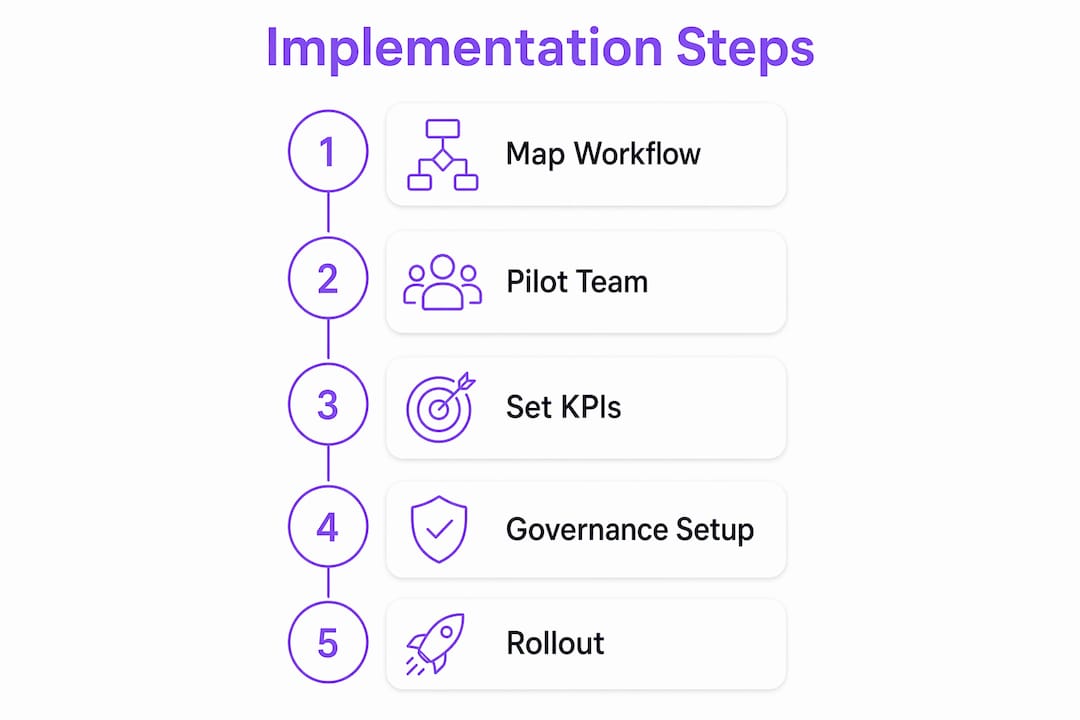
How to implement unified workflow communication step by step
- Map your highest-friction handoffs. Pick 1–3 processes where follow-ups are frequent or SLAs are missed. Onboarding, client implementations, and invoice approvals are common starting points.
- Design standard message templates. Each notification should include: what happened, what action is required, who is responsible, and a direct link to the relevant record.
- Set integration priorities. Connect your CRM or ERP first. Confirm that email reply processing works so recipients can act without leaving their inbox.
- Define governance rules. Assign role-based access, set retention policies for decision logs, and document escalation paths before go-live.
- Build a change-management plan. Schedule two training sessions: one before launch and one two weeks after. Identify a process owner for each pilot workflow.
- Set go/no-go criteria. Define what success looks like before you start. Reduction in follow-ups over a pilot period is a concrete, measurable threshold.
Pro Tip: Limit your pilot to one team and one workflow for the first two weeks. Expanding too fast is the most common reason pilots stall. See reusable workflow templates for a practical templating approach.
For teams integrating AI into this process, AI-in-workflow guidance from enterprise practitioners covers how to layer AI extraction and detection without adding complexity.
KPIs and metrics that prove the business case
Unified team collaboration is easier to sell internally when you attach numbers to it. Track these before and after your pilot:
| KPI | What it measures | Target improvement |
|---|---|---|
| Cycle time per process | Total time from trigger to completion | Reduction |
| Manual follow-ups per case | Count of status-request messages sent | Reduction |
| SLA compliance rate | % of cases closed within the agreed window | Improvement |
| Handoff time | Minutes between step completion and next step start | Significant reduction |
| Time-to-approval | Hours from approval request to decision | Reduction |
Example calculation: If your team sends an average of 10 follow-up messages per onboarding case and you run 50 onboardings per month, that is 500 messages. A 40% reduction saves 200 messages monthly. At five minutes per message, that is over 16 hours of recovered time every month, from one workflow.
Instrument your baseline using event logs from your workflow engine, webhook counters on integration endpoints, and a two-week manual sampling period before you switch on automation.
Which operations use cases deliver the fastest ROI?
- New-hire onboarding. Automated task sequences notify IT, HR, and the hiring manager at each step. Expected outcome: cycle time drops and no step is skipped because someone forgot to send an email.
- Client implementations. External collaborators complete intake forms and sign-offs via magic links. Expected outcome: fewer back-and-forth emails and a clear audit trail for every client decision. See cross-company workflow solutions for external-collaborator patterns.
- Invoice and purchase approvals. Approval requests route automatically with the invoice attached. Expected outcome: faster approvals and fewer exceptions escalated to managers. Automated approval workflows show how teams structure these in practice.
- Incident response and escalation. When a blocker is detected, the right person is notified immediately with full context. Expected outcome: fewer escalations reach senior leadership because the right owner acts first.
What to ask vendors when evaluating workflow communication tools
- Does the platform execute steps or only track status? Ask for a live demo of an automation firing without manual input. Tracking tools will show you a board; execution tools will show you a trigger.
- How deep are the integrations? Confirm email reply processing, CRM/ERP connectors, and API/webhook support. A connector that only reads data is not the same as one that writes back.
- How do external collaborators act? Ask specifically whether guests can complete a task without creating an account. Magic-link flows are the clearest signal of a purpose-built external-collaborator model.
- What does the governance model look like? Request documentation on role-based access, tenant isolation, and audit log retention.
- What are the pilot success criteria? A vendor confident in their product will help you define measurable KPIs before you sign anything.
How EasyFlow demonstrates unified workflow communication in practice
EasyFlow is built as an execution layer, not a tracker. The platform automates task handoffs, sends structured notifications, and detects blockers without requiring manual intervention.
- Magic links for external collaborators. Vendors, clients, and contractors complete tasks without creating accounts, which cuts onboarding friction on cross-company workflows.
- AI-powered workflow generation and extraction. Teams can generate workflow templates from a description or extract steps from existing documents, reducing setup time.
- Pre-built templates for onboarding, client implementation, and approvals. Each template includes structured messages, action-required prompts, and context links.
- Integrations. Email reply processing, API/webhooks, and visual workflow diagrams (Gantt and timeline views) connect EasyFlow to existing systems.
- Governance. Role-based access and automatic notifications with blocker detection support compliance and escalation requirements.
EasyFlow’s workflow automation approach covers team alignment proof points in detail.
Key Takeaways
Unified workflow communication works when messages are tied to execution triggers, not broadcast channels, and when every stakeholder can act without switching tools or creating new accounts.
| Point | Details |
|---|---|
| Definition | Unified workflow communication embeds structured messages and triggers directly inside business processes. |
| Top benefit | Automated status updates replace manual follow-ups, recovering measurable hours per process per month. |
| Implementation start | Map 1–3 high-friction handoffs first; set a measurable go/no-go KPI before launch. |
| Vendor test | Ask whether the platform executes steps automatically or only tracks status — the demo will tell you. |
| EasyFlow | EasyFlow executes workflows with magic links, AI features, and pre-built templates; a free plan is available to start a pilot. |
The mistake most operations teams make when rolling this out
Most teams pick the wrong starting point. They choose the most complex process because it has the most obvious pain, then spend six weeks configuring integrations before anyone sees a result. Pilots die in configuration.
The smarter move is to start with a process that already has a clear owner, a defined start and end, and a measurable follow-up count. New-hire onboarding fits that description almost universally. You can run a meaningful pilot in two to three weeks, collect real before/after data, and use that to justify the next phase.
One more thing: governance is not a phase-two problem. Set role-based access and retention policies on day one. Retrofitting permissions after a team has been using a tool for three months creates more disruption than the original rollout. The workflow automation resources on EasyFlow’s blog cover governance and template design in depth for teams ready to go further.
EasyFlow makes your first pilot straightforward
Operations teams that have mapped their handoffs and know which KPIs to track are ready to run a real pilot, not a proof of concept that sits in a slide deck. EasyFlow’s free plan lets you automate 1–3 processes immediately, with magic links for external collaborators, AI-assisted workflow setup, and pre-built templates for onboarding, approvals, and client implementations.

No lengthy implementation. No forcing vendors or clients to create accounts. You pick the process, set the trigger, and EasyFlow handles the handoffs. Most teams see a measurable drop in follow-ups within the first two weeks. Start your first workflow and use the KPI baselines from this article to measure exactly what changes.
FAQ
What is unified workflow communication in simple terms?
It is the practice of attaching messages, notifications, and required actions directly to workflow steps so every stakeholder gets the right prompt at the right time, with full context, without anyone having to chase status manually.
How is this different from using Slack or email for team updates?
Chat and email broadcast messages without execution context. Unified workflow communication fires a notification only when a specific workflow event occurs and includes the action required, the record link, and the responsible party, so no follow-up is needed.
What KPIs should I track to measure impact?
Track cycle time per process, manual follow-ups per case, SLA compliance rate, handoff time, and time-to-approval. A reduction in follow-ups over a pilot is a realistic and measurable target.
Can external collaborators participate without creating accounts?
Yes, when the platform supports magic links. EasyFlow uses this model so vendors, clients, and contractors can complete tasks via a secure link without registering, which removes a major friction point in cross-company workflows.
Where should an operations team start with implementation?
Start with one high-friction process that has a clear owner and a measurable follow-up count. New-hire onboarding and invoice approvals are the most common first pilots because they have defined start and end points and immediate, visible results.