
Collaborative Workflow Explained: A 2026 Team Guide

A collaborative workflow is defined as a structured process where two or more people share knowledge, skills, and responsibilities to achieve a common goal, using shared digital tools to maintain visibility and context. This concept goes beyond general teamwork. It relies on three core pillars: shared communication, centralized content management, and structured workflow progression. Teams that understand what is a collaborative workflow explained in practical terms gain a real advantage. They cut follow-ups, reduce confusion, and move work forward without constant check-ins. This guide breaks down how collaborative workflows are built, why they outperform traditional coordination, and how to put them into practice.
What is a collaborative workflow, and how does it differ from teamwork?
A collaborative workflow is a structured process where contributors share outcomes regardless of location, connected by fluid coordination rather than fixed group roles. That distinction matters more than most teams realize. Traditional teamwork depends on proximity and unified roles. Collaborative workflows, by contrast, emphasize distributed coordination where each person’s contribution feeds directly into the next stage of the process.
The standard industry term for this concept is “collaborative workflow,” and it sits within the broader field of work management and collaborative project management. Where a team might gather in a meeting room to align, a collaborative workflow captures that alignment inside a system. The system tracks who owns what, what has been completed, and what comes next. That visibility is what separates a workflow from a conversation.

Collaborative workflows differ from teamwork by connecting cross-functional contributors who share outcomes regardless of location, relying on fluid structures instead of synchronized group roles. This shift from fixed roles to outcome-oriented structures is what makes collaborative workflows particularly effective for hybrid and remote teams operating across time zones.
What are the main types of collaborative workflow structures?
Teams use two primary workflow structures, and choosing the right one changes how effectively work moves forward.
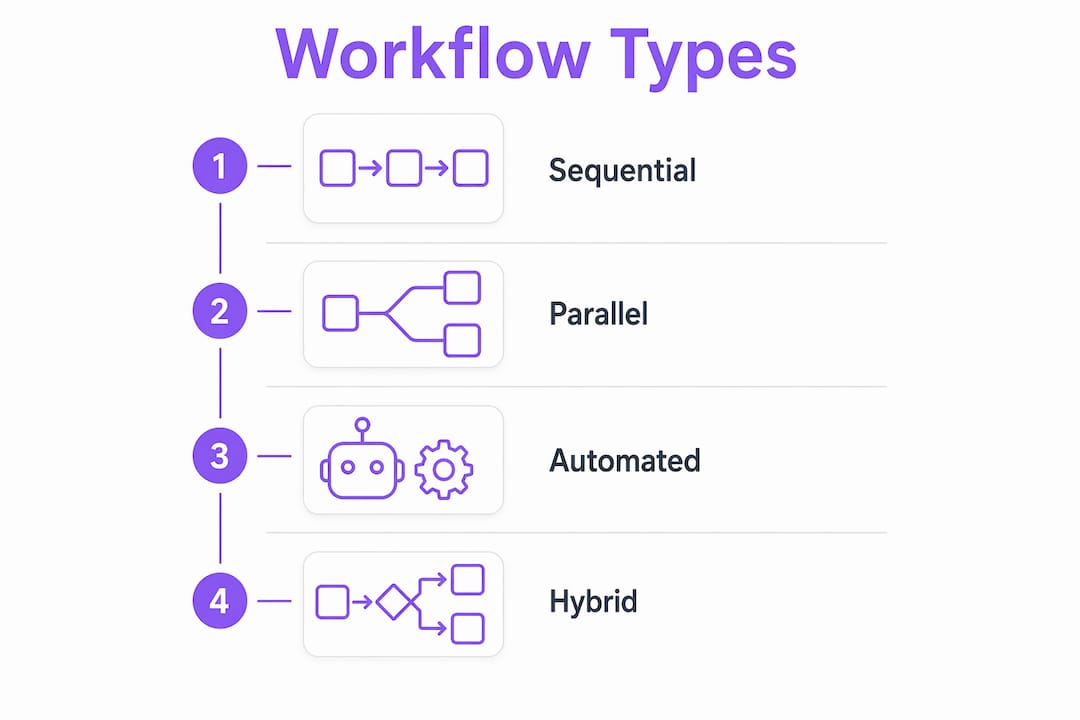
Sequential workflows follow a staged handoff model. One person or team completes a defined step before the next begins. This structure works well for processes where order matters, such as contract approvals, content publishing pipelines, or client onboarding. Each stage has a clear owner, a defined output, and a handoff point. The result is predictable progress and easy accountability.
Asynchronous workflows allow contributors to work at different times without waiting for live coordination. Asynchronous workflows often outperform synchronous ones for distributed teams by allowing work to progress without constant live check-ins, relying on a central digital source of truth. Success depends on clear task comments, file attachments, and visible progress updates. Without those elements, asynchronous work collapses into confusion.
Here is when to use each structure:
- Sequential workflows: Use when steps must happen in order, approvals are required between stages, or compliance documentation is needed at each handoff.
- Asynchronous workflows: Use when contributors span multiple time zones, tasks can be completed independently, or real-time meetings create bottlenecks.
- Hybrid structures: Use when some stages require live input (such as kickoff calls or reviews) while others can proceed independently.
Pro Tip: Map your workflow on paper before building it in any tool. Identify every handoff point and name the person responsible for each one. Gaps in ownership become obvious immediately.
How does workflow architecture underpin successful collaborative workflows?
Workflow architecture is the intentional design of how work moves through a system to produce clear responsibilities and governed transitions. Most teams focus on task lists. Workflow architecture focuses on movement. The difference is significant.
Workflow architecture defines exact points of input, decisions, and handoffs within a process, reducing manual task management. This means every step has a trigger, an owner, and a defined output before work begins. Teams that design workflows this way spend less time chasing status updates and more time executing.
Building effective workflow architecture involves four deliberate steps:
- Map the process end to end. Identify every task, decision, and approval from start to finish before assigning owners.
- Define input and output for each step. Every stage should have a clear deliverable that triggers the next stage.
- Design handoff points explicitly. Name who receives the work, what information they need, and what format it arrives in.
- Build in decision gates. Identify where a “yes/no” or “approve/reject” decision must happen and who holds that authority.
The most common failure point in any collaborative process is the handoff. Effective workflow architecture focuses on designing handoffs where responsibility shifts, because that is where information loss and delays most often occur. Mapping these transitions intentionally improves information flow and reliability across the entire process.
“The largest source of workflow failure is poorly mapped handoffs where responsibility and information transfer are unclear or inconsistent. Designing these transitions explicitly is not optional. It is the work.”
Teams that treat workflow architecture as a one-time setup activity miss the point. Workflows need periodic review as team structures, tools, and process requirements change. A workflow that worked for a five-person team often breaks at fifteen.
What are the key benefits and challenges of collaborative workflows?
The benefits of collaborative workflows are concrete and measurable in day-to-day operations. Improving workplace collaboration requires shared ownership, centralized information, and accessible communication across locations, with integrated workflows for scalability. Hybrid and remote teams benefit from mobile access, clear documentation, and inclusive practices that keep everyone aligned without requiring constant meetings.
The primary benefits teams report include:
- Improved visibility: Every contributor sees task status, ownership, and progress without asking for updates.
- Reduced administrative overhead: Structured handoffs replace email chains and status meetings.
- Shared accountability: When each step has a named owner, responsibility is clear and follow-through improves.
- Faster decision-making: Visual collaboration platforms acting as centralized hubs reduce project confusion, enabling teams to maintain a single source of truth that accelerates decision-making.
The challenges are equally real. Teams that ignore them pay for it in rework and delays.
- Delayed feedback: Waiting until project completion to gather input creates expensive rework. Early stakeholder involvement during ideation reduces this risk by identifying constraints when changes are still inexpensive.
- Poor handoffs: Without explicit handoff design, work stalls between stages and context gets lost.
- Over-reliance on synchronous communication: Teams that require live meetings for every decision create bottlenecks that slow the entire workflow.
- Lack of a central source of truth: Without a centralized digital space, teams spend excessive time on follow-ups rather than execution.
Pro Tip: Invite technical and operational stakeholders into the workflow design process before you build anything. Their constraints are far cheaper to address at the design stage than after launch.
How do collaborative workflows work in practice with modern tools?
Collaboration tools act as a visual source of truth to centralize context, feedback, and task status, reducing administrative overhead and promoting progress. In practice, this means teams use digital platforms to replace the informal coordination that once happened in hallways or email threads. The platform becomes the workflow.
Automation and workflow execution systems transform collaborative workflows into repeatable processes with predictable outcomes. Instead of a manager manually notifying the next person in a chain, the system triggers the handoff automatically when a task is marked complete. This removes a significant source of delay and human error from the process.
EasyFlow takes this further by actually executing processes rather than just tracking them. External collaborators can complete tasks via magic links without creating accounts, which removes onboarding friction from cross-functional workflows. Teams running client onboarding, new hire setup, or vendor approvals benefit directly from this approach.
| Workflow type | Best use case | Key requirement |
|---|---|---|
| Sequential | Contract approvals, publishing pipelines | Clear stage ownership and defined outputs |
| Asynchronous | Remote team projects, multi-timezone work | Disciplined documentation and visible progress |
| Automated | Recurring handoffs, compliance processes | Workflow execution system with trigger logic |
| Hybrid | Client implementations, product launches | Mix of live checkpoints and independent tasks |
Workflow execution systems also support compliance by creating an auditable record of every handoff, approval, and decision. For teams in regulated industries, this is not a convenience. It is a requirement. The shift from manual coordination to automated workflow execution is the defining change in how knowledge work gets done in 2026.
Key Takeaways
A collaborative workflow succeeds when it combines clear ownership, explicit handoff design, and a centralized digital source of truth that keeps every contributor aligned without constant meetings.
| Point | Details |
|---|---|
| Core definition | A collaborative workflow is a structured process where contributors share responsibilities using shared digital tools and visible task progression. |
| Two primary structures | Sequential workflows suit ordered processes; asynchronous workflows suit distributed teams working across time zones. |
| Handoffs are the failure point | Explicitly designing handoff points where responsibility shifts prevents information loss and process delays. |
| Early stakeholder input reduces rework | Involving technical and operational contributors during design identifies constraints before they become expensive problems. |
| Automation scales the process | Workflow execution systems replace manual coordination with triggered handoffs, producing repeatable and auditable outcomes. |
Why most teams are still treating workflows like group chats
I have watched teams spend months building elaborate task boards that nobody actually uses. The problem is almost never the tool. It is the absence of workflow architecture underneath it. Teams confuse activity with progress. A board full of tasks is not a workflow. A workflow is a system where work moves from one defined state to the next, with a named owner at every transition.
The shift that changes everything is moving from “who is working on this?” to “what needs to happen for this to move forward?” That reframe forces teams to design handoffs, define outputs, and name decision points. It also exposes the places where work quietly dies between stages, which is where most project delays actually originate.
Asynchronous work models accelerate this shift. When your team spans three time zones, you cannot afford to wait for a meeting to unblock a decision. You need a system that carries context forward automatically. Reusable workflow templates are one of the most underused tools for making this work consistently. Build the process once, run it repeatedly, and improve it based on what you observe.
The teams I have seen succeed with collaborative workflows share one habit: they treat workflow design as a first-class activity, not an afterthought. They map the process before they build anything. They name owners before they assign tasks. And they review the workflow after every major project to close the gaps that appeared during execution.
— Harsh
How EasyFlow handles team handoffs automatically
Teams that have designed their collaborative workflows well still face one persistent problem: executing handoffs without manual follow-up.

EasyFlow is built to solve exactly that. It automates team handoffs so that when one stage completes, the next begins automatically, with the right person notified and the right context attached. External collaborators join via magic links, no account creation required, which means client-facing workflows move at the speed of execution rather than the speed of onboarding. Teams running recurring processes like new hire onboarding or client implementations use EasyFlow to turn one-time workflow designs into repeatable, auditable systems. The result is fewer follow-ups, clearer ownership, and processes that actually finish.
FAQ
What is the collaborative workflow definition?
A collaborative workflow is a structured process where two or more contributors share knowledge, responsibilities, and digital context to achieve a common goal. It relies on three core pillars: shared communication, centralized content management, and structured workflow progression.
How does a collaborative workflow differ from regular teamwork?
Teamwork relies on proximity and unified roles. A collaborative workflow connects distributed contributors through fluid, outcome-oriented structures with explicit handoffs and visible task progression, regardless of location or time zone.
What are the main benefits of collaborative workflows?
The main benefits include improved task visibility, reduced administrative overhead, shared accountability, and faster decision-making through a centralized digital source of truth that eliminates the need for constant status meetings.
What is the most common reason collaborative workflows fail?
Poorly designed handoffs are the leading cause of workflow failure. When responsibility and information transfer between stages are unclear, work stalls and context gets lost. Mapping handoff points explicitly before launch prevents this.
How does automation improve collaborative workflows?
Automation replaces manual coordination by triggering handoffs automatically when a task is completed. This removes human error and delay from the process, turning a collaborative workflow into a repeatable, auditable system with predictable outcomes.