
How to Create Reusable Workflow Templates for Teams

Reusable workflow templates are predefined process blueprints that teams deploy repeatedly across projects without rebuilding logic from scratch. The industry term is workflow template, and the practice of building them for repeated use is standard in CI/CD, operations, and enterprise process management. Platforms like GitHub Actions, Dynatrace, and Dapr have each formalized this pattern because it solves a real problem: teams waste hours recreating the same process steps, introducing inconsistencies and errors along the way. When you create reusable workflow templates correctly, you cut that waste entirely. This guide covers the tools, steps, and governance practices that make templates worth building.
What tools do you need to create reusable workflow templates?
The right tools determine how far your templates can scale. Before writing a single line of configuration, your team needs access to a shared repository, a CI/CD or workflow platform, and a clear understanding of the YAML format that most modern platforms use.
The table below compares three widely used platforms and their core requirements:
| Platform | Trigger mechanism | Config format | Key requirement |
|---|---|---|---|
| GitHub Actions | workflow_call | YAML | Shared repo with defined inputs and secrets |
| Dynatrace | Workflow export | YAML | Platform access and workflow guide setup |
| Dapr | Named workflow classes | Code or YAML | Side-by-side version management |
Beyond the platform itself, teams need two organizational prerequisites. First, a shared repository or workspace where templates live centrally. Second, a permissions model that controls who can edit templates versus who can only consume them. Without that separation, templates drift the moment someone edits a “shared” file directly.
Required knowledge before you start:
- YAML syntax: Most platforms store workflow definitions as YAML. Errors in indentation break entire pipelines.
- Trigger types: GitHub Actions uses
workflow_callto mark a workflow as reusable. Understanding this trigger is the entry point to building reusable workflows. - Secret management: Secrets require explicit handling. Ambient environment secrets are not passed automatically to reusable workflows in GitHub Actions.
- Access control: Template authors need write access to the shared repo. Consumers need read access only.
Getting these prerequisites right before you design anything saves significant debugging time later.
How to build workflow templates step by step
Designing a template is not the same as writing a one-off workflow. A template must work for multiple consumers with different inputs, so the design contract matters as much as the logic itself.
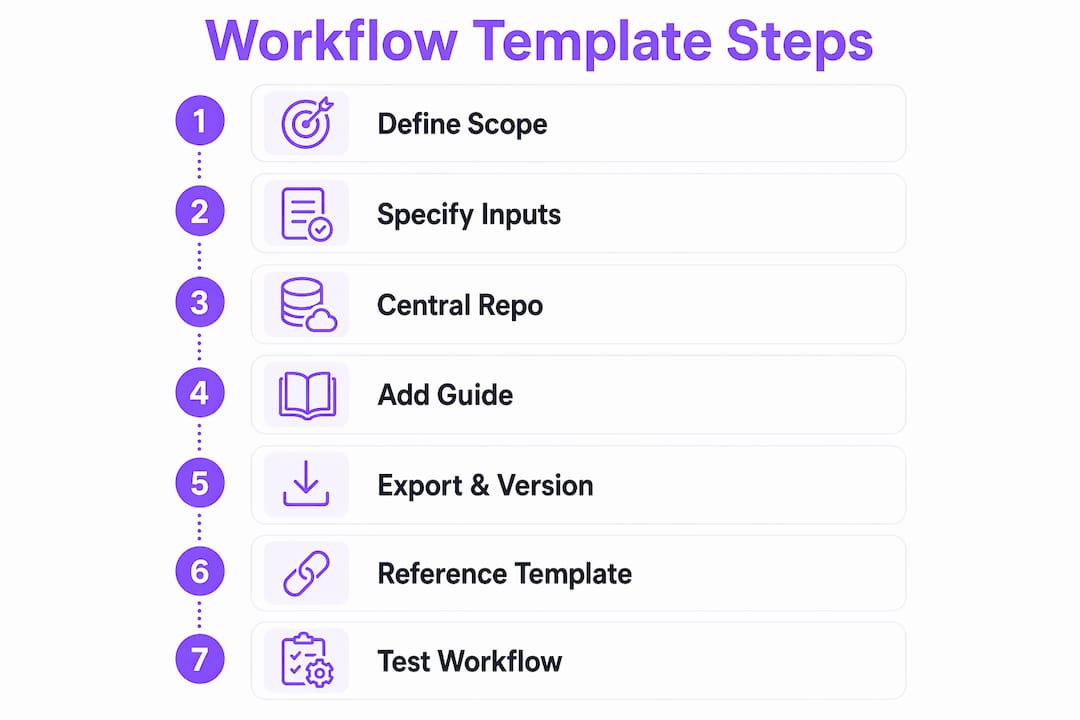
Step 1: Define the template’s scope
Decide exactly what the template does and what it does not do. A template that tries to cover too many cases becomes impossible to maintain. A CI pipeline template should handle build, test, and deploy. It should not also handle notification routing or secret rotation.

Step 2: Specify inputs, outputs, and secrets
Typed inputs and secrets must be declared explicitly at the top of the workflow file. In GitHub Actions, this means defining each input with a type (string, boolean, number), a description, and a default value where appropriate. Outputs follow the same pattern. This declaration is the template’s contract with every team that uses it.
Step 3: Build the workflow in a shared repository
Create the YAML file in a centrally accessible repository. Name the file clearly, for example ci-pipeline-v1.yml, so consumers know exactly what they are referencing. Keep the logic inside the template generic enough to accept the inputs you defined in Step 2.
Step 4: Add a workflow guide
Dynatrace workflow guides are embedded documentation that walks template users through prerequisites and configuration steps before they run the workflow. Every platform that supports templates benefits from this pattern, even if it means adding a README section or inline comments. Teams that skip this step generate support requests from every new consumer.
Step 5: Export and version the template
Dynatrace allows exporting workflows as YAML files, which you can then store in version control. GitHub Actions templates live natively in repositories. Either way, tag the initial release with a version number before sharing it.
Step 6: Reference the template from consuming repositories
Consuming workflows call the shared template by referencing its path and version tag. In GitHub Actions, this looks like uses: org/shared-workflows/.github/workflows/ci-pipeline-v1.yml@v1. The version tag is not optional.
Step 7: Test with a real consuming workflow
Run the template from a test repository before announcing it to the team. Validate that every input passes correctly, outputs return the expected values, and secrets reach the right steps.
Pro Tip: Pin every reusable workflow reference to a specific tag or commit SHA. Version pinning prevents silent pipeline failures when upstream workflow changes occur. A floating reference to main will break your consumers the moment someone merges an incompatible change.
How do you manage and maintain reusable templates over time?
Template maintenance is where most teams underinvest. A template that works on day one but breaks six months later is worse than no template at all, because teams have already built dependencies on it.
Versioning is non-negotiable. Dapr’s approach is instructive: side-by-side named workflow classes allow old instances to complete while new instances route to upgraded versions. This matters most in long-running workflows where an in-flight process cannot simply be restarted. The same logic applies to any team managing workflows that run for hours or days.
Immutability protects your standards. OMIQ enforces a strict rule: workflows created from templates cannot be edited directly. Any change requires creating a new template version. This prevents silent drift, where a consumer quietly modifies a workflow and diverges from the standard without anyone noticing. Enterprise teams should adopt this pattern regardless of platform.
Best practices for template lifecycle management:
- Never modify a released version in place. Create a new version and deprecate the old one on a published schedule.
- Maintain a changelog. Document what changed between versions and why. Consumers need this to decide when to upgrade.
- Set a deprecation window. Give consuming teams at least 30 days notice before retiring an old version.
- Audit template usage. Know which repositories reference which version before you deprecate anything.
- Centralize ownership. Assign a named team or individual as the template maintainer. Shared ownership without accountability produces abandoned templates.
Pro Tip: Before deleting an old template version, check for in-flight instances that are still running against it. Removing a version while workflows are mid-execution causes unpredictable failures. Run a usage audit and wait for active instances to complete before retiring any version.
What are the most common mistakes when building reusable templates?
Even experienced teams hit the same set of problems when they first design templates for shared use. Knowing these pitfalls in advance saves hours of debugging.
Common mistakes and how to fix them:
- Secrets not passed explicitly. In GitHub Actions, secrets are not inherited by default. The calling workflow must pass each secret explicitly, or use
secrets: inheritto forward all secrets. Forgetting this causes silent authentication failures that look like permission errors. - No input validation. Templates without typed inputs accept anything, including malformed values. Define types and required fields in the template contract to catch errors before the workflow runs.
- Nesting too deep. GitHub Actions limits reusable workflow nesting. Calling a reusable workflow that itself calls another reusable workflow hits platform limits quickly. Keep the call chain flat.
- Floating version references. Referencing a template by branch name instead of a tag means the template can change without the consumer knowing. Always pin to a tag or SHA.
- Missing output mapping. If a template produces outputs that consuming workflows need, those outputs must be explicitly mapped in the template’s
outputsblock. Skipping this step means downstream steps receive nothing. - No documentation for template users. A template without a guide generates repeated questions. Embed prerequisites and configuration instructions directly in the template or its repository README.
- Editing templates without versioning. Changing a live template without creating a new version breaks every consumer simultaneously. Treat released templates as immutable.
The template contract covering inputs, outputs, and required secrets is the single most effective tool for preventing runtime errors. Teams that document this contract before writing any logic ship templates that work on first use.
Key Takeaways
Reusable workflow templates deliver consistent, maintainable processes only when teams define clear contracts, enforce versioning, and treat released templates as immutable.
| Point | Details |
|---|---|
| Define the template contract first | Specify all inputs, outputs, and secrets before writing any workflow logic. |
| Use version pinning on every reference | Pin to a tag or SHA to prevent silent failures from upstream changes. |
| Enforce immutability on released templates | Require a new version for any change; never edit a live template in place. |
| Run side-by-side versions for long workflows | Keep old versions active until in-flight instances complete before retiring them. |
| Embed workflow guides for new users | Include prerequisite and configuration documentation to reduce onboarding errors. |
Why I think most teams design templates backwards
Teams almost always start with the logic and add the contract later. They build the workflow, get it working, and then think about inputs and documentation as an afterthought. That sequence produces templates that work for the original author and confuse everyone else.
The teams I have seen get this right start with the contract. They write out every input, every secret, every output, and every assumption before touching the YAML. That document becomes the specification. The workflow is just the implementation of that spec. When a new consumer reads the template, they have everything they need without asking anyone.
The other thing most guides skip is the governance conversation. Versioning and immutability sound like overhead until the first time someone edits a shared template and breaks twelve pipelines at once. After that, teams adopt strict versioning immediately. The immutability pattern from OMIQ and the side-by-side versioning from Dapr are not academic concepts. They are the difference between a template library that scales and one that becomes a liability.
My honest recommendation: treat your first template as a prototype. Build it, use it in two or three real workflows, and then rebuild it with everything you learned. The second version will be the one worth sharing.
— Harsh
How EasyFlow supports reusable workflow automation

EasyFlow takes the core idea behind reusable templates and applies it to the full execution layer, not just configuration files. Teams use EasyFlow to build process templates that actually run, sending tasks to the right people via magic links without requiring every participant to create an account. That removes the onboarding friction that kills adoption of even well-designed templates. For operations teams managing client onboarding, HR workflows, or cross-functional handoffs, EasyFlow’s workflow automation platform handles the execution that static YAML templates cannot. If your team is ready to move from template design to full process automation, EasyFlow’s free plan is the fastest way to start.
FAQ
What is a reusable workflow template?
A reusable workflow template is a predefined process blueprint that teams deploy across multiple projects or repositories without rebuilding the logic each time. Platforms like GitHub Actions, Dynatrace, and Dapr each support this pattern natively.
How do secrets work in GitHub Actions reusable workflows?
Secrets are not passed automatically to reusable workflows in GitHub Actions. The calling workflow must pass secrets explicitly or use secrets: inherit to forward all available secrets.
Why does version pinning matter for workflow templates?
Pinning a reusable workflow reference to a specific tag or SHA prevents silent failures when the upstream template changes. A floating reference to a branch name means any merged change can break consuming workflows immediately.
What does immutability mean for workflow templates?
Immutability means that once a template version is released, it cannot be edited directly. Any change requires creating a new version, which protects all existing consumers from unexpected behavior changes.
How do I handle long-running workflows when updating a template?
Use side-by-side versioning, as Dapr recommends, to keep the old version active while in-flight instances complete. Route new workflow instances to the updated version only after confirming no active instances depend on the old one.