
Project Execution Tools vs Task Management Software

If your team runs the same multi-step process more than 20 times a month and still relies on someone to manually ping the next person in line, you are not using the wrong tool — you are using the wrong category of tool.
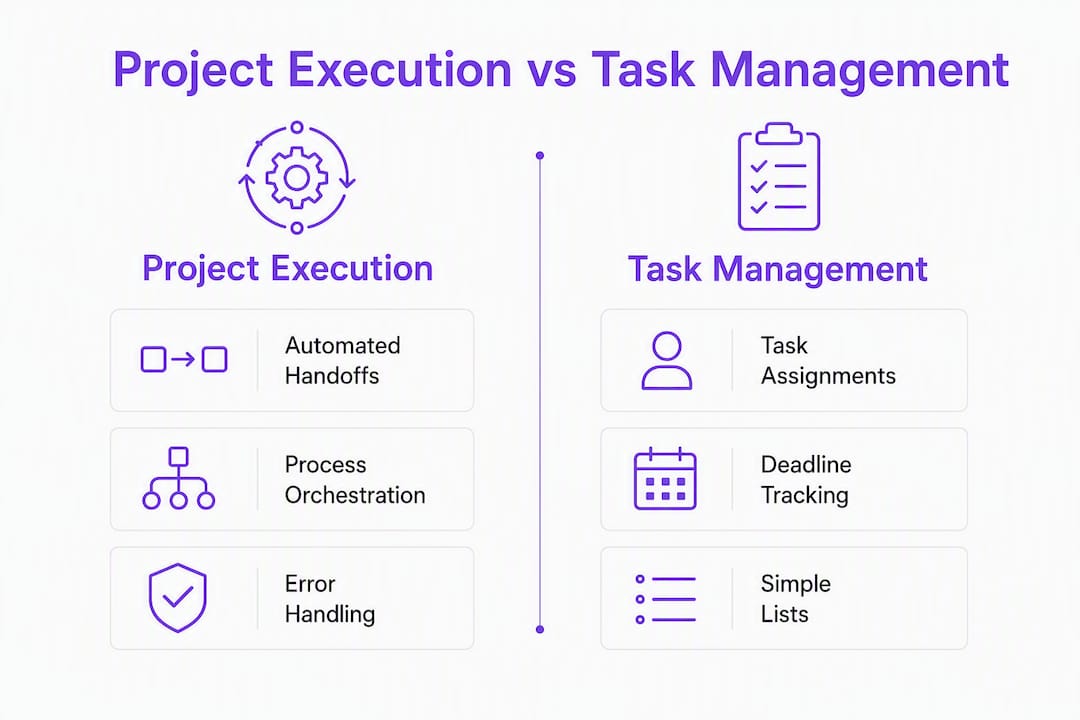
The verdict: Operations-heavy teams should choose a project execution tool (also called a workflow automation or process-execution platform) over standard task management software when recurring handoffs, SLA enforcement, and cross-system coordination are the actual bottleneck. Task management software tracks what needs doing. Process-execution software does it — routing steps, firing reminders, pulling in external collaborators, and enforcing business rules without anyone manually triggering the next action.
Key signals that put you in execution-tool territory:
- Processes run frequently with multiple handoffs
- Follow-up volume is high and manual
- External collaborators slow things down because they need accounts
- Compliance or quality gaps appear at handoff points
- Workflow automation delivers multiplicative ROI when processes are frequent and structured
EasyFlow is a trial-ready option built precisely for this definition. Its trial lets you run one end-to-end process and see whether manual handoffs disappear within the first week. Many teams see clear ROI within a few months of deploying a suitable pilot process.
Table of Contents
- What does “project execution tool” actually mean here?
- Does your ops team actually need an execution tool?
- What capabilities should you demand from an execution tool?
- How should you roll out an execution tool in 90 days?
- How do you measure whether it’s working?
- Where do execution tools deliver the fastest results?
- How do you evaluate vendors and run a focused POC?
- Key Takeaways
- The part most ops teams get wrong
- Cut manual handoffs with EasyFlow’s 14-day trial
- Useful sources
- FAQ
What does “project execution tool” actually mean here?
The term gets used loosely across the industry. For this article, a project execution tool is a Business Process Management Suite (BPMS) — a category defined by TechTarget as software that designs, models, executes, automates, and improves end-to-end business processes. It includes a workflow engine, a business rules engine, process monitoring, and exception handling. That is meaningfully different from a task list with due dates.
In practical terms, an execution tool:
- Executes steps automatically — no human needs to create the next task
- Enforces SLAs and business rules embedded in the process, not in someone’s memory
- Accepts email replies as process inputs, so participants never need to log in
- Onboards external collaborators via magic links — no account creation required
- Runs AI-powered steps to complete or classify work within the workflow
- Provides visual workflow diagrams (Gantt, timeline) and pre-built templates
- Detects blockers and escalates automatically
Modern BPMS platforms have moved toward cloud-based, low-code design, which means business users can build and own process definitions without waiting on IT. That shift matters for ops teams who need to iterate fast.
Purchase-decision implication: if a vendor cannot show you a live orchestration layer — sequencing, error handling, and human checkpoints all wired together — it is a task tracker with automation features bolted on, not an execution platform.
Does your ops team actually need an execution tool?
Use this checklist. The more boxes you check, the stronger the case for switching.
- A recurring process runs frequently (onboarding, invoice approval, client setup).
- Three or more people or systems touch each instance.
- Someone on your team spends meaningful time each week chasing status updates.
- External vendors or clients participate in the process and currently need accounts or email threads to do so.
- A compliance or quality failure has occurred at a handoff point in the last six months.
- The process touches more than one system — CRM, accounting, email — and handoffs between them are manual.
When processes cross multiple systems and people, workflow automation delivers outsized ROI versus single-task automation because it eliminates those manual bridges entirely.
Concrete examples of where the switch pays off quickly:
- New-hire onboarding: IT provisioning, HR paperwork, and manager check-ins run as a single automated sequence rather than separate email threads.
- Client implementation: External stakeholders complete their steps via magic link; no account setup, no delay waiting for credentials.
- Invoice routing: Approval rules fire automatically based on appropriate thresholds; exceptions escalate without anyone manually forwarding an email.
What capabilities should you demand from an execution tool?
Not every platform that calls itself a workflow tool actually executes processes. Here is what separates production-ready execution from feature theater.

| Capability | Why it matters for ops | Outcome |
|---|---|---|
| Automated handoffs | Steps trigger the next step without human action | Cuts cycle time and follow-up volume |
| Business rules engine | Conditions route work based on data, not judgment | Consistent compliance and quality |
| Visual workflow designer | Ops team owns process design without IT | Faster iteration and governance |
| Email-reply processing | Participants respond by email; reply updates the process | Zero-friction participation |
| External magic links | Vendors and clients act without creating accounts | Faster external onboarding |
| AI step execution | AI classifies, drafts, or completes steps in the flow | Reduces manual cognitive load |
| SLA enforcement and escalation | Deadlines trigger automatic escalation | Fewer missed SLAs |
| Integration surface (CRM, ERP) | Process pulls and pushes data across systems | Eliminates re-keying and sync errors |
| Exception handling | Errors route to a human checkpoint, not a dead end | Resilient, auditable execution |
| Analytics and reporting | Cycle time, bottleneck, and completion data | Measurable ROI |
Workflow automation enforces consistency by embedding rules and checkpoints into the process itself rather than relying on whoever happens to be paying attention that day.
Pro Tip: Ask any vendor to demonstrate a live process that includes an exception — a step that fails or times out. If the demo skips that scenario, the platform likely has no real orchestration layer. Real execution tools handle the unhappy path as gracefully as the happy one.
How should you roll out an execution tool in 90 days?
| Phase | Weeks | Owner | Success criteria |
|---|---|---|---|
| Discover | 1–2 | Ops lead + process owner | One high-frequency process mapped end-to-end |
| Build and pilot | 3–6 | Ops lead + IT (light touch) | Process runs live; first 10 instances completed without manual intervention |
| Measure and expand | 7–10 | Ops lead + department heads | Cycle time and follow-up volume measured; second process identified |
Map the process before you automate it. This is where most of the value actually comes from — and where most teams skip ahead too fast.
Common pitfalls to avoid:
- Automating a messy process. Automation runs a bad process faster. Fix the logic first.
- Skipping data integration. A workflow that cannot read from your CRM will create parallel data entry, not eliminate it.
- No designated process owner. Someone must own the definition, the SLAs, and the exception rules. Without that, the process drifts.
- Piloting a low-frequency process. Pick something that runs at least weekly so you get enough data to measure ROI within 90 days.
Role checklist for the pilot: one ops lead (process owner), one IT contact (integration sign-off), one end-user representative (tests the participant experience), one executive sponsor (approves scope changes).
How do you measure whether it’s working?
Track these KPIs from day one of the pilot:
- Cycle time per process instance (start to completion)
- Handoff lag — time between one step completing and the next starting
- Error and exception rate per 100 instances
- Follow-up volume — emails or messages sent to chase status
- Percentage of steps completed automatically versus manually
- Approvals per week handled without human routing
Quick ROI example: If a process runs 100 times a month and each instance previously required 30 minutes of manual coordination at a $50 loaded hourly rate, that is $2,500 in labor per month. Automating 80% of that coordination recovers $2,000 monthly — before accounting for error reduction or faster cycle times.
Most teams reach clear ROI within a few months when the pilot targets a suitable process. Build and deploy typically takes several weeks, leaving the remainder of the evaluation period to measure and confirm the gain.
Pro Tip: Set your success criteria before the pilot starts — not after. Agree on a target cycle time and follow-up reduction with your executive sponsor on day one. That number becomes your trial sign-off criterion and makes the business case write itself.
Where do execution tools deliver the fastest results?
New-hire onboarding is the most common first win. IT provisioning, equipment requests, policy acknowledgments, and manager introductions run as a single automated sequence. Onboarding automation typically cuts the time-to-productivity gap and eliminates the back-and-forth that delays Day 1 readiness.
Client implementations benefit from magic-link participation. External stakeholders complete their required steps without creating accounts, which removes the single biggest friction point in most client onboarding flows.
Invoice and approval workflows are high-frequency and rules-driven — exactly where a business rules engine pays off. Automated approval workflows route by dollar threshold, department, or vendor type and escalate exceptions without anyone manually forwarding an email.
Contractor coordination is where magic links and external-collaborator workflows shine. Contractors complete deliverable sign-offs, compliance forms, and status updates through a single link — no platform access required.
EasyFlow covers all four use cases with pre-built templates, visual workflow diagrams, and AI-powered step execution. The 14-day trial is scoped to let you run one of these processes end-to-end before committing.
How do you evaluate vendors and run a focused POC?
Run the proof of concept against a real process, not a demo scenario. Here is the sequence:
- Pick one process from the use-case list above that runs at least 20 times a month.
- Map it fully before touching the platform — every step, every decision point, every exception.
- Build the process in the vendor’s tool and run 10 live instances with real participants.
- Test email-reply handling: send a reply to a process notification and confirm it updates the workflow.
- Test magic-link participation: invite an external collaborator and time how long their first action takes.
- Trigger an exception deliberately and confirm the escalation path fires correctly.
- Pull the analytics report and verify cycle time data matches your manual baseline.
Vendor questions that reveal real capability:
- Where is data stored, and what is your data residency policy for U.S. customers?
- What are your admin controls for role-based access and audit logging?
- How do rollback or compensating actions work when a step fails mid-process?
- What is your support SLA during the trial and post-go-live?
- Can business users modify process definitions without an IT ticket?
The orchestration layer — sequencing, handoffs, error handling, and human checkpoints — is the technical core that makes workflow automation scale. If a vendor cannot demonstrate it under failure conditions, move on.
Key Takeaways
Project execution tools outperform task management software for operations teams when recurring processes involve multiple handoffs, external collaborators, and cross-system data — and most teams confirm that ROI within 90 days of a focused pilot.
| Point | Details |
|---|---|
| Choose execution tools for handoff-heavy work | If a process runs frequently with multiple handoffs, task tracking will not scale. |
| Map before you automate | Automating an unmapped process amplifies inefficiency; mapping is where the real value is found. |
| Demand a live orchestration demo | Test exception handling and magic-link participation before signing any contract. |
| Measure from day one | Set cycle time and follow-up reduction targets before the pilot starts, not after. |
| EasyFlow trial | EasyFlow offers a 14-day trial for ops teams to run one end-to-end process and validate ROI. |
The part most ops teams get wrong
The conventional wisdom says “automate your most painful process first.” That advice is half right and half dangerous. The most painful process is usually painful because it is poorly defined — with unclear ownership, inconsistent steps, and exception handling that lives in someone’s head. Automating that process does not fix the pain; it locks it in at machine speed.
The teams that get the fastest ROI from execution tools pick a process that is frequent and already consistent, not the one that hurts the most. They map it, find the two or three steps where handoffs stall, and automate those specifically. Then they expand.
Governance matters more than most vendors will tell you. Someone needs to own the process definition — not just the tool license. That person decides when a step changes, who can modify the workflow, and what the SLA is. Without that ownership, the process drifts back toward manual coordination within six months, and the tool gets blamed for a governance failure.
Cut manual handoffs with EasyFlow’s 14-day trial
Operations teams that have already decided they need process execution — not just task lists — can validate that decision in two weeks. EasyFlow runs automated handoffs, enforces SLAs, and lets external collaborators act through magic links without creating accounts. Pick one high-frequency process (onboarding, approvals, client setup), build it in EasyFlow during the trial, and run it against real instances.

The 14-day trial covers the full feature set: AI-powered step execution, email-reply processing, visual workflow diagrams, and pre-built templates. No IT project required to get started. Start your EasyFlow trial and have your first process running by end of week one.
Useful sources
External research:
- TechTarget — What Is BPMS? — definition of process-execution platforms and BPMS capabilities
EasyFlow resources:
- EasyFlow Blog — practical guides on workflow automation for ops teams
- Why project managers need workflow automation — the case for execution tools over task tracking
- Workflow orchestration explained — technical primer on orchestration for ops teams
FAQ
What is the difference between project execution tools and task management software?
Task management software tracks who owns what and when it is due. Project execution tools (process-execution platforms) automatically run each step, enforce business rules, and trigger the next action without manual intervention.
When should an ops team choose a process-execution tool over task tracking?
When a recurring process runs more than 20 times a month, involves 3 or more handoffs, or requires external collaborators to participate, a process-execution tool delivers faster and more consistent results than task tracking.
How long does it take to see ROI from workflow automation?
Most teams see clear ROI within 90 days when the pilot targets a high-frequency process; build and deployment typically takes 4–8 weeks, per Infinity Sky AI.
Does EasyFlow require external collaborators to create accounts?
No. EasyFlow lets external collaborators complete their steps through magic links, with no account creation required, which removes the main friction point in contractor and client workflows.
What should you test first in a proof of concept?
Run one real process end-to-end, test email-reply handling, trigger an exception deliberately, and confirm the escalation path fires correctly before evaluating any vendor’s analytics or reporting features.