
Why Project Managers Need Workflow Automation

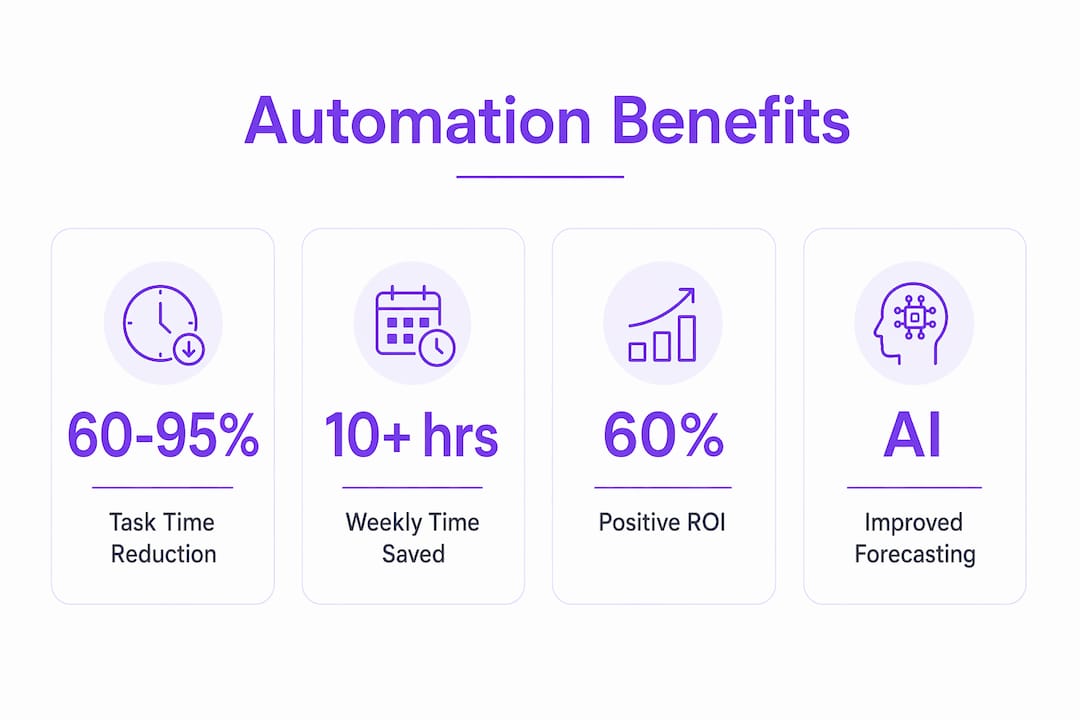
Workflow automation is defined as the use of technology to automatically execute repetitive project management tasks, freeing project managers to focus on decisions that actually move projects forward. Why project managers need workflow automation comes down to one measurable reality: repetitive tasks consume 60–95% of time that could go toward strategy, risk management, and team leadership. Tools like EasyFlow, Tempo.io, and Microsoft Power Automate now make it possible to automate status updates, approvals, and resource alerts without writing a single line of code. The result is faster projects, fewer errors, and teams that actually communicate.
Why project managers need workflow automation for repetitive tasks
The biggest drain on project management efficiency is not complexity. It is repetition. Status updates, approval requests, timesheet reminders, and data entry are rule-based tasks that follow the same logic every time. That makes them ideal candidates for automation.
AI-powered task automation saves teams 5–10 hours weekly in coordination overhead alone. That is time reclaimed from chasing people for updates and redirected toward solving actual project problems.
Here are the project tasks most worth automating first:
- Status update notifications sent automatically when a task moves between stages
- Approval routing triggered the moment a deliverable is marked complete
- Timesheet and deadline reminders sent on a schedule without manual follow-up
- Data entry from forms or emails into your project tracking system
- Resource allocation alerts when a team member is over capacity
Each of these tasks follows a predictable rule. If this happens, do that. That structure is exactly what automation handles best.
Project managers are not expected to be automation engineers. The key is identifying rule-based tasks like status reporting and timesheet reminders as prime candidates for bots. You do not need technical expertise to start. You need a clear map of where your time goes.

Pro Tip: Spend one week logging every task you repeat more than twice. Any task that follows a fixed rule is a candidate for automation. That list becomes your automation roadmap.
The efficiency gains compound quickly. When your team stops spending time on low-value coordination, they spend more time on the work that actually requires human judgment.
How automation improves project visibility and team collaboration
Manual project management is not primarily a productivity problem. It is a visibility problem caused by siloed emails and disconnected spreadsheets that make coordinated decision-making nearly impossible. Automation solves this by creating a single, shared source of truth that updates in real time.
When a task is completed, automation can instantly notify the next person in the workflow, update the project dashboard, and log the timestamp. No one has to ask what happened or when. The information is already there.
“Workflow automation provides transparency into task responsibilities, progress, and upcoming work, improving communication and speeding up project work cycles.” — Paycor
The collaboration benefits are concrete and measurable:
- Fewer status meetings because dashboards reflect real-time progress
- Faster handoffs because the next assignee is notified automatically
- Clearer accountability because every action is logged with a timestamp
- Reduced miscommunication because task instructions travel with the task, not in a separate email thread
- Better cross-functional alignment because external stakeholders get automated updates without needing system access
EasyFlow takes this further by allowing external collaborators to complete tasks via magic links, removing the need for them to create accounts. That single feature eliminates one of the most common bottlenecks in client-facing projects: waiting for external parties to get set up before work can move forward.
Workflow automation for team alignment is not about replacing human communication. It is about making sure the right information reaches the right person at the right moment, automatically.
Workflow automation tools: what features actually matter?
Most project managers over-prioritize task management features when evaluating automation tools. The better ROI comes from automations directly linked to financial outcomes like margin forecasting, budget alerts, and resource matching. That shift in thinking changes which tools belong on your shortlist.
Here is a comparison of tools relevant to project managers in 2026:
| Tool | Core Strength | Best For | Financial Automation |
|---|---|---|---|
| EasyFlow | Process execution with magic links | External collaboration and handoffs | Budget alert triggers, task-based billing |
| Tempo.io | Time tracking and resource planning | Professional services teams | Margin forecasting, capacity planning |
| Microsoft Power Automate | Enterprise-grade workflow logic | Large organizations with Microsoft 365 | Approval chains, financial system integrations |
The distinction between task tracking and process execution matters here. Tools like traditional project trackers show you what needs to happen. EasyFlow actually runs the process, sending tasks to the right people and collecting responses without requiring everyone to be inside the same platform.
Pro Tip: When evaluating automation tools, ask one question first: does this tool connect workflow actions to financial outcomes? If it cannot trigger a budget alert or flag a margin risk, it is a task tracker, not a workflow automation tool.
AI-driven resource allocation is another feature worth prioritizing. Matching work to team capacity automatically prevents burnout and keeps projects on schedule without requiring a weekly manual review. Resource allocation with automation supports sustainability by preventing burnout and matching work to team capacity, which is fundamental to avoiding project failure.
Nearly 60% of automation projects achieve positive ROI within 12 months, and AI-powered forecasting improves project margins by 5–15%. Those numbers make the case for investing in tools with financial automation built in, not bolted on.
How to implement workflow automation without breaking what works
The most common mistake in automation adoption is automating a broken process. If your approval workflow is slow because the logic is wrong, automating it makes the wrong thing happen faster. Fix the process first, then automate it.
Follow these steps to implement automation without creating new problems:
- Map your current workflows before touching any tool. Write down every step, every handoff, and every decision point.
- Apply value stream mapping to identify waste. Non-value-adding activities consume 20–30% of project resources. Eliminate those steps before you automate anything.
- Start with one high-impact use case. Status reporting and resource allocation alerts are low-risk, high-return starting points.
- Set measurable baselines. Track how long the manual process takes before you automate it. You need that number to prove ROI.
- Monitor and adjust. Automated workflows drift over time as projects evolve. Schedule a monthly review to check that triggers and rules still reflect reality.
Scaling is where automation pays its biggest dividend. Scaling project teams without automation causes exponential coordination overhead. Every new team member added to a manual workflow adds communication complexity at a non-linear rate. Automation removes the dependency on manual handoffs, so you can grow the team without growing the management burden.
EasyFlow’s approach to client onboarding automation is a practical example of this principle. Instead of assigning a team member to chase each client through each onboarding step, the workflow runs itself. The project manager monitors progress on a dashboard instead of managing it through email.
Pro Tip: Do not automate more than two workflows at once during your first implementation. Parallel automation rollouts make it hard to diagnose what broke when something goes wrong. Sequence your rollouts and validate each one before moving to the next.
The importance of workflow optimization is not just about saving time today. It is about building a project operation that can scale without adding proportional overhead tomorrow.
Key takeaways
Workflow automation is the highest-leverage investment a project manager can make, because it simultaneously reduces manual work, improves visibility, and enables team growth without adding coordination costs.
| Point | Details |
|---|---|
| Automation cuts repetitive work | Teams save 10+ hours weekly by automating status updates, approvals, and reminders. |
| Visibility beats productivity | Most project delays are coordination failures, not effort failures. Automation fixes the information gap. |
| Financial automation drives ROI | Tools that connect workflows to budget alerts and margin forecasting deliver 5–15% margin improvement. |
| Map before you automate | Value stream mapping eliminates waste before automation locks inefficient steps into a permanent loop. |
| Scale without headcount growth | Automation removes manual handoffs, letting teams grow without proportional increases in coordination overhead. |
The part most articles on automation get wrong
I have watched project managers adopt automation tools and then wonder why nothing changed. The tool was not the problem. The framing was.
Most people treat automation as a productivity fix. They want to do the same things faster. That is the wrong goal. The right goal is to stop doing low-value things entirely and redirect that capacity toward work that requires judgment, relationships, and creativity. Those are the things that actually determine whether a project succeeds.
The project managers I have seen get the most out of automation are the ones who treat it as a strategic decision, not a software purchase. They ask which tasks are costing them influence, not just time. A project manager who spends three hours a week chasing status updates is not just losing time. They are losing the credibility that comes from being the person with answers instead of the person asking questions.
There is also a real risk of over-automating. Automated workflows that remove human checkpoints from decisions that need human judgment create a different kind of problem. The goal is not to automate everything. It is to automate the predictable so you can be fully present for the unpredictable.
EasyFlow gets this balance right by executing processes without removing the project manager from the loop. The dashboard still shows you everything. You just do not have to manually push it forward.
— Harsh
See how EasyFlow handles the work you should not be doing
Project managers who automate their workflows with EasyFlow report fewer follow-ups, faster handoffs, and cleaner client communication from day one.

EasyFlow executes your workflows instead of just tracking them. External collaborators complete tasks through magic links without needing an account, so client-facing processes move forward without onboarding friction. From new hire onboarding to client implementations, EasyFlow removes the manual steps that slow your team down. Start your first automated workflow and see how much coordination overhead you can cut in the first week.
FAQ
What is workflow automation in project management?
Workflow automation in project management is the use of software to automatically trigger, route, and complete repetitive tasks like status updates, approvals, and notifications. It removes the need for manual follow-up on predictable, rule-based activities.
How much time can automation save project managers?
Automation reduces repetitive task time by 60–95% and saves project teams at least 10 hours weekly. AI-powered coordination tools add another 5–10 hours of savings per week.
What tasks should project managers automate first?
Start with status update notifications, approval routing, and deadline reminders. These tasks follow fixed rules, carry low risk, and deliver immediate time savings without requiring complex setup.
How does automation improve team collaboration?
Automation creates real-time visibility into task progress, triggers instant handoff notifications, and logs every action with a timestamp. Teams spend less time asking for updates and more time acting on them.
Does workflow automation work for external stakeholders?
Yes. Tools like EasyFlow allow external collaborators to complete tasks via magic links without creating accounts. This removes onboarding friction and keeps client-facing workflows moving without delays.