
Free Workflow Tools for Operations Teams: Pilot & Choose

Start with EasyFlow’s free tier. It executes workflows, routes tasks to external collaborators via magic links (no account required), and includes AI-powered steps — so your pilot tests real execution, not just task tracking.
Table of Contents
- What do free workflow tools actually include?
- How should you evaluate free workflow tools?
- Which free workflow tool archetype fits your team?
- Two-week pilot: what to test and how to measure it
- What happens after the free tier?
- Key Takeaways
- The gap between “workflow tool” and “workflow execution”
- EasyFlow runs your workflows from day one
- Useful sources for deeper evaluation
- FAQ
What do free workflow tools actually include?
“Free” means different things depending on the tool class. Most hosted free tiers cap you on one or more of these: active workflows, monthly run executions, number of seats, integrations available, or storage. For operations teams running multi-step handoffs, the run limit is usually the first wall you hit.
A few patterns worth knowing before you commit to a pilot:
- Run/execution caps are the most common constraint. A tool that allows 100 runs per month sounds fine until a single onboarding workflow fires 12 steps per new hire.
- Integration limits on free tiers often block the connectors you actually need (Slack, HubSpot, your HRIS).
- Support on free plans is typically community-only, which matters if you’re running a time-sensitive client implementation.
- SSO and RBAC are almost always paid add-ons. Open-source self-hosted engines are free forever for self-hosted instances, but SSO, RBAC, and audit logging sit behind paid licenses.
- AI nodes vary widely. Some hosted builders include built-in AI Classify and AI Text nodes with unlimited test runs during beta and no API key required. Others require you to bring your own API keys, which adds cost and compliance considerations.
The hidden cost most teams underestimate is time-to-value. A self-hosted open-source engine gives you full control, but someone on your team owns the infrastructure. If you don’t have a dedicated DevOps resource, that “free” tool carries a real labor cost.
Pro Tip: Before starting any pilot, ask the vendor one question: “What happens to my workflows if I exceed the free tier?” If the answer is “they pause until next month,” that’s a run-limit risk. If the answer is “upgrade required to continue,” budget accordingly.
How should you evaluate free workflow tools?
The single most important question is whether the tool executes workflows or only tracks tasks. A workflow engine fires steps, routes work, sends reminders, and handles retries automatically. A task tracker shows you what’s overdue and waits for a human to act.
Execution-first checklist:
- Does the tool trigger and complete steps automatically, or does it only display task status?
- Can external collaborators participate without creating an account (magic links or anonymous webhook starts)?
- Does it support webhook/native triggers for your existing systems?
- Are AI nodes available on the free tier, and do they require BYO API keys?
- Can you export workflow logic as JSON or YAML for portability?
- Is there a self-hosted option if you need data residency control?
- Does it maintain audit logs on the free tier, or is that gated?
- What’s the integration surface on free (native connectors vs. webhook-only)?
Red flags to walk away from:
- No export format at all (you’re locked in permanently)
- Every external user must create an account (kills adoption for client-facing flows)
- Pricing after free is opaque or requires a sales call to discover
- No audit or run history on the free tier
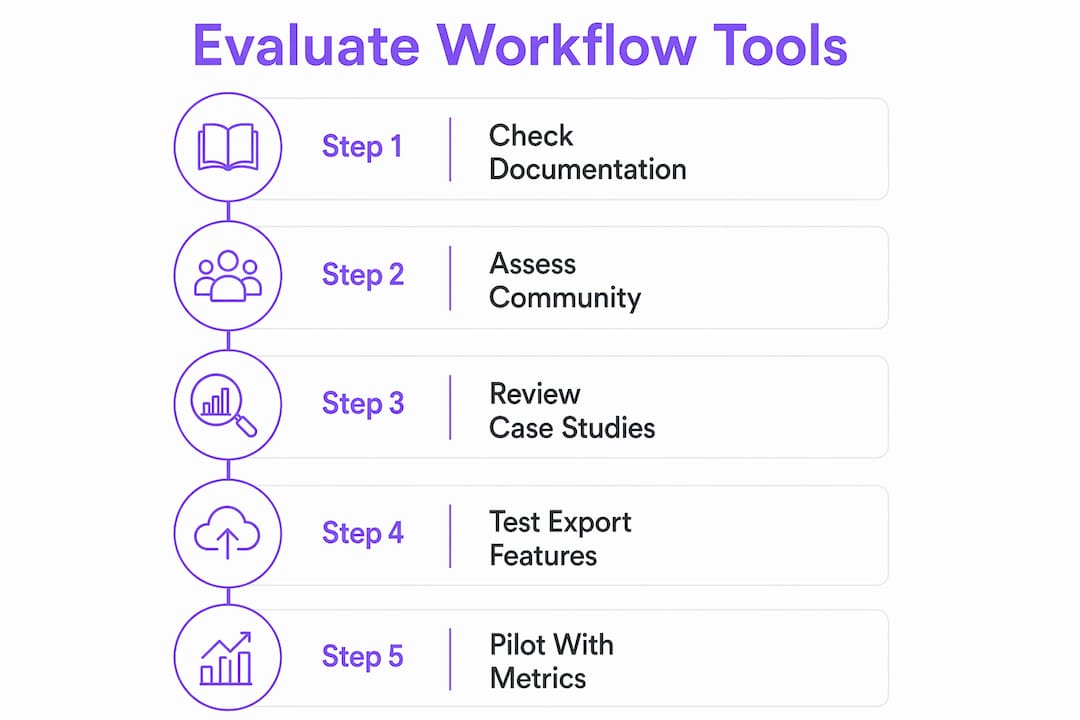
Trust signals worth noting: active public documentation, a GitHub community with recent commits, published case studies with real metrics, and a no-credit-card free trial. Portability via JSON/YAML export is a non-negotiable trust signal for any ops team that plans to scale or migrate.
Pro Tip: During a demo or pilot conversation, ask specifically: “Can I export this workflow as JSON or YAML and re-import it elsewhere?” If the answer is no or vague, treat that as vendor lock-in.
Which free workflow tool archetype fits your team?
Four distinct archetypes cover most of what’s available. Match your operational context to the right class before you spend time on a pilot.
| Archetype | Best for | Key trade-off |
|---|---|---|
| Hosted webhook-first builder | Quick API-driven automations, external webhooks, no-signup starts | Future pricing unknown; lock-in risk if no export |
| Self-hosted open-source engine | Full control, portability, no runtime costs | Ops overhead; SSO/RBAC/audit logs are paid add-ons |
| AI-agent / local IDE builder | AI-heavy pipelines, developer task automation, offline models | Narrower integration surface; more technical setup |
| Visualization-first diagramming | Process design, team alignment, stakeholder mapping | Often does not execute steps directly |
When to pick which:
Hosted webhook-first builders (like the beta builder at Requex with 30+ nodes including AI Classify) work well when you need to move fast and don’t want to manage infrastructure. Self-hosted engines like Dagu give you YAML DAG definitions, Docker/SSH executors, and wrap-around automation of legacy scripts — ideal if your team has infrastructure capacity and needs data residency control.
AI-agent/local builders (such as FlowGraph Pro or Code Sherlock) support offline LLM execution and 50+ node types with no usage limits, but they’re built for technical users automating developer pipelines, not ops teams running client onboarding flows.

Visualization-first tools like Miro’s workflow design canvas are strong for mapping and aligning teams on a process before you build it. They don’t execute steps, though — so they’re a design input, not an execution layer.
For most operations teams: start with a hosted execution-first tool for your pilot. If data residency or long-term cost is a concern, plan a self-hosted migration path and verify JSON/YAML export before you commit.
Two-week pilot: what to test and how to measure it
A focused two-week pilot tells you whether a free tool is worth adopting. Here’s the sequence:
- Days 1–2: Set up the tool, connect one integration (email or Slack), and build one real workflow (employee onboarding or a client implementation checklist).
- Days 3–4: Run the workflow end-to-end. Trigger it via webhook or manual start. Confirm each step fires and routes correctly.
- Days 5–6: Test the external collaborator flow. Invite someone outside your organization via magic link. Confirm they can complete their step without creating an account.
- Days 7–8: Test error handling. Deliberately fail a step and verify the tool retries or alerts correctly.
- Days 9–10: Export the workflow as JSON or YAML. Validate the export is complete and readable.
- Days 11–12: Run a security check. Confirm data is encrypted in transit, review what audit logs are available, and check whether SSO is available if needed.
- Days 13–14: Measure results against your baseline.
Pilot metrics to track:
| Metric | Baseline (before pilot) | Pilot result | Target |
|---|---|---|---|
| Successful workflow runs | — | Track daily | high completion rate |
| Manual touchpoints removed | Count per workflow | Count after automation | Reduce by at least half |
| Average time per handoff | Measure in hours | Measure in hours | Cut significantly |
| Failed/errored runs | — | Track daily | Keep low, ideally under 5% |
| Follow-ups sent manually | Count per week | Count after automation | Minimize as much as possible |
The fastest measurable wins come from automating handoffs that currently require manual follow-ups. Measure follow-up reduction, not just run counts — that’s the metric that gets budget approval for a paid tier.
What happens after the free tier?
Most tools follow one of three pricing shapes once you outgrow free: per-run billing, per-seat billing, or feature-gated tiers where enterprise features (SSO, RBAC, audit logging, priority support) unlock at a higher tier. For operations teams, per-run billing is the most predictable to budget; per-seat billing can balloon fast if you’re running cross-functional workflows with many participants.
Before you commit to a paid tier, run this migration checklist:
- Export all workflows as JSON or YAML and confirm re-import works
- Document all API keys and webhook endpoints in use
- Verify data export and retention policies (how long does the vendor keep run history?)
- Confirm SSO and RBAC availability on the tier you’re moving to
- Check infrastructure requirements if you’re considering a self-hosted migration
Pro Tip: If your team runs more than 500 workflow executions per month or needs SSO for compliance, calculate per-run costs before the trial ends. A tool that’s free at 100 runs can become expensive fast at scale.
The cost drivers that matter most for ops teams: total monthly run volume, number of external collaborator links generated, whether SSO/RBAC is required for compliance, and whether you need audit logging for regulated processes. Reusable workflow templates reduce the per-workflow build cost significantly once you’re on a paid tier.
Key Takeaways
The fastest path from manual handoffs to automated execution is a two-week pilot with an execution-first tool that supports external collaborators, exports workflow logic, and measures follow-up reduction.
| Point | Details |
|---|---|
| Execution vs. tracking | Choose a tool that fires steps automatically, not one that only displays task status. |
| External collaborator flows | Magic links let outside parties complete steps without accounts, cutting onboarding friction. |
| Portability check | Export a real workflow as JSON or YAML before committing to any vendor. |
| Pilot metric that matters | Track how many manual follow-ups are eliminated, not just workflow run counts, to justify a paid upgrade. |
| EasyFlow free tier | EasyFlow executes workflows, supports magic-link collaborators, and includes AI steps — start the pilot at teameasyflow.com. |
The gap between “workflow tool” and “workflow execution”
Most ops teams I talk to have already tried a task tracker and called it a workflow tool. The frustration is predictable: you build a beautiful board, assign owners, set due dates — and then spend the next two weeks sending the same Slack message asking if step 3 is done.
The distinction that actually matters isn’t free vs. paid. It’s whether the tool does something when a step is ready, or whether it waits for a human to notice. Execution-first tools fire the next step, send the reminder, route the task, and log the result. That’s the behavior that removes follow-ups from your calendar.
The magic-link pattern for external collaborators is underappreciated. Client onboarding workflows fail not because the internal team is slow, but because the external party has to create yet another account before they can submit a document or approve a step. Removing that friction — letting a client click a link and complete their part — is often the single change that makes a workflow actually finish on time.
For operations teams evaluating free options, the two-week pilot framework in this article is the right filter. If a tool can’t demonstrate measurable follow-up reduction in two weeks on a real workflow, it won’t perform better at scale.
EasyFlow runs your workflows from day one
Cut manual follow-ups on your next onboarding or client implementation without asking anyone to create an account. EasyFlow executes workflows end-to-end: it routes tasks, sends automatic reminders, and lets external collaborators complete steps via magic links. AI-powered steps and pre-built templates mean you can generate a live workflow in minutes, not days.

The free tier includes full workflow execution, magic-link collaborator access, and AI-assisted workflow generation. No credit card required to start. Operations teams running approval flows, new-hire onboarding, and client implementations have used EasyFlow to cut manual handoff time and reduce follow-up messages to near zero. Start your pilot at teameasyflow.com/start and run your first end-to-end workflow today.
Useful sources for deeper evaluation
- EasyFlow — start your free pilot: Primary conversion page; use this to begin a free trial with magic-link collaborator flows and AI-powered steps.
- Dagu self-hosted workflow engine: Documentation for a local-first, open-source engine with YAML DAG definitions, Docker/SSH executors, and free self-hosted use. Useful if data residency or infrastructure control is a requirement.
- Requex webhook-native builder: Hosted builder with 30+ nodes including AI Classify and AI Text; unlimited test runs during beta with no signup required.
- FlowGraph Pro visual AI pipeline studio: Offline-capable, no-account visual pipeline tool supporting local LLMs (Ollama) and BYO API keys. Useful for technical teams with AI-heavy pipelines.
- Code Sherlock visual automation IDE: Free open-source visual AI agent constructor with 50+ node types and offline model execution; best for developer-focused automation.
- Miro workflow design tool: AI-assisted infinite-canvas diagramming for process mapping and team alignment; visualization only, not execution.
- Contract workflow management guide — Formable: Partner resource covering contract-specific workflow patterns for legal teams; useful if your ops workflows include contract review or approval steps.
- Workflow automation’s role in team alignment — EasyFlow Blog: Explains how execution-first automation reduces follow-ups and improves stakeholder alignment; directly relevant to pilot metrics.
- Automated approval workflow examples — EasyFlow Blog: Concrete templates for approval and onboarding flows you can use during a two-week pilot.
FAQ
What’s the difference between a free workflow tool and a task tracker?
A workflow tool executes steps automatically — routing tasks, sending reminders, and logging results without human intervention. A task tracker displays status and waits for someone to act.
Do free workflow tools support external collaborators?
Some do. Tools that support magic links or anonymous webhook participation let external collaborators complete steps without creating an account, which is critical for client-facing workflows. EasyFlow includes this on its free tier.
Is JSON or YAML export available on free plans?
It depends on the tool. Self-hosted open-source engines like Dagu use YAML definitions natively. For hosted tools, check explicitly — no export format means you cannot migrate your workflow logic if you switch vendors.
What should I measure during a two-week free trial?
Track successful run completion rate, manual touchpoints removed per workflow, average handoff time, and the number of follow-up messages sent manually. Follow-up reduction is the metric most likely to justify a paid upgrade.
When should an operations team move from a free to a paid workflow tier?
When your monthly run volume consistently exceeds the free cap, when you need SSO or RBAC for compliance, or when your pilot shows measurable time savings that justify the subscription cost.