
Best Aonflow.com Alternatives for Operations Teams

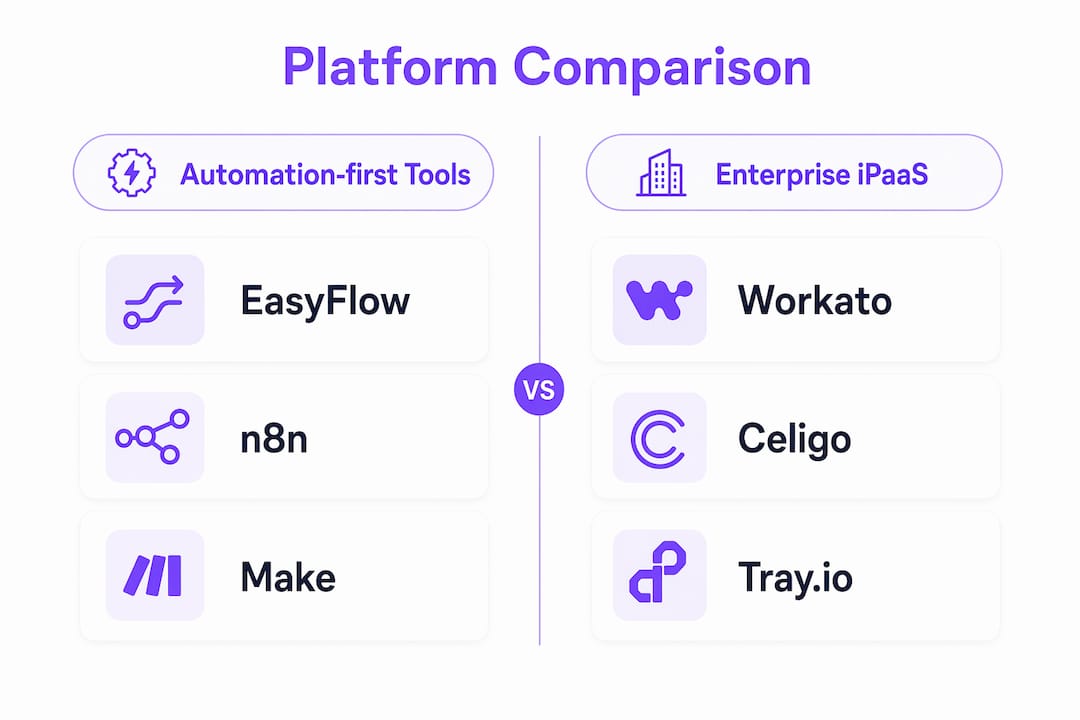
The best replacements for aonflow.com are automation-first platforms that execute processes without forcing external participants to create accounts. For most operations teams, the shortlist comes down to three options: EasyFlow, n8n, and Make (formerly Integromat). If you need one place to start, EasyFlow is the try-first pick for teams that need accountless external participation out of the box.
The single most important criterion for this audience isn’t connector count; it’s whether the platform lets external collaborators complete tasks via magic links, anonymous webhooks, or public submission endpoints, without requiring a licensed seat. That one feature separates tools that reduce friction from tools that just move it.
TL;DR trade-offs:
- EasyFlow: Process execution with accountless magic links; lowest onboarding friction; best for ops-heavy teams with external stakeholders
- n8n: Fair-code, self-hostable, highly portable; requires engineering time; strong for teams that want full control
- Make: Visual, low-code, generous free tier; cloud-only; better for moderate complexity than heavy enterprise flows
- Zapier: Widest connector library; limited multi-step logic depth; seat costs add up fast with external users
- Workato: Enterprise-grade iPaaS; powerful but demands dedicated engineering; overkill for most mid-market ops teams
- Celigo: NetSuite-native strength; excellent for finance ops; narrower outside that ecosystem
- Tray.io: Developer-friendly, handles complex logic well; steeper learning curve; no meaningful free tier
Table of Contents
- How do these aonflow.com alternatives compare side by side?
- What each alternative actually does for accountless workflows
- How do you choose the right alternative for your team?
- Which alternative fits your specific operations use case?
- Why EasyFlow stands out for accountless participant workflows
- What should you trial first, and how?
- Key Takeaways
- The metric most teams forget to measure
- EasyFlow is worth piloting before you commit to anything else
- Useful sources and further reading
- FAQ
How do these aonflow.com alternatives compare side by side?
Comparison dimensions drawn from recurring buyer criteria across platform evaluation pages.
| Dimension | EasyFlow | n8n | Make | Zapier | Workato | Celigo | Tray.io |
|---|---|---|---|---|---|---|---|
| Best for | Ops teams, external workflows | Dev-led teams, portability | SMB to mid-market | SMB, broad app coverage | Enterprise iPaaS | Finance/NetSuite ops | Enterprise, complex logic |
| Connector ecosystem | Core ops connectors | Core ops connectors | 1,000+ apps | 6,000+ apps | 1,000+ recipes | — | — |
| Complex multi-step logic | Yes | Yes | Moderate | Limited | Yes | Yes | Yes |
| Accountless participants | Yes (magic links) | Webhook-based | Public forms | Limited | Limited | Limited | Limited |
| Deployment | Cloud | Cloud + self-hosted | Cloud | Cloud | Cloud | Cloud | Cloud |
| Free tier / trial | Free tier | Free (self-hosted) | Free tier | Free tier | Trial only | Trial only | No free tier |
| Setup ease | Low-code | Developer-heavy | Low-code | No-code | Developer-heavy | Moderate | Developer-heavy |
| Portability | Exportable | Open fair-code | Exportable | Proprietary | Proprietary | Proprietary | Proprietary |
| Security & compliance | SOC 2 | SOC 2 | SOC 2 | SOC 2 | SOC 2, ISO 27001 | SOC 2, ISO 27001 | SOC 2, ISO 27001 |
Key implications for operations teams:
- Workato and Tray.io carry SOC 2 and ISO 27001, making them the safer default for regulated industries, but both require significant engineering time for maintenance
- n8n’s fair-code license means you own your workflow logic and can migrate without rebuilding from scratch
- Zapier’s 6,000+ connectors look impressive until you realize most ops teams use fewer than 20 regularly; verify your specific connectors (Salesforce, QuickBooks, Slack) before committing
- Only EasyFlow and n8n offer meaningful accountless participation by default; the others require workarounds or additional seat licenses
What each alternative actually does for accountless workflows
EasyFlow
EasyFlow executes processes rather than tracking tasks, which is the core distinction from tools like Asana or Trello. External collaborators complete steps via magic links, no account required. That matters most for contractor intake, client onboarding, and approval chains where participants sit outside your organization. Pricing includes a free tier; cloud-only deployment.
Watch for: Connector library is narrower than Zapier or Make. Verify your critical integrations before migrating.
n8n
n8n runs on a fair-code license, meaning you can self-host and export your entire workflow logic. Real-time webhook support is strong. The trade-off is setup: you need engineering resources to deploy and maintain a self-hosted instance. For teams that want zero vendor lock-in, it’s the most portable option on this list.
Watch for: Anonymous webhook support exists but requires configuration. Not a plug-and-play solution for non-technical ops managers.
Make
Make’s visual canvas makes multi-step logic genuinely approachable for non-developers. The free tier is generous, and the 1,000+ app library covers most common ops stacks. Public form endpoints exist but aren’t as frictionless as magic links for external participants.

Watch for: Cloud-only. Complex transformations at high volume can hit scenario execution limits.
Zapier
The widest connector library on this list. If your stack is unusual, Zapier probably covers it. The problem for external-participant workflows is seat-based pricing: adding external collaborators gets expensive fast, and true accountless flows require workarounds.
Workato, Celigo, and Tray.io
These three sit in enterprise iPaaS territory. Workato handles complex orchestration well; Celigo is the go-to for NetSuite-heavy finance teams; Tray.io gives developers fine-grained control over logic. All three demand dedicated engineering time and none offer meaningful accountless participation without custom development. For cloud deployment and workspace integration scenarios, they integrate well with major cloud providers, but the operational overhead is real.
Pro Tip: Before migrating, map every existing trigger as either API-based or webhook-based. Platforms optimize differently for real-time event-driven flows versus scheduled batch processing, and mis-mapping triggers is the most common cause of post-migration delays that get blamed on the new platform.
How do you choose the right alternative for your team?
Choose by trigger architecture and participant model first, connector breadth second, and enterprise features last.
Evaluation checklist (in order):
- Does the platform support magic links, anonymous webhooks, or public submission endpoints without requiring external seats?
- How does the platform handle your primary trigger type: real-time webhooks, scheduled batch, or API polling?
- Does it connect to the specific tools your team uses daily (Salesforce, QuickBooks, Slack, Google Workspace)?
- What is the total cost including external participant seats, not just internal user licenses?
- Is the workflow format exportable or open-source, or are you locked into a proprietary schema?
- Does the vendor hold SOC 2 or ISO 27001 certification for your data-sensitive flows?
- What does the implementation timeline look like, and do you have the engineering resources it requires?
Questions to ask vendors directly:
- How many licensed seats are required for external collaborators who only complete one step?
- How are webhooks rate-limited under peak load?
- Can we export our workflow definitions if we migrate away?
Red flags that should stop a shortlisting:
- Mandatory external seats for every participant, regardless of task complexity
- Closed proprietary workflow formats with no export path
- No SOC 2 or ISO 27001 for flows that touch customer or financial data
- No free tier or trial period before a multi-year contract
Operations teams evaluate platforms primarily on low-code capabilities, connector ecosystem size, and deployment flexibility. Teams that over-prioritize raw connector counts frequently miss the more important signal: how the platform handles runtime behavior and multi-step logic complexity.
Which alternative fits your specific operations use case?
| Use Case | Best Platform Category | Accountless Participation |
|---|---|---|
| External contractor onboarding | Automation-first (EasyFlow) | Yes, via magic links |
| Client project intake | Automation-first (EasyFlow, Make) | Yes (magic links / public forms) |
| Recurring vendor invoice automation | Enterprise iPaaS (Celigo, Workato) | Limited |
| Approvals and escalations | Automation-first or fair-code (EasyFlow, n8n) | Yes |
| Partner data ingestion | Enterprise iPaaS or fair-code (n8n, Workato) | Webhook-based |
| Mobile-first approval flows | Automation-first (EasyFlow, Make) | Yes |
Enterprise iPaaS is overkill when your flows involve fewer than a few hundred daily transactions and your team lacks dedicated integration engineers. It becomes necessary when you’re handling regulated data at scale, need complex transformation logic, or require on-prem deployment for compliance reasons. For partner onboarding automation specifically, accountless participation support is the deciding factor, not connector count.
Why EasyFlow stands out for accountless participant workflows
EasyFlow is built to run processes, not just log them. External collaborators receive magic links and complete their assigned steps without creating an account, which is the core differentiator for ops teams managing contractor intake, client implementations, or multi-party approvals.
Concrete use cases where this reduces friction:
- New-hire onboarding: HR sends a magic link; the new hire completes document submission and acknowledgment steps without IT provisioning an account first
- Client intake: A client receives a link, fills out a scoped intake form, and the workflow triggers the next internal step automatically
- Contractor tasks: Vendors complete deliverable sign-offs or compliance acknowledgments without joining your platform
The expected operational wins are fewer follow-up emails, faster cycle times on multi-party processes, and lower IT overhead for external account management. EasyFlow’s approach to reducing contractor onboarding friction is documented in detail on the EasyFlow blog for teams that want to validate the approach before committing.
What should you trial first, and how?
For most operations teams seeking accountless participants and low overhead, start with EasyFlow. If your team has engineering resources and portability is the priority, add n8n to the pilot.
A focused pilot plan over a couple of weeks:
- Days 1–2: Scope one process (contractor intake or client onboarding). Document every step, every participant, and every trigger type.
- Days 3–5: Build the flow in EasyFlow using magic links for external steps. Test with one real external participant.
- Days 6–7: Measure time-to-complete versus your current manual process.
- Days 8–30: Run the flow with a real cohort. Track three metrics: time-to-complete, participant completion rate, and number of follow-up messages sent.
- End of pilot: Compare against baseline. If completion rate exceeds your current rate and follow-ups drop, expand to a second process.
Start your pilot at EasyFlow’s free trial page.
Key Takeaways
For operations teams replacing aonflow.com, accountless participant support is the single most important selection criterion, and EasyFlow is the fastest path to testing that capability.
| Point | Details |
|---|---|
| Prioritize participant model | Choose a platform that supports magic links or anonymous webhooks before evaluating connector count. |
| Trigger architecture matters | Map API vs. webhook triggers before migrating to avoid post-launch delays that look like platform failure. |
| Scale vs. speed trade-off | Automation-first tools deploy faster; enterprise iPaaS handles higher volume but requires dedicated engineering. |
| Portability check | Prefer exportable or fair-code formats (n8n, EasyFlow) to avoid rebuilding flows if you switch platforms. |
| EasyFlow as starting point | EasyFlow’s free tier and magic-link flows make it the lowest-friction pilot for external-participant workflows. |
The metric most teams forget to measure
Operations teams that focus on participant completion rates, rather than connector counts, consistently reach ROI faster. That’s not a soft claim. When a contractor fails to complete an onboarding step because they hit a login wall, the delay doesn’t show up in your integration dashboard. It shows up as a follow-up email, a missed deadline, or a frustrated vendor. The platforms on this list all have impressive feature pages. The real test is whether an external participant, with no account and no training, can complete their step in under three minutes.
The other mistake worth naming: teams frequently underestimate seat costs. A platform priced at $X per internal user looks affordable until you realize every external approver or contractor counts as a seat. Run the math on your actual external participant volume before signing anything.
Pilot one process. Measure completion rate and follow-up volume. The right platform will be obvious within two weeks.
EasyFlow is worth piloting before you commit to anything else
If the article’s comparison convinced you that accountless participation is the deciding factor, EasyFlow is the most direct way to test that assumption without a long implementation cycle. You get process execution (not just task tracking), magic-link flows for external participants, and a free tier that lets you run a real pilot on a real process before spending anything.

The pilot checklist from the verdict section applies here: pick one process, invite one external participant via magic link, and measure completion rate against your current baseline. That’s a one-week test, not a six-month implementation.
Start your free pilot and see whether accountless flows cut your follow-up volume. If they do, you have your answer.
Useful sources and further reading
Research sources used in this article:
- Aonflow Alternatives & Competitors — SaaSHub’s market overview; best for vendor selection and trust signal comparisons
- iPaaS.com vs. Aonflow comparison — Useful for connector library and deployment mode evaluation
- MuleSoft Anypoint Platform vs. Aonflow — Reference for enterprise iPaaS comparison dimensions
- Aonflow company profile — Tracxn; useful for portability and vendor lock-in context
- Top 15 Aonflow Alternatives — eBool; broader alternative listing for teams exploring beyond the shortlist
EasyFlow further reading:
- Reduce contractor onboarding friction — Practical guide to accountless contractor flows
- Workflow automation’s role in team alignment — Success metrics and adoption guidance for pilot design
- EasyFlow blog — Full library of workflow automation articles and platform comparisons
FAQ
What makes a platform a true aonflow.com alternative?
A true alternative executes multi-step processes and supports external participants without requiring them to create accounts. Platforms that only track tasks or require seat licenses for every external collaborator don’t solve the same problem.
Does n8n support accountless external participants?
n8n supports anonymous webhooks and public endpoints, but configuring them requires engineering work. It’s not a no-code solution for external participant flows out of the box.
Which alternative has the best free tier for operations teams?
EasyFlow and Make both offer free tiers suited to operations teams. EasyFlow’s free tier includes magic-link flows; Make’s free tier covers a limited number of monthly scenario executions.
When does enterprise iPaaS become necessary over automation-first tools?
Enterprise iPaaS (Workato, Celigo, Tray.io) becomes necessary when you’re processing high transaction volumes, handling regulated data that requires ISO 27001 compliance, or need complex data transformation logic that lighter tools can’t handle.
How long does a realistic pilot take before choosing a platform?
A focused pilot on one process takes about a week. Measure time-to-complete, participant completion rate, and follow-up volume against your current baseline to get a clear answer.