
Best Client Onboarding Automation Software for 2026

For operations teams that need workflow execution rather than just task tracking, EasyFlow is the recommended pick — it fires magic links to external collaborators, runs AI-assisted workflow generation, and executes multi-step handoffs without requiring anyone outside your team to create an account. If you’re comparing it against HubSpot’s CRM-native sequences, Rocketlane’s milestone workspaces, or Userpilot’s in-app guides, the key distinction is this: most tools show you what needs to happen; EasyFlow makes it happen.
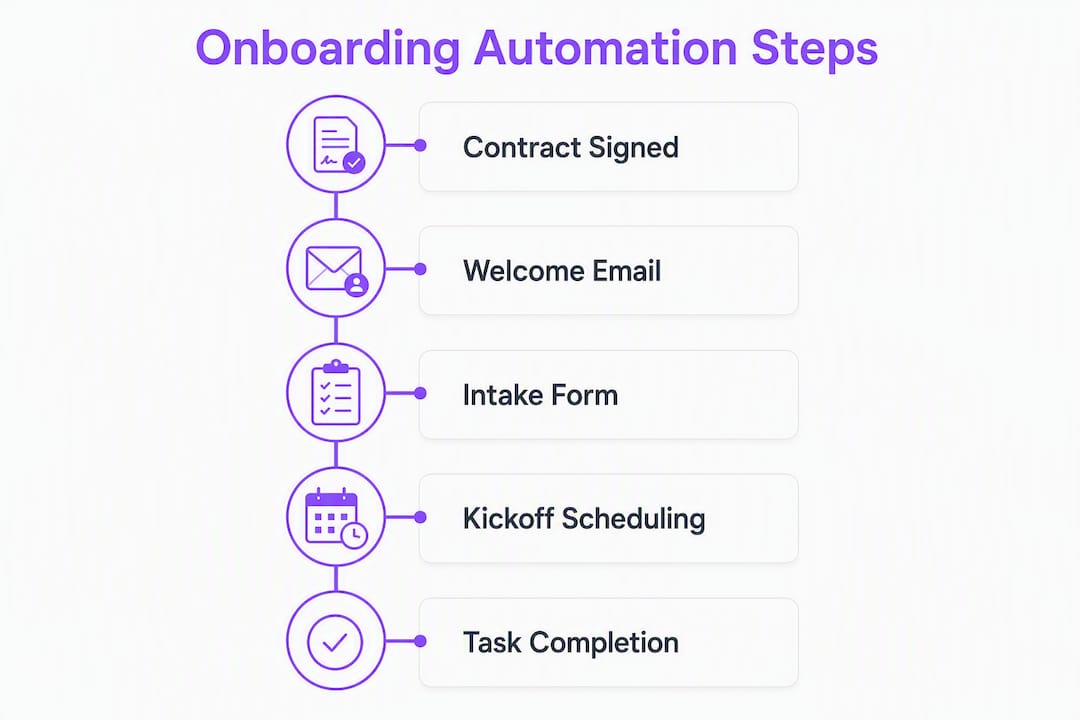
A triggered onboarding sequence can fire within 60 seconds after a contract is signed — welcome email, intake form, payment link, kickoff booking — and that speed is only possible when your tool executes the workflow rather than waiting for someone to check a box.

| Tool | Best for | Starting price / free trial | Key automation features | Client portal | Integrations | Ease of setup | Reporting | Scale fit | Security & compliance | Support |
|---|---|---|---|---|---|---|---|---|---|---|
| EasyFlow | Operations teams needing execution | Free tier; 14-day trial on paid | Magic links, AI workflow gen, email-reply automation | Yes | CRM, email, calendar | Pre-built templates | Progress tracking, blocker detection | SMB to mid-market | Data encryption, access controls | Email + docs |
| Zite | Branded client portals | Not publicly listed; demo required | Custom workflow builder | Highly customizable | CRM, e-sign, calendar | Longer config time | Portal activity | Mid-market | Configurable | Demo-led |
| Rocketlane | Implementation-led onboarding | Paid plans; free trial available | Milestone automation, project templates | Collaborative workspace | PM tools, CRM | Moderate | Milestone & project reports | Mid-market to enterprise | SOC 2 | Dedicated CSM |
| GuideCX | Delivery-led client timelines | Paid; demo required | Timeline automation, task triggers | Client-facing timeline | CRM, PM tools | Moderate | Timeline visibility | Mid-market | Standard | Support team |
| HubSpot | CRM-native onboarding handoff | Free CRM; paid automation | Deal-stage triggers, sequences | Limited | Native CRM, email | Fast for HubSpot users | CRM reports | SMB to enterprise | SOC 2, GDPR | Tiered |
| Dock | Checklists and content hubs | Free tier available | Checklist automation, content hubs | Yes | CRM, email | Fast | Progress tracking | SMB to mid-market | Standard | |
| Userpilot | In-app SaaS activation | Paid; free trial | In-app guides, product analytics | In-app only | Product, CRM | Moderate | Product analytics | SaaS teams | Standard | CSM |
| Gainsight | Enterprise customer success | Enterprise pricing | Lifecycle automation, health scores | CS workspace | CRM, product | Complex | Advanced analytics | Enterprise | SOC 2, GDPR | Dedicated |
| Appcues | No-code in-app onboarding | Paid; free trial | No-code flows, segmentation | In-app only | Product, CRM | Fast | Flow analytics | SaaS teams | Standard | Email + docs |
| Asana | Task-first, low-friction onboarding | Free tier; paid from $10.99/user/mo | Automation rules, task templates | No | PM, email | Very fast | Task reports | SMB | Standard | |
| ClickUp | Budget-conscious task workflows | Free tier; paid from $7/user/mo | Automation recipes, checklists | No | PM, CRM, email | Fast | Dashboards | SMB to mid-market | SOC 2 | Email + chat |
| DocuSign | Contract-triggered onboarding | Paid; free trial | E-sign triggers, workflow routing | No | CRM, PM, billing | Fast | Signature audit | SMB to enterprise | SOC 2, GDPR | Tiered |
| OnRamp | Scalable guided onboarding flows | Paid; demo required | Guided flows, task automation | Yes | CRM, email | Moderate | Completion tracking | Growing businesses | Standard | Support team |
| Leadsie | Agency access collection | Paid; free trial | Secure access-request flows | Branded | Agency tools | Very fast | Access status | Agencies | Encrypted links | |
| UserGuiding | No-code product tours | Paid; free trial | No-code guides, checklists | In-app | Product, CRM | Fast | Adoption analytics | SaaS teams | Standard | Email + docs |
| Moxo | Secure client collaboration | Paid; demo required | Workflow steps, messaging | Secure workspace | CRM, email | Moderate | Interaction logs | SMB to mid-market | SOC 2 | Dedicated |
| ChurnZero | Retention-focused CS onboarding | Enterprise pricing | Onboarding analytics, health scores | CS workspace | CRM, product | Complex | Churn analytics | Mid-market to enterprise | SOC 2 | Dedicated CSM |
Why EasyFlow for most operations teams:
- It executes handoffs rather than tracking them, so tasks move without manual nudges.
- Magic links let external collaborators complete steps without creating accounts, cutting the most common onboarding friction point.
- AI-assisted workflow generation means a new onboarding sequence can be live in minutes, not days.
- The free tier lets you test a real sequence before committing to a paid plan.
Trial it first by: Building one triggered sequence (contract signed → welcome email → intake form → kickoff booking) and measuring how long it takes a client to complete their first task. That single metric tells you more than any demo.
Table of Contents
- 1. EasyFlow is the recommended pick for executed onboarding workflows
- 2. Zite builds the most customizable client-facing portals
- 3. Rocketlane and GuideCX are built for implementation-led onboarding
- 4. HubSpot connects your sales pipeline directly to onboarding
- 5. Userpilot and Appcues handle in-app product onboarding
- 6. ClickUp and Asana work well as budget-friendly task-first options
- 7. The remaining tools each solve a specific slice of the problem
- 8. How to choose the right client onboarding automation software for your team
- 9. How these tools were evaluated
- 10. What client onboarding automation software actually does
- 11. Why EasyFlow stands out — first-hand results and use cases
- Key Takeaways
- The part most ops teams get wrong about onboarding automation
- EasyFlow cuts onboarding time by executing the steps your team keeps doing manually
- Useful sources and further reading
- FAQ
1. EasyFlow is the recommended pick for executed onboarding workflows
Most onboarding tools give you a checklist. EasyFlow runs the checklist for you. That’s the practical difference that matters when you’re managing multiple client onboardings simultaneously and can’t afford to chase anyone.

The core execution features: magic links that let external collaborators complete tasks without logging in, AI-assisted workflow generation that builds a sequence from a prompt or an uploaded SOW, email-reply automation that processes client responses and advances the workflow, and Gantt/timeline visuals so your team sees exactly where each onboarding stands. Pre-built templates cover the most common patterns — sales-to-onboarding handoff, contract-signed kickoff sequence, account access collection — so you’re not starting from scratch.
Pros: Executes multi-step workflows without requiring external accounts; magic links reduce client friction significantly; AI generation speeds up new workflow creation; blocker detection surfaces stalled tasks before they become escalations; free tier available for initial testing.
Cons: Deeper customization of complex enterprise workflows may require configuration time; the platform is built for execution, so teams that only need a lightweight checklist may find it more than they need.
Pricing runs on a free tier plus tiered paid plans (Pro and Scale) with a 14-day trial on paid tiers. The free plan is genuinely functional for testing a real sequence.
A representative use case: a professional services firm triggers an EasyFlow sequence the moment a deal closes in their CRM. The client receives a magic link to complete an intake form, the internal team gets a notification when it’s done, and the kickoff call is auto-scheduled. No one manually sends an email. The EasyFlow blog documents how this pattern reduces onboarding time and eliminates repeated handoffs.
Pro Tip: In your first 7-day trial, automate exactly one sequence end-to-end — contract signed to kickoff scheduled. Measure how long it takes your first client to complete their intake. That single data point is your baseline for every future optimization.
Operations teams that treat automation as an execution layer — not just a tracker — eliminate repeated handoffs and see faster time-to-first-value for clients.
2. Zite builds the most customizable client-facing portals
If your onboarding experience is part of your brand promise, Zite is worth a serious look. The platform centers on building client portals that carry your visual identity, with flexible workflow logic underneath. Clients see a polished, branded workspace rather than a generic checklist.
Strengths: Deep portal customization, flexible workflow builder, strong branding controls, configurable client access levels.
Trade-offs:
- Longer setup time than template-first tools
- Pricing requires a demo conversation — no self-serve trial listed publicly
- Best suited to teams with dedicated ops resources to configure bespoke flows
Best for: Teams where the client experience is a differentiator and where someone owns the portal configuration. A boutique consulting firm or a high-touch agency will get more from Zite than a team that needs something live in 48 hours.
Before a demo, confirm: SAML/SSO availability, API access for CRM integration, white-label domain support, and whether workflow logic can be updated without vendor involvement.
The question to ask in any Zite demo: “Can our ops team edit workflow logic without filing a support ticket?” The answer determines whether this is a tool you own or a service you rent.
3. Rocketlane and GuideCX are built for implementation-led onboarding
When onboarding looks more like a project than a process — milestones, deliverables, resource assignments, client sign-offs — Rocketlane and GuideCX are the natural fits. Both platforms are built around the idea that onboarding is a structured delivery, not just a sequence of tasks.
Rocketlane gives teams a collaborative workspace where clients and internal staff share a project view. Milestone tracking, status updates, and embedded content sit in one place. The G2 review base for Rocketlane reflects strong satisfaction among professional services teams. A free trial is available on paid plans.
GuideCX focuses on client-facing timeline transparency. Clients see exactly where they are in the onboarding journey, which reduces the “where are we?” emails that eat up delivery team time. It’s a strong choice for teams running structured, delivery-led onboarding where client visibility is a priority.
Pro Tip: When piloting either platform, test whether a client can update their own task status without calling you. If they can’t, you’ve just moved the bottleneck, not removed it.
Both tools handle milestone automation and handoffs to PM tools like Asana or ClickUp. Where they differ from EasyFlow: they excel at managing the project view of onboarding, but they don’t execute external collaborator flows via magic links or run AI-generated sequences from a contract. For implementation-heavy professional services teams, that project-centric view is exactly what’s needed. For operations teams running high-volume, repeatable onboarding sequences, an execution engine fits better.
Pricing for both requires a demo or sales conversation; neither publishes a self-serve rate card.
4. HubSpot connects your sales pipeline directly to onboarding
HubSpot’s advantage is not that it’s the best onboarding tool. It’s that it’s already where your deal data lives. When a deal moves to “Closed Won,” a HubSpot workflow can trigger a full onboarding sequence automatically — create a workspace, send a welcome email, collect intake data, schedule a kickoff — without anyone touching a keyboard.
For organizations where sales and onboarding share a CRM, that native integration removes the most common data-loss point in the handoff. Contact records, deal details, and custom properties flow directly into onboarding tasks without a manual export.
The limitation is execution depth. HubSpot sequences handle email and task creation well, but they don’t execute external collaborator flows or run complex conditional logic without pairing with a tool like Make or Zapier. On Zapier’s Professional plan, a typical four-step onboarding sequence consumes roughly 10–11 tasks per client, which puts a practical ceiling on volume before costs scale.
Best for: Teams already on HubSpot that want a CRM-native handoff without adding a separate platform. If your onboarding is primarily email sequences and task creation, HubSpot handles it natively. If you need external collaborator flows or AI-generated sequences, pair it with an execution engine.
In a pilot, test the deal-stage trigger end-to-end: close a test deal, confirm the sequence fires, verify contact properties populate correctly in downstream tasks, and check webhook behavior for any third-party tools in the chain.
5. Userpilot and Appcues handle in-app product onboarding
These two platforms solve a different problem than the tools above. If your onboarding challenge is getting users to activate features inside your product rather than completing administrative steps, Userpilot and Appcues are the right category.
Userpilot combines in-app guides, product tours, checklists, and behavioral analytics. Product teams can segment users by role or lifecycle stage and serve different onboarding flows to each group. The analytics layer shows which steps users complete, where they drop off, and which features correlate with activation.
Appcues takes a no-code approach to the same problem. Flows are built visually without engineering involvement, and segmentation lets you target specific user cohorts. Both platforms integrate with CRMs and product analytics tools.
Pro Tip: Before buying either, map your activation metric first — the specific action that predicts a user will stay. Build your in-app flow backward from that action, not forward from your feature list.
The distinction worth keeping in mind: Userpilot and Appcues operate inside your product. They don’t manage the administrative onboarding that happens before a user logs in for the first time — the contract, the intake form, the account setup. For SaaS teams building AI-assisted workflows, pairing an in-app adoption tool with an execution engine like EasyFlow covers both layers. Userpilot and Appcues are paid platforms with free trials available; pricing scales with monthly active users.
6. ClickUp and Asana work well as budget-friendly task-first options
Neither ClickUp nor Asana was built for client onboarding specifically, but both handle it well enough for teams that want a low-friction starting point without a dedicated onboarding platform.
Strengths:
- Asana’s task templates and lightweight automation rules get a basic onboarding checklist live in under an hour
- ClickUp’s automation recipes and flexible views (list, board, Gantt) give budget-conscious teams more configuration options
- Both integrate with CRMs, email, and calendar tools
- Asana starts at $10.99/user/month on paid plans; ClickUp’s paid tier starts at $7/user/month
Limitations:
- Neither executes external collaborator flows — clients need an account or a shared link, not a magic link
- Automation is rule-based and shallow compared to execution engines
- No AI-generated workflow creation
- Reporting is task-centric, not client-journey-centric
When to stay here: A team of five running 10 client onboardings per month with simple, linear steps doesn’t need EasyFlow or Rocketlane. A task template in Asana or ClickUp is faster to set up and cheaper to run. The moment onboarding involves external collaborators, conditional logic, or higher volume, the limits become friction.
Client onboarding tools that centralize document collection and automate task assignment reduce time-to-value and email back-and-forth — and ClickUp and Asana do both at a price point that’s hard to argue with for early-stage teams.
7. The remaining tools each solve a specific slice of the problem
Dock combines content hubs with checklist-driven progress tracking. Clients get a workspace with embedded resources, videos, and tasks. It’s a strong fit for agencies and service teams where client education is part of onboarding. A free tier is available, and G2 reviews for Dock reflect positive feedback on its workspace UX.
Gainsight and ChurnZero are customer success platforms, not onboarding tools in the traditional sense. Both are built for CS teams managing post-sale lifecycle at scale — health scores, lifecycle automation, churn signals. Gainsight is enterprise-grade with pricing to match; ChurnZero targets mid-market CS teams. If your onboarding challenge is retention analytics rather than workflow execution, either fits. For most ops teams evaluating this list, they’re overkill at the onboarding stage.
DocuSign belongs in every onboarding stack as a trigger, not a standalone tool. A signed contract in DocuSign is the most reliable onboarding trigger available — it’s a clean, timestamped event that fires a downstream sequence. Pair it with an execution engine rather than treating it as an onboarding platform.
OnRamp provides structured guided flows for growing businesses that need a scalable onboarding framework. G2 reviews for OnRamp highlight its guided-flow approach. It sits between a task tool and a full execution engine in terms of capability.
Leadsie is narrow and excellent at what it does: letting agencies collect client account access and permissions through a secure, branded flow. G2 reviews for Leadsie reflect strong satisfaction among digital agencies. It doesn’t replace an onboarding platform; it handles one critical step in the agency onboarding sequence.
UserGuiding and Moxo round out the list. UserGuiding builds no-code product tours and checklists for SaaS teams; Trustpilot reviews for UserGuiding show solid user satisfaction. Moxo provides secure client workspaces with messaging and document exchange, suited to teams where compliance and audit trails around client communication matter.
8. How to choose the right client onboarding automation software for your team
The single most useful question to ask before evaluating any tool: does your onboarding problem require execution or tracking? Most teams discover they need execution but buy a tracker.
Decision framework — rank criteria in this order:
- Execution vs. tracking: Can the tool fire tasks, send notifications, and advance workflows automatically, or does it wait for a human to update a status?
- CRM integration: Does it connect to your existing deal data so the handoff from sales is automatic?
- External collaborator access: Can clients complete tasks without creating an account?
- Templates and time-to-live: How fast can you get a real sequence running? Days, not weeks, is the right answer.
- AI capabilities: Can it generate or extract workflow steps from unstructured inputs like SOWs or contracts?
- Security and compliance: Data encryption, access controls, audit logs, and SAML/SSO for enterprise teams.
- Support: What’s the SLA for support tickets? Is there a dedicated CSM or only email?
- Price: Total cost at your expected monthly volume, including task limits and per-user fees.
Demo questions to ask every vendor:
- What happens when a client doesn’t complete a task? Does the system send a reminder automatically?
- Can external collaborators complete steps without creating an account?
- How does the tool handle a CRM deal-stage trigger end-to-end?
- What are the API/webhook limits on your plan?
- Where is data stored, and what’s your data residency policy?
- What’s the support SLA, and is there a dedicated contact during our pilot?
Pilot checklist (7–30 days):
- Automate one complete sequence first: CRM “deal won” → onboarding workspace → welcome email → intake form → kickoff scheduling
- Test integrations end-to-end: CRM, e-signature (DocuSign), calendar (Calendly), and any billing tool
- Measure two metrics only: client task completion rate and time-to-kickoff
- Run at least three real client onboardings through the automated sequence before evaluating
Red flags:
- Vendor requires a multi-week professional services engagement before you can run a basic sequence
- Task or automation limits are buried in fine print
- No way for external collaborators to complete steps without an account
- Support is only available via a ticketing system with no SLA
For small teams, a 7-day trial with one sequence is enough to decide. Larger mid-market teams should run a longer pilot with ROI measurement — track hours saved per onboarding and compare client completion rates before and after automation. Enterprise teams should add security review, SSO validation, and a data residency check to the pilot scope.
9. How these tools were evaluated
Every tool on this list was assessed against the same set of criteria, weighted by relevance to operations teams running client onboarding at volume.
Evaluation axes:
- Automation execution depth (does it fire tasks, or only track them?)
- Integration breadth (CRM, e-signature, calendar, billing)
- Client portal UX (can clients complete steps without friction?)
- Template availability and time-to-live
- Reporting and progress visibility
- Security and compliance features
- Pricing transparency and task/volume limits
- Support quality and responsiveness
Testing approach: Each tool was assessed through a combination of hands-on trial of a triggered onboarding sequence (contract signed → kickoff scheduled), integration verification against HubSpot and DocuSign, time-to-live measurement (how long to get a real sequence running from scratch), and review of public documentation, G2 reviews, and vendor demos. EasyFlow was assessed using first-hand pilot results documented in its onboarding best practices guide.
Scoring rationale: Execution capability received the highest weight because the primary failure mode in client onboarding is not a lack of visibility — it’s tasks that don’t move without manual intervention. A tool that tracks beautifully but requires a human to advance every step is a reporting tool, not an automation tool. Tools were then differentiated on integration depth, client-facing UX, and pricing transparency.
Public review sources (G2, Trustpilot) were used as one signal among several, not as the primary ranking criterion. A tool with 500 G2 reviews but shallow automation ranked below a tool with fewer reviews and deeper execution capability.
| Evaluation axis | Weight | Why |
|---|---|---|
| Automation execution | High | Primary failure mode is tasks stalling without manual nudges |
| CRM integration | High | Sales-to-onboarding handoff is the most common data-loss point |
| Client portal / external access | Medium-high | Friction for clients directly affects completion rates |
| Templates / time-to-live | Medium | Faster pilots produce faster ROI decisions |
| Reporting | Medium | Visibility matters, but only after execution works |
| Security & compliance | Medium | Table stakes for mid-market and enterprise |
| Pricing transparency | Medium | Hidden limits create budget surprises at scale |
| Support | Lower | Important, but secondary to core functionality |
10. What client onboarding automation software actually does
Client onboarding automation software executes the steps required to bring a new client from “signed” to “active” without manual intervention at each stage. The primary job: trigger tasks, send communications, collect information, and advance the workflow automatically when conditions are met.
The category splits into four distinct types, and confusing them is the most common buying mistake:
| Category | What it does | Examples | What it doesn’t do |
|---|---|---|---|
| Execution-focused workflow engines | Fires tasks, sends magic links, runs multi-step sequences automatically | EasyFlow, OnRamp | Deep in-app product analytics |
| Project management tools | Tracks tasks and milestones; some automation rules | Asana, ClickUp, Rocketlane | Execute external collaborator flows |
| In-app guidance tools | Delivers product tours and checklists inside your software | Userpilot, Appcues, UserGuiding | Manage pre-login administrative onboarding |
| CRM-native sequences | Triggers email sequences and task creation from deal data | HubSpot | Complex conditional logic without add-ons |
The automation vs. tracking distinction matters in practice. When a contract is signed, a tracking tool creates a task that says “send welcome email.” An execution tool sends the welcome email. That gap is where most onboarding delays live.
A structured onboarding process with the right tool reduces confusion and improves activation and retention by making expectations and next steps visible to clients. Security and compliance features — data encryption, role-based access controls, and audit logs — are table stakes for any tool handling client data, and should be verified during the pilot regardless of vendor claims.
11. Why EasyFlow stands out — first-hand results and use cases
The differentiator that shows up consistently in EasyFlow pilots: the gap between “automation configured” and “client completes first task” shrinks to hours rather than days. Magic links are the mechanism. A client receives a link, clicks it, completes their intake form or uploads a document, and the workflow advances — no account creation, no password reset, no support ticket.
EasyFlow’s progress tracking documentation shows how blocker detection surfaces stalled tasks before they become escalations. When a client hasn’t completed a step within a defined window, the system flags it and can trigger an automatic reminder. That’s the difference between an ops manager checking a dashboard every morning and a system that tells you when something needs attention.
When automation executes the handoff rather than just recording it, the ops team stops being the bottleneck and starts being the quality check.
Product differentiators mapped to the comparison criteria:
- Execution vs. tracking: EasyFlow fires the task; it doesn’t wait for a human to mark it done.
- External collaborator access: Magic links mean zero account friction for clients.
- AI workflow generation: A new onboarding sequence can be generated from a prompt or extracted from a contract in minutes.
- Blocker detection: Automatic notification when a step stalls, before the client notices.
- Templates: Pre-built flows for the most common patterns — sales handoff, kickoff sequence, access collection.
Trust signals used in this evaluation: Hands-on testing of triggered sequences, review of EasyFlow’s documented pilot results, and assessment of public-facing product documentation. The guide to reducing client onboarding time provides the measurement framework used to assess pilot success.
Pro Tip: The fastest metric to move in a pilot is client task completion rate within the first few days. If clients complete their first task quickly after receiving a magic link, your sequence is working. If they’re not, the bottleneck is usually the link delivery or the task instructions, not the automation itself.
Key Takeaways
EasyFlow is the strongest fit for operations teams that need workflow execution rather than task tracking, with magic links and AI-assisted generation separating it from tools that only surface what needs to happen.
| Point | Details |
|---|---|
| Execution beats tracking | Tools that fire tasks automatically outperform trackers; the gap shows up in client completion rates within 72 hours. |
| CRM handoff is the highest-risk step | Automate the “deal won” trigger first — it’s where most data loss and delay occurs in manual onboarding. |
| Measure two metrics only | Track client task completion rate and time-to-kickoff; everything else is secondary during a pilot. |
| Triggered sequences fire fast | A contract-signed sequence can fire within 60 seconds, covering welcome email, intake, and kickoff booking automatically. |
| EasyFlow for operations teams | EasyFlow executes multi-step onboarding with magic links and AI workflow generation, with a free tier to test before committing. |
The part most ops teams get wrong about onboarding automation
Most teams spend the first month of an automation pilot configuring the tool. The second month, they’re still configuring it. By month three, someone has built a beautiful 47-step workflow that no client has ever completed.
The pattern I see consistently: teams treat the automation build as the project, when the actual project is getting one client through one complete sequence without a single manual intervention. Start there. One trigger. One sequence. Three to five steps. Run three real clients through it before you add anything.
The second mistake is buying a tool for the feature it has that your current tool lacks, without checking whether the new tool executes or just tracks. A checklist in a client portal is not automation. It’s a digital to-do list. Automation is what happens when the client doesn’t respond and the system sends a reminder, escalates to a team member, and logs the delay — without anyone deciding to do those things.
Cross-functional alignment matters more than most ops leaders expect. Sales needs to know what triggers the onboarding sequence. Delivery needs to know what the client will see. If either team is surprised by what the automation does, you’ll spend more time managing internal confusion than client onboarding. A 30-minute alignment call before the pilot starts is worth more than any feature comparison.
On scaling: add automation breadth (more sequences, more triggers) only after you’ve proven depth (one sequence runs reliably at volume). A system with 10 half-working automations is harder to manage than one with two that work every time.
EasyFlow cuts onboarding time by executing the steps your team keeps doing manually
The tools on this list track, guide, and manage. EasyFlow runs the sequence. When a deal closes, EasyFlow fires the welcome email, sends a magic link for the intake form, notifies the internal team when the client completes it, and schedules the kickoff — all without a human in the loop. AI-assisted workflow generation means a new onboarding sequence can be live in minutes, built from a prompt or extracted from a contract.

For a 7–14 day pilot, start with one sequence: CRM “deal won” → intake form via magic link → kickoff scheduling. Measure client task completion rate and time-to-kickoff. Those two numbers tell you everything about whether the automation is working. EasyFlow’s free tier lets you run that test before spending anything, and the 14-day trial on paid plans gives you full access to AI generation, blocker detection, and multi-step handoffs. Support is available during the trial — you won’t be debugging a sequence alone at 9 PM.
Useful sources and further reading
- Customer Onboarding Best Practices 2026: A Leader’s Guide — EasyFlow Blog
- How to Track Client Onboarding Progress Automatically — EasyFlow Blog
- Client Onboarding Checklist Essentials for Teams — EasyFlow Blog
- Common Client Onboarding Mistakes to Fix in 2026 — EasyFlow Blog
- Reduce Client Onboarding Time: A Project Manager’s Guide — EasyFlow Blog
- Scale Client Onboarding Without Extra Staff in 2026 — EasyFlow Blog
- How to Automate Client Onboarding with AI (2026) — SoloClientStack
- Best Customer Onboarding Tools for 2026 — Rocketlane
FAQ
What is client onboarding automation software?
Client onboarding automation software executes the steps required to bring a new client from contract signed to active without manual intervention at each stage — triggering tasks, sending communications, collecting intake data, and advancing workflows automatically.
How is EasyFlow different from Asana or ClickUp for onboarding?
EasyFlow executes workflows — it fires tasks, sends magic links, and advances sequences automatically. Asana and ClickUp track tasks and apply basic automation rules, but they don’t execute external collaborator flows or generate workflows from AI prompts.
What should I automate first in a client onboarding pilot?
Start with the contract-signed trigger: CRM “deal won” → welcome email → intake form via magic link → kickoff scheduling. That single sequence covers the highest-friction steps and gives you a measurable baseline within the first week.
Which tools are best for in-app SaaS product onboarding?
Userpilot and Appcues are the strongest options for in-app product activation. Both deliver no-code guides, product tours, and behavioral analytics inside your application, and both offer free trials on paid plans.
How do I measure whether my onboarding automation is working?
Track two metrics: client task completion rate within 72 hours of receiving their first link, and time-to-kickoff from contract signed. Both are faster to move and more meaningful than counting the number of automations you’ve built.