
How to Track Client Onboarding Progress Automatically

Tracking client onboarding progress automatically means using connected software to capture, update, and display each onboarding milestone without any manual input from your team. The industry term for this practice is workflow orchestration, and it combines tools like Zapier, Calendly, and Notion into a single automated system that replaces spreadsheets, status emails, and memory-dependent follow-ups. Manual client onboarding consumes 3 to 5 hours of administrative time per client, which means a team onboarding 20 clients monthly loses up to 100 hours to repetitive tasks. That is time your team could spend on actual client work. This guide walks you through the tools, the setup, and the monitoring strategies that make automated onboarding tracking a reality.
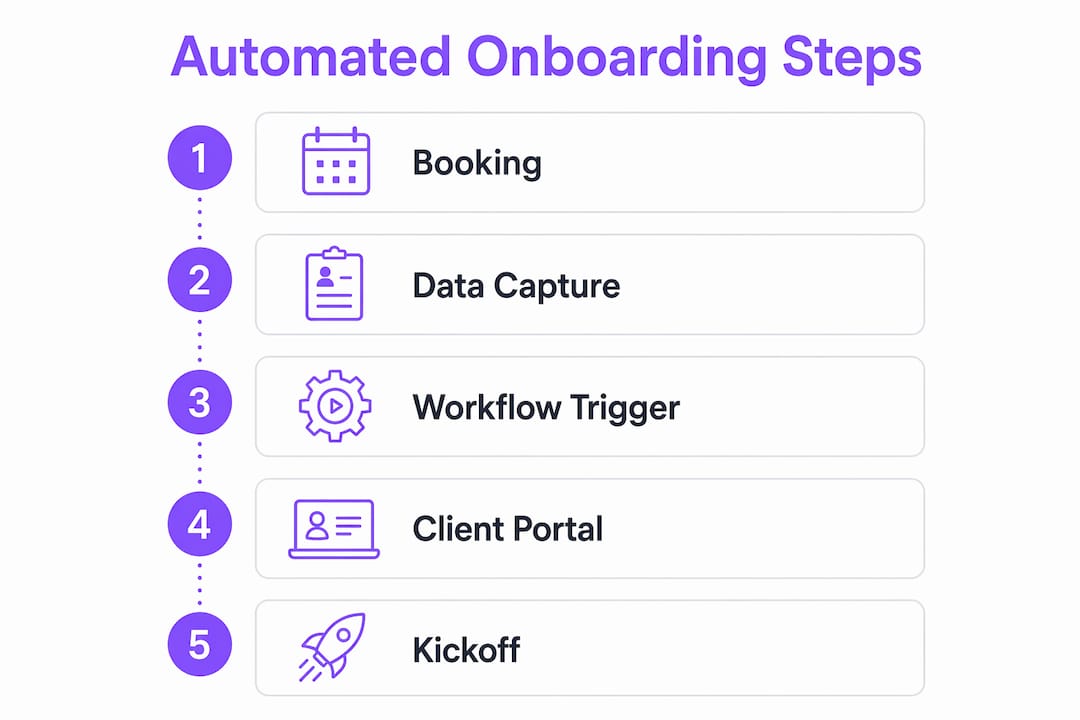
How to track client onboarding progress automatically: tools you need first
Before you build any automation, you need the right components in place. Think of it like wiring a house: the automation logic is the electrical system, but the tools are the outlets, switches, and panels that make it functional.
The core stack for automated onboarding tracking covers three categories: scheduling, automation, and client visibility.
- Scheduling: Calendly captures the initial booking and acts as the trigger that starts your entire onboarding sequence.
- Automation platform: Zapier connects your apps and executes the trigger-action logic. Alternatives include Make (formerly Integromat) and n8n for teams that want more branching control.
- Client portal: Notion or Airtable hosts the live client record that updates automatically as each onboarding step completes.
- CRM or database: HubSpot, Airtable, or a custom database stores client data and serves as the single source of truth across all connected tools.
Calendly, Zapier, and Notion together provide a connected automated onboarding flow without manual data entry or follow-ups. That combination matters because each tool handles a distinct job, and none of them require your client to create an account just to participate.
Here is a comparison of the most common tools and their roles:
| Tool | Role in onboarding automation |
|---|---|
| Calendly | Captures booking, triggers the workflow |
| Zapier | Connects apps, executes trigger-action sequences |
| Notion | Hosts client portal with live status updates |
| Airtable | Database and client-facing interface |
| HubSpot | CRM, pipeline tracking, and escalation alerts |
| Make / n8n | Advanced branching and SLA-based logic |
Choosing between these tools depends on your team’s technical comfort and the complexity of your onboarding process. If your onboarding has fewer than five steps, Zapier plus Calendly plus Notion is enough. If you are managing enterprise clients with compliance requirements, HubSpot or SAP SuccessFactors adds the SLA monitoring layer you need.
Step-by-step: how to automate client onboarding tracking from booking to kickoff
The most effective onboarding workflows define five phases: intake, contract and payment, setup, scheduling, and kickoff. Each phase has a clear trigger, an owner, and a deadline. Without that structure, automation has nothing to act on.
Here is the sequence that turns a manual 75-minute process into a 10-minute automated review:
- Client books a discovery call via Calendly. This booking event is the trigger. Zapier detects it and fires the first action.
- Zapier sends a welcome email automatically. The email includes a link to an intake form (built in Typeform or Jotform) and sets expectations for next steps.
- Intake form submission triggers the next branch. When the client submits the form, Zapier captures the responses and pushes them into your Notion client portal and your CRM simultaneously.
- Contract and payment links go out automatically. Zapier triggers DocuSign or PandaDoc to send the contract, and a payment link via Stripe follows. No manual sending required.
- Portal updates on contract signature. Once DocuSign registers a completed signature, Zapier updates the client’s Notion record from “Pending Contract” to “Contract Signed.” The client can see this change in real time.
- Kickoff call scheduling triggers automatically. After payment confirmation, Zapier sends a Calendly link for the kickoff call and adds the event to both calendars.
- Reminder sequences run without intervention. Zapier or your email platform sends 48-hour and 24-hour reminders before the kickoff call.
Pro Tip: Build your Zapier workflow in a staging environment first and run three test clients through it before going live. One misconfigured field mapping can send the wrong contract to the wrong client, which is far harder to fix than preventing.
Zapier acts as the central automation controller that orchestrates the full sequence from booking to kickoff. The key insight here is that each step produces a data output that becomes the trigger for the next step. Nothing waits for a human to notice it.

How to monitor and solve stalled onboarding steps automatically
Automation does not guarantee completion. Clients miss emails, delay signing contracts, or ignore intake forms. The difference between a good onboarding system and a great one is what happens when a step stalls.
Common causes of onboarding delays include:
- Clients not completing intake forms within 48 hours of receiving them
- Contract signature delays due to internal approval chains on the client side
- Payment failures that go unnoticed until the kickoff call is already scheduled
- Missing documents that block the setup phase from starting
SAP SuccessFactors enterprise dashboards flag tasks as “Nearing Deadline” when they are within seven days of their SLA window. That same logic applies to smaller-scale tools. In Zapier or Make, you set a time-based trigger: if a client record has not moved from “Intake Sent” to “Intake Received” within 48 hours, the system sends an automatic reminder and flags the record in your CRM.
Automated escalations trigger internal alerts if a client fails to complete a stage within the SLA window. SLA windows of three to five days are standard for most B2B onboarding sequences. This turns your automation from a passive sender into an active manager that catches problems before they become delays.
“Active monitoring shifts organizations from reactive problem chasing to proactive queue management of stalled onboarding tasks.” — HubSpot Client Onboarding Automation Insights
A centralized client progress dashboard, whether built in HubSpot’s pipeline view, an Airtable grid, or a custom Notion database, gives your team a single place to see every client’s current stage, days in stage, and next action. Color-coded status fields (green for on track, yellow for nearing deadline, red for overdue) make it immediately obvious where attention is needed without anyone having to check individual records.
Pro Tip: Do not automate every escalation to the client. If a client is three days overdue on a contract, send one automated reminder. If they are five days overdue, route an internal alert to the account manager to make a personal call. Automation handles volume; humans handle relationships.
What good client communication looks like with automated progress tracking
Clients ask “where are we in the process?” because they cannot see the answer themselves. The fix is not faster replies. It is giving clients a read-only view of their own onboarding record.
Client self-service portals with read-only interfaces reduce inbound status request emails by making progress visible at the client’s fingertips. Tools like Airtable Interfaces and Notion shared pages let you publish a live view of the client’s onboarding checklist, with each item updating automatically as your internal workflow progresses.
The benefits of this approach are concrete:
- Clients stop emailing for status updates because they already have the answer.
- Your team stops writing status update emails, which typically consume 20 to 30 minutes per client per week.
- Clients feel more confident in your process because transparency signals competence.
- Misaligned expectations surface earlier, before they become complaints.
Pro Tip: When you share a client portal link, include a 60-second Loom video showing the client exactly what they are looking at and what each status label means. Clients who understand the portal use it. Clients who do not understand it email you anyway.
Automation removes administrative tasks but keeps relationship-building steps human. The portal handles “what stage are we in.” The kickoff call handles “what does success look like for you.” Never automate the latter.
Notion and Airtable both support this model without requiring your client to create an account. You share a link, they see a live view, and your team never has to manually update a status field again because the automation does it the moment a trigger fires.
Key takeaways
Automated client onboarding tracking works because it connects scheduling, automation, and client visibility tools into one continuous workflow that monitors itself and escalates problems before they stall.
| Point | Details |
|---|---|
| Start with the right stack | Calendly, Zapier, and Notion cover scheduling, automation, and client visibility for most teams. |
| Structure onboarding in five phases | Intake, contract, setup, scheduling, and kickoff each need a trigger, owner, and SLA deadline. |
| Use SLA windows for monitoring | Time-based triggers flag stalled steps automatically so your team acts before delays compound. |
| Give clients a live portal | Read-only Notion or Airtable views eliminate status request emails and build client confidence. |
| Keep kickoff calls human | Automate logistics and document collection, but retain live meetings for relationship-building. |
Why I think most teams automate the wrong things first
I have seen teams spend weeks building elaborate Zapier sequences for welcome emails while their actual bottleneck is contract signature delays that nobody is monitoring. The automation looks impressive in a demo and does almost nothing for the client experience.
The teams that get this right start from the client’s perspective, not the team’s. They ask: where does the client feel confused, ignored, or stuck? Almost always, the answer is somewhere between intake form submission and kickoff call scheduling. That gap, often three to seven days, is where clients form their first real impression of how you operate.
Onboarding automation scales team capability by connecting systems as one source of truth, not by replacing the team. That framing matters. When you treat automation as a scaling tool rather than a cost-cutting tool, you make different decisions. You keep the kickoff call. You add a personal video to the portal link. You use the time automation saves to actually prepare for that first meeting instead of chasing documents.
The other thing I would push back on: do not wait until your onboarding is “perfect” to automate it. Automate what you have, run real clients through it, and refine based on where the sequence breaks. A working 80% solution running today beats a perfect system you are still designing in six months.
Treating onboarding as a continuous operational workflow rather than a series of disconnected events is what separates teams that scale from teams that just get busier.
— Harsh
See how Teameasyflow handles this for your team
If you are ready to move beyond spreadsheets and manual follow-ups, Teameasyflow is built for exactly this problem.

Unlike task trackers like Asana or Trello, Teameasyflow actually executes your onboarding workflows. External clients complete tasks via magic links without creating accounts, your team gets real-time progress visibility, and the system sends automated updates at every stage. You get a client progress dashboard, built-in escalation logic, and zero manual status emails. It is free to start, and your first automated onboarding workflow can be live in under three hours.
FAQ
What does it mean to track client onboarding progress automatically?
It means using connected tools to update and display each onboarding milestone without manual input. Triggers like a completed booking or signed contract automatically move the client record to the next stage and notify relevant team members.
What tools do I need to automate client onboarding tracking?
The core stack is Calendly for scheduling, Zapier for automation logic, and Notion or Airtable for the client portal. HubSpot or a CRM adds pipeline visibility and SLA monitoring for teams managing higher client volumes.
How do I handle clients who stall at a specific onboarding step?
Set time-based triggers in Zapier or Make that fire an automated reminder if a step is not completed within your SLA window. If the client remains stalled after the automated reminder, route an internal alert to the account manager for a personal follow-up.
How long does it take to set up an automated onboarding workflow?
Initial setup takes two to three hours for a standard five-phase workflow. Once live, the system reduces per-client manual processing time from roughly 75 minutes to under 10 minutes per client.
Should kickoff calls be automated or kept as live meetings?
Kickoff calls should always be live. Successful teams automate logistics like document collection and scheduling but retain live kickoff meetings to build client trust and reduce churn risk.