
Scale Client Onboarding Without Extra Staff in 2026

Automation is the only proven method to scale client onboarding without extra staff, and the numbers make the case clearly. A documented end-to-end workflow reduced onboarding admin from 6.5 hours to 14 minutes with zero human involvement. That result came from 11 automated steps triggered by a single DocuSign contract signature. Tools like HubSpot, Slack, Calendly, and Notion handled the rest. Operations managers who still rely on headcount to absorb onboarding volume are solving the wrong problem. The real fix is replacing manual handoffs with triggered, repeatable workflows.
Which onboarding tasks are best suited for automation to scale without hiring?
The highest-value automation targets are the tasks your team repeats identically for every client. These steps consume hours of admin time but require zero judgment. Automating them frees your team to focus on delivery and relationship-building instead of coordination.
The contract signature event alone is enough to trigger an entire onboarding sequence without a single manual handoff. That single event can kick off CRM updates in HubSpot, workspace creation in Notion, Slack channel setup, invoice generation, and kickoff scheduling via Calendly. Each step fires automatically in sequence.
High-impact tasks to automate first:
- Contract parsing and CRM update: Pull client data from DocuSign or PandaDoc and write it directly to HubSpot or your CRM of choice.
- Workspace and file setup: Create a client folder in Google Drive or Notion with pre-built templates automatically populated with client details.
- Welcome email sequence: Send a welcome packet with next steps within 60 seconds of intake form submission, building trust before your team even sees the notification.
- Kickoff scheduling: Trigger a Calendly invite with the right team member assigned based on client type or deal size.
- Internal Slack alert: Notify the account team instantly with client details and required next actions, cutting email lag entirely.
- Task assignment: Use tools like ClickUp or Asana to assign owners and deadlines automatically to every onboarding task.
Pro Tip: Start by timing how long each manual onboarding step takes your team today. The steps that take more than 10 minutes and happen identically every time are your first automation targets.
The communication steps are especially worth automating early. Clients who receive an immediate, professional welcome message report higher confidence in the engagement from day one. That first impression used to depend on whether your account manager remembered to send it.

How to build an automated onboarding workflow from contract to kickoff
Building a reliable automated onboarding workflow starts with mapping what your team actually does today. Walk through your last five client onboardings and write down every manual step, who did it, and how long it took. You will find the same handoffs repeating with minor variations.
Step-by-step workflow implementation:
- Define your trigger. Choose the event that starts the workflow. A DocuSign signature, a HubSpot deal moving to “Closed Won,” or a form submission all work. One trigger, one workflow.
- Map every downstream step. List each task that must happen after the trigger, in order. Include who owns it and what the deadline is.
- Assign owners and SLAs. Automated workflows assign owners and deadlines to each task without human coordination. Define these rules once in your workflow builder.
- Connect your tools. Integrate your CRM, file storage, communication platform, and scheduling tool. Most no-code platforms support native connectors to HubSpot, Slack, Google Drive, Calendly, and invoicing tools like QuickBooks.
- Add failure handling. Build in auto-retry with exponential backoff for webhook failures. Log every execution so you can audit what ran and when.
- Test with a real client scenario. Run the workflow end-to-end in a staging environment before going live. Check every output: CRM record, Slack message, file folder, calendar invite.
- Measure and refine. Track time-to-kickoff and error rates after launch. Adjust triggers, owners, or deadlines based on what the data shows.
Pro Tip: Design every workflow step to be idempotent. That means running the same step twice produces the same result without duplication. This makes safe reruns possible when something fails, without creating duplicate records or double-sending emails.
| Workflow step | Tool | Owner assigned by automation |
|---|---|---|
| Contract signed | DocuSign / PandaDoc | Triggers workflow |
| CRM record updated | HubSpot | System |
| Client workspace created | Notion / Google Drive | System |
| Welcome email sent | Email platform | System |
| Kickoff scheduled | Calendly | Account manager |
| Internal alert sent | Slack | System |
| Tasks created with deadlines | ClickUp / Asana | Account manager |
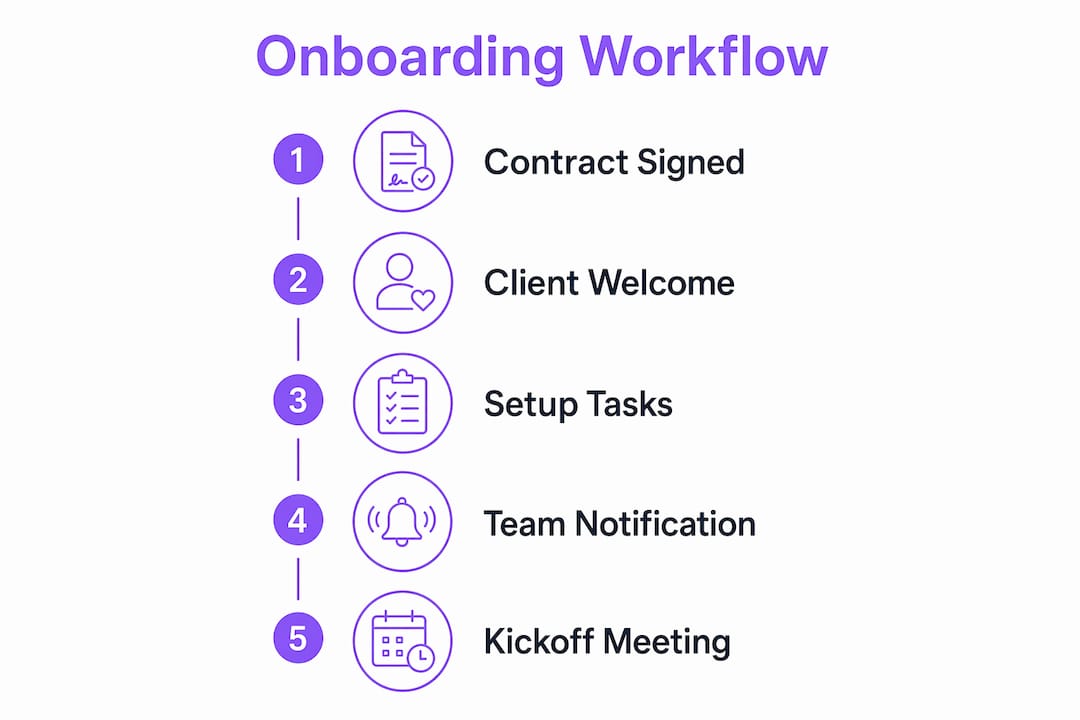
The goal is a workflow where your team receives a Slack notification that a new client is onboarded, with every setup step already complete. They show up to the kickoff call ready to deliver, not ready to chase down access credentials.
What are common mistakes when scaling onboarding without extra staff?
The most common mistake is automating only part of the process and calling it done. Partial automation leaves manual gaps that still require someone to monitor and fill. The result is a workflow that looks automated but still generates follow-up work.
Hiring more staff without fixing the underlying process is the other trap. Adding a specialist only shifts manual tasks to a new person. It does not eliminate the handoffs, reduce the error rate, or make the process faster. True scale requires automation connecting intake, CRM, file storage, and notifications into one unbroken sequence.
Common failure points to watch:
- Webhook failures: Integration errors between tools are the most frequent cause of broken workflows. Build in auto-retry and log every failure.
- Incomplete data from intake forms: If a client skips a required field, downstream automation breaks. Use form validation to block submission until all required fields are complete.
- Scheduling bottlenecks: Calendly links sent without checking team availability create booking conflicts. Use round-robin scheduling rules to distribute kickoff calls automatically.
- No audit trail: Without execution logs, you cannot tell whether a step ran or failed. Every workflow platform worth using provides this natively.
“Scaling onboarding is more about eliminating manual handoffs than adding more staff or AI responders.” — lowcode.agency
Maintain your workflow by reviewing execution logs monthly. Look for steps with high failure rates or long completion times. Those are the bottlenecks to fix next. Automation is not a one-time build. It is a system you improve continuously as your client base grows.
Automation tools compared: which approach fits your team?
The right automation approach depends on your team size, technical resources, and how complex your onboarding process is. No-code platforms work well for most operations teams. Custom-coded workflows make sense only when your process has logic that no off-the-shelf tool can handle.
AI-powered personalization is now accessible to small teams through tools like AI chatbots and knowledge bases. These handle client Q&A, send reminders, and deliver role-specific onboarding guides without increasing headcount. The cost is a fraction of a full-time hire.
| Approach | Best for | Ease of setup | Scalability | Typical cost |
|---|---|---|---|---|
| No-code workflow tools | Small to mid-size teams | High | Medium to high | Low to medium |
| Full-service automation platforms | Enterprise or complex workflows | Medium | High | Medium to high |
| Custom-coded workflows | Unique logic or deep integrations | Low | Very high | High |
| AI-powered onboarding tools | Personalization at scale | Medium | High | Medium |
EasyFlow sits in the no-code category but goes further than task trackers like Asana or Trello. It executes processes rather than just listing them. External clients can complete tasks via magic links without creating accounts, which removes a common friction point that slows onboarding in the first place.
Consistent, high-quality onboarding for every client is the real competitive advantage of automation over manual processes. A manual process delivers quality that varies with whoever is running it that week. An automated workflow delivers the same experience every time, regardless of team capacity.
Pro Tip: Before buying any platform, map your current workflow in a simple document first. The clarity you gain from that exercise will tell you exactly which features you actually need, and which ones vendors are selling you that you will never use.
You can find real examples of onboarding automation adoption across different team types to see which approach translated best into practice.
Key takeaways
Automation replaces manual onboarding handoffs and reduces admin time from hours to minutes, making headcount growth unnecessary for most teams.
| Point | Details |
|---|---|
| Start with a single trigger | A contract signature event can fire an entire onboarding sequence without any manual steps. |
| Automate the highest-volume tasks first | Welcome emails, CRM updates, workspace setup, and kickoff scheduling deliver the fastest time savings. |
| Build in failure handling | Auto-retry, execution logs, and idempotent steps prevent broken workflows from requiring human restarts. |
| Avoid partial automation | Automating only some steps still leaves manual gaps. Connect every handoff in one unbroken sequence. |
| Choose tools that execute, not just track | Platforms that run processes deliver more value than task trackers that only list what needs to happen. |
The mindset shift that actually makes this work
Most operations leaders I talk to frame onboarding as a staffing problem. When volume increases, their first instinct is to hire. That instinct is understandable, but it is almost always wrong.
The real problem is that onboarding processes are built around people remembering to do things. Someone has to remember to send the welcome email. Someone has to remember to create the Notion workspace. Someone has to remember to post in Slack. When you hire to solve that problem, you are just adding more people who have to remember more things.
What actually works is treating onboarding as a system, not a task list. Every step has a trigger, an owner assigned by the system, a deadline, and a failure condition. When you build it that way, the process runs whether your best account manager is in the office or on vacation.
The teams I have seen get this right share one habit: they review their workflow logs regularly. Not to check if things ran, but to find the steps that are slow or failing more than expected. That review cycle is what turns a decent automated workflow into a great one over time.
The future of onboarding scalability is not more staff and not more AI. It is better-designed systems that connect your existing tools into sequences that run themselves. The technology to do this exists today, at a price point accessible to teams of any size. The only thing standing between most operations managers and a fully automated onboarding process is the decision to map it out and build it.
— Harsh
How EasyFlow handles onboarding without the admin overhead
EasyFlow automates the workflows that typically pile up on your operations team after a client signs. It connects triggers, task assignments, team handoffs, and client-facing steps into one running sequence.

Unlike task trackers that only show what needs to happen, EasyFlow executes the process directly. External clients complete their steps via magic links without creating accounts, which removes the most common friction point in early onboarding. Your team gets notified at the right moment, with the right context, and no manual follow-up required. You can also track onboarding progress automatically across every active client without building a separate reporting system. EasyFlow offers a free plan to get started.
FAQ
How much time can automation save on client onboarding?
Automation can reduce onboarding admin from 6.5 hours to 14 minutes per client. That result comes from connecting 11 automated steps triggered by a single contract signature event.
What triggers an automated onboarding workflow?
A contract signature via DocuSign or PandaDoc, or a deal stage change in HubSpot, is enough to trigger the full sequence. No manual action is required after the trigger fires.
Does hiring more staff solve onboarding bottlenecks?
Hiring shifts manual tasks to a new person but does not eliminate the handoffs or reduce errors. True scale requires automation connecting intake, CRM, file storage, and notifications into one unbroken sequence.
What happens when an automated workflow fails?
Well-designed workflows include auto-retry with exponential backoff and execution logs so failures are caught and resolved without human restarts. Idempotent steps mean the workflow can rerun safely without creating duplicate records.
Do clients need to create accounts to participate in automated onboarding?
Not with tools like EasyFlow. Clients complete their required steps via magic links, removing the account creation barrier that slows down the early stages of client integration.