
Cut Follow Ups in 90 Days: Agentic Workflows for Ops Teams

Agentic workflows are business-process systems that execute steps automatically, hand off tasks between people and outside collaborators without added logins, and use AI to complete or route work rather than just track it. Operations teams juggling frequent handoffs, external vendors, or repetitive approvals should prioritize them now: the payoff is faster cycle times, fewer status-check emails, and work that moves even when nobody is chasing it.
TL;DR:
- Agentic workflows are best suited for processes that repeat weekly or daily, involve multiple team or external handoffs, and have recurring errors.
- The systems should be evaluated on their ability to execute steps automatically, support external participants without accounts, and provide comprehensive audit trails.
- Successful pilots focus on high-volume, low-judgment tasks like approval routing or status updates, and track metrics such as completion time and manual follow-ups.
- Implementation involves mapping current processes, running a 14-day trial with internal and external workflows, and iterating based on exception handling before scaling.
- EasyFlow offers a 14-day trial that emphasizes execution over tracking, with AI-assisted steps and magic links to reduce friction in external collaboration.
Table of Contents
- What Are Agentic Workflows, Exactly?
- What Do Operations Teams Actually Gain?
- When Should You Actually Invest in This?
- How Do You Evaluate an Agentic Workflow System?
- Building Your 90-Day Rollout Plan
- Why Execution-First Workflows Change How Ops Teams Work
- Getting Started With EasyFlow
- Sources
- FAQ
What Are Agentic Workflows, Exactly?
Agentic workflows execute processes instead of just displaying them on a board. A workflow is triggered by an event (a new client signs, an employee accepts an offer), and the system then runs the next steps itself: assigning tasks, sending reminders, routing approvals, and completing simple actions through AI without a human opening the tool.
The mechanics matter more than the buzzword. A trigger fires. Rules or AI decide what happens next. External participants who aren’t on your payroll (a client, a contractor, a new hire’s former employer) get a magic link that lets them complete their piece with no account creation and no password reset request three days later.
This is a different category from both directions people usually think of it:
- Project management tools like Asana or Trello track what needs to happen and who owns it, but a human still has to open the task and do the work.
- Developer-focused AI agent frameworks let autonomous code agents make decisions inside software systems. That’s a different audience solving a different problem.
- Agentic workflows for operations sit in between: they execute the actual business process, whether that’s onboarding, procurement, or client implementation, and only surface to a human when judgment is genuinely required.
Workflow automation software has always run triggers and rule-based actions. What’s changed is how much of the “next step” an AI layer can now handle on its own.
What Do Operations Teams Actually Gain?
The honest answer is fewer interruptions, not fewer people. Business process automation research shows cycle time reductions of a large proportion for routine processes (https://www.axiant.co/insights/benefits-of-business-process-automation) when implemented correctly, alongside a sharp drop in manual error. That range holds up because the processes losing the most time were never complicated. They were slow because a human had to notice something was ready, then remember to act on it.
Removing that human relay race changes the math on follow-ups. Every handoff in a manual process is a place where a task can sit for two days waiting for someone to check their inbox. Agentic workflows collapse that gap: the system notifies the next person the moment they’re needed, flags a stalled step before a manager has to ask about it, and keeps a timestamped record of who did what and when.
That record turns out to matter for reasons beyond speed. Operations automation that runs the same way every time gives auditors and compliance teams a trail they can actually follow, instead of a patchwork of emails and spreadsheet notes.
Concrete gains teams report include:
- Faster new-hire onboarding, since IT, HR, and the hiring manager get notified automatically instead of relying on a checklist someone forgets to update.
- Shorter client implementation timelines, because clients complete their own steps via a link the moment they’re ready, not the moment your team remembers to send a reminder.
- Fewer dropped handoffs across departments, since the system, not a person’s memory, tracks what’s next.
EasyFlow’s own workflow data shows this pattern directly: magic link participation cuts the follow-up volume in onboarding and client-facing processes because outside collaborators act the moment a task reaches them.
When Should You Actually Invest in This?
Not every process deserves an agentic workflow, and treating this as an all-or-nothing platform decision is how pilots stall. Look for signals first.
- The process repeats constantly. If you run it once a quarter, automation barely pays for itself. If you run it weekly or daily, it does.
- It crosses team boundaries. Handoffs between departments, or between your team and an outside party, are where delays actually live.
- Outside collaborators are involved. Clients, vendors, or new hires who won’t create an account are exactly where magic links save the most friction.
- Errors keep happening at the same step. A recurring mistake usually means a human is relying on memory where a rule or an AI-assisted step could just handle it.
To prioritize which pilot to run first, look at quantitative proxies: task volume per month, number of handoffs per process, and hours your team spends on follow-up emails and status pings. A process with high volume, three or more handoffs, and heavy follow-up time is your best first candidate. Delivery teams scale without growing headcount by automating exactly these high-friction, high-frequency processes first.
Pro Tip: Don’t pilot your most complex process first. Pick something boring and high-volume, like status update notifications or approval routing, so you can prove the model before you touch anything with real judgment calls attached.
How Do You Evaluate an Agentic Workflow System?
Most procurement conversations get stuck comparing feature lists. The better question is simpler: does this system execute the process, or does it just display it? A tool that only tracks status is a project management tool with a new coat of paint, no matter how it’s marketed.
Run your evaluation against these dimensions:
- Execution vs. tracking: can the system complete a step itself, or does a human still have to open it and act?
- External collaborator flows: can a client or vendor act without creating an account, and does the invite expire or need to be resent constantly?
- AI-assisted step completion: does AI handle simple actions (drafting a reply, extracting data from a form) or just flag that a step exists?
- Integrations: does it connect to your existing email, CRM, and file storage, or require your team to change tools first?
- Governance and audit trails: is every action timestamped and attributable, especially for steps touching billing or compliance?
- Analytics: can you see where workflows stall, not just whether they’re “in progress”?
Governance deserves particular weight here. AI-assisted process features can accelerate mapping and flag bottlenecks, but they need orchestration and audit controls wrapped around them, especially once a step can affect a client bill or a compliance record.
A 14-day proof of concept beats a slide deck every time. Build two workflows: one purely internal (say, a purchase approval chain) and one involving an outside party (client document collection via magic link). Measure completion time, number of manual nudges required, and how many participants finished their step without contacting your team for help.
The real test of an agentic workflow platform isn’t whether it can run a demo cleanly. It’s whether a client who has never seen the tool before can finish their task from a link with zero instructions from your team.
Ask vendors directly about session logs, permission scoping for external users, and how long incomplete tasks stay accessible before they need to be reissued. A platform for team invitations and access control is worth reviewing alongside your vendor shortlist if governance around external participants is a sticking point.
Building Your 90-Day Rollout Plan
Treat this as four phases, not one big-bang launch.
- Map before you automate. Spend the first two weeks documenting your actual process, not the version in the employee handbook. Mapping workflows before automating them surfaces the exceptions and dead-end steps that would otherwise break your pilot. Set baseline metrics now: current cycle time, handoff count, follow-up volume.
- Pilot with one to three workflows. Choose the high-frequency, low-judgment candidates identified earlier. Invite any external participants via magic link and measure their completion rate against your baseline.
- Iterate on exceptions. The first version of any workflow breaks somewhere. Refine the rules, tighten AI-assisted steps that are misfiring, and document how exceptions get escalated to a human.
- Scale with structure. Once two or three workflows are stable, build a template library so new processes don’t start from scratch, add role-based training, and set up analytics dashboards that flag stalled steps before they become a client complaint.
Pro Tip: Assign one person to own governance from day one, even during the pilot. Retrofitting audit trails after a workflow is already running client-facing tasks is far harder than building them in from week one.
Starting with high-repeatability tasks like approval routing and status notifications is what separates rollouts that stick from ones that quietly get abandoned by month three.

Why Execution-First Workflows Change How Ops Teams Work
Most operations teams I talk to are stuck reacting: chasing a signature, resending a form, pinging someone for the third time about the same approval. Agentic workflows shift that fundamentally. The work moves whether or not anyone remembers to check on it, and that turns operations from a job of constant follow-up into a job of designing systems that run themselves.
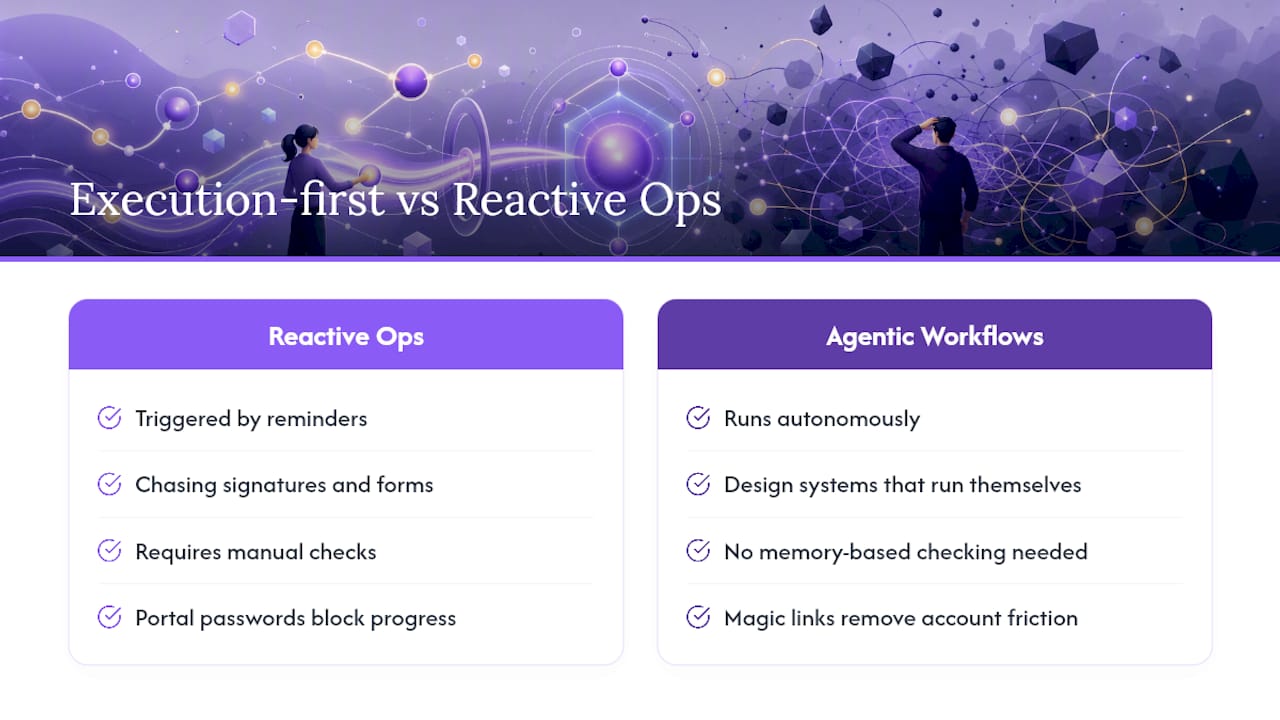
The proof point that convinced me this isn’t just theory is the magic link mechanic. Outside collaborators completing tasks without an account sounds small until you’ve watched a client implementation stall for four days because someone forgot their portal password. Remove that one friction point and completion rates change immediately.
— Harsh
Getting Started With EasyFlow
EasyFlow was built around the execution-first criteria that actually matter in a vendor evaluation, not the ones that look good on a comparison chart. It runs the process rather than just displaying it, lets clients and vendors complete tasks through a magic link with zero account setup, and uses AI to handle simple steps like drafting replies or extracting data from submitted forms.

For a 14-day trial, pick one internal workflow and one that involves an outside collaborator. Track completion time, the number of manual nudges you send, and how many external participants finish their step without contacting your team. Those three numbers tell you more about fit than any feature list.
EasyFlow’s pre-built templates cut the setup time for that trial down to something you can start this week, not next quarter. If your team wants to test it without a sales conversation first, you can start a free trial and build your first workflow today.
Sources
- Workflow automation software and tools | Microsoft Power Automate
- What Is Workflow Automation? Guide for Delivery Teams | Teamwork
- Workflow automation guide | Atlassian
FAQ
What Is the Difference Between Agentic Workflows and Regular Automation?
Regular automation runs fixed rules on a trigger. Agentic workflows add AI-assisted decision-making and step completion on top of those rules, so more of the process finishes without a person opening a task manually.
Do Agentic Workflows Replace Project Management Tools?
Not exactly. Project management tools track who owns a task; agentic workflows like EasyFlow execute the task itself, including notifying and routing work to the next person or system automatically.
How Long Does It Take to See Results From a Pilot?
Most teams see measurable results, fewer follow-up emails and faster completion, within a 14-day proof of concept if the pilot workflow is high-frequency and involves at least one external handoff.
Can External Clients or Vendors Use These Systems Without Creating an Account?
Yes, when the platform supports magic-link participation. EasyFlow lets outside collaborators complete their step directly from a link, which removes the account-creation friction that stalls client-facing processes.
Which Processes Should Operations Teams Automate First?
Start with high-volume, low-judgment processes that cross team boundaries, like approval routing, status notifications, or client document collection, since these produce the fastest measurable wins.