
Workflow Bottleneck Identification Checklist for Ops Teams

The workflow bottleneck identification checklist runs six steps: map the current state, measure cycle time and WIP, identify the constraint, diagnose root cause, pilot the smallest fix, then monitor and standardize. Run that sequence on one recurring workflow and you can recover 8–15% of throughput before spending a dollar on new headcount or tooling. Named frameworks like Little’s Law and the Theory of Constraints give the diagnostic its teeth; tools like EasyFlow handle the handoff automation once you know where the constraint lives.
Start within 30 minutes: pick one recurring workflow, pull five recent cases, and note where each one waited longest. That single observation is your map seed.
Key Takeaways
A workflow bottleneck identification checklist works when you map first, measure second, and pilot the smallest fix before investing in automation or headcount.
| Point | Details |
|---|---|
| Map before measuring | Define scope and build a swimlane map before collecting any metrics to avoid measuring the wrong steps. |
| Exploit existing capacity first | MIT Sloan research shows that removing non-value-added steps can recover 8–15% of throughput before new investment. |
| Queue upstream + starvation downstream | That combination is the clearest constraint signal; use Little’s Law to confirm WIP and lead time at the step level. |
| Pilot the smallest fix first | A 2–6 week pilot with a named owner and rollback condition validates fixes without risking the live workflow. |
| EasyFlow automates confirmed fixes | After your audit identifies the constraint, EasyFlow executes handoffs and reminders automatically via a 14-day trial. |
Table of Contents
- What does a bottleneck analysis checklist actually look like?
- How do you map a workflow before measuring anything?
- What metrics should you collect to find the real constraint?
- How do you spot which step is actually the constraint?
- How do you diagnose root cause and choose which fix to prioritize?
- How do you run a pilot without breaking the live workflow?
- How do you lock in gains so they don’t erode in 60 days?
- What are the fastest fixes for the most common bottleneck types?
- How long does a bottleneck identification program actually take?
- When does automation make sense as a bottleneck fix?
- A 30-day ops lead runbook for your first audit and pilot
- EasyFlow cuts follow-ups and automates handoffs from day one
- Sources
- FAQ
What does a bottleneck analysis checklist actually look like?
A compact audit checklist that defines start and end events, lists every step with its owner, and marks handoffs and wait time is the fastest way to surface delays and rework. Here is a printable version you can run in a live session or on a whiteboard.
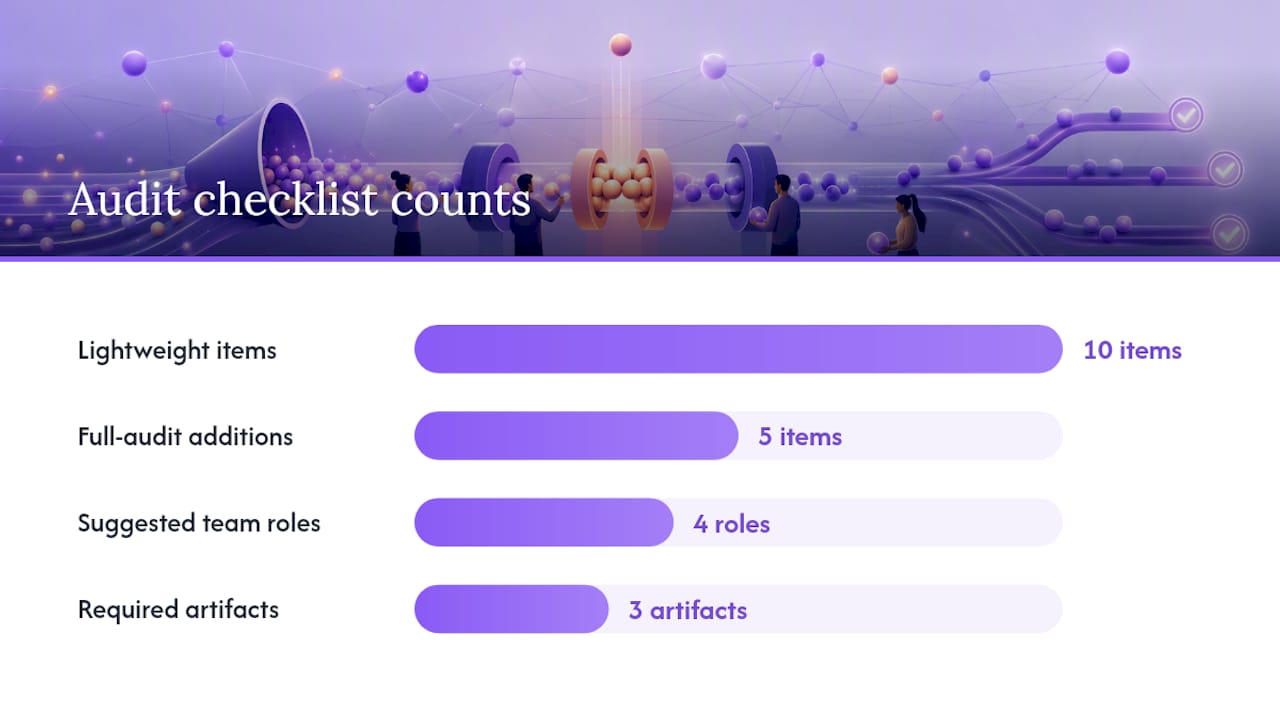
Lightweight audit (30–90 minutes):
- [ ] Define scope: name the start event, end event, and one case type
- [ ] List every step in execution order
- [ ] Assign one owner per step
- [ ] Mark each handoff (step changes owner or system)
- [ ] Separate active work time from wait time for each step
- [ ] Flag any step where work bounces back (rework)
- [ ] Collect five recent cases and note timestamps
- [ ] Identify the step with the longest queue or highest WIP
- [ ] Run a 5 Whys on that step
- [ ] Pilot the smallest fix; measure the same metrics
Full audit (1–4 weeks) adds:
- Swimlane map with systems and inputs/outputs
- Metric collection across 20+ cases
- Root-cause workshop with frontline staff
- Prioritization matrix and pilot plan
- Stakeholder sign-off and monitoring dashboard
Suggested audit team: process owner, data owner (pulls timestamps), one frontline observer, and one stakeholder who approves changes. Required artifacts: five sample cases, a current-state map, and a measurements sheet.
How do you map a workflow before measuring anything?
Mapping the current state before you touch any data is what separates a real audit from a guess. The map reveals handoffs, wait time, and rework that no dashboard shows.
Scope first. Name the start event (“client submits request”), the end event (“deliverable sent”), and one product or case type. Mixing two case types in one map is the most common reason maps mislead.
Build swimlanes. Each lane represents one owner or system. For every step, capture:
- Step name and sequence number
- Owner (person or team)
- System used
- Input required / output produced
- Active time (work being done)
- Wait time (work sitting idle)
- Rework flag (yes/no)
Sample mapping session (60 minutes):
- Gather three to five frontline staff who touch the workflow
- Write each step on a sticky note; arrange in sequence
- Draw handoff arrows between lanes
- Ask for each step: “How long does the work actually take?” and “How long does it sit before someone picks it up?”
- Circle any step where the answer to “why does it wait?” is “we don’t know”
Map the current state, not the ideal. Workarounds and exceptions belong on the map because they are where the constraint usually hides.
What metrics should you collect to find the real constraint?
Throughput, cycle time, WIP depth, wait time, and rework rate are the five numbers that tell you where flow breaks down. Vanity metrics like “tasks completed” hide the constraint; these five expose it.
Essential metrics per step:
Collect data by pulling timestamps from your ticketing system, CRM, or MES. No perfect data? Pull five recent cases manually and note when each step started and ended.
Pro Tip: Use interval or event timestamps rather than averages. Little’s Law (WIP = throughput × lead time) only reveals the true constraint when you can see WIP and throughput at the step level, not just the process total.
Also track capacity utilization per step and time-in-stage distribution. A step running at 95% utilization with high variance is a stronger constraint signal than one running at 80% with low variance.
How do you spot which step is actually the constraint?
Queue accumulation upstream combined with idle time or starvation downstream is the clearest constraint signal you will find. Everything else is a symptom.
Watch for these signals:
- WIP piling up before one specific step
- Downstream steps waiting for input (starvation)
- Frequent expediting or escalation at one step
- Cycle time variability rising over time
- Repeated rework returning to the same step
Little’s Law check: if WIP = throughput × lead time, a step with high WIP and low throughput has a lead time problem, not a volume problem. Throwing more cases at it makes the queue longer, not shorter.
MIT Sloan research is direct on this: exploiting existing capacity by removing non-value-added steps recovers 8–15% of throughput before any new investment is needed. Adding resources alone does not reliably fix task-based bottlenecks driven by centralization or complex dependencies. Exploit first, then decide whether to invest.
How do you diagnose root cause and choose which fix to prioritize?
A 5 Whys session on the constraint step takes 20 minutes and usually surfaces the systemic cause. A fishbone (Ishikawa) diagram adds structure when multiple causes compete.
Root-cause classification:
- Process design: the step was never designed for current volume
- Handoff quality: inputs arrive incomplete, triggering rework
- Resource capacity: one person or team is the single point of execution
- Tooling/data gaps: manual steps exist because no system handles them
Prioritization matrix (copy into a spreadsheet):
Pro Tip: Classify the root cause before scoring. A process-design problem needs redesign; a handoff-quality problem needs a readiness checklist; a tooling gap is the only case where automation is the right first move.
Score impact divided by effort. Pick the fix with the highest score that does not require capital approval. Run that one first.
How do you run a pilot without breaking the live workflow?
A small pilot on one case type, with a clear rollback condition, is how you validate a fix without betting the operation on it. The five-step TOC-derived method makes this explicit: exploit the constraint, subordinate everything else, then elevate only if throughput still falls short.
Pilot plan template:
- Scope: which case type, which step, which team
- Hypothesis: “Adding a readiness checklist at handoff will reduce wait time at manager approval by 30%”
- Success metric: wait time at the constraint step, WIP depth, cycle time
- Sample size and period: 20 cases or 2 weeks, whichever comes first
- Owner: named process owner, not a committee
- Rollback condition: if rework rate rises above pre-pilot baseline, revert within 24 hours
- Measurement cadence: daily check during pilot; full review at end
Measure the same metrics you collected in Step 2. Confirm the constraint has moved before starting the next cycle. Piloting a second fix at the same step when the constraint has already shifted wastes the effort.
How do you lock in gains so they don’t erode in 60 days?
Dashboards and a weekly review cadence are what separate a one-time improvement from a permanent one. Without them, teams revert to old habits within two months.
Minimum dashboard KPIs:
- WIP by step (updated daily)
- Throughput (cases completed per week)
- Cycle time distribution (control chart)
- Queue depth trend at the former constraint step
Operational cadence:
- Daily standup for the constraint owner (5 minutes, WIP and blockers only)
- Weekly review for the improvement team (30 minutes, metrics vs. baseline)
- Monthly constraint confirmation run (48 hours of WIP monitoring to confirm the constraint has not shifted)
Sustainment checklist:
- [ ] Update the process map with the new current state
- [ ] Document acceptance criteria and handoff checklist
- [ ] Update the RACI for any ownership changes
- [ ] Archive the pilot data and root-cause notes
Sample monitoring table:
Workflow compliance documentation after a pilot is what makes the improvement auditable and repeatable.
What are the fastest fixes for the most common bottleneck types?
Most workflow constraints fall into four patterns, and each has a fix you can implement in under two weeks without a capital request.
Unclear ownership: assign one named owner per step with a defined SLA. Teams that add a single owner and a 24-hour SLA to an unowned step typically see cycle time drop at that step within the first week.
Approval overload: reduce approval layers for low-risk cases or set auto-approve thresholds (e.g., requests under $500 or matching a standard template route automatically). Automated approval workflows cut approval wait time significantly for rule-based cases.

Tool fragmentation: when work moves across three or more systems before a handoff completes, consolidate to a single system of record for that handoff. The reduction in re-entry errors alone shortens cycle time.
Handoff gaps: a readiness checklist that the sending step must complete before passing work downstream eliminates the most common source of rework. A workflow audit checklist that includes scenario-specific handoff checks is more useful than a generic list.
Quick fixes are stopgaps when the root cause is process design or volume growth. If the same step re-emerges as the constraint after two pilot cycles, a redesign or automation is the right next move.
How long does a bottleneck identification program actually take?
Most costs in the first two phases are people hours, not capital. The three-step approach of mapping, reviewing tools, and documenting a new workflow is a practical starting point for teams with limited process infrastructure.
Budget the pilot phase before requesting capital for automation or tooling. If the exploit and subordinate actions recover the throughput you need, the capital request may never be necessary.
When does automation make sense as a bottleneck fix?
Automation is the right answer when the root cause is a repeatable, rule-based task with predictable inputs and high volume. It is the wrong answer when human judgment variability is the actual constraint.
Automation decision checklist:
- [ ] Task is repeatable and rule-based (same logic every time)
- [ ] Inputs are predictable and structured
- [ ] Volume justifies the setup cost vs. hiring
- [ ] Manual handoffs or follow-ups are the documented root cause
- [ ] Rework rate is low (automation amplifies errors, not just speed)
High-value automation candidates (start here):
- Intake validation (check completeness before routing)
- Approval routing for standard cases
- Automated deadline reminders and follow-up notifications
- Handoff packaging (assemble all required inputs into one handoff record)
Pro Tip: Pilot automation on intake validation or handoff packaging first. These are the steps where manual variability is lowest and the ROI is clearest. Measure time saved × cost per hour, reduction in follow-up messages, and error-rate drop before expanding.
When automating external collaborator workflows, account for consent and data-handling requirements. TCF consent standards apply when external parties interact with automated flows that process personal data.
Buyers evaluating automation tools consistently prioritize trigger reliability and connector quality over feature breadth, and Gartner review data confirms that integration stability and handoff automation are the top evaluation criteria. Pilot on a low-stakes workflow first; confirm the automation holds before expanding scope.
A 30-day ops lead runbook for your first audit and pilot
Days 1–3: Define scope. Name the workflow, start event, end event, and one case type. Pull five recent cases and note where each one waited longest. Book a 60-minute mapping session with frontline staff.
Days 4–10: Map and measure. Build the swimlane map. Collect timestamps for 15–20 cases. Fill in the metrics table (active time, wait time, WIP, rework). Identify the step with the highest queue.
Days 11–18: Diagnose and select the pilot fix. Run a 5 Whys session. Score fixes using the effort × impact matrix. Pick the highest-scoring fix that does not require capital approval. Write the pilot plan (hypothesis, metric, owner, rollback condition).
Days 19–30: Run the pilot and review. Implement the fix. Measure daily. Hold a review at day 30 comparing pilot metrics to baseline. The single metric to prove improvement: cycle time at the constraint step.
Document lessons and update the process map after the review. The map is the institutional memory; without it, the next ops lead starts from scratch.
EasyFlow cuts follow-ups and automates handoffs from day one
Finding the constraint is only half the work. Executing the fix without creating new manual overhead is where most teams stall.

EasyFlow executes the process, not just tracks it. Once you identify a handoff gap or approval delay, EasyFlow automates the handoff, sends reminders automatically, and lets external collaborators complete tasks via magic links without creating accounts. That means no onboarding friction, no follow-up threads, and no missed deadlines because someone forgot to check a dashboard. Teams using EasyFlow for workflow automation report cutting manual follow-ups and speeding up handoff cycles on workflows from new-hire onboarding to client implementations.
The 14-day trial on paid plans lets you run one pilot workflow end-to-end before committing. Start with the handoff or approval step your audit just flagged, confirm the fix holds, then expand. Teameasyflow.
This section describes a vendor option. Pilot the fix manually first if you prefer; automate once the process logic is confirmed.
Sources
- Improve Workflows by Managing Bottlenecks
- How to Find Operational Bottlenecks Step by Step
- Workflow Audit Checklist for Bottlenecks
- 3 steps to identify and fix bottlenecks in your firm’s workflow
FAQ
What is the first step in a workflow bottleneck identification checklist?
Define the scope: name the start event, end event, and one case type, then pull five recent cases to seed the map. Without a clear scope, the audit measures multiple flows at once and the constraint signal disappears in the noise.
How do you identify workflow bottlenecks without perfect data?
Pull five recent cases manually and note where each one waited longest. Queue accumulation upstream of a step combined with idle time downstream is a reliable constraint signal even with a small sample.
When should you automate a bottleneck fix instead of redesigning the process?
Automate when the root cause is a repeatable, rule-based task with predictable inputs and high volume. If human judgment variability is the constraint, redesign the process first; automation will amplify the problem, not fix it.
How long does a typical bottleneck audit take?
A quick audit runs in one day (8–12 person-hours); a focused audit takes 1–2 weeks (30–50 hours). The pilot phase adds 2–6 weeks, and scaling a confirmed fix takes 1–3 months.
Can EasyFlow help after a bottleneck audit identifies a handoff gap?
Yes. EasyFlow automates handoffs, sends deadline reminders, and lets external collaborators act via magic links without creating accounts. The 14-day trial on paid plans lets you test one pilot workflow before committing.