
Executable Workflows vs Flowcharts: What Ops Teams Need

If a process needs to run itself, executable workflow automation is the right tool. If it just needs to be explained to a new hire, a flowchart still does the job. That’s the entire decision, once you strip away the jargon: a flowchart or workflow diagram documents what should happen, while executable workflow automation actually makes it happen, without a human pushing every step forward.
Two questions settle it fast:
- Does this process need orchestration, automatic handoffs, reminders, or SLA tracking? If yes, you need execution, not illustration.
- Do people outside your organization (clients, contractors, vendors) need to complete steps without creating an account? If yes, you need a system built for that, not a diagram with arrows.
The rest of this piece covers the technical difference in plain terms, a checklist for evaluating automation vendors, and a step-by-step plan for converting a static diagram into something that runs.
Key Takeaways
Executable workflow automation runs and enforces a process automatically, while a flowchart only documents what should happen, and operations teams need the former for any process involving handoffs, deadlines, or external collaborators.
| Point | Details |
|---|---|
| Know the real difference | A workflow engine executes and monitors processes; a flowchart only illustrates them for humans to follow manually. |
| Check for executable constructs | Confirm service tasks, data mappings, timers, and condition expressions before calling a model automation-ready. |
| Convert diagrams incrementally | Map data, mark manual steps, add executable pieces one at a time, then pilot before full deployment. |
| Guard against deployment failures | Validate and activate every process definition, check versioning, and monitor for stalled steps before go-live. |
| Choose execution tools deliberately | EasyFlow runs handoffs and reminders automatically and lets external collaborators finish tasks via magic links with no account needed. |
Table of Contents
- Workflow Diagram vs Flowchart: The Technical Difference That Actually Matters
- What Should Operations Teams Demand Before Automating a Process?
- How Do You Turn a Flowchart Into an Executable Workflow?
- Why Do Executable Workflows Fail in Production?
- When a Simple Flowchart Still Beats a Workflow Automation Tool
- Choosing Software for Diagrams and for Execution
- Connecting Executable Workflows to the Systems You Already Run
- Keeping Executable Workflows Current Without Breaking Them
- What Operations Teams Get Wrong About Automation Readiness
- Move From Diagrams to Running Processes With EasyFlow
- Sources
- FAQ
Workflow Diagram vs Flowchart: The Technical Difference That Actually Matters
A flowchart is a picture. A workflow engine is software that runs the process the picture describes. That distinction sounds obvious until you’re evaluating vendors who use “workflow” language loosely, and it’s the one that decides whether your team is still manually nudging tasks forward six months from now.
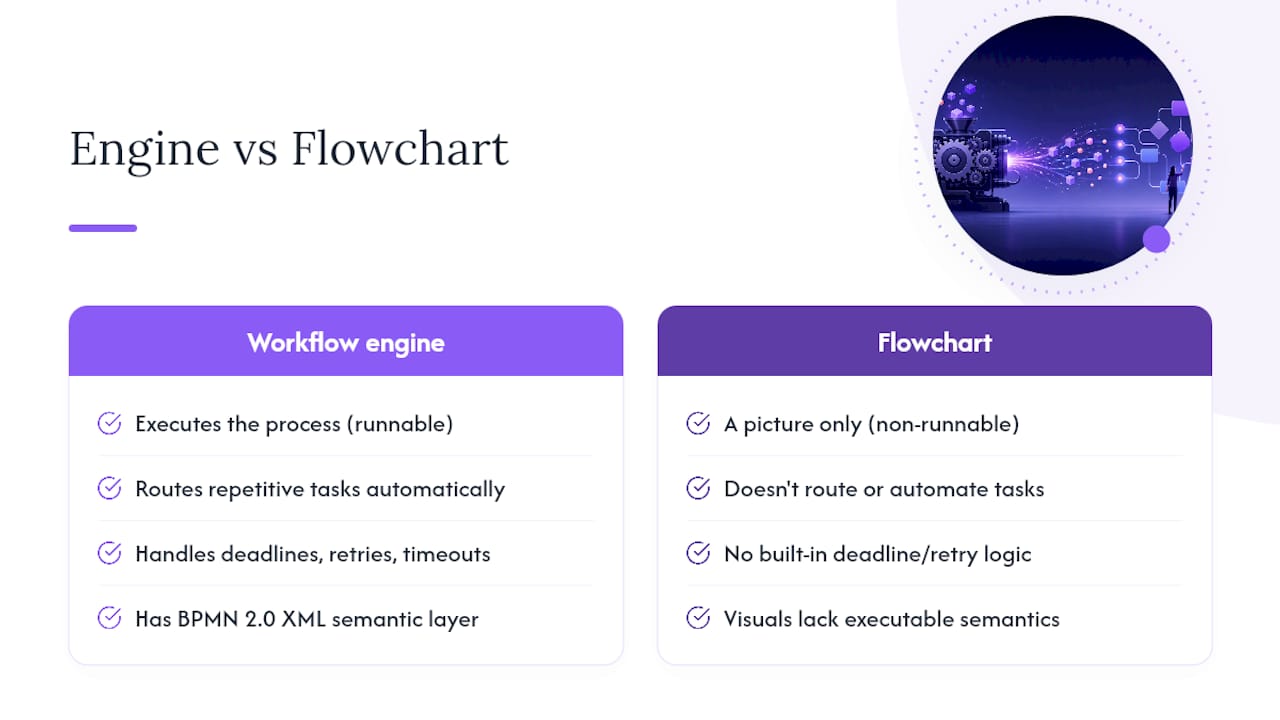
According to IBM’s explanation of workflow engines, a workflow engine provides the framework for defining, executing, and monitoring a process: it routes repetitive tasks, automates deadline handling, and increasingly supports low-code builders so operations staff don’t need a developer for every change. That’s orchestration. A diagram, no matter how clean, doesn’t route anything. It sits in a shared drive until someone remembers to look at it.
The deeper technical split shows up in how process models are built. Visual Paradigm’s guide to executable versus non-executable BPMN lays out the requirement clearly: an executable model needs a semantic layer underneath the visuals, expressed in BPMN 2.0 XML, with specific constructs like service tasks, data mappings, and condition expressions. Miss any of those, and the diagram is descriptive only, useful for training or stakeholder alignment, but not runnable by any engine.
That gap between picture and program is exactly why JointJS’s explainer on decoupling BPMN modeling and execution matters for evaluation purposes. Diagram presentation and execution semantics are architecturally separable, which is convenient for portability, but it also means a diagram can look automation-ready and still be nothing more than a picture. Engine-specific extensions often complicate moving a “runnable” model between platforms, so portability claims deserve a second look before you commit.
Quick gut check: if a vendor can’t show you how a step gets triggered, retried, or timed out automatically, you’re looking at a documentation tool wearing automation branding.
What Should Operations Teams Demand Before Automating a Process?
Not every process deserves automation, and not every automation vendor delivers what operations teams actually need. Before signing anything, run the candidate process and the vendor through this list.
- Execution capabilities. Confirm real orchestration: automatic task routing, retry logic with backoff, SLA tracking, and monitoring that alerts someone when a step stalls. A tool that only displays status without acting on it isn’t automation.
- Integration and data handling. Look for prebuilt connectors, an open API or webhook support, clear data mapping between steps, and correlation keys so the system can match incoming messages or events to the right running process instance.
- Collaboration without friction. External collaborators, clients, contractors, vendors, should be able to complete their piece of the process without creating an account. Magic links that route directly to the task are the difference between a five-minute turnaround and a three-day email chain.
- Governance and control. Versioning, process activation and validation steps, an audit trail, and the ability to test or simulate a workflow before it touches real work all matter more once a process handles paying customers or compliance-sensitive steps.
- Business signals that justify the investment. High-volume, repetitive processes with visible rework or error costs are the best automation candidates. A process that runs twice a year, handled by two people who already know it cold, usually isn’t worth the setup time.
Pro Tip: Start your evaluation with the process that generates the most follow-up emails, not the one that looks the most complex on paper. Follow-up volume is a better automation signal than process length.
Timeline and cost scale with scope. A single, well-defined handoff (say, new client onboarding) can go from diagram to running pilot in a relatively short time frame. A multi-department process touching several external systems takes longer, mostly because of the integration and data-mapping work, not the automation logic itself.
How Do You Turn a Flowchart Into an Executable Workflow?
Converting documentation into something that runs is a sequence, not a single leap. Skip steps and you’ll spend more time debugging a broken deployment than you saved by automating in the first place.
- Keep the descriptive model first. Use the existing diagram to align stakeholders and mark which steps are genuine automation candidates versus steps that require human judgment. Visual Paradigm’s guidance recommends this exact sequence: descriptive first, executable second, added incrementally.
- Map the data. Define what variables move between each step and label manual tasks explicitly. A workflow mapping approach that names every handoff point prevents the most common source of automation failure: a step that assumes data exists when nothing actually populated it.
- Add executable constructs incrementally. Service tasks with clear operation references, condition expressions, and timers get layered in one at a time, not all at once. Not every step needs to be executable. Marking manual, human-in-loop tasks and letting the engine handle only the automatable pieces keeps the model simpler and cheaper to maintain.
- Validate before you trust it. Run the model in simulation or staging, then pilot it on a small batch of real cases and collect metrics: completion time, error rate, how often a human had to intervene.
- Deploy with a checklist, not a leap of faith. Validate and activate the process definition, confirm versioning is correct, set up monitoring, and have a documented rollback plan before the first real case runs through it.
Why Do Executable Workflows Fail in Production?
Most failures aren’t exotic. They’re missed steps in a checklist that felt optional until it wasn’t.
The most common error pattern: a process that looks ready but was never actually validated or activated in the engine, or a deployment that references an executable definition that doesn’t exist yet. Broadcom’s support documentation on a Clarity process failure shows exactly this: a process that can’t start because it was never marked active or validated, a step teams skip when they’re rushing a pilot into production.
Deployment ordering causes the second most common category of failure. A documented Camunda/Zeebe deployment distribution issue illustrates how version mismatches and out-of-order deployments create inconsistent states across a running system, not a bug in the process logic itself, but a gap in how the deployment was sequenced.
Before going live, confirm these four things:
- Every service task references a real, callable operation.
- Correlation keys and timer expressions (ISO 8601 format) are correct, not placeholder values.
- Test coverage includes at least one full run through staging.
- Monitoring flags stalled tokens and queues a retry or alert instead of failing silently.
When something does break, the runbook should cover re-validation, version rollback, and a short postmortem, in that order, before anyone touches the live process again.
When a Simple Flowchart Still Beats a Workflow Automation Tool
Automation isn’t always the right call. A flowchart still wins for one-time decisions, training materials, and processes so infrequent that building an executable model would cost more than the manual work it replaces.
New-employee orientation materials, incident escalation guides, and decision trees (“if the client says X, route to Y”) are classic flowchart territory. Nobody needs a workflow engine tracking whether a manager correctly explained the vacation policy. The value is entirely in clarity of explanation, not in enforcement.
Executable automation earns its cost on the opposite end: high-frequency, multi-person handoffs where a missed step has a real cost. Client onboarding, new-hire equipment provisioning, contract approval chains, and vendor implementation projects all share the same shape, several people touch the process, timing matters, and a stalled step is expensive in follow-up emails and delayed revenue. Omnivance Media’s rundown of business processes worth automating covers several of these categories in more depth, and the pattern holds across industries: repetition plus coordination cost equals automation candidate.
The practical test: if the process needs to be understood, diagram it. If it needs to be enforced, automate it.
Choosing Software for Diagrams and for Execution
You’ll likely need two different categories of tool, and treating them as interchangeable is where most automation projects stall.
For pure documentation, general-purpose diagramming tools handle flowcharts and process maps well enough. They’re built for visual clarity, not runtime behavior, and that’s fine when the goal is training or compliance documentation.
For execution, look specifically for a platform built around a workflow engine rather than a diagramming tool with automation features bolted on. The distinction shows up fast in a demo: ask the vendor to show you a task automatically reassigning after a deadline, or a reminder firing without a human triggering it. If they can only show you a static diagram updating status manually, that’s a documentation tool.
EasyFlow falls into the execution category by design. It runs the process rather than just picturing it, handles task handoffs and reminders automatically, and lets external collaborators complete their steps through a magic link with no account setup. For operations teams managing onboarding, implementations, or any process with outside participants, that last detail alone often decides which tool actually gets adopted versus which one gets abandoned after the pilot.
Connecting Executable Workflows to the Systems You Already Run
An executable workflow that can’t talk to your CRM, your HR system, or your billing platform is only half a solution. Integration is where most of the real engineering effort goes, not in the workflow logic itself.
Start with connectors and webhooks rather than custom code wherever possible. A workflow that needs to know when a deal closes in your CRM should subscribe to that event, not poll for changes every few minutes. Correlation keys matter here too, the workflow engine needs a reliable way to match an incoming webhook or email reply to the specific running process instance it belongs to, especially when dozens of instances are active at once.
Data mapping deserves the same attention as the workflow steps themselves. Decide early which system owns which field, customer email in your CRM, task status in your workflow tool, and avoid syncing the same data bidirectionally unless you’ve thought through what happens when both systems try to update it simultaneously.
For teams without deep engineering resources, workflow orchestration platforms that support email-based reply processing solve a real integration gap: instead of building a custom API connection to every vendor or client system, the workflow simply reads and acts on email replies, which almost every external system can already send.
Keeping Executable Workflows Current Without Breaking Them
A flowchart goes stale quietly. Nobody notices until a new hire follows outdated steps. An executable workflow goes stale loudly, it either breaks in production or keeps enforcing rules everyone agreed were wrong months ago.
That difference should shape how you maintain each one. Static diagrams need a periodic review, maybe quarterly, tied to whoever owns the process. Executable workflows need version control from day one: every change gets deployed as a new version, tested in staging first, and rolled out without disrupting instances already mid-process. Skipping this is exactly how teams end up with the deployment mismatches described earlier.
Build a lightweight change log for every automated process: what changed, why, and who approved it. When a step starts failing three months after a “small tweak,” that log is the difference between a five-minute fix and a half-day investigation. Treat monitoring as ongoing maintenance too, not a one-time setup task, since silent failures (a stalled token, a retry loop nobody’s watching) tend to surface only when someone finally asks why a client hasn’t heard back.
What Operations Teams Get Wrong About Automation Readiness
Most teams overestimate how automation-ready their processes are because the diagram already looks complete. A clean flowchart creates false confidence: it feels finished, but it hasn’t specified a single data mapping, timer, or condition an engine could actually run.
The teams that succeed treat the diagram as a conversation, not a deliverable. They pilot one high-friction process, usually the one generating the most follow-up emails, before touching anything else. That’s the pattern worth trusting over the instinct to automate everything at once. EasyFlow’s approach reflects this directly: pre-built templates and AI-assisted workflow generation exist to shorten that first pilot, not to replace the judgment of deciding what’s worth automating in the first place.
— Harsh
Move From Diagrams to Running Processes With EasyFlow
EasyFlow is built for exactly the gap this article covers: it doesn’t just draw the process, it runs it. Task handoffs happen automatically, reminders fire without someone chasing a colleague on Slack, and AI-powered workflow generation turns a rough process description into a working structure faster than mapping it by hand.

Look for four things when you evaluate it against the checklist above: a real execution engine (not a status board), external collaborator support through magic links so clients and vendors never need to create an account, built-in monitoring that flags stalled steps before they become a follow-up email, and pre-built templates for common processes like onboarding and client implementations.
EasyFlow offers a free plan and a 14-day trial on paid tiers, so you can pilot one high-value process, onboarding a new hire, kicking off a client implementation, before committing further. Start a free trial and run your first executable workflow this week.
Sources
- What Is a Workflow Engine? | IBM
- Executable vs Non-Executable BPMN: Clear Modeling for Automation & Documentation
FAQ
Is a Workflow Diagram the Same as a Flowchart?
They’re closely related but not identical: a flowchart typically shows a single decision path, while a workflow diagram often maps roles, handoffs, and timing across a broader process. Neither one executes anything on its own.
What’s the Difference Between a Workflow and an SOP?
An SOP (standard operating procedure) is a written instruction set for humans to follow; a workflow, in the executable sense, is a system that carries out those instructions automatically, tracking timing, handoffs, and completion without someone manually checking a document.
When Should I Use a Flowchart Instead of Automation?
Use a flowchart for training materials, one-time decisions, or processes that run too rarely to justify setup time. Once a process repeats often enough to generate follow-up emails or missed deadlines, automation usually pays for itself faster.
Can EasyFlow Replace My Existing Process Diagrams?
EasyFlow doesn’t replace the documentation phase, teams still benefit from mapping a process visually first, but it replaces the manual follow-through by actually executing the steps, sending reminders, and letting external collaborators complete tasks via magic links.
How Long Does It Take to Automate a Process?
A single, well-defined handoff can move from diagram to running pilot in a couple of weeks. Processes involving multiple external systems take longer, mainly due to integration and data-mapping work rather than the automation logic itself.