
What Does Workflow Compliance Mean for Teams?

Workflow compliance is defined as the practice of embedding regulatory requirements, internal policies, and governance controls directly into business operational steps so that adherence happens automatically during execution. This is not a separate audit layer bolted on after the fact. It is a structural decision about how work gets done. Understanding what does workflow compliance mean gives professionals and team leaders a concrete framework for building processes that are both efficient and audit-ready from day one. The global compliance software market is projected to reach $7.1 billion by 2032, growing at a CAGR of 12.1%. That scale reflects how seriously organizations now treat compliance as an operational priority, not a back-office function.
What does workflow compliance mean in practice?
Workflow compliance is the operational layer that makes a compliance program real. A compliance program sets the rules. A compliance workflow is the granular, repeatable execution layer that operationalizes those rules in daily work. Without that execution layer, even well-resourced compliance programs fail under scrutiny.
Think of it this way: a data privacy policy is a program-level document. The workflow compliance process is the sequence of steps your team follows every time a new vendor is onboarded, a contract is signed, or a data request is received. Each step has an owner, a trigger, and a required output. That structure is what makes compliance verifiable.

The workflow compliance definition also covers internal governance, not just external regulation. Teams that apply this thinking to HR onboarding, financial approvals, or client implementations gain the same benefit: consistent, documented execution that holds up under review.
What are the essential stages of a compliance workflow?
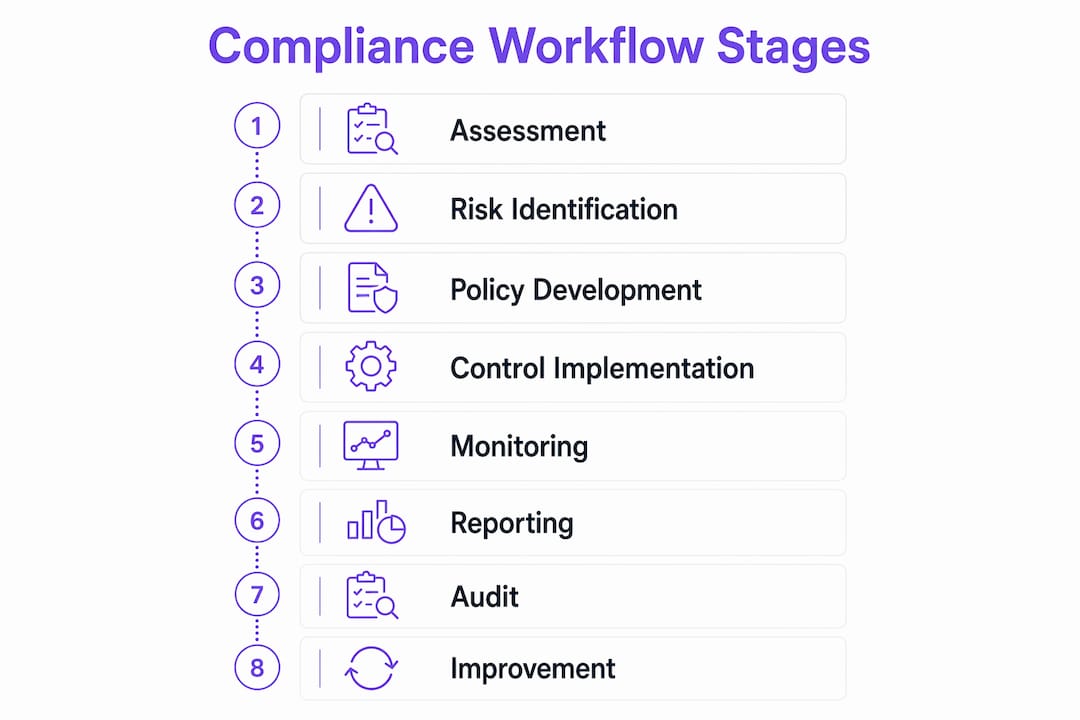
A functional compliance workflow includes eight core stages. Each stage builds on the previous one, creating a chain of accountability from initial risk identification to final evidence collection.
- Regulatory assessment. Identify which laws, standards, or internal policies apply to the process. This step sets the scope.
- Risk identification. Map where the process is most likely to fail or create exposure. Prioritize controls around those points.
- Policy development. Translate regulatory requirements into specific, written rules that govern the workflow.
- Control implementation. Build those rules into the process itself, through approval gates, required fields, or role-based access.
- Training. Confirm that every person who touches the workflow understands their responsibilities and the consequences of deviation.
- Monitoring and auditing. Track workflow execution in real time. Flag exceptions before they become violations.
- Reporting. Produce structured records of workflow performance for internal leadership and external regulators.
- Evidence collection. Capture timestamped proof that each control was executed correctly.
Each stage supports audit readiness. Skipping any one of them creates a gap that regulators or internal auditors will find.
Pro Tip: Map your compliance workflow against a recognized framework such as SOC 2 or ISO 27001 before you build it. Doing so identifies control gaps early and saves significant rework during your first audit.
How does automation enhance workflow compliance?
Automation turns compliance from a periodic scramble into a continuous, transparent process. Mature compliance workflows replace manual checklists with automated, role-based routing and timestamped approval gates that maintain real-time audit trails. The difference in reliability is significant.
Key benefits of automating your compliance workflow include:
- Consistent execution. Automated routing removes the human variable. Every instance of the workflow follows the same path.
- Real-time alerts. Automated monitoring flags exceptions the moment they occur, not days later during a manual review.
- Audit evidence as a byproduct. Automated workflows create append-only, timestamped logs that provide reliable audit trails without additional documentation effort.
- Faster regulatory adaptation. When a regulation changes, you update the workflow once. Every future instance reflects the change automatically.
- Scalability. A manual process that works for 10 transactions breaks at 1,000. An automated workflow handles volume without proportional increases in compliance risk.
Workflow automation reduces manual follow-up, strengthens audit readiness, and allows faster regulatory change response. That combination frees compliance teams to focus on judgment-intensive work rather than document chasing.
Pro Tip: Design your automated workflows so that audit evidence is generated as a direct byproduct of task completion, not as a separate step. Form submissions, approval clicks, and status changes should all write to a log automatically.
What are common challenges in achieving effective workflow compliance?
The most common failure is confusing a compliance program with a compliance workflow. Organizations invest heavily in policies, training, and governance committees, then assume the work is done. Without robust workflows, those programs fail under scrutiny because no one can prove the policies were actually followed.
Other frequent obstacles include:
- Fragmented processes. Compliance steps spread across email, spreadsheets, and disconnected tools create gaps in the audit trail and make consistent execution nearly impossible.
- Reactive compliance. Teams that treat compliance as a pre-audit activity rather than a daily operational practice accumulate risk between review cycles.
- Manual data collection. Gathering evidence after the fact is time-consuming and unreliable. Manual compliance increases the risk of missed deadlines and incomplete documentation compared to automated, repeatable processes.
- Unclear ownership. When no one is explicitly responsible for a workflow step, that step gets skipped or executed inconsistently. Accountability requires named owners, not shared inboxes.
- Inconsistent execution. Even well-designed workflows fail when team members apply them differently. Without enforcement mechanisms, variation is inevitable.
Recognizing these patterns early lets you address them in the workflow design phase rather than during a compliance incident.
How can organizations design effective compliance workflows?
Effective workflow design starts with four structural decisions: what triggers the workflow, who owns each step, what evidence gets collected, and what happens when a control fails. A well-designed compliance workflow defines all four before a single task is assigned.
| Design element | What to define | Why it matters |
|---|---|---|
| Trigger | The event or condition that starts the workflow | Prevents workflows from being skipped or started inconsistently |
| Step ownership | The specific role responsible for each task | Creates accountability and eliminates ambiguity |
| Evidence requirement | The document, log, or approval captured at each control point | Supports audit readiness without extra documentation effort |
| Escalation path | The action taken when a step fails or is overdue | Keeps the workflow moving and flags risk to leadership |
| Review cycle | The schedule for auditing workflow performance | Allows continuous improvement and regulatory adaptation |
Mapping your processes against compliance triggers is the most underused design technique. Start by listing every regulatory requirement or internal policy that applies to the process. Then identify the exact workflow step where each requirement must be satisfied. That mapping becomes your control framework.
Role-based ownership is equally critical. Assign compliance responsibility to a job function, not a person’s name. When people change roles, the workflow stays intact.
Pro Tip: Use workflow templates to standardize compliance steps across similar processes. A template built for vendor onboarding can be adapted for client onboarding in a fraction of the time it takes to build from scratch.
What practical benefits do professionals gain from enforcing workflow compliance?
Enforcing workflow compliance delivers measurable operational value, not just regulatory protection. The benefits compound over time as workflows mature and teams build institutional knowledge into the process itself.
- Reduced manual coordination. Automated routing and reminders eliminate the follow-up emails and status meetings that consume team time. Automation allows compliance teams to shift focus from manual document collection to strategic risk oversight and remediation.
- Continuous audit readiness. High-performing compliance workflows make evidence a native product of work execution via automated form submissions, logs, and approvals. That means audit preparation takes hours, not weeks.
- Stronger risk management. When compliance is embedded in the workflow, risk is identified and addressed at the point of execution. Problems surface before they become violations.
- Faster regulatory adaptation. Teams with documented, automated workflows update their controls in one place when regulations change. Teams without them scramble to retrain staff and revise manual processes across multiple systems.
- Better team alignment. Workflow automation improves team alignment by giving every participant a clear view of their responsibilities and the status of shared processes.
The importance of workflow compliance extends beyond avoiding penalties. Organizations that treat compliance as an operational discipline rather than a legal obligation build processes that are faster, more consistent, and easier to scale.
Key Takeaways
Workflow compliance is most effective when it is built into process execution from the start, not added as a review layer after the fact.
| Point | Details |
|---|---|
| Compliance lives in the workflow | Embedding rules into operational steps makes adherence automatic and verifiable. |
| Eight stages create the framework | Regulatory assessment through evidence collection forms a complete, auditable chain. |
| Automation removes the manual burden | Automated routing, alerts, and logs replace checklists and reduce human error. |
| Ownership and triggers are non-negotiable | Every workflow step needs a named role, a defined trigger, and a required output. |
| Evidence should be a byproduct | Audit-ready logs are generated automatically when workflows are designed correctly. |
Why most teams get workflow compliance backward
Most organizations I have seen treat compliance as something that happens to their processes, not something built into them. They write a policy, run a training session, and then hope execution follows. It rarely does consistently.
The real insight is that compliance is an architecture problem, not a behavior problem. If your workflow does not force the right action at the right moment, no amount of training will produce consistent results. The teams that get this right stop asking people to remember compliance steps and start building those steps into the process itself.
Automation is a powerful enabler here, but it is not a replacement for clear thinking. I have seen organizations automate broken workflows and end up with faster, more consistent failures. The sequence matters: design the workflow correctly first, then automate it. Trying to automate your way out of a poorly designed process just accelerates the problem.
The other thing I would push back on is the idea that compliance workflows are only for regulated industries. Any team that hands off work between people, collects approvals, or needs to demonstrate that a process was followed correctly benefits from this discipline. HR onboarding, client implementations, and financial approvals all carry compliance risk. Treating them with the same rigor as a SOC 2 control produces better outcomes across the board.
Continuous improvement is where the real value accumulates. A compliance workflow is not a one-time build. Review it quarterly, measure where exceptions occur, and update the design. Teams that do this consistently find that their workflows get faster and more reliable over time, not slower and more bureaucratic.
— Harsh
EasyFlow and workflow compliance automation
Compliance workflows only work when execution is consistent. EasyFlow automates task routing, approvals, and evidence capture so that every workflow instance follows the same path without manual coordination.

Teams using EasyFlow assign role-based ownership, set escalation rules, and generate timestamped audit logs as a natural byproduct of work completion. External collaborators join via magic links without creating accounts, which removes onboarding friction from compliance-sensitive processes like vendor reviews or client implementations. If you are ready to move your compliance workflows off spreadsheets and into a system that executes them reliably, start with EasyFlow and see how automated workflows change what your team can actually prove.
FAQ
What is the workflow compliance definition?
Workflow compliance is the practice of embedding regulatory requirements, internal policies, and governance controls directly into operational steps so that adherence occurs automatically during execution, not as a separate review.
How does a compliance workflow differ from a compliance program?
A compliance program sets high-level policies and governance rules. A compliance workflow is the granular, repeatable execution layer that operationalizes those policies in daily work and produces verifiable evidence.
What are the core stages of a compliance workflow?
A functional compliance workflow covers eight stages: regulatory assessment, risk identification, policy development, control implementation, training, monitoring and auditing, reporting, and evidence collection.
How does automation improve workflow compliance?
Automation replaces manual checklists with role-based routing, real-time alerts, and timestamped logs, turning compliance into a continuous process that generates audit evidence as a byproduct of normal work.
What is the most common reason compliance workflows fail?
Unclear ownership is the leading cause. When no specific role is responsible for a workflow step, execution becomes inconsistent and audit trails break down, even when the underlying policy is sound.