
SOP Automation: Your Practical Ops Playbook for 2026

AI-powered SOP automation is the fastest path from a manual, error-prone process to a documented, executable workflow your team can run consistently. Start today by picking one routine SOP, capturing it with a screen recorder or import, and wiring a simple webhook or alarm to trigger it in a test environment.
- Pick one SOP to pilot. Choose something your team runs at least weekly with clear, repeatable steps (incident triage, new-hire day-one checklist, vendor handoff).
- Capture it. Record the actual work using a browser recorder or import an existing document, then let an AI draft the step structure and screenshots.
- Wire a trigger. Connect a monitoring alarm, a scheduled event, or a webhook to kick off the SOP in a sandbox before you touch production.
Operations managers, compliance officers, and process improvement professionals get the most out of this approach. EasyFlow is the practical platform to trial first: it captures, drafts, executes, and audits SOP workflows without requiring every collaborator to create an account.
Key Takeaways
AI-powered SOP automation converts static procedures into executable, auditable workflows, and the fastest path to a working pilot is a simple, high-frequency SOP captured and tested within one week.
| Point | Details |
|---|---|
| Start with the simplest SOP | Pick a high-frequency, low-variability process with API-connected tools for the fastest first win. |
| Test before production | Run unit tests, a sandbox dry-run, and a chaos/fault injection experiment before any production rollout. |
| Governance is non-negotiable | Assign an owner, version every change, and log every execution to meet audit and compliance expectations. |
| Change management drives adoption | Teams that trust the automation use it; run a tabletop drill and make the audit log visible to build that trust. |
| EasyFlow executes, not just tracks | EasyFlow runs handoffs, supports magic links for external collaborators, and logs every step automatically. |
Table of Contents
- What is SOP automation and why does it matter?
- How does AI-powered SOP automation actually work?
- Which SOP types deliver the fastest automation wins?
- How do you wire the technical architecture for SOP automation?
- How do you test and validate an automated SOP before production?
- What governance and best practices keep SOP automation under control?
- Why EasyFlow works well for ops teams automating SOPs
- How to automate your first SOP: a practical quick-start timeline
- What most SOP automation pilots get wrong
- Start your first SOP automation pilot with EasyFlow
- Sources
- FAQ
What is SOP automation and why does it matter?
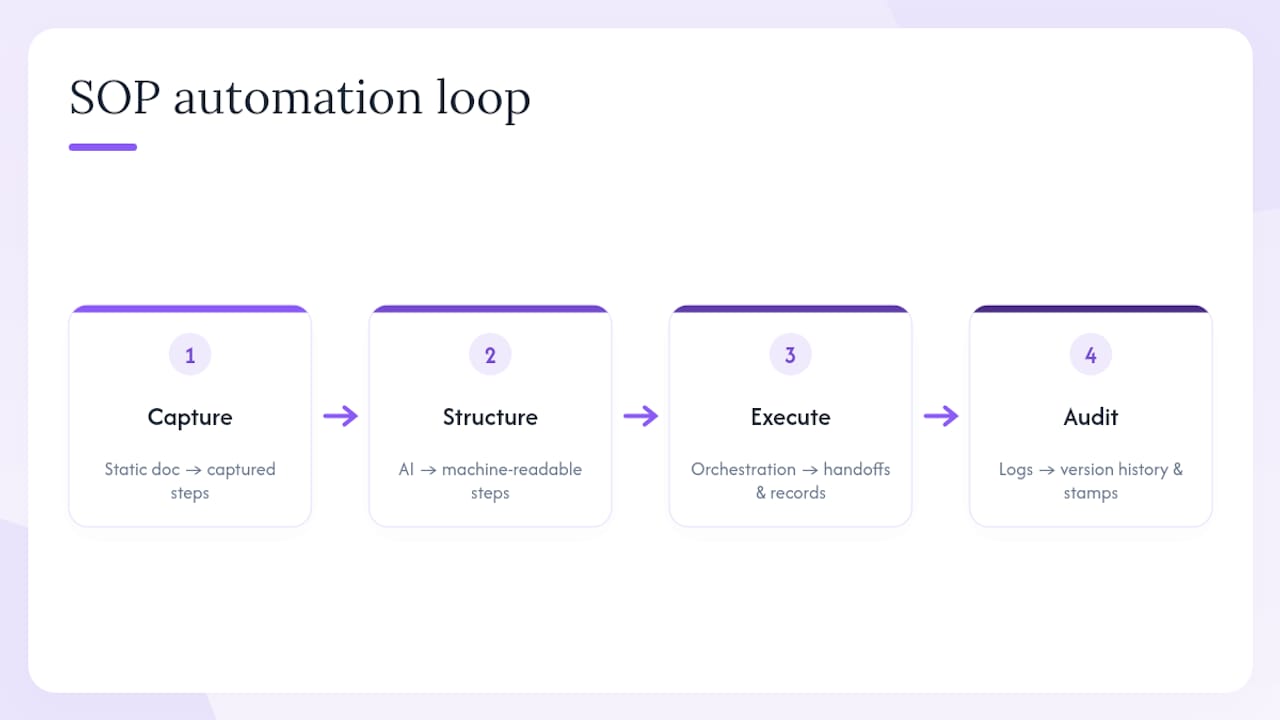
SOP automation is the practice of converting a standard operating procedure from a static document into a live, executable workflow: you capture the steps, structure them with AI assistance, publish them with access controls, execute them through an orchestration engine, and log every run for audit purposes.
The four-stage loop is capture → structure → execution → audit. Each stage adds something the paper version never had: machine-readable steps, automatic handoffs, traceable execution records, and version history.
Consistency and quality. A human following a PDF skips steps under pressure. An automated workflow does not. Every run follows the same sequence, which matters most in regulated environments where deviation is a liability.
Faster recovery. Incident response SOPs that fire automatically on a monitoring alarm cut the gap between detection and containment. The team arrives to a process already in motion rather than a blank screen.
Auditability and version control. 21 CFR 820.70 requires written instructions and records as part of a quality system for device manufacturers. That same principle applies across regulated industries: every SOP change needs a version stamp, an approver, and a traceable execution log. Automation makes that record automatic rather than manual.
Resource scaling. Automating a recurring SOP frees the person who used to run it manually to handle work that actually needs judgment. That compounding effect across ten or twenty SOPs is where the real capacity gain shows up.
Stat to know: Teams that automate workflow handoffs consistently report fewer dropped tasks and faster cycle times across onboarding, compliance, and incident response workflows.
How does AI-powered SOP automation actually work?
The pipeline has five stages. Understanding each one helps you evaluate tools and spot where your current setup breaks down.
Capture
You record the actual work: a browser session, a screen recording, or an imported document. Capture-first tools auto-screenshot each step and generate a draft description. The key word is actual — capture what people do, not what the old policy document says they should do.
Draft
An AI model takes the raw recording and produces structured steps with titles, descriptions, and screenshots. Agentic LLM architectures go further: they model the SOP as a directed acyclic graph (DAG) where each node maps to either an API call or a user interaction, with execution memory that lets the agent recover from errors or choose alternative branches. That structure is far more resilient than a rigid rule-based script that breaks the moment a UI changes.
Edit and QA
A human reviewer checks the AI draft, adds exception handling, fills in branching logic (“if the vendor hasn’t responded in 24 hours, escalate to the account manager”), and stamps a version. Automation-ready SOPs include explicit QA checkpoints, exception paths, and a review structure — not just a linear list of steps.
Publish
The reviewed SOP gets published with role-based access controls, assigned to a template library, and made available to the execution engine. This is also where you set the trigger type.
Execute
The orchestration engine fires the SOP based on a trigger and routes each step to the right executor. Common trigger types include:
- Monitoring alarms (CloudWatch, Prometheus threshold breach)
- Scheduled events (cron, EventBridge rules)
- Webhooks (form submission, ticket creation, external API event)
- CLI or manual start (an operator kicks off a runbook on demand)
- Monitoring alerts from CI/CD pipelines (a failed deployment triggers a rollback SOP)
Execution environments range from API calls and serverless functions to agent-based runners (SSM Automations, LLM agents) and UI-driven steps handled by a human via a task link.
Pro Tip: Capture the actual work, not the documented work. Shadow a team member through one real run of the SOP, record the screen, and note every tool they touch. That session will reveal three to five undocumented steps that would silently break any automation built from the old policy doc.
Which SOP types deliver the fastest automation wins?
Not every SOP is worth automating first. The highest-return candidates share three traits: they run frequently, they follow a predictable path most of the time, and they touch systems that already have APIs or webhooks.

Incident response and runbooks. When a monitoring alarm fires at 2 AM, an automated runbook can isolate a resource, capture diagnostic data, and page the right engineer before anyone opens a laptop. The time saved between alarm and containment is measurable in minutes, and in a production outage, minutes matter.
Employee onboarding checklists. Onboarding involves the same sequence of account provisioning, tool access, and orientation tasks for every new hire. Automating it reduces onboarding errors and removes the coordinator from the critical path for routine steps. The human stays involved for judgment calls; the workflow handles the handoffs.
Recurring compliance activities. Quarterly access reviews, vendor security assessments, and audit evidence collection follow fixed schedules and fixed checklists. Automating the collection and routing steps means the compliance officer reviews findings rather than chasing them.
Vendor handoffs and QA sample checks. Any process that crosses an organizational boundary (sending a deliverable to a vendor, collecting a sign-off, logging a QA result) is a handoff that can be automated with a task link or a webhook.
Stat to know: Onboarding automation case studies consistently show that automating the handoff-heavy steps of onboarding cuts coordinator time per new hire significantly, with the largest gains in multi-team or multi-system processes.
Pro Tip: Score your SOP candidates on four dimensions before you pick one: frequency (runs per month), variability (how often the path branches), risk (cost of a missed step), and integration readiness (does every tool involved have an API or webhook?). The SOP with the highest frequency and lowest variability is almost always the right first pilot.
How do you wire the technical architecture for SOP automation?
The reliable pattern is: event → trigger → orchestrator → SOP document → executor → feedback/alerting. Every component has a job, and the seams between them are where most pilots fail.
AWS Resilience Hub’s event-driven approach demonstrates this cleanly: a CloudWatch alarm fires, EventBridge routes the event to an SSM Automation document, the automation executes the SOP steps, and the result feeds back into alerting. The same pattern works with any monitoring stack — swap CloudWatch for Prometheus and EventBridge for a webhook receiver.
“Agentic LLM workflows can execute SOPs as fault-tolerant DAGs, reducing maintenance compared with rigid rule-based bots — because the agent adapts to UI and format changes rather than breaking on them.” — Agent-S research, arXiv 2503.15520
Integration checklist
Before you wire a pilot, confirm you have each of these in place:
- Monitoring and alerting: CloudWatch/EventBridge, Prometheus/Alertmanager, or equivalent. The alarm is the trigger; if it’s unreliable, the automation is unreliable.
- Webhooks: Inbound webhook endpoint on your orchestrator to receive events from external systems (ticketing, CI/CD, forms).
- SSO/SCIM: Identity federation so the automation runs under a service account with auditable permissions, not a personal credential.
- APIs for step execution: Every tool the SOP touches should have an API or a task-link mechanism for human steps.
- Artifact storage: Screenshots, logs, and execution records need a defined storage location (S3, a document store, or your SOP platform’s built-in audit log).
- Version control: The SOP document itself should live in a versioned store with change history and approval records.
Execution options and trade-offs
Agent-based runners (SSM Automations, LLM agents) work well for multi-step infrastructure SOPs where each step calls an API or runs a script. They handle branching and error recovery natively. Serverless/API-driven runbooks are lighter and faster for single-purpose automations (send a notification, update a record, trigger a downstream job). For steps that genuinely require a human decision, a task assignment via magic link keeps the workflow moving without blocking on a manual check-in.
Understanding workflow orchestration patterns before you build saves significant rework when the SOP grows beyond its first version.
Pro Tip: Run the automation under a dedicated service account with least-privilege IAM roles. Store secrets in a secrets manager (AWS Secrets Manager, HashiCorp Vault), never in the SOP document itself. Every execution should write a structured log entry: timestamp, step ID, outcome, and the identity that triggered the run. That log is your audit trail.
How do you test and validate an automated SOP before production?
Testing an automated SOP is not optional. An untested automation that fires in production during an incident is worse than no automation at all — it can take a bad situation and make it unpredictable.

The AWS Resilience Hub CI/CD pattern uses fault injection (FIS-style chaos experiments) to validate both the automation and the monitoring that triggers it. The experiment injects a fault, confirms the alarm fires within the expected window, verifies that EventBridge routes the event correctly, and checks that the SOP execution completes and logs a success record. Run that experiment in CI before every change to the SOP or its dependencies.
Testing sequence
- Unit test each step. Run the individual step in isolation against a mock or sandbox environment. Confirm it handles the happy path and at least one error condition.
- Dry-run in sandbox. Execute the full SOP end-to-end in a non-production environment with real (but non-critical) data. Log every step outcome.
- Automated CI run. Add the dry-run to your CI pipeline so it executes on every commit that touches the SOP document, its triggers, or its dependencies.
- Chaos/fault injection experiment. Inject the fault condition the SOP is designed to handle. Confirm the alarm fires, the trigger routes correctly, and the SOP completes within the expected time window.
- Acceptance test with a stakeholder. Walk the SOP owner through one full execution in the sandbox. Get sign-off before promoting to production.
- Gradual rollout. Use a feature flag or a percentage-based rollout to run the automation alongside the manual process for the first week in production. Compare outcomes.
Key metrics to track
- Run success rate: percentage of executions that complete without a manual intervention or error.
- Mean time to recovery (MTTR): for incident SOPs, the time from alarm to resolution. This is the clearest before/after metric.
- False-trigger rate: how often the SOP fires when it shouldn’t. A high rate erodes trust faster than almost anything else.
- Time saved per run: actual clock time versus the manual baseline.
- Audit log completeness: percentage of runs with a full, structured execution record.
When an automation fails, it should fail loudly: write an error event to your alerting channel, log the failed step with context, and either retry with backoff or hand off to a human via a task notification. Silent failures are the most dangerous outcome in any automated SOP.
What governance and best practices keep SOP automation under control?
Automation without governance creates a different kind of risk: processes that run without anyone knowing who owns them, when they were last reviewed, or whether they still reflect current policy.
Governance checklist
- Assign an owner to every SOP. The owner is responsible for accuracy, review cadence, and approving changes. No owner means no accountability when the SOP produces a wrong outcome.
- Set a review cadence. Quarterly for high-risk or regulated SOPs; semi-annually for stable, low-risk ones. Put the review date in the SOP metadata.
- Version every change. Every edit gets a version number, a change summary, and an approver. The execution engine should log which version ran for each execution.
- Control access. Separate who can view, edit, approve, and trigger an SOP. Editors should not be able to approve their own changes.
- Require a change approval step. Any modification to a production SOP should go through at least one reviewer before it goes live. Automation-ready SOP structure includes explicit review checkpoints for exactly this reason.
Common pitfalls
- Automating without tests. If you skip the sandbox and CI steps, the first real failure will happen in production, under pressure.
- Hardcoding credentials. A service account password in a SOP document is a security incident waiting to happen. Use a secrets manager.
- Failing to simulate failures. An automation that has never been tested against its failure condition is not a safety net; it’s a false sense of security.
- Automating a broken process. If the manual SOP is inconsistent or poorly documented, automating it just makes the inconsistency faster and harder to catch.
Pro Tip: Before you roll out an automated SOP to the full team, run a tabletop drill. Walk through the SOP manually with the people who will use it, narrate each automated step aloud, and ask “what would you do if this step failed?” That conversation surfaces edge cases that no amount of unit testing will catch, and it builds the team’s confidence in the automation at the same time.
Why EasyFlow works well for ops teams automating SOPs
EasyFlow is built for the exact problem ops and compliance teams run into with standard project management tools: those tools track tasks, but they don’t execute them. EasyFlow actually runs the process.
The features that matter most for SOP automation:
- AI-powered capture and draft: describe or import a process and EasyFlow generates the workflow structure, ready to edit and publish.
- Execution orchestration: the platform routes each step to the right person or system automatically, with reminders and blocker detection built in.
- Magic links for external collaborators: vendors, contractors, and clients can complete their steps without creating an account, which removes the single biggest friction point in cross-organizational SOPs.
- Pre-built templates: common SOP types (onboarding, client implementation, vendor handoff) are available as starting points, not blank canvases.
- Version control and audit logs: every change is versioned, every execution is logged, and the audit trail is available without a separate tool.
- API and webhook support: EasyFlow connects to your monitoring stack, your ticketing system, and your CI/CD pipeline so SOPs can fire automatically on the triggers you already use.
For a compliance officer running quarterly access reviews or an ops manager handling client onboarding, that distinction is the whole point. The EasyFlow trial gives you 14 days on a paid plan to run a real pilot: pick one SOP, capture it, wire a trigger, and measure the outcome.
How to automate your first SOP: a practical quick-start timeline
The goal for a first pilot is a working, tested automated SOP within five to seven business days. Here is a realistic effort breakdown:
| Phase | Activity | Estimated effort |
|---|---|---|
| Day 1: Capture | Record or import the SOP; let AI generate the draft | 2–3 hours |
| Day 2: Edit and QA | Human review, add exception paths, version stamp | 2–4 hours |
| Day 3: Publish | Set access controls, assign owner, add to template library | 1–2 hours |
| Day 4: Wire triggers | Connect monitoring alarm or webhook; configure executor | 2–4 hours |
| Day 5: Test | Unit tests, sandbox dry-run, chaos experiment | 3–5 hours |
| Day 6–7: Monitor | Gradual rollout, compare outcomes vs. manual baseline | Ongoing |
Execution checklist
- Record one full manual run of the SOP (screen capture + notes).
- Import or paste the steps into your SOP platform; review the AI-generated draft.
- Add exception handling for the two or three most common failure modes.
- Assign an owner and set the first review date.
- Map every tool the SOP touches and confirm API or webhook availability.
- Wire the trigger (alarm, schedule, or webhook) in a sandbox environment.
- Run the unit test for each step; fix failures before the full dry-run.
- Execute the full dry-run; log every step outcome.
- Run a chaos/fault injection experiment to confirm the trigger fires correctly.
- Get stakeholder sign-off; promote to production with a feature flag.
- Monitor run success rate, MTTR, and false-trigger rate for the first two weeks.
Success at each milestone: Day 3 means a published, versioned SOP with an owner. Day 5 means a passing CI run and a completed chaos experiment. End of week two means a production automation with a measured baseline for MTTR or time saved.
What most SOP automation pilots get wrong
The teams that struggle with SOP automation pilots almost always make the same three mistakes, and none of them are technical.
The first is scope creep on the first pilot. An ops manager picks an incident response SOP that touches six systems, requires three approvals, and has twelve exception paths. It takes six weeks, the team loses confidence, and the whole program stalls. The right first pilot is almost embarrassingly simple: a five-step process that runs twice a week and touches two systems. Get one win on the board before you tackle complexity.
The second mistake is skipping the test investment. Teams that go straight from “we captured the SOP” to “we wired it to production” are setting themselves up for a failure that happens at the worst possible moment. The chaos experiment step feels like overhead until the first time it catches a misconfigured trigger that would have silently dropped an incident response. That one catch pays for the entire testing investment.
The third is treating automation as a technology project rather than a change management one. The people who currently run the SOP manually need to understand what the automation does, trust that it handles edge cases correctly, and know exactly when to intervene. A team that doesn’t trust the automation will work around it, which defeats the purpose entirely. Run the tabletop drill. Show the execution log. Make the audit trail visible.
The broader point: workflow automation’s role in team alignment is as much about communication and trust as it is about the technology. The teams that get this right treat the first pilot as a proof of concept for the people, not just the platform.
Start your first SOP automation pilot with EasyFlow
Ops teams that have spent months managing SOPs in static documents get their first automated workflow running in days with EasyFlow, not weeks. The platform captures your process, drafts the workflow structure with AI, executes every handoff automatically, and logs the full audit trail without a separate tool.

The 14-day trial on a paid plan gives you enough runway to run a real pilot: capture one SOP, wire a trigger, test it in a sandbox, and measure the outcome against your manual baseline. External collaborators join via magic link, so you don’t lose time on account setup for vendors or contractors. When the pilot works, scaling to the next SOP takes hours, not weeks.
Start your EasyFlow trial and bring one SOP to your first session: the process name, the tools it touches, and the trigger condition you want to automate.
Sources
- Automate Standard Operating Procedures (SOPs) execution with AWS Resilience Hub | AWS Cloud Operations Blog
- Agent-S: LLM Agentic workflow to automate Standard Operating Procedures
- How to Write SOPs That Are Automation-Ready
FAQ
What does SOP stand for?
SOP stands for Standard Operating Procedure: a documented, step-by-step set of instructions for completing a recurring task consistently and correctly.
What is SOP in automation?
In automation, an SOP is a structured workflow that an orchestration engine can execute automatically, routing each step to the right person or system based on triggers, conditions, and rules rather than manual coordination.
Can ChatGPT generate SOPs?
ChatGPT can draft an SOP from a description or a set of notes, but the output needs human review, exception handling, and a QA step before it is automation-ready. Purpose-built SOP automation tools like EasyFlow add execution, versioning, and audit logging that a general-purpose language model does not provide on its own.
What is the best software to create and automate SOPs?
The best choice depends on whether you need documentation only or actual execution. EasyFlow is built for teams that need both: it captures and drafts the SOP with AI, then executes the workflow, routes handoffs, and logs every run automatically, including steps assigned to external collaborators via magic link.
How long does it take to automate a first SOP?
A simple, well-scoped SOP can be captured, edited, tested, and running in production within five to seven business days, with roughly 10 hours of total effort split across capture, editing, trigger wiring, and testing.