
Reduce Onboarding Errors with Automation: 2026 Guide

Automation is the most reliable method to reduce onboarding errors with automation by replacing manual handoffs with standardized, triggered workflows that execute consistently every time. Poor onboarding costs between 50% and 200% of an employee’s annual salary when early turnover results from confusion, missed steps, or administrative overload. The industry term for this approach is workflow automation, and it covers everything from document collection to IT provisioning to scheduled communications. When you build automation on a well-mapped process, new hires arrive prepared, paperwork clears before day one, and HR teams spend time on people instead of paperwork.
How to reduce onboarding errors with automation: prerequisites first
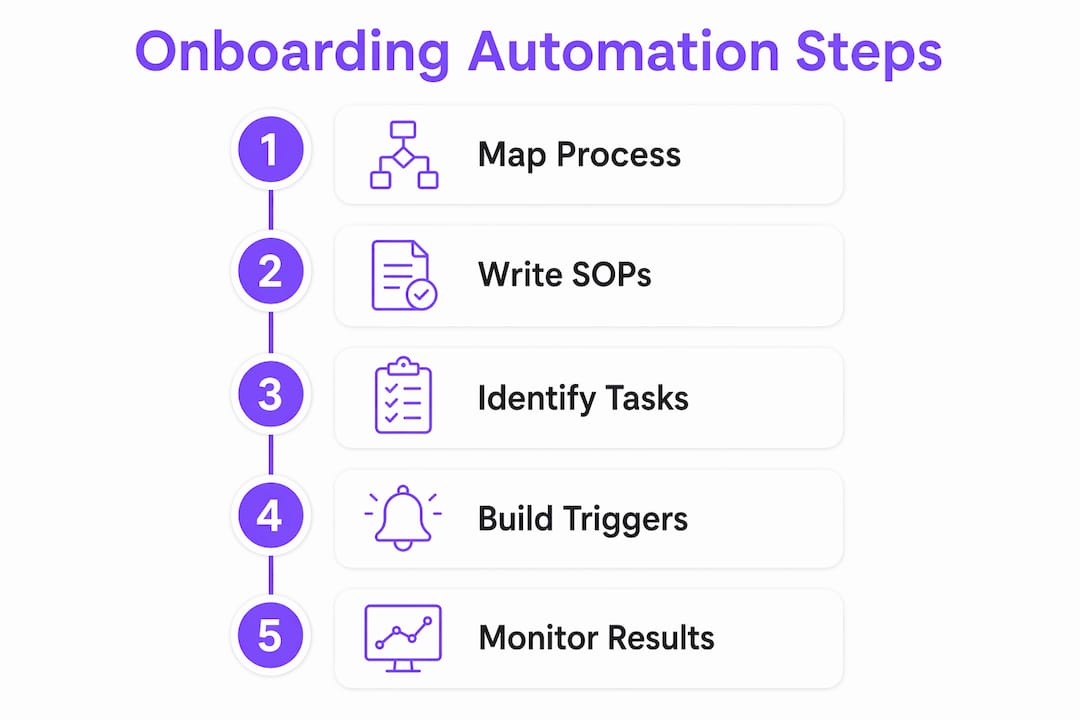
The single biggest mistake HR teams make is automating a broken process. Automating without process mapping scales chaos rather than fixing it. Before you touch any automation tool, you need a clear picture of every onboarding task, who owns it, and when it must happen.
Map your onboarding from offer to 90 days
Start by listing every task from offer acceptance through the new hire’s 90th day. Include document collection, equipment requests, system access, benefits enrollment, training assignments, and manager introductions. Assign a clear owner and a deadline to each task. This map becomes the foundation your automation will execute.

Write SOPs before you build triggers
Standard operating procedures (SOPs) turn your task map into repeatable instructions. An SOP for IT provisioning, for example, specifies exactly which accounts to create, in which order, and what confirmation to send. Without SOPs, automation produces inconsistent outputs because the underlying logic was never defined. Write the procedure first, then automate it.
Identify which tasks are right for automation
Not every onboarding task belongs in an automated workflow. Routine, repeatable steps with clear inputs and outputs are ideal: document requests, e-signature collection, account creation, and training assignments. Judgment-based tasks, such as a manager’s first coaching conversation or a culture discussion, stay human. Separating these two categories prevents automation from feeling cold or impersonal.
What to look for in an onboarding automation platform
When selecting a platform, prioritize these capabilities:
- Central HRIS integration: The platform must connect to your HR system of record so new hire data flows automatically without manual re-entry.
- Workflow triggers: Automation should fire based on events like offer acceptance, start date, or task completion, not manual clicks.
- E-signature support: Document collection and signing must happen inside the workflow, not through a separate email chain.
- Role-based provisioning: The system should assign tools and access based on the new hire’s role and location automatically.
- Training module assignment: Learning paths should trigger based on role, department, or seniority without HR manually enrolling each person.
A single source of truth platform with integrated downstream tools removes the handoff friction that causes data loss and duplicate entry. That integration is what separates genuine workflow automation from a task checklist.
Pro Tip: Before evaluating any platform, document your current onboarding error rate by reviewing the last 10 new hire files for missed steps, late completions, or incorrect data. That baseline tells you exactly what to fix and gives you a benchmark to measure improvement.
Step-by-step guide to automating your onboarding workflow
Effective onboarding automation saves HR teams 45–105 minutes per new hire and raises productivity by over 70%. That time savings compounds across every hire you make. The steps below build a complete automated workflow from offer acceptance through the first 90 days.
-
Set your primary trigger. Configure your HRIS to fire an automation sequence the moment a candidate accepts an offer. This single event starts every downstream task automatically.
-
Automate document collection before day one. Send a welcome packet with e-signature requests for tax forms, direct deposit authorization, and policy acknowledgments. Set a deadline and an automatic reminder if the new hire has not completed signing within 48 hours.
-
Provision IT access by role. Connect your HRIS to your IT provisioning system so that the new hire’s role and location automatically determine which accounts, devices, and software licenses to create. No ticket, no manual request.
-
Assign training paths automatically. Map each role to a predefined learning path in your learning management system (LMS). The automation enrolls the new hire the moment their profile is created, so training is ready on day one.
-
Schedule welcome communications. Build a timed sequence of emails or messages: a welcome from HR on day one, a team introduction from the manager on day two, a benefits reminder on day five, and a 30-day check-in prompt two weeks out.
-
Add conditional logic for stalled tasks. If a task is not completed by its deadline, the workflow escalates automatically. A missed e-signature triggers a reminder to the new hire and a notification to HR. A missed IT provisioning confirmation alerts the IT lead.
-
Build manager reminders into the sequence. Schedule automated nudges to the hiring manager at key moments: the day before the new hire starts, the end of week one, and the 30-day mark. These prompts keep managers engaged without requiring HR to chase them manually.
Pro Tip: Automation handles the schedule, but the manager’s words matter. Write a short script or talking points for each manager prompt so the conversations feel personal, not like a compliance checkbox.
What are the most common onboarding automation mistakes?
Common onboarding mistakes include automating broken processes, failing to sequence communications, and neglecting manager roles. Each of these errors is preventable with the right design choices.
-
Automating an unstandardized process. If your current onboarding is inconsistent across departments, automation will lock in that inconsistency at scale. Standardize first, then automate.
-
Sending too much content at once. Information overload is a top cause of onboarding failure. Delivering every policy document, training module, and form on day one overwhelms new hires and increases errors. Sequence content to match the new hire’s readiness at each stage.
-
Running disconnected systems. When your HRIS does not talk to your IT system, your LMS, or your payroll platform, data must be re-entered manually at each handoff. Each manual entry is a potential error. Integration eliminates this.
-
Removing the manager from the process. Automation handles admin, but new hires with actively involved managers are 3.4 times more likely to rate onboarding as exceptional. Automation should prompt and support manager involvement, not replace it.
-
Skipping feedback loops. Without structured check-ins, errors accumulate silently. Build pulse surveys at the 7, 30, and 90-day marks to catch friction while it is still correctable.
Pro Tip: Run a pilot with one department before rolling automation out company-wide. A small test group surfaces edge cases and broken logic without affecting every new hire.
How do you monitor automated onboarding for ongoing accuracy?
Monitoring is what separates a one-time setup from a continuously improving system. The right metrics tell you where automation is working and where it is creating new problems.
Track these four metrics from day one:
- Task completion rate: The percentage of onboarding tasks completed on time. A drop signals a broken trigger, a confusing instruction, or a bottleneck in a specific step.
- Time to productivity: How long it takes a new hire to reach full output in their role. Automation should shorten this by removing delays in access, training, and information delivery.
- New hire satisfaction score: Collected via pulse surveys, this score reflects the new hire’s experience of the process. Low scores at the 7-day mark often point to information overload or a missing human touchpoint.
- Error rate per hire: Track how many corrections, re-submissions, or escalations occur per onboarding cycle. This is your clearest measure of whether automation is reducing mistakes.
Feedback loops at 7, 30, and 90 days maximize improvement by catching friction early while new hires’ memories are fresh. A 7-day survey might reveal that the IT provisioning email arrived too late. A 30-day survey might show that the training sequence felt rushed. Each data point gives you a specific adjustment to make.
Use a centralized dashboard to view task completion across all active onboarding workflows simultaneously. When one new hire’s document signing stalls, you see it immediately instead of discovering it on their start date. Adjust automation timing, content sequencing, and escalation rules based on what the data shows, not on assumptions.
Pro Tip: Schedule a quarterly review of your onboarding automation with both HR and a recent cohort of new hires. Their direct feedback on what felt automated versus what felt personal will guide your next round of improvements.
For teams looking to connect automation to employee satisfaction outcomes, the relationship between onboarding accuracy and retention is well documented and worth building into your reporting framework.
Key Takeaways
Automating onboarding reduces errors only when the underlying process is standardized, integrated, and monitored with structured feedback at regular intervals.
| Point | Details |
|---|---|
| Standardize before automating | Document SOPs for every routine task before building any workflow trigger. |
| Integrate your systems | Connect your HRIS to IT, LMS, and payroll to eliminate manual data re-entry errors. |
| Sequence content delivery | Release training and documents in stages to prevent information overload and improve retention. |
| Keep managers in the loop | Use automation to prompt manager involvement at key moments, not to replace human interaction. |
| Monitor with structured feedback | Run pulse surveys at 7, 30, and 90 days to catch errors early and adjust workflows based on real data. |
Where automation ends and leadership begins
The most common mistake I see HR teams make is treating automation as the finish line. They build a workflow, watch it run, and assume the onboarding problem is solved. It rarely is.
Automation is infrastructure. It handles the paperwork, the provisioning, the reminders, and the scheduling. What it cannot do is make a new hire feel genuinely welcomed, answer an unexpected question with empathy, or notice that someone is struggling in their first week. That requires a person.
The data on manager involvement is striking. Only 11% of employers extend structured onboarding beyond three months, yet manager involvement is the single strongest predictor of whether a new hire rates their experience as exceptional. Automation frees managers from admin overhead so they have the time and mental space to actually show up for their people. That is the real return on investment.
I have seen teams build technically impressive onboarding workflows that still produce disengaged new hires because no one thought about the human moments. The welcome email was automated. The manager introduction was automated. Even the “how are you settling in?” message was automated. New hires noticed. They always do.
The right balance is this: automate everything that does not require judgment, empathy, or relationship. Free your managers to do the things that only humans can do. Then use your metrics to confirm that both sides of the equation are working. Automation without human design is just a faster way to make people feel like a ticket number.
— Harsh
How EasyFlow fits into your onboarding automation setup
HR teams that want to cut follow-ups and eliminate manual handoffs without rebuilding their entire tech stack have a direct path forward with EasyFlow.

EasyFlow automates the workflows that typically require constant manual coordination: document collection, task assignments, manager notifications, and cross-team handoffs. External collaborators, including new hires who have not yet set up company accounts, can complete tasks through magic links without creating a login. That removes one of the most common friction points in early onboarding. Teams using EasyFlow for onboarding workflow automation report fewer follow-ups, faster task completion, and cleaner handoffs between HR, IT, and hiring managers. If your onboarding process still depends on email chains and manual reminders, EasyFlow is worth a close look.
FAQ
What does it mean to reduce onboarding errors with automation?
Reducing onboarding errors with automation means replacing manual, error-prone handoffs with triggered workflows that execute the same steps correctly every time. This covers document collection, IT provisioning, training assignment, and scheduled communications.
How long does it take to set up onboarding automation?
Setup time depends on the complexity of your existing process and the platforms you use. Teams with documented SOPs and an integrated HRIS can configure a basic automated workflow in one to two weeks.
What metrics show that onboarding automation is working?
Track task completion rates, time to productivity, new hire satisfaction scores, and error rates per hire. Feedback loops at 7, 30, and 90 days give you the clearest picture of where the process is succeeding or breaking down.
Can automation replace the manager’s role in onboarding?
Automation cannot replace manager involvement. Automating routine tasks frees managers to focus on coaching and relationship building, which are the interactions that most directly affect new hire satisfaction and retention.
What is the biggest risk of onboarding automation?
The biggest risk is automating a process that was already broken. Standardizing workflows into documented SOPs before applying automation prevents you from scaling errors instead of eliminating them.