
Human-in-the-Loop Automation: A Practical Rollout Guide

Human-in-the-loop automation, often abbreviated as HITL, is a workflow design pattern where automated systems pause at defined decision points and wait for a human to review, approve, or correct before continuing execution. The one-line decision rule: use HITL when the cost of an automated error exceeds the cost of a human review. A fraud-detection pipeline flagging a $50,000 wire transfer is the textbook case. The automation does the heavy lifting; the human catches what the model cannot afford to miss.
Key Takeaways
Human-in-the-loop automation works when the cost of an automated error exceeds the cost of a human review, and it scales when reviewer throughput, schema design, and feedback loops are treated as first-class engineering concerns from day one.
| Point | Details |
|---|---|
| Choose HITL deliberately | Use it when automated errors carry costs that outweigh the latency and staffing expense of human review. |
| Keep reviewer schemas minimal | One boolean decision plus optional notes is the baseline; every extra field slows throughput and increases errors. |
| Set SLAs with fallback behaviors | Configure timeouts to auto-escalate or default to a safe action so workflows never stall indefinitely. |
| Measure review rate and MTTR | A growing queue or rising mean time to review signals a routing or capacity problem before it becomes a crisis. |
| EasyFlow for HITL rollouts | EasyFlow executes approval gates, magic-link reviewer handoffs, and audit logging without requiring reviewer accounts. |
Table of Contents
- What human-in-the-loop automation actually means for your team
- Core HITL control-flow patterns you need to know
- What you need to build a production HITL system
- Where HITL actually fits: common use cases
- Design principles that keep HITL from becoming a bottleneck
- How major platforms implement HITL: patterns and examples
- How to run a several-week HITL pilot and measure what matters
- Your step-by-step HITL rollout checklist
- The part of HITL most teams get wrong
- How EasyFlow supports human-in-the-loop workflows
- Sources
- FAQ
What human-in-the-loop automation actually means for your team
IBM defines HITL as systems where humans actively participate in operation, supervision, or decision-making, and highlights improved accuracy and governance as the primary benefits. That framing matters because it positions HITL not as a fallback for weak AI, but as a deliberate architectural choice.
Benefits of HITL automation:
- Accuracy uplift: Human reviewers catch edge cases, ambiguous inputs, and novel scenarios that trained models miss.
- Accountability: Every decision has a named owner, a timestamp, and a rationale, which satisfies audit and compliance requirements.
- Safer rollouts: Teams can automate incrementally, routing uncertain predictions to humans while high-confidence cases run fully automated.
- Explainability: Reviewer decisions create labeled data that explains why a workflow took a given path, which matters for regulated industries.
Drawbacks and operational costs:
- Latency: Every human checkpoint adds wait time. A reviewer who takes four hours to respond turns a real-time pipeline into a batch process.
- Staffing and scheduling: Review queues need coverage. Gaps in coverage stall workflows.
- Scaling ceiling: Human throughput is finite. As volume grows, review costs grow linearly unless you automate more of the routing.
- Human error: Reviewers under time pressure make mistakes too, especially with poorly designed review interfaces.
The comparison with full automation comes down to one question: what happens when the system is wrong? For low-stakes, high-volume decisions with well-understood distributions, full automation wins on cost and speed. For high-stakes, low-volume decisions with real consequences for errors, HITL is the right call. A practical rule of thumb: if you would not be comfortable explaining an automated decision to a regulator or a customer, put a human in the loop.
Core HITL control-flow patterns you need to know
Three patterns cover the vast majority of real-world HITL implementations. Understanding them at the control-flow level lets you choose the right one before you write a line of configuration.
The pause/wait-for-input pattern
This is the most common pattern. The workflow reaches a checkpoint, serializes its current state, and suspends. A notification goes out to a reviewer. The reviewer opens a form, makes a decision, and submits. The workflow resumes from exactly where it paused, carrying the reviewer’s input as a variable.
Elastic documents this precisely: a waitForInput step pauses execution, presents structured context to a reviewer, and resumes with the reviewer’s response. The key design requirement is durable state. The workflow engine must be able to persist the execution context across an indefinite pause, because a reviewer might respond in two minutes or two days.
The request/response typed channel pattern
Microsoft’s Agent Framework describes a RequestPort pattern where an executor sends a typed request to an external system and pauses until a response arrives. The framework saves pending requests as part of workflow checkpoints, so they survive restarts and long pauses. When the response arrives, the runtime re-emits it to the correct execution context using a correlation identifier.
The correlation ID is the piece most teams underestimate. Without a strong correlation mechanism, responses from multiple concurrent reviewers can land in the wrong workflow instance. Every request needs a unique token that travels with the notification and returns with the response.
Approval gates and handoff orchestration
Approval gates are a specialized form of the pause/wait pattern, typically modeled as sequential or parallel user tasks in a process engine. Camunda’s BPMN tooling models these as explicit user tasks with branching: approve routes to the next automated step, reject routes to a correction loop or a termination path. Multi-level approval chains, where a manager approves and a finance lead countersigns, are modeled as sequential user tasks with separate assignee rules.
Pro Tip: Design your correlation IDs to include both the workflow execution ID and the step ID. This lets you route responses correctly even when the same workflow type runs hundreds of concurrent instances.
What you need to build a production HITL system
A HITL system has more moving parts than a fully automated pipeline. Planning these components before you start building saves significant rework.
Core technical components
| Component | Purpose | Key configuration |
|---|---|---|
| Workflow engine | Orchestrates steps, manages state, handles pauses | Durable execution, checkpoint storage |
| Message broker / queue | Delivers review requests and routes responses | Dead-letter queue, retry policy |
| Review UI / form | Surfaces context and collects reviewer input | Minimal fields, one decision + notes |
| Audit log | Records every decision with actor, timestamp, rationale | Append-only, versioned records |
| Timeout / escalation handler | Triggers fallback when no response arrives in time | SLA threshold, escalation target |
| Resume API | Accepts reviewer response and restarts the workflow | Authenticated endpoint, correlation ID |
Reviewer roles and responsibilities
Three roles cover most HITL implementations. A primary reviewer handles the queue during business hours and owns the decision. A triage lead monitors queue depth, reassigns overloaded reviewers, and escalates edge cases. An on-call backup covers off-hours for time-sensitive workflows like security incident response. Each role needs a documented decision guideline, not just access to the queue.
Operational controls
SLAs need teeth. Define a maximum time-to-review for each workflow type, then configure the timeout handler to escalate automatically when the threshold is crossed. Escalation options include reassigning to a backup reviewer, defaulting to a safe fallback action, or paging an on-call engineer. Every escalation should write a record to the audit log.
Security and privacy: Apply least-privilege access so reviewers see only the fields they need to make a decision. Never surface raw PII in a review form unless the reviewer’s role explicitly requires it. Set data retention policies for review records that match your compliance requirements, and encrypt reviewer decisions at rest.
Where HITL actually fits: common use cases
These are the scenarios where teams consistently get value from human-assisted automation. For each one, the decision point is the exact moment to pause the workflow.
Security incident response. An automated detection pipeline flags a potential intrusion. Decision point: before executing any containment action (blocking an IP, isolating a host). Reviewer role: security analyst. Risk level: critical. Automating the detection is fine; automating the response without review is not.
Customer support escalation. An AI agent handles tier-1 support and detects a conversation it cannot resolve with high confidence. Decision point: before sending a response that could worsen the customer relationship. Reviewer role: senior support agent. Risk level: medium to high depending on customer tier.
Invoice and payment approval. An accounts payable pipeline processes invoices automatically up to a dollar threshold. Decision point: any invoice above the threshold, or any invoice from a new vendor. Reviewer role: finance manager. Risk level: high. This is one of the most common automated approval workflows teams implement.
HR onboarding document verification. An HR onboarding automation extracts data from submitted documents (IDs, tax forms, certifications). Decision point: before the record is written to the HRIS. Reviewer role: HR coordinator. Risk level: medium. Errors here create downstream payroll and compliance problems. A well-designed hr onboarding workflow catches these before they propagate.
Content publishing. An AI drafts or summarizes content for publication. Decision point: before the content goes live. Reviewer role: editor or compliance officer. Risk level: medium to high depending on the content type and audience.
Quality control in manufacturing or data pipelines. Automated inspection flags items that fall outside tolerance. Decision point: before a batch is approved or rejected. Reviewer role: QA engineer. Risk level: high.
Design principles that keep HITL from becoming a bottleneck
Most HITL implementations fail not because the technology breaks, but because the review step was designed as an afterthought. These principles prevent that.
-
Treat reviewer throughput as a first-class constraint. Before you configure a checkpoint, calculate the expected review volume and the time each review takes. If the math shows reviewers will be underwater at peak load, redesign the routing rules to reduce what reaches them.
-
Keep the reviewer schema minimal. Elastic recommends one boolean decision plus optional notes as the baseline. Every additional field slows throughput and increases the chance of a reviewer skipping fields under pressure.
-
Surface only the context needed to decide. A reviewer who has to open three other systems to gather context will either slow down or guess. Pre-fetch and display the relevant signals in the review form itself.
-
Set explicit SLAs and fallback behaviors. n8n’s guidance on HITL workflows emphasizes configuring fallback behaviors, such as auto-escalating, defaulting to a safe action, or notifying a backup owner, so workflows never stall indefinitely when a reviewer is unavailable.
-
Design feedback loops from day one. Reviewer decisions are labeled data. Capture them in a structured format that can feed back into model retraining or rule refinement. Teams that skip this step lose the compounding value of human oversight.
-
Version your decision records. When a reviewer changes a decision or an escalation overrides an initial call, the audit log should capture both the original and the revised decision with separate timestamps and actors.
-
Watch for queue overload as an early warning signal. A growing review queue usually means either the routing rules are too aggressive (sending too much to humans) or reviewer capacity is insufficient. Both have different fixes; measuring queue depth separately from time-to-review tells you which problem you have.
Pro Tip: Run a tabletop exercise before go-live: give your reviewers a batch of test cases and time how long each review takes. The result is your realistic throughput baseline, which is almost always lower than the optimistic estimate.
How major platforms implement HITL: patterns and examples
Understanding how specific platforms implement HITL patterns lets you map concepts to real configuration choices.
Elastic: waitForInput
Elastic’s workflow engine implements the pause/wait pattern through a waitForInput step. When the workflow reaches this step, execution suspends and the engine writes the current state to durable storage. A notification is dispatched to the reviewer with a structured payload containing the context fields defined in the step’s schema. When the reviewer submits their decision via the review UI, the engine resumes the workflow and injects the reviewer’s response as a typed variable. The schema design follows the minimal-fields principle: one approval boolean, an optional notes field, and the pre-fetched context the reviewer needs.
Microsoft Agent Framework: RequestPort
Microsoft’s Agent Framework implements HITL through a RequestPort abstraction. An executor sends a typed request object to the port and suspends. The framework serializes the pending request as part of the workflow checkpoint, so the state survives process restarts. Code samples are available in C#, Go, and Python. When the external system (a human reviewer, an approval UI, or another service) posts a response, the runtime matches it to the correct execution context using the correlation identifier embedded in the original request. Microsoft’s GitHub samples show how pending requests are re-emitted on restore, which is the critical behavior for long-running workflows.
Camunda: BPMN user tasks and approval gates
Camunda models human tasks as explicit BPMN user tasks within a process flow. Each user task has an assignee rule, a form definition, and an optional boundary timer event that fires if the task is not completed within the SLA window. When the timer fires, the process can escalate to a different assignee or take a default path. Approval gates are modeled as exclusive gateways following the user task: the outgoing sequence flows carry conditions (approved = true routes one way; approved = false routes another). This makes the approval logic visible in the process diagram, which helps both engineers and business stakeholders understand the flow.
Pattern-to-platform mapping
| HITL pattern | Platform example | What to configure |
|---|---|---|
| Pause/wait-for-input | Elastic waitForInput |
Schema fields, reviewer notification, resume endpoint |
| Request/response typed channel | Microsoft RequestPort |
Request type, correlation ID, checkpoint behavior |
| BPMN approval gate | Camunda user task | Assignee rule, form fields, boundary timer, gateway conditions |
| Durable state across restarts | Microsoft Agent Framework checkpoints | Checkpoint storage, re-emit on restore |
IBM’s overview of HITL systems covers the governance and supervision layer that sits above these implementation patterns, particularly relevant for enterprise deployments where audit trails and model governance are regulatory requirements.
Useful starting points for implementers:
- Elastic
waitForInputdocs cover schema design and reviewer notification configuration. - Microsoft Agent Framework docs include language-specific code samples for
RequestPort. - Camunda docs cover BPMN user task modeling, form binding, and SLA timers.
- IBM’s HITL explainer addresses governance framing for enterprise and regulated contexts.
How to run a several-week HITL pilot and measure what matters
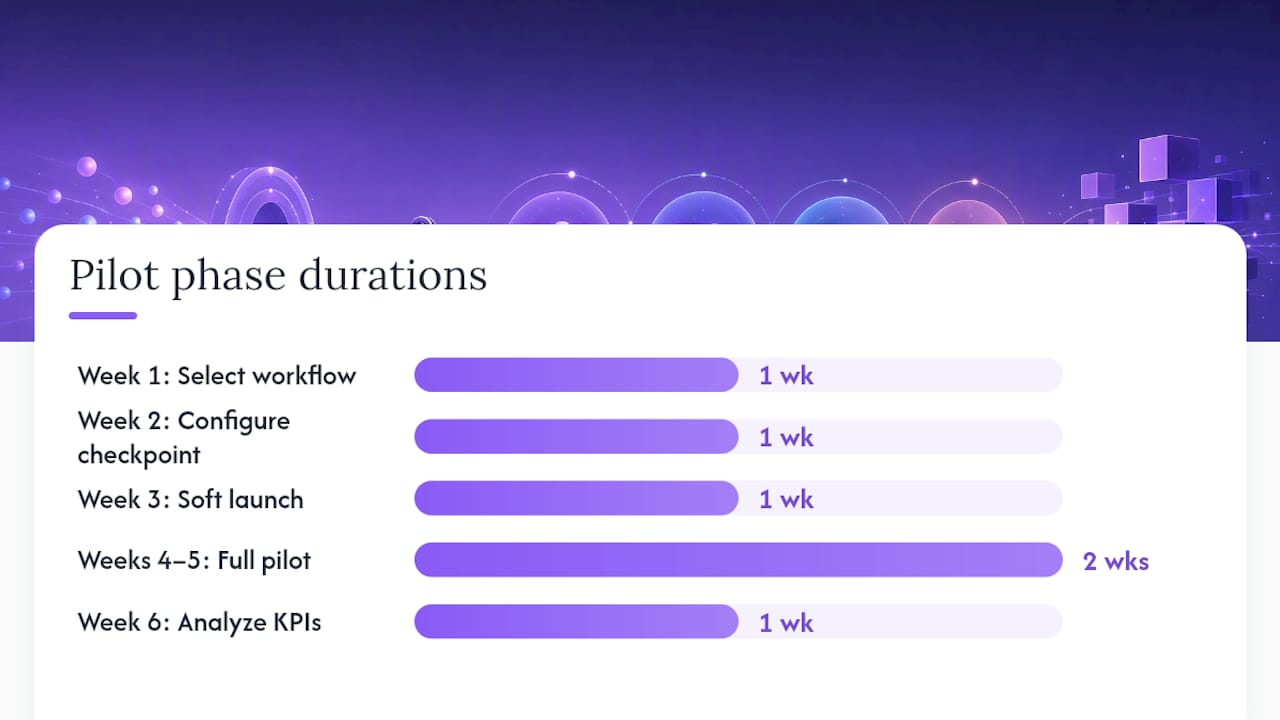
A pilot scoped to one workflow type with a defined success threshold is the fastest way to validate HITL value before committing to a broader rollout.
Pilot timeline:
- Week 1: Select one workflow, map the current error rate, and define the decision point for the human checkpoint. Identify reviewers and document decision guidelines.
- Week 2: Configure the checkpoint, build the reviewer form, and run internal testing with synthetic cases.
- Week 3: Soft launch with a small reviewer group. Monitor queue depth and time-to-review daily.
- Weeks 4–5: Full pilot volume. Collect reviewer decisions, flag disagreements, and run a mid-pilot calibration session with reviewers.
- Week 6: Analyze KPIs against acceptance criteria. Decide to scale, iterate, or redesign.
- Weeks 7–8 (optional): Iterate on schema or routing rules based on pilot findings, then re-measure.
KPIs to track:
- Review rate: Percentage of total workflow executions routed to a human reviewer. A very high rate suggests the routing threshold is too aggressive.
- Mean time to review (MTTR): Average elapsed time from checkpoint trigger to reviewer submission. This is your latency cost.
- Accuracy uplift: Error rate before HITL minus error rate after HITL, measured on a consistent sample.
- Rework reduction: Number of downstream corrections or escalations that the human checkpoint prevented.
- Cost per reviewed item: Total reviewer time cost divided by the number of items reviewed.
ROI signal: Multiply the number of errors prevented by the average cost of each error (rework time, customer impact, compliance penalty), then subtract the total reviewer cost. If the net is positive, HITL is paying for itself. As workflow automation ROI analysis shows, even modest error-prevention rates can justify the staffing cost when the downstream cost of errors is high.
Acceptance criteria for scaling: MTTR below your SLA threshold, accuracy uplift above your target, and reviewer queue depth stable (not growing) at pilot volume. If all three are met, the pattern is ready to scale.
Your step-by-step HITL rollout checklist
This checklist is designed to be copied into a project tracker or workflow builder. Each item has an owner role and a rough timing.
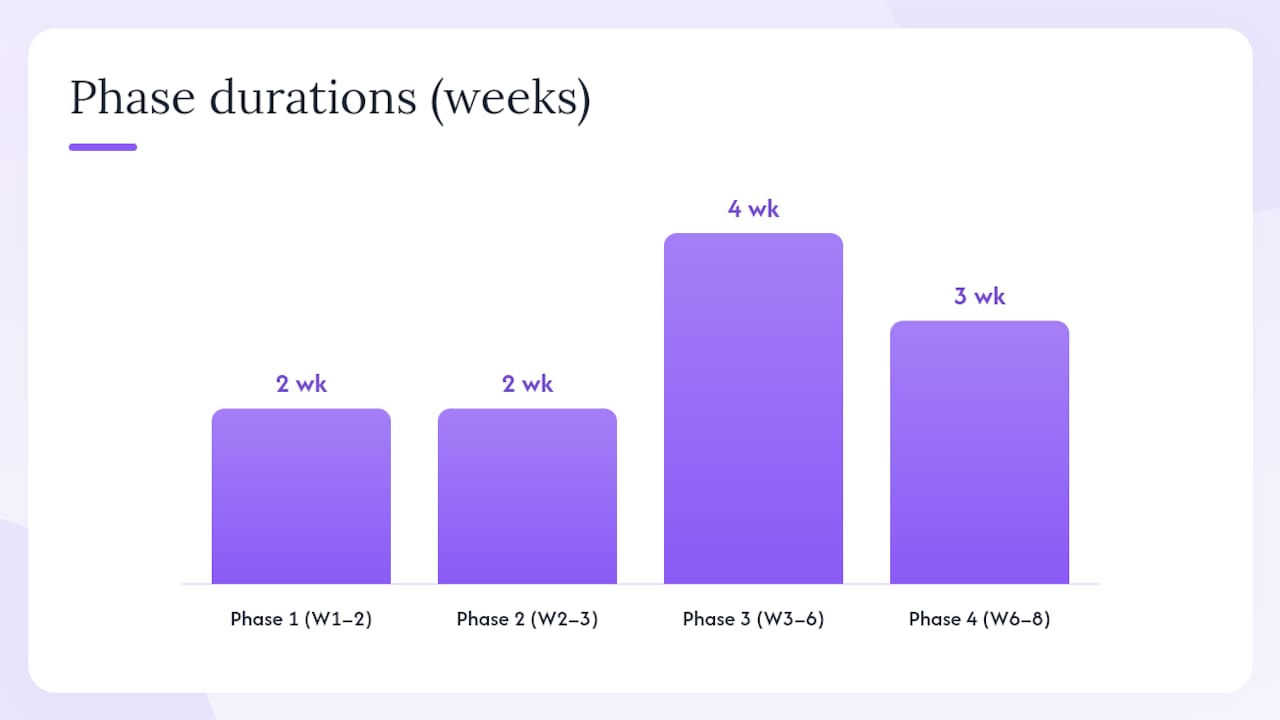
Phase 1: Design (Weeks 1–2)
- [ ] Select the target workflow and document the current error rate. Owner: process owner.
- [ ] Define the exact decision point for the human checkpoint. Owner: process owner + engineer.
- [ ] Draft the reviewer decision guideline (one page maximum). Owner: process owner.
- [ ] Design the reviewer schema using the template below. Owner: engineer.
- [ ] Identify primary reviewer, triage lead, and on-call backup. Owner: operations manager.
- [ ] Set SLA thresholds and define fallback behaviors for each timeout tier. Owner: engineer + operations manager.
Phase 2: Build and test (Weeks 2–3)
- [ ] Configure the checkpoint step (waitForInput, RequestPort, or BPMN user task). Owner: engineer.
- [ ] Build the reviewer notification (email, Slack, or in-app). Owner: engineer.
- [ ] Build the reviewer form with the minimal schema. Owner: engineer.
- [ ] Configure the audit log to capture actor, timestamp, decision, and notes. Owner: engineer.
- [ ] Run internal testing with at least 20 synthetic cases. Owner: QA + engineer.
Phase 3: Pilot (Weeks 3–6)
- [ ] Soft launch with a small reviewer group. Owner: operations manager.
- [ ] Monitor queue depth and MTTR daily. Owner: triage lead.
- [ ] Run a mid-pilot calibration session to align reviewers on edge cases. Owner: process owner.
- [ ] Collect reviewer decisions in a structured format for feedback loop analysis. Owner: engineer.
Phase 4: Iterate and scale (Weeks 6–8)
- [ ] Analyze KPIs against acceptance criteria. Owner: process owner + operations manager.
- [ ] Adjust routing threshold or schema based on pilot findings. Owner: engineer.
- [ ] Document the final reviewer guideline and schema version. Owner: process owner.
- [ ] Schedule quarterly reviews of reviewer accuracy and queue health. Owner: operations manager.
Reviewer schema template (copy and adapt):
Decision: [ Approve / Reject ]  (required)
Notes: ___________________________  (optional, free text)
Context displayed to reviewer:
  - [Field 1: pre-fetched relevant signal]
  - [Field 2: pre-fetched relevant signal]
  - [Field 3: risk score or confidence level]
DistilledPatterns describes this approach as treating human tasks as planned, auditable production steps with interfaces, throughput targets, and quality checks, which prevents reviewer queues from becoming the limiting factor in an otherwise automated pipeline.
Pro Tip: Feed reviewer decisions back into your model or rule engine on a regular cadence, monthly at minimum. Human corrections are labeled data. Teams that capture and use them systematically move the automation boundary forward over time, reducing review volume without sacrificing accuracy.
The part of HITL most teams get wrong
The conventional wisdom on HITL automation focuses almost entirely on the technology: which platform to use, how to configure the checkpoint, which API to call. That is the wrong place to spend most of your attention.
The harder problem is reviewer design. A poorly designed review interface, with too many fields, unclear guidelines, or missing context, produces reviewers who are slow, inconsistent, or both. Inconsistent reviewers are worse than no reviewers at all, because they introduce noise into the audit trail and degrade the labeled data that feeds model improvement.
The teams that get HITL right treat the reviewer experience the same way a product team treats a user experience: they prototype the form, run usability tests with actual reviewers, measure throughput, and iterate. They set throughput targets before launch, not after the queue is already overloaded. And they build the feedback loop into the architecture from day one, not as a future enhancement.
One practical tip that practitioners consistently overlook: design for reviewer disagreement. When two reviewers would make different decisions on the same case, that is signal, not noise. Build a mechanism to flag and review disagreements, use them to sharpen the decision guideline, and track inter-reviewer agreement as a quality metric alongside accuracy. A well-orchestrated workflow makes this kind of quality tracking straightforward because every decision is already a structured, logged event.
How EasyFlow supports human-in-the-loop workflows
Skipping the review step because your workflow tool makes it hard to pause and wait is one of the most common reasons HITL implementations stall. EasyFlow is built to execute the handoff, not just track it.

EasyFlow maps directly to the core HITL patterns: approval gates run as structured checkpoints, external reviewers receive magic links to complete their step without creating an account, and every decision is logged with a timestamp and actor for the audit trail. The platform handles automatic notifications and blocker detection, so stalled reviews surface before they breach an SLA. For HR onboarding automation specifically, EasyFlow’s pre-built templates cover document verification checkpoints and multi-step approval chains out of the box.
Teams can Teameasyflow and run their first HITL workflow within a day using a pre-built template. No reviewer accounts required.
Sources
FAQ
What is human-in-the-loop automation?
Human-in-the-loop automation is a workflow pattern where an automated system pauses at defined decision points and waits for a human to review, approve, or correct before execution continues. IBM describes it as systems where humans actively participate in operation, supervision, or decision-making to improve accuracy and governance.
What is the human-in-the-loop mechanism?
The core mechanism is a pause-and-resume cycle: the workflow engine serializes its state at a checkpoint, dispatches a structured review request to a human, and resumes execution with the human’s response once it arrives. Correlation identifiers ensure the response routes back to the correct workflow instance, which is critical when many instances run concurrently.
What is the human-in-the-loop strategy?
A HITL strategy defines which decisions require human review, what context reviewers need, what SLAs govern response time, and how reviewer decisions feed back into model or rule improvement. The goal is to place humans at the highest-value decision points while automating everything else, then gradually move the automation boundary forward as confidence grows.
What is human-in-the-loop simulation?
In simulation and training contexts, human-in-the-loop simulation means a human operator participates in a simulated environment in real time, providing inputs that the simulation responds to. In software workflow contexts, the same term sometimes refers to running a HITL workflow against synthetic test cases to validate reviewer form design and throughput before going live with real data.