
Workflow Friction Explained: What Managers Need to Know

Workflow friction is any force in a process that slows, blocks, or degrades the handoff of work between people, systems, or teams. A contract that sits in a shared inbox waiting for someone to notice it, a new-hire form that gets re-entered into three separate tools, a security prompt that fires every time a user switches applications — these are all friction. The immediate fix most managers can start with today: map your highest-volume handoffs, count how many times data is re-entered at each one, and eliminate the first redundant step you find. That single exercise, informed by frameworks like the NIST Cybersecurity Framework for policy-related friction, and tools like EasyFlow for execution, tends to surface more savings than any broad process overhaul.
Quick examples of workflow friction in practice:
- A sales rep copies deal data from a CRM into a separate invoicing tool by hand every week
- An onboarding checklist requires a manager to manually approve each step before the next one unlocks
- A security checkpoint forces every external collaborator to create a new account before completing a single task
Key Takeaways
Workflow friction is a design problem, not a people problem — fixing it starts with mapping handoffs and measuring re-entry counts before changing anything.
| Point | Details |
|---|---|
| Friction lives in the system | Persistent delays that survive staff changes are process design issues, not performance issues. |
| Four types to diagnose | Process, technical, cognitive, and policy friction each require different fixes — label before acting. |
| Estimate cost first | Time lost per occurrence × hourly rate × weekly frequency reveals which friction point to fix first. |
| Pilot before scaling | Run any fix manually for one week before automating; automation amplifies whatever design is already there. |
| EasyFlow for execution | EasyFlow automates handoffs, removes account-creation barriers for external collaborators, and replaces manual follow-up with automatic reminders. |
Table of Contents
- What is workflow friction, and where does it actually show up?
- What causes workflow friction, and what are the main types?
- Why workflow friction costs more than most managers realize
- How do you spot and measure workflow friction?
- Practical strategies to reduce workflow friction
- A manager’s checklist for fixing friction now
- How EasyFlow removed approval friction in a client onboarding workflow
- The case for treating friction as a design problem, not a people problem
- Cut the manual work your team is doing right now
- Sources
- FAQ
What is workflow friction, and where does it actually show up?
The term “workflow friction” is sometimes used loosely to mean any inefficiency, but the design-level distinction matters: friction lives in the system, not in the people running it. A team that re-enters data five times a day is not doing it wrong — the process was designed that way, or was never designed at all. That difference changes where you look for fixes.
Scope-wise, workflow friction covers:
- Handoff gaps: work that stalls between two owners because neither has a clear trigger to act
- Tool sprawl: teams using four apps to accomplish what one integrated system could handle
- Manual approval chains: decisions routed through a human when a rule could handle them automatically
- Security and policy checkpoints: access controls or compliance steps that interrupt task flow without proportional risk reduction
- Data re-entry: the same information typed into multiple systems because they don’t talk to each other
Friction does not describe a staffing shortage, a skill gap, or a single employee’s performance. If the problem disappears when you replace the person, it’s a people issue. If it persists regardless of who runs the process, it’s friction.
Pro Tip: Look for “shadow systems” — spreadsheets, personal email threads, or WhatsApp groups that teams use to work around the official process. Every shadow system is a sign that the sanctioned workflow has too much friction to be usable.
What causes workflow friction, and what are the main types?
Friction rarely has a single source. Most operations teams are dealing with at least two or three types simultaneously, which is why a fix aimed at only one layer often disappoints.
Process friction is the most common type. It shows up as unclear ownership (“who’s supposed to send this?”), approval chains that exist because no one ever removed them, and steps that were added for a one-time exception and never retired. A manager can usually spot it by asking: “What happens when the person who normally does this is out?” If the answer is “nothing moves,” that’s process friction.
Technical friction comes from tool sprawl and poor integrations. When a team uses separate platforms for project tracking, communication, file storage, and client communication — none of which share data — every handoff requires a human to act as the connector. Operational friction compounds across those handoffs, and automating a poorly designed workflow only makes the mess move faster.
Cognitive friction is subtler. It’s the mental load of switching between applications, navigating a complex UI to complete a simple task, or holding context in your head because the system doesn’t carry it forward. Context switching alone fragments focus in ways that accumulate across a workday.

Policy and security friction is the category most organizations handle worst. Security controls that interrupt normal work are sometimes necessary — but the correct approach is an intentional, risk-proportionate balance, not a default of maximum restriction. Some friction is genuinely constructive: a mandatory second review before a large financial transfer is friction that earns its place. Atlassian’s research on workplace friction distinguishes “bad friction” — obstacles that overwhelm people — from constructive friction that intentionally slows risky actions.
Pro Tip: To classify a friction point quickly, ask three questions: How many times is data re-entered at this step? How long does work sit waiting for a human decision? How often does this step generate an exception or workaround? High scores on any one of these signal a priority fix.
Why workflow friction costs more than most managers realize
The direct costs are visible: delays, rework, missed deadlines. The indirect costs are where friction quietly drains organizations. Employees who spend significant portions of their day on manual re-entry or chasing approvals report higher burnout rates and lower engagement. Customer-facing processes that stall internally translate directly into slower response times and eroded trust.
A straightforward way to estimate the cost of a single friction point: multiply the time lost per occurrence by the hourly fully-loaded labor rate, then by the weekly frequency. A 15-minute approval delay that happens 40 times a week, at a $50 blended hourly rate, costs roughly $500 per week — over $25,000 a year for one bottleneck. Most operations have several.
The hidden multiplier is error rate. When people re-enter data manually, mistakes enter the system. Those mistakes generate correction cycles, which are themselves friction. AI monitoring tools can surface these bottlenecks continuously, but they work best when applied to well-structured processes — not as a substitute for fixing the underlying design.
| Impact type | Example | Estimated cost driver |
|---|---|---|
| Approval delay | Contract waits 3 days for a signature | Lost revenue cycle time |
| Manual re-entry | CRM data copied to invoicing tool | Labor time + error correction |
| Context switching | Engineer toggling between 5 apps | Reduced deep-work output |
| Security checkpoint | External user blocked by account creation | Onboarding drop-off rate |
| Shadow system maintenance | Team maintains a parallel spreadsheet | Duplicate effort + version risk |
How do you spot and measure workflow friction?
Suspicion is not evidence. Before you can make the case for a fix, you need a baseline. The good news: measuring friction doesn’t require expensive tooling to start.
Step 1: Observe. Walk a process end-to-end with the person who runs it daily, not the person who designed it. Ask them to narrate every step, including the workarounds. Cross-team handovers and approval choke points are the highest-leverage observation points — that’s where process gaps and alignment gaps show up most clearly.
Step 2: Instrument. Pick five metrics and start tracking them weekly:
- Lead time: total elapsed time from process start to completion
- Cycle time: active working time (lead time minus wait time reveals how much is pure friction)
- Handoff queue length: how many items are waiting at each transition point
- Approval turnaround: median time from approval request to decision
- Re-entry count: how many times the same data is typed into a different system per process run
Step 3: Baseline. Run the measurement for two weeks before changing anything. A baseline gives you the “before” number that makes any improvement legible.
Step 4: Track and prioritize. Once you have two weeks of data, rank friction points by frequency multiplied by time cost. The top three are your pilot candidates.
Pro Tip: If your team uses a project management tool, export task-age data and sort by longest-open items. Tasks that sit untouched for more than two days at a specific stage almost always mark a friction point, not a workload problem.
Practical strategies to reduce workflow friction
Not every fix requires a platform migration or a six-month redesign. The most effective approach separates quick wins from structural changes and sequences them deliberately.
Quick wins (days to two weeks):
- Assign a single named owner to every handoff step — ambiguous ownership is the single fastest source of delay
- Remove one approval that exists for historical reasons rather than current risk
- Write a one-paragraph standard operating procedure (SOP) for the three most-repeated tasks your team does manually
- Set up automated deadline reminders so follow-up chasing stops being a human job
Structural changes (weeks to months):
- Redesign handoffs so context travels with the work (the receiving person should never have to ask “what’s the background on this?”)
- Integrate systems that currently require manual data transfer between them
- Embed business rules directly into tools so decisions happen automatically at the point of need
- Replace account-creation barriers for external collaborators with link-based task access
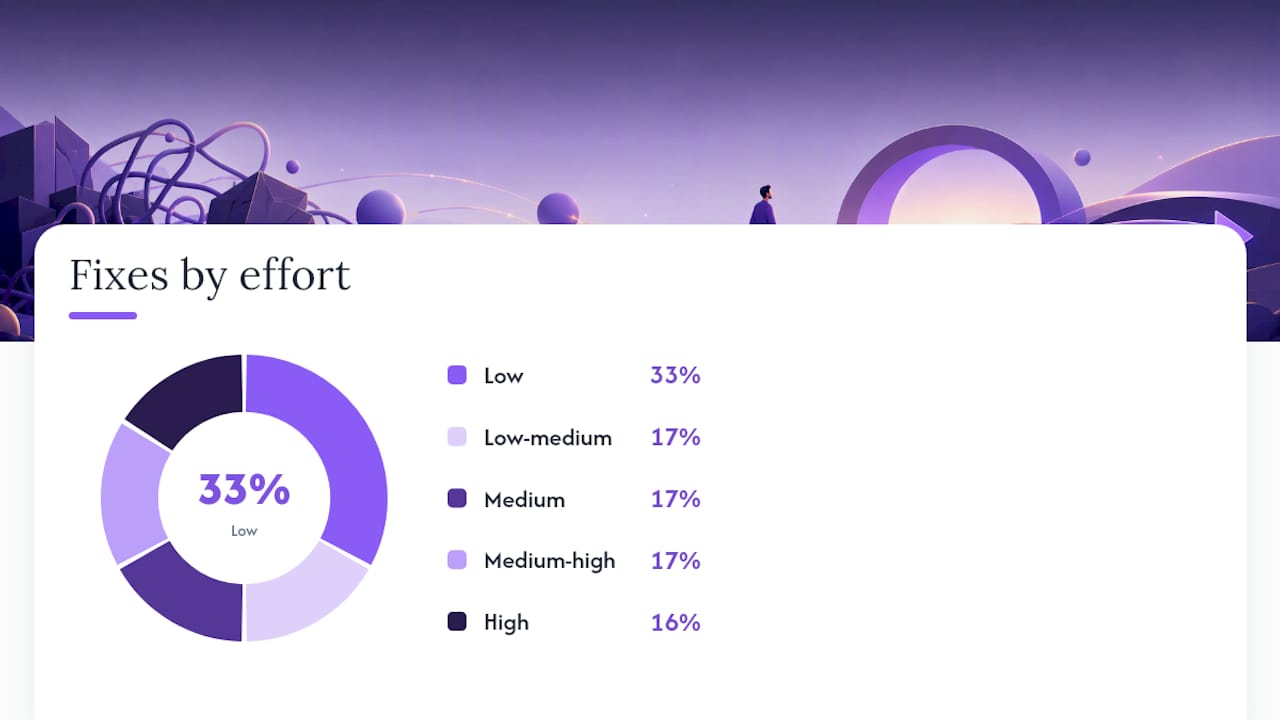
| Action | Effort | Time to impact | Risk |
|---|---|---|---|
| Assign handoff owners | Low | Days | Very low |
| Remove one legacy approval | Low | Days | Low |
| Write SOPs for top 3 tasks | Low-medium | 1–2 weeks | Very low |
| Automate reminder sequences | Medium | 1–2 weeks | Low |
| Redesign a handoff | Medium-high | 4 weeks | Medium |
| Integrate two systems | High | 8 weeks | Medium-high |
Pro Tip: Before automating any process, run it manually for one week with the new design. Automation amplifies whatever is already there — a flawed process automated at scale creates flawed outputs at scale. Validate the logic first, then add the engine.
Involving your team early is not optional. The people closest to the work know where the real friction is, and they’ll resist changes they didn’t help design. A 30-minute discovery session with the three people who run a process daily will surface more friction than a week of management observation.
A manager’s checklist for fixing friction now
Turn the strategy above into a concrete sequence. This checklist works as a two-week pilot structure.
- Map one process end-to-end. Choose the process with the highest volume or the most visible delays. Document every step, every handoff, and every tool involved.
- Measure the baseline. Track lead time, cycle time, and re-entry count for two weeks without changing anything.
- Classify each friction point. Use the four types (process, technical, cognitive, policy) to label each issue. This prevents mismatched fixes.
- Score by impact and effort. Place each friction point on a 2x2 grid: high impact/low effort items go first (quick wins); high impact/high effort items go into a structured project; low impact items go to the backlog.
- Run a two-week pilot on one quick win. Assign ownership, remove one approval, or add one automated reminder. Measure the same metrics.
- Gather feedback from the team. Ask: Did this make the process easier? Did it create any new problems? What would you change?
- Iterate, then scale. Only expand the fix after the pilot confirms it works. Scaling a broken fix is how friction gets worse.
| Quadrant | Impact | Effort | Examples |
|---|---|---|---|
| Do first | High | Low | Assign handoff owner, remove legacy approval |
| Plan carefully | High | High | System integration, full handoff redesign |
| Fill gaps | Low | Low | Add a status-update template |
| Deprioritize | Low | High | Full platform migration for a minor process |
Pro Tip: Ask stakeholders this during discovery: “If you could make one step in this process disappear tomorrow, which one would it be?” The answer almost always points to the highest-friction moment, and it gives you a quick win with built-in team buy-in.
How EasyFlow removed approval friction in a client onboarding workflow
A professional services team was running client onboarding through a combination of email threads, a shared spreadsheet, and a project management tool. Every time a new client started, the operations manager manually triggered each step, chased external contacts for document submissions, and re-entered status updates across three systems. The average onboarding cycle ran 12 days.
The team replaced that process with an EasyFlow workflow. Key changes:
- Handoff automation: each completed step automatically triggered the next, with no manual intervention from the operations manager
- Magic link access: external clients received task links by email and completed their steps without creating accounts, eliminating the account-creation barrier that had caused a consistent drop-off
- Automated reminders: overdue steps triggered follow-up notifications automatically, removing the daily follow-up emails the manager had been sending by hand
The onboarding cycle shortened, and the team reported fewer missed steps because the workflow itself tracked completion rather than relying on a human to monitor a spreadsheet.
Lessons from this case:
- The biggest gain came from removing the account-creation requirement for external collaborators, not from automating internal steps
- The operations manager’s time freed up most when reminders and status tracking became automatic
- The team ran the new workflow manually for one week before activating automation, which caught two sequencing errors before they reached clients
Pro Tip: When onboarding external collaborators, the account-creation step is almost always the highest drop-off point. Removing it with link-based task access can cut external completion time significantly without any change to the underlying process logic.
The case for treating friction as a design problem, not a people problem
Most friction-reduction efforts fail for the same reason: they start with the wrong diagnosis. A manager sees a delayed handoff and assumes someone isn’t following through. They add a reminder, a check-in meeting, or a performance note. The delay persists, because the process itself was never designed to carry context from one owner to the next.
Friction is almost always a design problem. The fix belongs at the system level. That doesn’t mean every fix is expensive or slow — assigning a single owner to an ambiguous handoff takes ten minutes and often produces immediate results. But the diagnostic frame matters: when you look at the system instead of the person, you find the actual leverage point.
The other mistake worth naming: the instinct to automate first. Automation is powerful, but it’s an amplifier. Apply it to a well-designed process and you get speed and consistency. Apply it to a broken one and you get faster, more consistent errors. The sequence is always: map, simplify, then automate. Skipping the middle step is where most technology-led friction-reduction projects go wrong.
Prioritize high-impact handoffs first, run bounded pilots before scaling, and measure the same metrics before and after every change. That discipline separates teams that actually reduce friction from teams that just move it somewhere less visible.
Cut the manual work your team is doing right now
The friction patterns in this guide — approval chains, re-entry loops, external collaborator barriers — are exactly what EasyFlow is built to eliminate. Instead of tracking tasks in a project management tool and still doing the coordination by hand, EasyFlow executes the process: it triggers the next step automatically, sends reminders without anyone asking, and lets external collaborators complete tasks through a magic link with no account required.

For operations-heavy teams, the practical payoff is fewer follow-up emails, shorter onboarding cycles, and an operations manager who spends time on decisions instead of status updates. EasyFlow offers a free plan and a 14-day trial on paid tiers, so you can run a pilot on one real process before committing. Start your free trial and map your first friction point in under an hour.
Sources
- Why Workflow Friction Is a Design Problem
- 7 sneaky ways friction is making your work life harder - Inside Atlassian
- What Is Workflow friction? Definition & Examples
- Operational Friction: Better SMB Workflow Design
FAQ
What does friction mean in simple terms?
Friction is anything that slows down or blocks the normal flow of work between people or systems. In a workflow context, it’s the gap between how a process is supposed to run and how it actually runs.
What does process friction mean?
Process friction refers specifically to delays and obstacles caused by unclear steps, missing ownership, or unnecessary approvals built into a workflow’s design rather than by the people executing it.
What are the four main types of workflow friction?
The four types are process friction (unclear steps, legacy approvals), technical friction (tool sprawl, poor integrations), cognitive friction (context switching, complex interfaces), and policy or security friction (access controls and compliance checkpoints that interrupt task flow).
What is friction in the workplace?
Workplace friction covers both harmful obstacles that slow teams down and, in some cases, constructive checks that intentionally slow risky decisions. Atlassian’s research distinguishes the two: the goal is to remove bad friction while preserving the checks that genuinely reduce risk.
How does EasyFlow help reduce workflow friction?
EasyFlow automates task handoffs, sends reminders automatically, and lets external collaborators complete steps via magic links without creating accounts — directly addressing the approval chains, re-entry loops, and onboarding barriers that generate the most friction in operations-heavy teams.