
Shared Workflow Environments in GitHub Actions: 2026 Guide

What is a shared workflow environment in GitHub Actions?
A shared workflow environment is a centralized setup where multiple repositories, teams, or automated agents pull from the same pool of reusable CI/CD logic rather than each maintaining their own copy. In GitHub Actions specifically, this means storing reusable workflows as YAML files in a single repository’s .github/workflows directory, then calling them from any other workflow via the workflow_call event trigger.
The practical payoff is real. Instead of copy-pasting a deployment pipeline across multiple repositories and then scrambling to update them all when a security patch lands, you update one file and callers can inherit the fix automatically. That’s the core promise of a collaborative workflow environment: one source of truth, many consumers.
Key characteristics of a shared workflow environment in GitHub Actions:
- Centralized storage: Reusable workflows live in
.github/workflowsand are referenced by other repositories using theuseskeyword. - Reduced duplication: Teams stop maintaining divergent pipeline code across projects, which cuts the risk of inconsistent behavior between repositories.
- Standardized processes: Every team calling the shared workflow runs the same tested logic, from linting to deployment.
- Controlled access: Private repositories can share workflows within an organization without making them public, using repository-level access settings.
- Security by design: GitHub Actions isolates environment secrets at the workflow level, preventing accidental leakage between callers and callees.
- Versioning support: Callers reference a tag or branch, so you can roll out breaking changes without disrupting existing pipelines overnight.
The concept extends beyond GitHub. Amazon SageMaker Unified Studio, for example, lets project members share workflow environments backed by Amazon Managed Workflows for Apache Airflow, where any project member can sync files once an owner provisions the environment. The underlying principle is identical: shared compute, shared logic, controlled access.
How to create and structure a reusable workflow
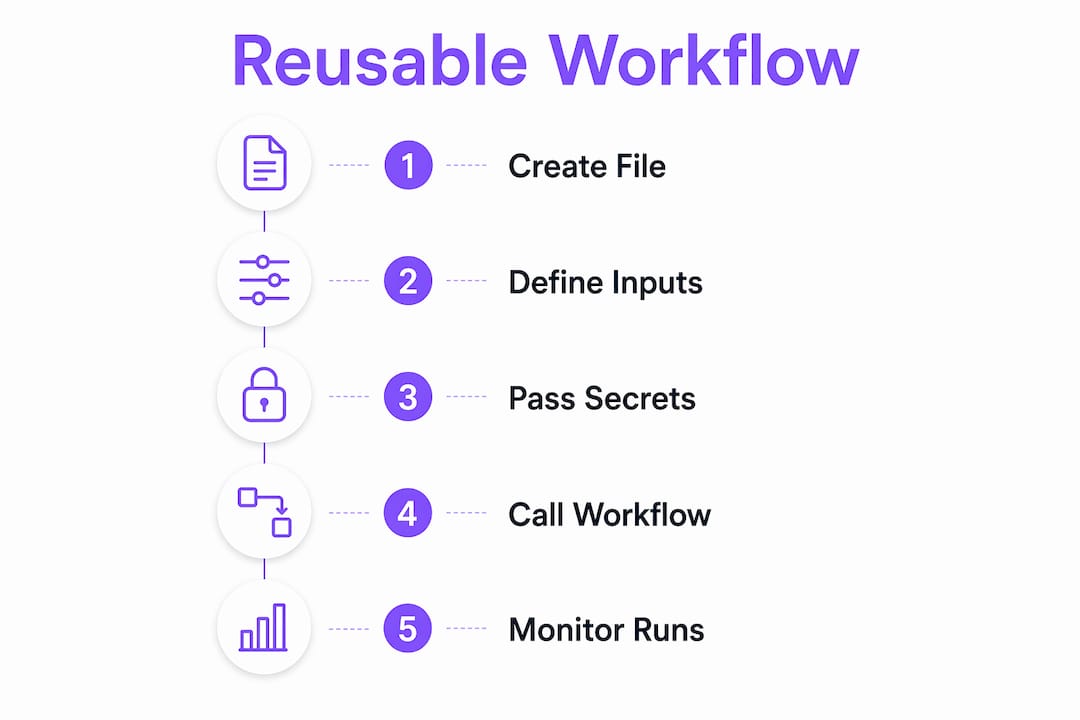
Every reusable workflow starts with one structural requirement: the file must live in .github/workflows at the root of its repository. Subdirectories inside that folder are not supported by GitHub Actions, so a file inside a subdirectory of .github/workflows will not be recognized as callable.

The workflow_call trigger
The trigger that makes a workflow reusable is on: workflow_call. Without it, the file is just a regular workflow. Here’s a minimal example:
# .github/workflows/run-tests.yml
name: Shared Test Runner

on:
  workflow_call:
    inputs:
      node-version:
        required: true
        type: string
    secrets:
      NPM_TOKEN:
        required: true

jobs:
  test:
    runs-on: ubuntu-latest
    steps:
      - uses: actions/checkout@v4
      - name: Set up Node.js
        uses: actions/setup-node@v4
        with:
          node-version: ${{ inputs.node-version }}
      - name: Install dependencies
        run: npm ci
        env:
          NPM_TOKEN: ${{ secrets.NPM_TOKEN }}
      - name: Run tests
        run: npm test
This workflow accepts a node-version input and an NPM_TOKEN secret from whoever calls it. The caller controls both values, and the reusable workflow never hardcodes them.
Structuring for reusability
A few structural choices make a reusable workflow genuinely maintainable rather than just technically callable:
- Parameterize everything environment-specific. Hardcoded region names, image tags, or environment URLs belong in inputs, not in the workflow body.
- Use semantic versioning for tags. When callers reference
@v2.1.0instead of@main, a breaking change inmainwon’t silently break their pipelines. - Keep jobs focused. A reusable workflow that does testing, building, and deploying in one job is hard to call selectively. Split concerns across separate reusable workflows.
- Document inputs and outputs inline. YAML comments above each input declaration save the next developer from reading the entire file to understand what to pass.
- Store shared workflows in a dedicated repository. A repo named something like
org/shared-workflowsmakes discovery obvious and access control straightforward.
Versioning deserves particular attention. Proper version control ensures stability and traceability across every repository that depends on the shared workflow. Tagging releases and maintaining a changelog for your shared workflow repository is the same discipline you’d apply to any internal library.
Pro Tip: Create a CHANGELOG.md in your shared workflow repository and require a changelog entry for every pull request that modifies a workflow file. Callers can check it before upgrading their uses reference to a new tag, rather than discovering breaking changes in a failed pipeline run.
How to pass inputs, secrets, and environment variables
Passing data into reusable workflows is where most teams hit their first friction. The syntax is straightforward; the gotchas are in the isolation model.

Inputs
Inputs are declared in the reusable workflow under on.workflow_call.inputs and passed by the caller under jobs.<job_id>.with. Types can be string, boolean, or number.
# Caller workflow
jobs:
  call-shared-deploy:
    uses: org/shared-workflows/.github/workflows/deploy.yml@v1.2.0
    with:
      environment: production
      image-tag: ${{ github.sha }}
    secrets:
      DEPLOY_KEY: ${{ secrets.DEPLOY_KEY }}
# Reusable workflow (deploy.yml)
on:
  workflow_call:
    inputs:
      environment:
        required: true
        type: string
      image-tag:
        required: true
        type: string
    secrets:
      DEPLOY_KEY:
        required: true
Secrets and the isolation problem
GitHub Actions cannot natively inherit environment-level secrets from the caller. The on.workflow_call trigger does not support the environment keyword, so if your caller workflow has an environment like production with its own secrets, those secrets do not automatically flow into the reusable workflow. The reusable workflow uses its own environment secrets if you declare an environment block at the job level inside it.
The practical implication: you must pass secrets explicitly, or use secrets: inherit to forward all of the caller’s secrets to the directly called workflow.
# Using secrets: inherit
jobs:
  call-shared-deploy:
    uses: org/shared-workflows/.github/workflows/deploy.yml@v1.2.0
    with:
      environment: production
    secrets: inherit
One important chain behavior: in in a workflow chain, secrets only propagate if each workflow explicitly passes them; automatic forwarding does not occur. secrets: inherit at the A-to-B level does not automatically propagate to C.
Environment variables
Environment variables set at the workflow or job level in the caller do not pass into the reusable workflow. Only inputs and explicitly passed secrets cross that boundary. Teams that need to share environment state across the boundary typically use infrastructure-as-code tooling to manage that state outside the workflow itself.
| Data type | How to pass | Scope |
|---|---|---|
| Input parameters | jobs.<id>.with |
Declared inputs only |
| Secrets | jobs.<id>.secrets or secrets: inherit |
Direct callee only |
| Environment variables | Not directly passable | Must use inputs as a workaround |
| Environment-level secrets | Not passable via workflow_call |
Reusable workflow uses its own environment |
Pro Tip: Avoid secrets: inherit in high-security pipelines. Explicit secret declarations in the reusable workflow’s on.workflow_call.secrets block make the security surface visible and auditable. Anyone reading the file knows exactly which secrets it consumes.
How to call and nest reusable workflows
Calling a reusable workflow uses the uses keyword at the job level, not inside a step. That distinction trips up developers who are used to referencing actions inside steps.
# Caller workflow
name: CI Pipeline

on:
  push:
    branches: [main]

jobs:
  run-tests:
    uses: org/shared-workflows/.github/workflows/run-tests.yml@v2.0.0
    with:
      node-version: "20"
    secrets:
      NPM_TOKEN: ${{ secrets.NPM_TOKEN }}

  deploy:
    needs: run-tests
    uses: org/shared-workflows/.github/workflows/deploy.yml@v2.0.0
    with:
      environment: production
      image-tag: ${{ github.sha }}
    secrets:
      DEPLOY_KEY: ${{ secrets.DEPLOY_KEY }}
The needs keyword works exactly as it does with regular jobs, so you can sequence reusable workflow calls just like any other job dependency.
Nesting reusable workflows
GitHub Actions supports up to supported nesting levels: one top-level caller plus nine nested workflows. A chain like caller.yml → build.yml → setup-env.yml → configure-tools.yml is valid. Permissions can only be maintained or reduced as you go deeper in the chain, never elevated.
# build.yml (itself a reusable workflow that calls another)
on:
  workflow_call:
    inputs:
      node-version:
        type: string
        required: true

jobs:
  setup:
    uses: org/shared-workflows/.github/workflows/setup-env.yml@v1.0.0
    with:
      node-version: ${{ inputs.node-version }}

  build:
    needs: setup
    runs-on: ubuntu-latest
    steps:
      - uses: actions/checkout@v4
      - run: npm run build
When nesting helps and when it hurts
Nesting is useful when you have a genuine hierarchy: a “build” workflow that always needs an “environment setup” workflow, for example. It becomes a liability when you nest for the sake of organization rather than actual dependency. Debugging a failed run three levels deep means clicking through multiple workflow logs, and the error context at the bottom of the chain is often stripped of the caller’s original context.
| Nesting depth | Recommended use case | Debugging complexity |
|---|---|---|
| 1 level (caller + 1) | Standard shared logic reuse | Low |
| 2 levels | Modular pipeline composition | Medium |
| 4+ levels | Rarely justified | High |
Pro Tip: When a nested workflow fails, start debugging from the innermost workflow log first. The outermost caller log usually just shows “called workflow failed” with no detail. GitHub Actions surfaces the actual error in the log of the workflow where the failure occurred.
How to use outputs and monitor reusable workflows
Defining and consuming outputs
Reusable workflows can pass outputs back to their callers, which is how you chain data across jobs. You declare outputs in the reusable workflow under on.workflow_call.outputs, map them from job outputs, and then read them in the caller via needs.<job_id>.outputs.<output_name>.
# Reusable workflow: build.yml
on:
  workflow_call:
    outputs:
      image-digest:
        description: "The digest of the built container image"
        value: ${{ jobs.build.outputs.digest }}

jobs:
  build:
    runs-on: ubuntu-latest
    outputs:
      digest: ${{ steps.build-step.outputs.digest }}
    steps:
      - id: build-step
        run: |
          DIGEST=$(docker build -q .)
          echo "digest=$DIGEST" >> $GITHUB_OUTPUT
# Caller workflow consuming the output
jobs:
  build:
    uses: org/shared-workflows/.github/workflows/build.yml@v1.0.0

  deploy:
    needs: build
    runs-on: ubuntu-latest
    steps:
      - run: echo "Deploying image ${{ needs.build.outputs.image-digest }}"
The output chain requires each level to explicitly re-export values. If build.yml calls setup.yml and you need an output from setup.yml in the top-level caller, build.yml must capture and re-declare that output.
Monitoring workflow runs
GitHub Actions provides workflow run logs and history through both the UI and the REST API. For shared workflows specifically, a few monitoring practices pay off:
- Filter by workflow file name in the Actions tab to see all runs of a specific reusable workflow across the repository.
- Use the GitHub Actions API (
GET /repos/{owner}/{repo}/actions/runs) to pull run history programmatically for dashboards or alerting. - Check the “Caller workflow” annotation in the run summary, which shows which top-level workflow triggered the reusable workflow run.
- Set up workflow run notifications via GitHub’s notification settings or webhook integrations to catch failures in shared workflows before they cascade.
- Review step-level logs rather than just job-level summaries when debugging, since a reusable workflow’s failure often surfaces in a specific step that the job summary obscures.
| Monitoring method | What it shows | Best for |
|---|---|---|
| GitHub Actions UI | Run history, logs, step details | Ad hoc debugging |
| REST API | Programmatic run data | Dashboards, alerting |
| Webhook events | Real-time run status | Slack/PagerDuty integrations |
| Audit log | Who triggered what, when | Security and compliance |
Versioning affects monitoring too. When you update a shared workflow to a new tag, runs on the old tag and the new tag appear separately in the history. Keeping a clear tagging strategy means you can compare failure rates between versions without guessing which run used which workflow revision.
What the developer community says about shared workflow environments
The GitHub Actions model of shared workflows is the most widely adopted implementation, but the broader concept of a shared workflow environment is evolving fast, particularly as AI agents enter the CI/CD picture.
Workflows as directed acyclic graphs
Advanced CI/CD practitioners increasingly model pipelines as directed acyclic graphs rather than linear YAML sequences. In a DAG model, tasks are nodes with explicit dependencies, and any node can be claimed by a human reviewer, a script, or an AI agent. This moves beyond what GitHub Actions natively expresses in YAML, but the reusable workflow pattern is a step in that direction: each reusable workflow is effectively a subgraph that can be composed into larger pipelines.
The audit trail advantage is real here. When every task result is a git commit, attribution falls out of git history without any extra tooling. Teams working on compliance-heavy pipelines find this particularly useful.
Human-AI collaboration in shared environments
Agentic development workflows are pushing the definition of a shared workflow environment further. Tools built for AI-human collaboration need persistent compute, real-time streaming of agent activity, and a shared context layer where both humans and agents can see what’s happening. The GitHub Actions model handles the automation side well; the emerging gap is in the handoff layer between automated steps and human review gates.
Projects like Chorus and Enju (both open-source) treat humans and AI agents as interchangeable task executors on the same DAG, with permissions controlling who can claim what. This architecture mirrors what reusable GitHub Actions workflows do at the pipeline level, but extends it to the task level with asynchronous review cycles.
Security practices from the community
Stack Overflow and GitHub Discussions consistently surface the same security concerns around shared workflows:
- Avoid
secrets: inheritin public or cross-org workflows. It’s convenient, but it exposes every secret in the caller to the called workflow, including ones the workflow doesn’t need. - Pin reusable workflow references to a full commit SHA in high-security environments, not just a tag. Tags are mutable; a SHA is not.
- Audit who has write access to the shared workflow repository. A malicious commit to a shared workflow can affect every repository that calls it.
- Use CODEOWNERS in the shared workflow repository to require review from a security-focused team member before any workflow change merges.
Pro Tip: For reusable workflow templates used across many repositories, treat the shared workflow repo like a production service: require pull request reviews, run a linter on YAML files in CI, and tag every release. The blast radius of a bad commit is proportional to how many callers depend on that workflow.
Key Takeaways
A shared workflow environment in GitHub Actions centralizes reusable CI/CD logic in one repository, letting any number of callers consume it via workflow_call while maintaining security isolation and version control.
| Point | Details |
|---|---|
| Core structure | Reusable workflows live in .github/workflows and are triggered by workflow_call. |
| Nesting limit | GitHub Actions supports up to ten nesting levels: one top-level caller plus nine nested workflows. |
| Secret isolation | Environment-level secrets do not pass through workflow_call; teams must pass secrets explicitly or use secrets: inherit. |
| Versioning discipline | Callers should reference a specific tag or SHA to avoid inheriting breaking changes from an updated shared workflow. |
| Monitoring approach | The GitHub Actions UI, REST API, and webhooks each serve different monitoring needs, from ad hoc debugging to real-time alerting. |
FAQ
What is a shared workflow in GitHub Actions?
A shared workflow is a reusable YAML file stored in .github/workflows that other workflows call via the uses keyword and the workflow_call trigger, allowing multiple repositories to run the same CI/CD logic from one central location.
What are the four types of workflows?
Workflow classifications vary by context, but in CI/CD the common categories are sequential (linear step-by-step), parallel (concurrent jobs), conditional (branching on outcomes), and reusable (modular workflows called by other workflows). GitHub Actions supports all four patterns.
What are the three basic components of a workflow?
A GitHub Actions workflow consists of a trigger (the event that starts it), one or more jobs (groups of steps that run on a runner), and steps (individual commands or action calls within a job).
What are examples of shared workflow environments in real CI/CD pipelines?
Common examples include a centralized test runner called by every microservice repository, a shared container build and push workflow referenced across a monorepo, and a standardized deployment workflow that enforces approval gates before production releases.
Can reusable workflows access environment-level secrets from the caller?
No. GitHub Actions isolates environment secrets at the workflow level, so environment secrets from the caller do not flow into a reusable workflow via workflow_call. Teams must pass secrets explicitly using jobs.<id>.secrets or use secrets: inherit for direct callees.