
Sync Task Assignments Across Stakeholders: An Ops Playbook

Automate assignment routing and stakeholder handoffs so the system, not people, enforces the next step. That’s the fix. Manual follow-ups exist because someone has to notice a task is done and manually push it to the next person. Remove that human relay and the whole bottleneck disappears.
Start here:
- Set routing rules that assign work the moment a trigger fires, no manual reassignment.
- Turn on automatic notifications so stakeholders know the second something lands in their queue.
- Use magic links for anyone outside your organization so they can act without creating an account.
This week’s action: pick one recurring, rule-based workflow (client onboarding, contract handoff, invoice approval) and map its current handoff points before you automate anything.
Key Takeaways
Automated routing, magic links for external stakeholders, and a named workflow operator together are what actually keep task assignments synced without manual follow-ups.
| Point | Details |
|---|---|
| Start with one workflow | Pick your highest-frequency, most rule-based process for the first pilot, not the most complex one. |
| Run a parallel test | Keep manual and automated processes running side by side for two weeks before cutting over. |
| Track both metric types | Monitor completion rate and time-to-next-step alongside exception rate and alert volume. |
| Name an owner | Assign a workflow operator who runs weekly spot checks and handles escalations directly. |
| Use EasyFlow for external steps | EasyFlow routes tasks automatically and lets external stakeholders complete steps via magic links, with a 14-day trial on paid plans. |
Table of Contents
- Why Automation Fixes Unsynced Task Assignments
- How Does Automated Task Synchronization Actually Work?
- Implementation Checklist: Map, Build, Pilot, Roll Out
- What to Expect: Timeline, Costs, and ROI Signals
- How to Measure Success and Treat Operational Data as a Strategic Asset
- Risk Management for Exceptions, Conflicts, and Failures
- Change Management for Stakeholder Buy-In
- How EasyFlow Keeps Task Assignments Synced Across Every Stakeholder
- Sources
- FAQ
Why Automation Fixes Unsynced Task Assignments
Automation eliminates the manual routing gaps where tasks stall, and it forces the next step to happen instead of waiting for someone to remember it. Every unsynced handoff is really a decision point nobody owns. Automation assigns that decision to a rule instead of a person’s memory.
The benefits show up fast once routing is automatic:
- Fewer status-check emails and Slack pings, because the system notifies the next owner directly.
- Shorter cycle time between steps, since there’s no lag waiting for a human to notice.
- Clear ownership at every stage, with a visible record of who has the ball.
- A built-in audit trail that shows exactly when a task moved and who touched it.
One bank’s experience makes the case concretely: after adopting standardized handoff checklists and workflow software, it cut processing time to 28 days, dropped errors to 8%, lifted customer satisfaction from 67% to 89%, and estimated $780,000 in annual savings. Numbers like that rarely come from a single tweak. They come from removing the handoff gaps where work used to sit untouched.
Pro Tip: Automate your highest-frequency, most rule-based workflow first. It’s the fastest way to prove ROI before you tackle anything with judgment calls or exceptions baked in.
How Does Automated Task Synchronization Actually Work?
Five components make automated handoffs possible: a routing engine, an integration layer, notification channels, magic-link delivery for outsiders, and exception handling. Miss any one of these and you get automation that only works when everything goes according to plan, which is rarely how operations actually run.
Here’s what each piece does:
- Routing engine. Decides who gets a task next, based on rules or dynamic logic. Platform documentation on task routing shows work can go to a specific person, a shared work queue, or be assigned through an expression that picks the right owner programmatically, which matters when workload or role changes week to week.
- Integration and orchestration layer. Connects the systems that generate triggers, so a single event, a signed contract, a new hire’s start date, a paid invoice, can kick off tasks in more than one platform at once.
- Notification channels. Emails, Slack, or in-app alerts that tell the next assignee something needs their attention now, not next time they log in.
- Magic-link delivery. Lets external stakeholders, clients, vendors, contractors, complete their step without ever creating an account.
- Exception handling. Flags anything that doesn’t fit the standard path and routes it to a human instead of letting it fail silently.
Sketch this as a one-page diagram: trigger → routing → assignee → notification → handoff verification. That single line captures the whole system, and it’s the fastest way to spot where your current process breaks down.
Cross-system automation is where this gets powerful. A signed contract can trigger onboarding tasks in one platform, fire a Slack notification, create a billing record, and schedule a kickoff call, all from one event, with no one manually re-entering data three times.
Implementation Checklist: Map, Build, Pilot, Roll Out
Follow a fixed sequence, and the pilot is far more likely to survive contact with real stakeholders. Skipping steps is how automation projects turn into six-month rebuilds nobody asked for.
- Inventory the task. List every step, every owner, and every handoff point in the workflow you’re automating first.
- Map cross-team dependencies. Note where a task depends on input from another department or an external party.
- Audit your data. Automation stalls fast when input data is inconsistent or missing, so check data readiness before you build anything. Flag missing inputs instead of letting the workflow run on bad data silently.
- List the top five exceptions. For each one, decide: auto-handle, or route to a human. Don’t guess. Pull this from actual incident history if you have it.
- Build the routing logic. Configure assignment rules, notifications, and magic-link delivery for external steps.
- Run a two-week parallel test. Keep the manual process running alongside the automated one, then compare time-per-task and error rates before and after.
- Set cutover criteria. Define what “ready to go live” means in numbers, not gut feel, before you turn off the manual backup.
- Assign a workflow owner. Someone needs to watch the pilot daily for the first two weeks.
Pro Tip: Don’t automate a broken process. If your current handoff has three unofficial workarounds nobody talks about, fix the process first, then automate the fixed version.
Pilot scope should stay narrow. One workflow, one team boundary, two weeks. Success criteria: fewer manual reassignments, faster time-to-next-step, and zero tasks silently dropped.
What to Expect: Timeline, Costs, and ROI Signals
A single-workflow pilot typically runs two to four weeks from mapping to cutover. Cross-system builds involving multiple platforms and external stakeholders usually take longer, often six to ten weeks, because integration testing takes real time.
Timeline breakdown:
- Simple, single-system workflow: two to four weeks.
- Cross-system build with external magic-link steps: six to ten weeks.
- Enterprise rollout across multiple departments: quarter-plus, staged team by team.
Cost drivers are predictable once you know where to look: integration effort (no-code connectors are far cheaper than custom engineering), subscription licensing, and the staff hours needed to run the pilot properly. A no-code platform with pre-built connectors almost always beats custom integration work on both speed and cost for a first pilot.
ROI math is simple: (hours saved per week × hourly cost) minus subscription cost equals weekly net gain. One automation example cut a weekly reporting workflow from about 110 minutes to roughly 15 minutes after automating exports, summarization, and distribution. That’s the kind of signal that pays for a pilot in under a month.
Early signs the pilot is working: fewer manual reassignments, faster average time-to-next-step, and a visible drop in “where is this?” messages.
How to Measure Success and Treat Operational Data as a Strategic Asset
Track two categories: execution metrics and health metrics. Execution tells you if work is moving. Health tells you if the system itself is stable.
Execution metrics:
- Completion rate. Percentage of tasks finished without manual intervention, pulled straight from your workflow platform’s logs.
- Time-to-next-step. How long a task sits before the next assignee picks it up.
- Cycle time. Total time from trigger to final handoff completion.
Health metrics:
- Exception rate. How often a task falls outside the standard path and needs human routing.
- Alert volume. How many notifications go out per workflow run, a spike often signals a rule that’s misfiring.
Pro Tip: Save every rule and template you build as part of your standard operating procedure, not just inside the tool. The template is the workflow, and if it only lives in one platform’s config screen, you lose it the moment someone changes tools.
Here’s the part most ops teams miss: automated workflows generate clean, structured data automatically, timestamps, owners, exception counts, without anyone manually logging anything. That data becomes the foundation for forecasting staffing needs and spotting bottlenecks before they cost you a client. Put completion rate, exception rate, and average cycle time in your weekly ops report, and you’ll catch drift within days instead of discovering it in a quarterly review.
Risk Management for Exceptions, Conflicts, and Failures
Every automated workflow will eventually hit a task that doesn’t fit the rules, and how you’ve prepared for that moment determines whether automation earns trust or gets blamed for every dropped ball.
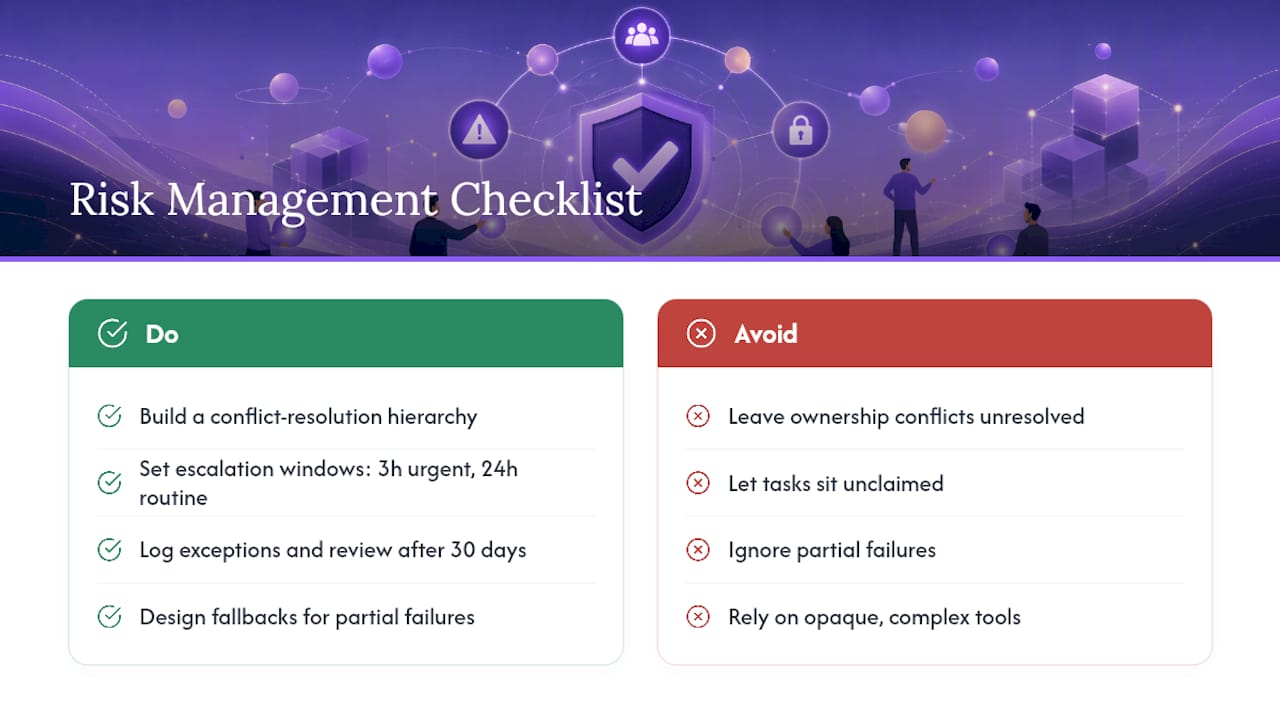
Build a conflict resolution hierarchy before launch: if two stakeholders are both assigned ownership of the same step, or a routing rule contradicts an exception rule, define which one wins. Most conflicts trace back to overlapping rules written by different teams who never compared notes.
Set an escalation threshold. If a task sits unclaimed past a set time window, three hours for urgent items, twenty-four for routine ones, it should escalate automatically to a backup owner or a manager, not sit silently waiting for someone to check.
Design for partial failure, not just total failure. If an external stakeholder never clicks their magic link, the workflow needs a reminder cadence and a fallback contact method, not a dead end. If an integration between two systems drops a record, the workflow should flag the gap rather than proceed as if nothing happened.
Keep a living exceptions log. Every time a task requires manual override, write down why. After thirty days, patterns emerge, usually two or three exception types account for most of the manual work. Fold those into your routing rules and your exception rate drops on its own.
Choose workflow systems and shared databases that preserve an audit trail without adding complexity. Technology should support the handoff, not become the reason it fails.
Change Management for Stakeholder Buy-In
Resistance to automated task routing rarely comes from the technology. It comes from stakeholders who don’t trust a system to do what a person used to do, and who worry the change makes their role obsolete or their work invisible.
Address that directly, early. Show every affected team exactly what changes for them: who gets notified, what they see, how they act on a magic link if they’re external. Vague announcements about “new automation” breed more anxiety than specifics ever will.
Run the parallel period publicly. When stakeholders can see the manual and automated processes running side by side and watch the automated version catch things the manual one missed, skepticism fades faster than any memo could manage. Nothing builds trust like watching the system flag an error a person would have missed.
Give internal champions a visible role. Pick one person per team who tests the new routing first and reports back to their peers. Peer validation moves faster than a mandate from ops leadership ever will.
Communicate what does not change. Stakeholders who fear losing control over their work respond well to hearing explicitly that they still make the judgment calls, the system just makes sure the right task reaches them at the right time. Frame automation as removing the annoying part of the job, chasing, reminding, re-explaining, not replacing the decisions that actually require a person.
Finally, close the loop with results. Share the completion rate and time-to-next-step numbers from the pilot with the teams who adopted it first. People adopt faster when they see their own effort reflected in a number that improved.
How EasyFlow Keeps Task Assignments Synced Across Every Stakeholder
EasyFlow automates the exact handoffs this article walks through: it assigns, routes, and executes process steps for your team and for outside collaborators who never need to create an account.

The platform runs on pre-built workflow templates for common ops processes, so you’re not building routing logic from a blank page. External stakeholders complete their step through a magic link EasyFlow sends directly to their inbox, which removes the account-creation friction that kills so many client and vendor workflows before they start. Behind the scenes, orchestration connects your other systems, and built-in monitoring flags blockers before they turn into missed deadlines. If you want the deeper mechanics of cross-team routing before you commit, EasyFlow’s guide on cross-team workflow breaks down the common patterns.
This shape fits the use cases ops teams automate first:
- New hire onboarding, where HR, IT, and the hiring manager all need to complete steps in sequence without someone chasing each one down.
- Client implementations, where an external contact has to sign off or submit information via magic link, no login required.
- Invoice and approval workflows, where routing to the right approver automatically prevents the multi-day stall waiting for a manual forward.
- SLA escalations, where a stalled task needs to jump to a backup owner before a deadline gets missed.
EasyFlow offers a 14-day trial on paid plans, plus a free tier for teams who want to test the basics first. Use the trial to validate your pilot checklist: one workflow, real stakeholders, magic links tested end to end, and a side-by-side comparison against your current manual process. Start your trial and run that first workflow before your next status meeting.
Common Pitfalls in the First 90 Days
The mindset that prevents most pilot failures is simple: automation only fixes a process that already works. If your handoff is broken today, automating it just breaks things faster and with less visibility into why.
Assign a named workflow operator from day one, someone who runs weekly spot checks, owns the SOP, and handles escalations personally rather than letting them pile up in a queue.
Watch for these three pitfalls specifically: automating a process nobody has actually mapped end to end, ignoring exceptions until they pile up into a credibility problem, and launching without a single named owner accountable for the pilot’s outcome.
Sources
- Analyse Phase: Understanding and Solving Process Handoff Problems in Business Operations - Lean 6 Sigma Hub
- Workflow Automation for Operations Teams: Where to Start and What Actually Works
- Building AI-Powered Workflows for Ops Teams: From Manual Processes to Intelligent Automation
FAQ
What Does It Mean to Sync Task Assignments Across Stakeholders?
It means routing and executing task handoffs automatically, so internal team members and external stakeholders each get the right step at the right time without anyone manually reassigning work.
How Long Does a Task Synchronization Pilot Take?
A single-workflow pilot typically takes two to four weeks; cross-system builds involving external magic-link steps often take six to ten weeks.
Do External Stakeholders Need an Account to Participate?
Not with a magic-link approach. EasyFlow, for example, lets external collaborators complete their assigned step through a link sent directly to their inbox, with no account setup required.
What’s the First Metric to Track After Automating Handoffs?
Time-to-next-step, since it directly shows whether tasks are moving faster once routing and notifications are automated.
How Do You Handle Exceptions in an Automated Workflow?
Map your top five exceptions before launch, decide which ones can be auto-handled versus routed to a human, and keep a living log so recurring exceptions get folded into your rules over time.