
How Structured Onboarding Scales Client Teams Fast

Structured onboarding is the process of systematizing client integration steps so quality stays consistent as team volume grows. When you add clients without a defined system, every new engagement costs more time and introduces more risk. Research shows that increasing retention by just 5% can lift profits by 25% to 95%. That number reflects how much value leaks out when onboarding is ad hoc. Understanding how structured onboarding scales client teams means understanding the mechanics behind automation, clear ownership, and continuous measurement. These three forces determine whether your process holds up at 10 clients or 100.
How structured onboarding scales client teams operationally
The first sign of a broken onboarding process is manual work that multiplies with every new client. A mature onboarding system should require fewer than 5 manual steps per client. When a process exceeds 15 manual steps, it creates bottlenecks that compound as volume increases. That threshold is not arbitrary. It reflects the point where human coordination costs outpace the value of the work being done.
The most direct fix is automation at the right trigger points. Manual consulting onboarding typically takes 4–6 hours per client. Automating intake, document collection, and task sequencing cuts that time to 15 minutes. For a firm bringing on six new clients per month, that shift saves up to $9,900 in monthly opportunity costs. Those hours go back into billable work or team capacity.

Effective onboarding strategies use triggers, not reminders. A trigger fires automatically when a deal closes, a form is submitted, or a deadline passes. Reminders require a human to notice and act. The difference between the two is the difference between a process that scales and one that stalls.
Here is what a well-structured onboarding process includes at the operational level:
- Automated intake forms that collect client data immediately after contract signing, with no manual follow-up required
- Task sequencing that fires the next step as soon as the previous one is completed, not on a fixed calendar schedule
- Document generation triggered by intake data, so proposals, contracts, and welcome packets populate without manual drafting
- Status dashboards that show every client’s position in the onboarding flow without requiring a status meeting
- Escalation rules that alert the right person when a step stalls beyond a defined time window
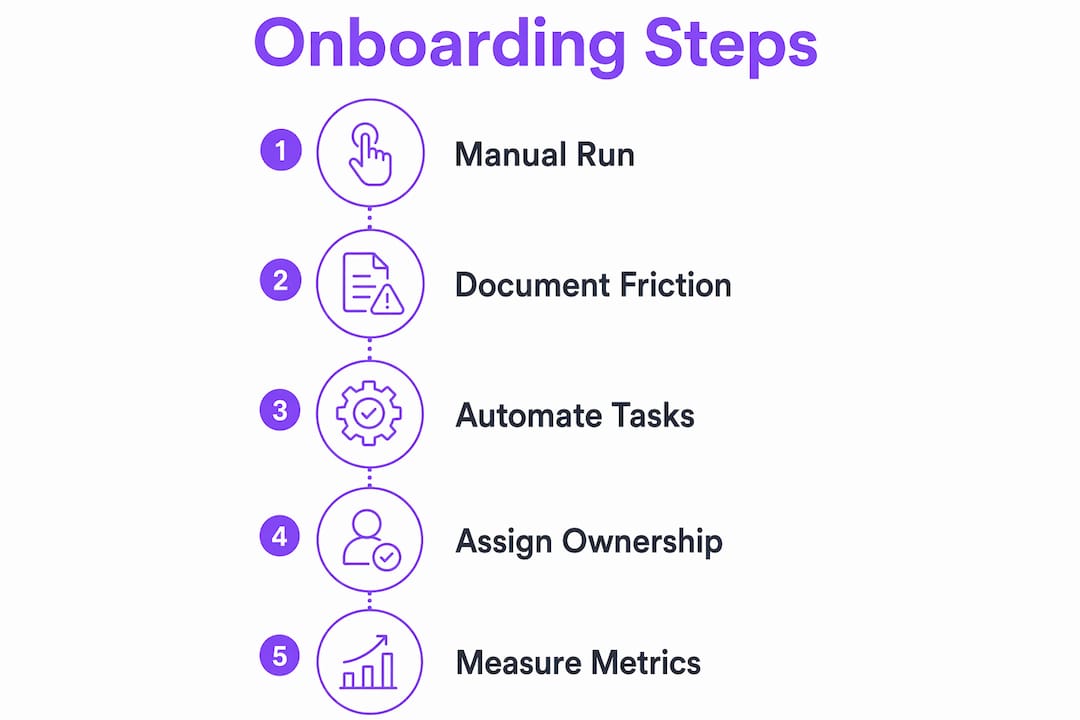
Pro Tip: Before automating anything, run your onboarding process manually for at least three clients. Document every step, every delay, and every question. Automate only after you know exactly where the friction lives.
How does assigning clear ownership improve onboarding scalability?
Ownership confusion is the most common reason onboarding processes break at scale. Most teams assign tasks. Scalable teams assign outputs. The distinction matters because a task can be “done” while the outcome it was meant to produce still hasn’t happened.
Assigning ownership by outputs and outcomes, not just tasks, prevents the handoff trap where work is technically complete but the next step never starts. In a typical onboarding flow, three roles carry distinct accountability: the client, the internal manager, and the automation layer. When each role owns a defined output rather than a checklist item, the process moves forward without a coordinator chasing every transition.
A practical ownership model for client onboarding looks like this:
- Client: Owns the completion of the intake form and document submission. The process does not advance until this output exists.
- Account manager: Owns the kickoff call outcome, specifically the signed scope confirmation. Not the meeting itself, but the document that results from it.
- Operations lead: Owns the internal setup checklist, including system access, tool provisioning, and role assignments.
- Automation layer: Owns all sequencing between steps. No human should manually trigger the next phase when a prior output is confirmed.
- Project lead: Owns the go-live confirmation and the first milestone check-in, which closes the onboarding loop formally.
This model eliminates the handoff trap because every transition has a named owner and a defined output. When something stalls, you know exactly where to look. You can reduce onboarding friction significantly just by making this ownership structure explicit in writing before you build any automation.
Pro Tip: Map your current onboarding flow and write one owner name and one output next to every step. If you cannot name both, that step is a handoff risk.
Why do metrics matter for scaling onboarding?
Measurement is the part most project leaders skip, and it is exactly why their onboarding processes stop improving after the first few clients. Tracking metrics across 5–10 clients is the minimum threshold for identifying real friction points versus one-off anomalies. Below that sample size, you are reacting to noise.
The metrics that matter most are not satisfaction scores. They are operational signals that reveal where the process slows down or breaks.
“If you are not measuring time-to-completion at each onboarding stage, you are not managing the process. You are just hoping it works.”
The table below shows the core metrics that operations managers should track from the first client onboarding forward:
| Metric | What it measures | Why it matters |
|---|---|---|
| Time to first deliverable | Days from contract signing to first client output | Reveals intake and setup delays |
| Intake form completion rate | Percentage of clients who complete intake without follow-up | Identifies friction in the client-facing entry point |
| Calendar scheduling delay | Days between kickoff request and confirmed meeting | Flags coordination bottlenecks |
| Step drop-off rate | Percentage of onboarding steps completed on time | Shows where the process loses momentum |
| Time to full activation | Total days from deal close to client fully active | The headline metric for overall onboarding efficiency |
You can track client onboarding progress automatically using workflow tools that log timestamps at each stage. Manual tracking in spreadsheets works for the first few clients but breaks down quickly. The goal is a feedback loop where each completed onboarding cycle produces data that improves the next one.
How can you personalize onboarding without losing process consistency?
Personalization and standardization feel like opposites. They are not. The key is knowing which parts of the process must be identical for every client and which parts can flex without breaking the system.
71% of clients expect personalized interactions during onboarding. That expectation does not disappear just because you are running 20 clients at once. The teams that handle this well separate the delivery layer from the process layer. The process is always the same. The delivery adapts.
Role-based onboarding portals are the most effective tool for this. A portal shows each stakeholder only what is relevant to their role. The client sees their intake checklist and progress tracker. The internal team sees the full workflow status. The executive sponsor sees milestone summaries. Everyone gets a tailored view without the team building a custom experience from scratch for each client.
Here is how to build personalization into a standardized process:
- Segment clients by type before onboarding begins. A SaaS client and a professional services client need different intake questions, different kickoff agendas, and different success milestones. Build separate templates for each segment, not a single generic flow.
- Automate the standard steps, customize the touchpoints. The document collection, system setup, and task sequencing run identically for every client. The kickoff call agenda, the welcome message, and the first check-in format adapt to the client’s industry and goals.
- Use conditional logic in intake forms. When a client selects their industry or company size, the form routes them to the relevant follow-up questions automatically. This creates a personalized experience without manual configuration.
- Build named milestones into every client plan. Generic milestones like “setup complete” feel impersonal. Milestones named after the client’s specific goal, such as “first report delivered to [Client Name]'s finance team,” signal that the process was built for them.
Pro Tip: Create three onboarding templates based on client complexity: simple, standard, and complex. Assign every new client to one of these tracks at contract signing. You get personalization at the segment level without rebuilding the process each time.
Scaling client engagement does not require more staff. It requires a process architecture that handles volume without losing the quality that clients notice. EasyFlow supports this by automating onboarding workflows so teams can grow client capacity without growing headcount.
Key Takeaways
Structured onboarding scales client teams by combining automation, explicit ownership, and continuous measurement into a repeatable process that holds quality at any volume.
| Point | Details |
|---|---|
| Limit manual steps | Keep manual steps below 5 per client; above 15 signals a process that will break at scale. |
| Automate at trigger points | Replace reminders with triggers that fire automatically when a prior step is confirmed complete. |
| Assign output ownership | Name one owner and one output for every onboarding step to eliminate handoff gaps. |
| Measure from the start | Track time-to-completion, drop-off rates, and scheduling delays across every client from day one. |
| Personalize the delivery layer | Standardize the process, then adapt kickoff agendas, milestones, and portals by client segment. |
What I have learned from scaling onboarding the hard way
The most common mistake I see project leaders make is automating too early. They build a workflow before they understand where the real delays live, and then they automate the wrong things. The result is a fast process that still produces bad outcomes.
The right sequence is always: run it manually, document every friction point, then automate the mechanical steps that repeat without variation. This is not a slow approach. It is the only approach that produces automation you can actually maintain when something breaks at 2 a.m. before a client launch.
The second mistake is treating ownership as a formality. Writing names next to steps in a document feels bureaucratic until the day a client goes silent for a week and nobody knows whose job it was to follow up. Ownership clarity is not overhead. It is the structure that makes everything else work.
My honest recommendation: start with the onboarding checklist essentials before you touch any automation tool. Get the steps right on paper first. Then automate. Then measure. Teams that follow this sequence build processes that actually scale. Teams that skip to automation first spend months fixing the wrong problems.
— Harsh
EasyFlow makes onboarding scale without adding headcount
Project leaders who have refined their onboarding process manually are ready for the next step: removing the human coordination that slows every handoff.

EasyFlow automates the workflow handoffs that typically require a coordinator to chase. External collaborators complete tasks through magic links without creating accounts, which removes the biggest source of client-side friction in the first week of onboarding. Role-based task visibility means every team member sees only what they need to act on, and nothing gets lost in a shared inbox. If you are ready to run onboarding automatically, EasyFlow gives your team the execution layer that task-tracking tools cannot provide.
FAQ
What is structured client onboarding?
Structured client onboarding is a defined, repeatable process for integrating new clients that assigns clear steps, owners, and timelines. It replaces ad hoc coordination with a system that produces consistent outcomes regardless of team size.
How many manual steps should an onboarding process have?
A mature onboarding process should require fewer than 5 manual steps per client. More than 15 manual steps signals a process that will create bottlenecks as client volume grows.
How does automation reduce onboarding time?
Automating intake, document collection, and task sequencing cuts onboarding time from several hours to roughly 15 minutes per client. Triggers that fire immediately at deal close eliminate the waiting period that manual handoffs create.
Why does ownership clarity matter in onboarding?
Assigning ownership by output rather than task prevents the handoff trap where work is technically complete but the next step never starts. Every onboarding stage needs one named owner and one defined deliverable.
How do you personalize onboarding at scale?
Segment clients by type before onboarding begins and build separate templates for each segment. Standardize the process steps, then customize the delivery layer, including kickoff agendas, milestones, and portal views, by client category.