
Cut SLA Breaches in 90 Days: SLA Management Workflows for Ops Teams

An SLA management workflow is the operational engine that turns a signed agreement into enforced daily behavior: service definitions, intake rules, timers, escalation logic, and review cadence working together instead of sitting in a PDF. The single highest-leverage move is narrow but decisive: pick one high-impact service, lock its intake fields, and start the SLA clock only when that data is actually present. Teams that do this see fewer breaches and catch problems while they’re still fixable, not after a client complains.
TL;DR:
- Focusing on one high-impact service for SLA enforcement allows teams to refine intake validation, response, and escalation rules before expanding to other services.
- Designing intake forms that capture complete data upfront ensures the SLA clock only starts when accurate information is available, preventing false breach metrics.
- Implementing tiered escalation rules that alert support staff before breaches occur helps mitigate delays and maintains service levels proactively.
- Real-time dashboards prioritizing tickets at risk and open breaches enable teams to address issues early, reducing the likelihood of SLA violations.
- Using automation tools like EasyFlow streamlines SLA workflow enforcement, replacing manual follow-ups with validated, trigger-based notifications and handoffs.
Table of Contents
- What Makes an SLA Management Workflow Actually Work?
- How Do You Design Intake So SLAs Measure Real Work?
- Escalation Rules That Prevent Breaches Instead of Announcing Them
- What Metrics Actually Belong on an SLA Dashboard?
- How Should You Roll Out New SLA Policies Without Breaking Things?
- How Often Should You Review SLA Performance?
- How EasyFlow Puts This Playbook Into Practice
- What Ops Teams Get Wrong Most Often
- Run Your SLA Workflow on EasyFlow Instead of Spreadsheets and Reminders
- Where to Go Deeper on SLA Implementation
- Sources
- FAQ
What Makes an SLA Management Workflow Actually Work?
Most SLA failures trace back to missing plumbing, not bad intentions. A service level agreement is only as strong as the workflow enforcing it, and that workflow needs four operating parts working in sync.
Every SLA has to tie back to a specific entry in your service catalog. “IT support” is not a service; “password reset requests” or “client onboarding document review” is. Vague service definitions produce vague SLAs that nobody can actually measure.
Response and resolution targets are not the same clock, and treating them as one is a common design mistake. Response measures how fast someone acknowledges the ticket. Resolution measures how fast the actual problem gets solved. Timers should pause when work is legitimately blocked, such as waiting on customer input, and resume when the ball is back in your court.
Ownership matters as much as the target itself. If a vendor or another internal team supports part of your service, you need an operating level agreement or underpinning contract that mirrors your external commitment. Otherwise you’ve promised something you can’t control.
Core components checklist:
- Service catalog entry with a named owner
- Separate response and resolution targets with defined pause conditions
- OLAs and underpinning contracts that match or exceed your SLA targets
- Business-hours and calendar rules baked into every timer, not applied manually
A compact set of operating rules built around these four elements gives you something enforceable instead of aspirational.
How Do You Design Intake So SLAs Measure Real Work?
The SLA clock is only honest if it starts on complete information. Start it on a half-filled ticket and you’re measuring how fast your team fixes your own intake form, not how fast they solve customer problems.
Design intake so required routing data gets captured and validated before the timer begins. Waiting on a missing field is not the same as agent inaction, and your metrics need to reflect that distinction.
- Capture the requesting service, impact level, and requester identity at submission, not after triage.
- Require any attachments or reproduction steps the resolving team will need, and block submission without them.
- Validate the ticket against catalog rules automatically, rejecting anything routed to the wrong queue before it ever starts a clock.
- Map priority using a combination of impact, urgency, and customer tier rather than a single dropdown.
A payments outage affecting your top-tier account is a different priority tier from a cosmetic bug reported by a trial user, even if both come in labeled “urgent” by the requester. Validation before the SLA start prevents both under and over prioritization.
Don’t try to instrument every service at once. Model one or two high-impact services first, get the intake fields right, and expand once the pattern holds.
Pro Tip: Run your intake form past the team who actually resolves tickets, not just the team that designs the form. They know which missing field causes the most rework.
Escalation Rules That Prevent Breaches Instead of Announcing Them
Escalation only earns its place in the workflow if it happens before the breach, not after. A tiered warning system gives agents and managers time to act while there’s still time to act.
Each threshold should trigger a specific, predefined response, not just a louder alert.
Automated escalation rules should:
- Reassign the ticket to a senior agent or secondary queue when the warning threshold hits
- Notify the ticket owner’s manager directly at the escalation threshold, not just the requester
- Update the priority field and log the reason automatically
- Preserve the original owner’s visibility on the ticket rather than fully transferring it away, so context doesn’t get lost mid-handoff
Before any handoff, require a short checklist: current status, blocking dependency, customer communication history, and next action owed. Skipping this is how escalated tickets sit untouched for hours while two people each assume the other has it.
Automated and manual escalation paths need to coexist, not compete. Automation should enforce the SOP reliably, while agents retain override authority for edge cases the rules didn’t anticipate.
Pro Tip: Keep the escalation SOP as a living document agents can read, and mirror every rule in it as an actual automation. If the two drift apart, agents start ignoring both.
What Metrics Actually Belong on an SLA Dashboard?
Your dashboard should answer one question at a glance: what needs attention right now, before it becomes a breach. That means the layout has to prioritize risk over history.
Real-time view should show:
- Compliance rate broken out by priority tier, not blended into one number
- Tickets currently at risk, meaning inside the warning or escalation window
- Open items that have already breached, sorted by how long they’ve been open
- Current queue load per team or agent
Shifting attention from lagging to leading indicators is the real difference between a dashboard people check and one they ignore. Counting breaches after the fact tells you what already went wrong. Watching tickets approach the 80% threshold tells you what’s about to.
Early warning in practice: if items sitting in the warning band start climbing week over week even though breach counts look flat, that’s a leading signal that staffing or intake volume has shifted before it shows up in the compliance number itself.
Weekly reports should track breach counts by root cause, not just totals. Monthly reports should add trend lines by service and by team. Quarterly reviews should compare actual performance against renegotiated targets. A workflow bottleneck checklist helps trace whether a recurring breach is really an SLA problem or a capacity problem wearing an SLA costume.
How Should You Roll Out New SLA Policies Without Breaking Things?
Never flip a new SLA policy live across every queue on day one. Test it, pilot it narrowly, then expand.
- Build test cases that simulate a ticket sitting exactly at the warning threshold, exactly at breach, and one that pauses mid resolution, then confirm the timer behaves correctly in each case.
- Pilot on the one or two services you modeled first, and measure compliance rate, false escalation rate, and agent complaints during the pilot window.
- Route any SLA change that touches infrastructure, vendor contracts, or underpinning agreements through a formal request for change process rather than adjusting it informally.
- Confirm every underlying OLA or UC can actually support the new target before you commit to it externally. A supported approval workflow with built-in validation steps catches this before launch, not after the first breach.
How Often Should You Review SLA Performance?
Reviews are where breaches turn into fixes instead of repeating monthly. Weekly stand-ups with the ops lead and team supervisors should catch tickets currently at risk. Monthly reviews with department heads should look at trend lines and root-cause categories. Quarterly reviews with whoever owns the client or vendor relationship should decide whether targets themselves need renegotiation.
Every breach deserves a short postmortem, not a shrug:
- What was the root cause: capacity, intake data quality, vendor delay, or a genuinely unrealistic target?
- Was this an isolated incident or the third breach this quarter with the same cause?
- Does the fix belong in the workflow (better intake, more automation) or in the agreement itself (renegotiated target, added OLA capacity)?
Regular reviews are what surface root causes before they compound into a pattern that costs you the account.
How EasyFlow Puts This Playbook Into Practice
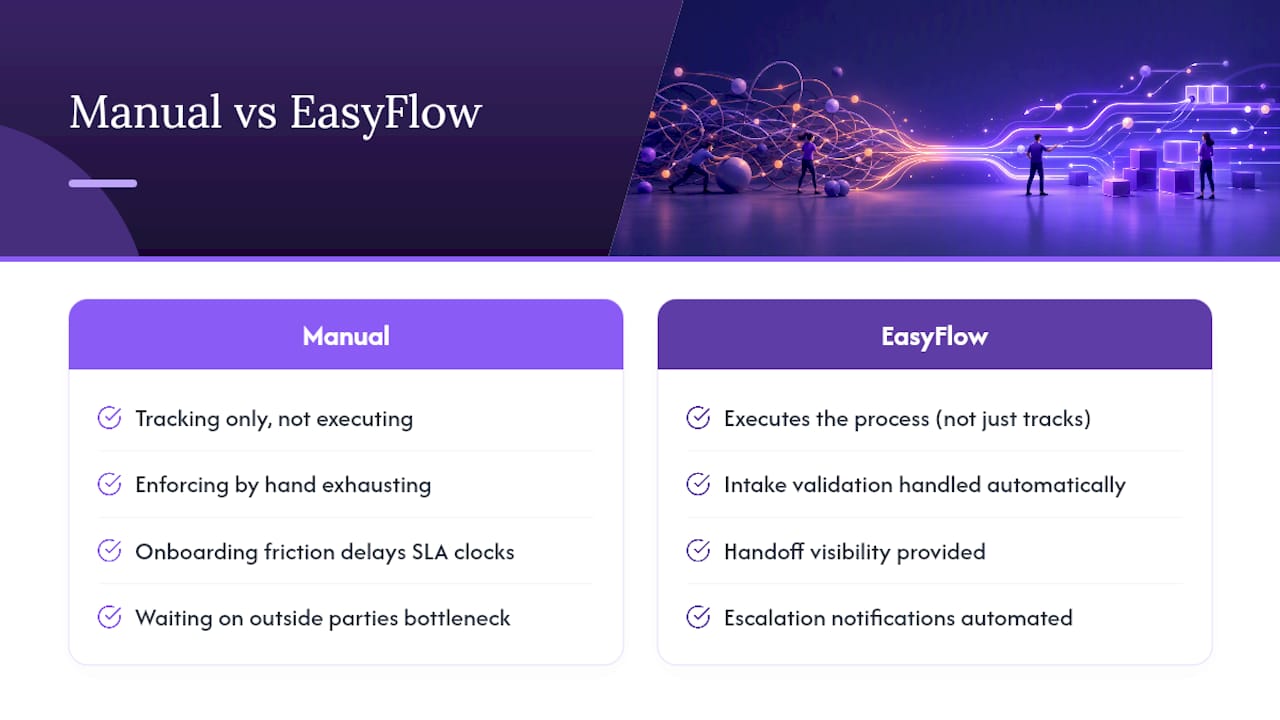
Most of this workflow design fails not because the rules are wrong, but because enforcing them by hand is exhausting. EasyFlow executes the process itself rather than just tracking that it happened, which matters for intake validation, handoff visibility, and escalation notifications alike.
External collaborators, like a vendor completing an OLA step or a client submitting missing intake data, complete their part through a magic link, no account required. That single detail removes the onboarding friction that quietly delays SLA clocks in client implementation and new-hire onboarding workflows, where waiting on outside parties is usually the real bottleneck.
What Ops Teams Get Wrong Most Often
Teams overbuild before proving one service works, and they negotiate SLA targets without pulling operations into the room first. Fix intake validation and escalation automation in the first 30 days, measure compliance for 60, then renegotiate anything unrealistic by day 90.
— Harsh
Run Your SLA Workflow on EasyFlow Instead of Spreadsheets and Reminders
EasyFlow is built for exactly the workflow this playbook describes: intake validation before a timer starts, tiered escalation notifications that fire automatically, and handoff visibility that doesn’t disappear when a ticket changes hands.

Instead of chasing agents for status updates or manually checking who’s approaching a breach threshold, EasyFlow’s deadline reminder and escalation automation handles the notification and reassignment steps this article recommends, without anyone building the logic from scratch. External vendors and clients complete their steps through a magic link, so an OLA dependency waiting on a third party never sits stalled because someone forgot to create an account.
If you’re still enforcing SLA rules through spreadsheets and follow-up emails, start a free trial on EasyFlow and set up your first service with real intake validation and automated escalation before your next review cycle.
Where to Go Deeper on SLA Implementation
- SLA Monitoring process guidance: the platform-level detail on escalation decision steps.
- EasyFlow’s approval workflow examples: configuration-side reference for intake validation.
- Scoping technical support SLAs: practical framing for defining a workable first service.
Sources
- SLA Management Guide for Help Desk Teams | HelpDeskFocus
- Service Level Management process guidance (FTOC)
FAQ
What Is the Difference Between an SLA and a KPI?
An SLA is a commitment tied to a specific target and consequence, like resolving priority-one tickets within four hours. A KPI is simply a metric you track, such as average resolution time, which may or may not be attached to a formal agreement.
What Is the SLA Management Process?
It’s the ongoing cycle of negotiating targets, monitoring performance against them in real time, escalating at-risk tickets before they breach, and reviewing results to renegotiate or fix the underlying workflow. Service level management coordinates all four stages under one owner.
What Does a Four-Hour SLA Mean?
It means the clock, once started, gives four hours to hit the committed action, usually first response or full resolution depending on how the agreement defines it. The clock should pause for legitimate blockers and only run during agreed business hours unless the SLA specifies continuous coverage.
What Are the Three Types of SLA?
The three common types are customer-based (covering everything one customer receives), service-based (covering one specific service for all customers), and multi-level (layering corporate, customer, and service tiers together). Most operations teams start with service-based agreements because they’re easiest to measure and pilot.
How Do I Start Building an SLA Management Workflow From Scratch?
Pick one high-impact service, define its intake fields and validation rules, set response and resolution targets with pause conditions, and build tiered escalation before you expand to a second service. Tools like EasyFlow can automate the intake validation and escalation steps once you’ve defined the rules, cutting the manual follow-up that usually breaks a first rollout.