
Recover 15–20 Hours/Week: Runbook Automation for Ops Using Magic Links

Ops runbook automation is business workflow automation that executes cross-team processes, automates handoffs, and removes manual follow-up from repeatable operations work like onboarding and client implementations. It differs from IT/DevOps runbook automation, which scripts server and incident response tasks. If you manage operations or projects, the practical move is to evaluate a platform like EasyFlow, built specifically to run these processes rather than just track them.
TL;DR:
- External collaborators can complete their tasks through magic links without needing to create accounts, reducing delays in client and vendor workflows.
- Automating processes like onboarding and procurement can typically produce measurable time savings within 1 to 6 weeks of pilot testing.
- High-ROI workflows often see a 30 to 50 percent reduction in processing time, especially in repetitive, cross-department tasks.
- Proper mapping, testing, and fallback procedures are crucial to avoid automating broken processes and to ensure smooth scaling.
- External-not-internal workflows benefit most from AI-assisted data extraction and intelligent routing, which adapt to varied input formats and conditions.
Table of Contents
- What Does Ops Runbook Automation Mean for Your Team?
- What Features Should You Look for in Runbook Creation Tools?
- How Do You Implement Runbook Automation Without Breaking Anything?
- How Do You Measure ROI on Runbook Automation?
- Which Use Cases Deliver the Fastest Payoff?
- What Integration and Governance Issues Should You Plan For?
- A Different Take on Why Most Ops Automation Efforts Stall
- Start Automating Your Team’s Runbooks Today
- Sources
- FAQ
What Does Ops Runbook Automation Mean for Your Team?
Business runbook automation is not the same as an IT runbook, which usually documents server recovery steps or incident escalation paths. Here, a runbook is the sequence of steps a team follows to complete a recurring cross-functional process, like onboarding a client or provisioning a new hire, and automation means software executes those steps instead of a person chasing them through email.
The value shows up fast once you stop treating it abstractly. Automated routing means tasks move to the next owner without someone checking a spreadsheet. Fewer follow-ups means fewer “just checking in” messages clogging inboxes. Better visibility means a manager can see exactly where a process stalled instead of asking three people.
Manual work automation typically eliminates includes:
- Status update emails sent just to confirm a task is still moving
- Duplicate data entry across a CRM, a spreadsheet, and an email thread
- Reminder pings sent manually because a deadline is approaching
- Copy-pasting the same intake information into multiple systems
Workflow automation replaces these fragile, manual routines with structured digital paths that move work automatically across teams and systems.
What Features Should You Look for in Runbook Creation Tools?
Not every tool billed as a “workflow platform” actually executes processes. Some just track status while people still do the manual handoff work by hand. When you evaluate runbook creation tools, look past the demo and check for capabilities that hold up under real cross-team pressure.
The core list to check:
- Automated routing and branching logic. A task should move to the right person based on conditions you set, not a rule someone remembers to apply.
- Approvals and reminders built in. No one should need to manually nudge a stalled approver.
- External collaboration without account creation. Vendors, clients, and contractors complete their step through a link, not a login screen.
- AI-assisted workflow generation and extraction. Some platforms can read a document or email and pull structured data straight into a workflow, adapting when formats vary.
- Integrations with email, CRMs, and project tools, plus exportable audit logs.
- Dashboards with blocker detection, so a stuck step gets flagged instead of discovered three days later.
The account-creation friction point matters more than most buyers realize. Every external collaborator forced to create a login is a drop-off risk, and in client implementations, that friction directly delays revenue-generating work.
Pro Tip: When comparing tools, test the external-collaborator flow yourself. Send a task to a personal email and time how long it takes to complete it. If it requires a signup step, that is friction your clients will feel too.
How Do You Implement Runbook Automation Without Breaking Anything?
Jumping straight to automation on a broken process just automates the breakage faster. The sequence below keeps risk low while showing results within weeks, not quarters.
- Map the existing process end to end. Write down every handoff, every approval, and every point where work currently stalls. Automation failures usually trace back to skipping this step and automating a process that was already broken.
- Pick a high-frequency, cross-team pilot. Good candidates run often, touch at least two departments, and have a clear start and end point. New-hire onboarding and client kickoff are common first picks because they repeat weekly or monthly.
- Design inputs and validation rules. Decide what information triggers the workflow and what conditions send it down a different branch, like a deal size that requires extra approval.
- Build the branching and exception paths. This is where AI-assisted extraction earns its keep, since it can read varied document formats and route data correctly even when the input isn’t perfectly standardized.
- Test with a small cohort and capture metrics. Run it on three to five real cases before rolling out company wide.
- Iterate, then scale. Fix what broke in testing, then expand to the full team.
- Document fallback procedures and assign an owner. Every automated workflow needs a manual backup path and a named person watching for exceptions.
A sensible rollout order mirrors what Marathon Insights recommends: map and simplify first, pilot on rule-based volume work, layer in AI handling for exceptions, then scale with monitoring. Teams that automate their top repetitive workflows this way often recover 15 to 20 hours per week within the first month for a small team, according to the same guide.
How Do You Measure ROI on Runbook Automation?
Set expectations before you pitch this to leadership, because vague promises get vague budget approval. Track a small set of metrics instead of a dozen vanity numbers.
- Time saved per process cycle, measured from process start to completion.
- Reduction in manual follow-ups, tracked as emails or messages sent to chase a task.
- Error rate, especially data entry mistakes caught before or after automation.
- Cycle time, the total elapsed time from trigger to close.
- SLA compliance, particularly for client-facing processes with contractual deadlines.
Timelines vary by complexity. A simple, single-branch workflow, like routing an approval request, can pilot in 1 to 2 weeks. A multi-department workflow with several exception paths, like a full client implementation, usually needs 4 to 6 weeks to test and stabilize.
The numbers back up the investment. Operations teams using AI workflow automation report significant reductions in time spent on repetitive tasks, and deployments targeting high-ROI flows like vendor onboarding and SLA monitoring commonly show 30 to 50 percent reductions in processing time. When you present results, package them as before-and-after cycle times next to a dollar estimate of hours reclaimed. For a deeper breakdown of what to expect and when, EasyFlow’s workflow automation ROI guide walks through realistic timeframes by workflow type.
Which Use Cases Deliver the Fastest Payoff?
Some processes are better automation candidates than others. The best ones repeat often, touch multiple departments, and currently rely on someone remembering to chase the next step.
- New-hire onboarding. Before automation, HR emails IT for equipment, IT emails facilities for a badge, and the new hire’s manager gets looped in late. Automated, each step triggers the next automatically, and training sequences fire on a schedule without a coordinator tracking it manually.
- Client implementations. Intake forms, contract approvals, and technical setup usually live in separate inboxes with no shared visibility. Automating this orchestrates the handoff between sales, legal, and delivery so nothing waits on a forwarded email.
- Procurement and approvals. Purchase requests above a certain threshold need manager sign off, then finance, then an ERP entry. Threshold-based routing sends the request to the right approver automatically and logs the decision instead of burying it in a chat thread.
Each case shares the same before-and-after pattern: manual chasing replaced by automatic routing, with a visible trail of who did what and when.
What Integration and Governance Issues Should You Plan For?
Automation that moves data between systems without a plan creates new risk instead of removing old friction. A few decisions up front prevent most of the pain later.
- Map data movement and field mappings before building anything. Know exactly which fields sync between your CRM, email, and project tools, and where a mismatch could cause silent errors.
- Keep exportable audit trails. Centralized logs support compliance reviews and make it possible to reconstruct exactly what happened in a disputed approval or missed deadline.
- Design graceful failure modes. If an integration goes down, the workflow needs a manual fallback path, not a silent stall.
- Control external-collaborator access. Magic links are convenient, but they still need expiration windows and scoped permissions so a client or vendor only sees what applies to their step.
Teams handling structured reporting data specifically may also want to look at dedicated document automation resources for extracting and formatting operational reports.
A Different Take on Why Most Ops Automation Efforts Stall
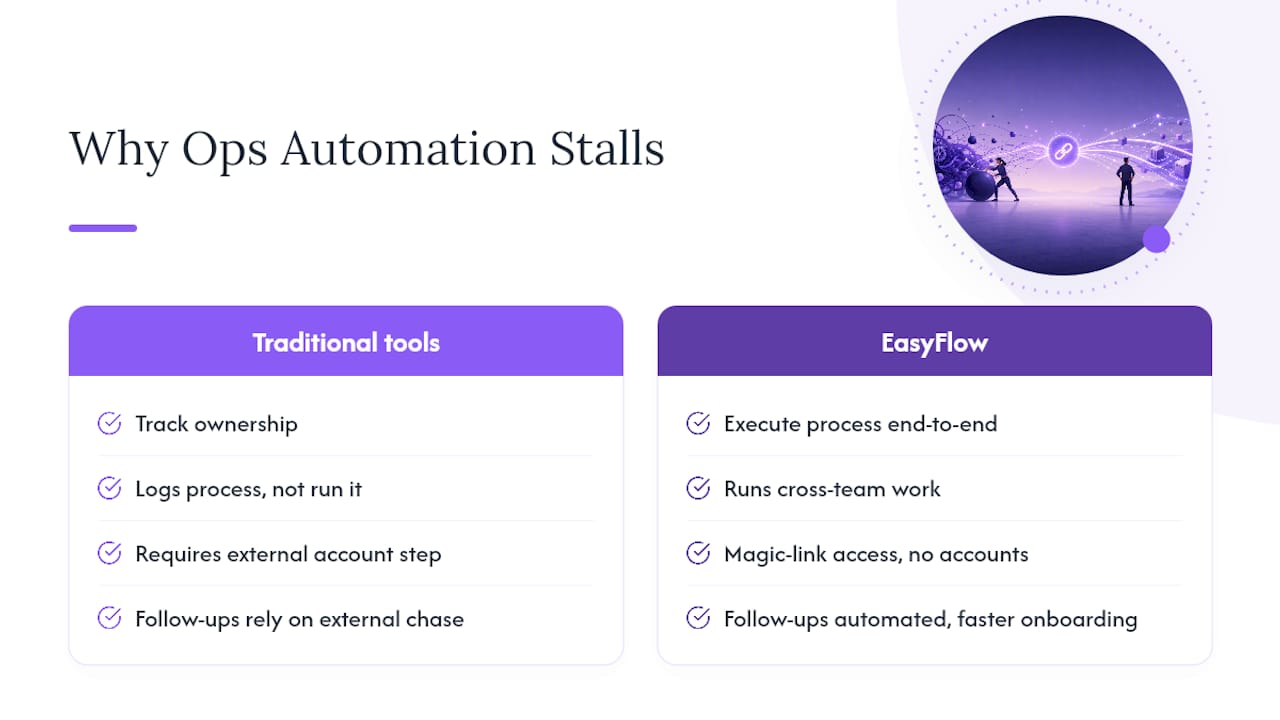
Most operations teams underestimate how much of their process pain is a handoff problem, not a task problem. They buy a tool that tracks who owns what, then wonder why follow-ups haven’t dropped. EasyFlow was built around a different premise: the software should execute the process, not just log it, which is the real gap between tools like Asana or Trello and something built to run cross-team work.
The friction most teams never fix is the external one. Every vendor, client, or new hire forced to create an account before completing a step is a delay you built into your own process. EasyFlow’s magic-link access skips that step entirely, which is why implementation and onboarding workflows move faster once follow-ups stop depending on someone remembering to chase a person outside the company.
— Harsh
Start Automating Your Team’s Runbooks Today
If you have read this far, you already know the gap between a tracked task and an executed one. EasyFlow closes that gap. Instead of another board where your team updates status by hand, EasyFlow runs the process itself, routes the next step automatically, and lets external collaborators finish their part through a magic link with no account required.

That last point matters more than it sounds. Client implementations and vendor onboarding stall constantly because someone outside your company has to create a login just to upload a document or approve a step. Remove that barrier and cycle times drop without adding headcount. EasyFlow offers a free plan to start and a 14 day trial on paid tiers, so you can pilot one real workflow, like onboarding or a client kickoff, before committing to anything. Start your free trial and map your first automated workflow this week.
Sources
For deeper research behind the figures in this guide, see the practical implementation guide from Marathon Insights and the breakdown of runbook automation beyond IT from Business Process Incubator.
On the EasyFlow blog, Process Management Tools for Ops Leaders covers tool selection in more depth, and Assign Tasks Without Manual Intervention walks through eliminating handoff delays step by step.
- How Workflow Automation Breaks Down Silos and Supercharges Cross-Department Collaboration - InfoSeeMedia
- AI Workflow Automation for Operations Teams: A Practical Implementation Guide | Marathon Insights
- AI Workflow Automation for Operations | NiCE
FAQ
What Is the Difference Between Ops Runbook Automation and IT Runbooks?
Ops runbook automation executes business processes like onboarding and client implementations across teams, while IT runbooks script incident response and infrastructure recovery steps. This guide covers the business process side only.
How Long Does a Runbook Automation Pilot Take?
A simple, single-branch workflow can pilot in 1 to 2 weeks, while a complex, multi-department workflow like a client implementation usually needs 4 to 6 weeks to test and stabilize.
What Results Can Operations Teams Expect From Automation?
Teams commonly see 40 to 60 percent reductions in time spent on repetitive tasks, and high-ROI flows like vendor onboarding often show 30 to 50 percent reductions in processing time.
Can External Collaborators Use Runbook Automation Without an Account?
Yes. Platforms like EasyFlow let external collaborators, such as clients or vendors, complete their assigned step through a magic link with no signup required, which reduces onboarding friction.
Which Processes Should You Automate First?
Pick a high-frequency, cross-team process with clear start and end points, such as new-hire onboarding or client kickoff, since these repeat often enough to show measurable results quickly.