
What Is a Project Workflow Template? 2026 Guide

A project workflow template is a reusable, parameterized blueprint that standardizes repeatable sequences of tasks, dependencies, decision points, and roles to ensure consistent project execution. Think of it as the operational DNA of your process. 94% of organizations identify digitizing and standardizing workflows as critical for business success in 2026. That number signals a shift: teams are no longer treating process documentation as optional. Tools like Jira, Airtable, and Teamwork have made workflow templates a core feature of modern project management, and for good reason. When your team runs the same type of project repeatedly, a template eliminates the guesswork every single time.
What is a project workflow template and why does it matter?
A project workflow template is the formal industry term for what many teams call a “process blueprint” or “repeatable workflow.” It captures the how of your work: the sequence of steps, who owns each one, what triggers the next action, and where approvals are required. Unlike a simple to-do list, a structured workflow sequence guides a project from initiation to completion by focusing on operational flow rather than scheduling.
The distinction matters because most teams confuse having tasks with having a process. A task list tells you what to do. A workflow template tells you how it gets done, in what order, by which role, and under what conditions. That difference separates teams that execute predictably from teams that reinvent the wheel on every project.

Common examples of workflow templates include client onboarding workflows, software release workflows, content production workflows, and employee onboarding workflows. Each one captures a repeatable process that would otherwise rely on tribal knowledge or memory.
What are the essential components of a workflow template?
Effective workflow templates share a consistent set of building blocks. Understanding each component helps you build templates that actually get used rather than abandoned after one project.
- Trigger and start condition. Every template needs a defined starting point. A client signing a contract, a ticket reaching “approved” status, or a form submission can all serve as triggers. Without a clear trigger, teams skip the template entirely.
- Task sequence with role-based ownership. Role-based task assignments rather than individual-specific ones keep templates usable when team members change. Assign tasks to “Account Manager” or “QA Engineer,” not to “Sarah” or “Tom.”
- Dependencies and timing estimates. Each task should specify what must be completed before it can begin and how long it typically takes. This creates a baseline for performance measurement.
- Decision points and approval gates. Approval gates and escalation paths define what happens when a task fails review or a deadline is missed. These are not optional extras. They are the mechanism that prevents work from stalling silently.
- Measurement hooks and SLA guardrails. Incorporating SLA guardrails allows proactive management and real-time bottleneck detection. Organizations with mature workflows waste significantly less money per dollar invested.
Pro Tip: Resist the urge to document every possible edge case inside the template. Focus on the 80% repeatable core and leave explicit placeholders for the variables. Over-parameterization is the fastest way to create a template nobody uses.
How does a workflow template differ from a project plan?
This is the most common point of confusion in project management, and getting it wrong leads to duplicate documentation and wasted effort.
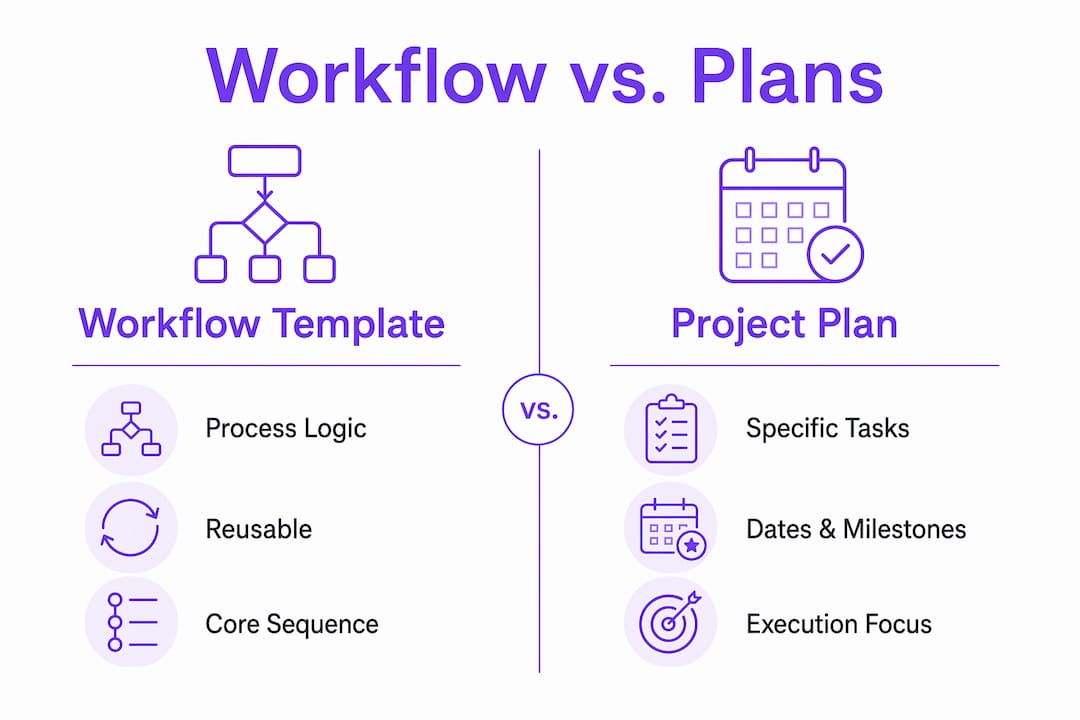
Workflow templates define the how and process logic. Project plans define the what and when, with specific dates, milestones, and resource allocations tied to a single project instance. A workflow template feeds into a project plan. The plan consumes the template’s structure and populates it with real dates and names.
A task template is a third, narrower concept. It defines the details of a single repeatable task, such as a standard checklist for a code review or a brief for a blog post. Task templates live inside workflow templates.
| Tool | Defines | Scope | Reusability |
|---|---|---|---|
| Workflow template | Process logic and sequence | End-to-end process | High, reused across projects |
| Project plan | Dates, resources, milestones | Single project instance | Low, built per project |
| Task template | Single task details or checklist | One task | High, reused within workflows |
The relationship is hierarchical. Workflow templates sit at the process level. Project plans sit at the execution level. Task templates sit at the activity level.
Pro Tip: Build your workflow template first, then use it as the foundation when creating each new project plan. This cuts project setup time significantly and keeps your plans consistent across the team.
How to create an effective project workflow template
Building a workflow template that your team actually follows requires more than listing tasks in a document. Here is a proven process for creating templates that hold up in practice.
-
Map the current end-to-end process with your team. Gather the people who actually do the work, not just managers. Walk through the last three to five completed projects of the same type and document every step that occurred. Use a whiteboard, Miro, or a simple spreadsheet to capture the flow.
-
Separate the repeatable core from the variables. Every process has steps that happen every time and variables that change per project, such as client name, budget, or deadline. Separating repeatable core elements from variables is the foundation of a usable template. Mark variable fields as explicit placeholders.
-
Define role-based ownership and dependencies. Assign each task to a role, not a person. Then map which tasks must finish before others can begin. Add a baseline time estimate for each task. This gives you the data you need to spot delays before they become crises.
-
Implement the template in your workflow management tool. Platforms like Jira, Teamwork, and Airtable all support workflow template implementation natively. Build the template inside the tool your team already uses so adoption requires no behavior change.
-
Run the template on a real project and document friction points. The first run will expose gaps. That is expected. Note every place where team members deviated from the template or asked clarifying questions.
-
Iterate after 3–5 project cycles. Iterating on templates after every three to five uses based on real project data ensures the template stays relevant and efficient. Ignoring this step risks outdated processes and lost productivity.
Common pitfalls to avoid include building the template in isolation without input from the people doing the work, assigning tasks to individuals instead of roles, and skipping the measurement hooks that let you track performance over time.
Pro Tip: Run a 30-minute retrospective after each project that uses the template. Ask the team one question: “Where did the template slow you down or fail to guide you?” That single question generates the data you need to improve the template before the next cycle.
What are the benefits and challenges of workflow templates?
The case for workflow templates is grounded in measurable outcomes, not theory.
Core benefits:
- Faster project setup. Digitized workflows improve team coordination and reduce manual follow-ups. When the process is already defined, project kickoff becomes a matter of populating variables, not rebuilding the plan from scratch.
- Reduced errors and clearer handoffs. Structured templates define exactly what “done” means for each task before the next one begins. This eliminates the ambiguity that causes rework.
- Performance benchmarking. Once you have baseline timing data from your template, you can measure every new project against it. Deviations become signals, not surprises.
- Better onboarding for new team members. A documented workflow template is a training document. New hires learn the process by following it, not by asking colleagues.
Challenges to manage:
The biggest risk with workflow templates is not that teams ignore them. The biggest risk is that teams build them once and never update them. A template that reflects how your team worked two years ago is worse than no template at all. It creates false confidence and real confusion.
Rigidity is the other major challenge. Templates must balance standardization with the flexibility to handle exceptions. The solution is to build exception paths directly into the template as decision points, rather than leaving them undocumented. Most project failures stem from a lack of clear, documented pathways. Retrospectives are the mechanism that turns past confusion into future efficiency.
Key takeaways
A project workflow template works because it separates process logic from project-specific variables, making consistent execution repeatable across every team and project cycle.
| Point | Details |
|---|---|
| Definition is foundational | A workflow template standardizes task sequences, roles, dependencies, and decision points for repeatable projects. |
| Role-based ownership matters | Assign tasks to roles, not individuals, to keep templates usable as teams change. |
| Templates feed project plans | Build the workflow template first, then use it as the structure for each new project plan. |
| Iterate after 3–5 cycles | Refine templates using real project data to prevent outdated processes from reducing efficiency. |
| Measurement hooks are non-negotiable | SLA guardrails and approval gates enable proactive management and real-time bottleneck detection. |
Where most teams get workflow templates wrong
I have reviewed workflow documentation for teams across industries, and the pattern is consistent. Teams invest real effort in building a template, run it once or twice, and then let it sit unchanged for 18 months. By the time someone questions why projects keep hitting the same bottleneck, the template is three team changes and two tool migrations out of date.
The fix is not a better template. The fix is treating the template as a living document from day one. That means scheduling a review after every three to five project cycles, assigning someone to own the template, and making it easy for any team member to flag a problem with the process.
The second mistake I see constantly is over-parameterization. Teams try to document every possible scenario inside a single template. The result is a 47-step workflow that nobody follows past step 12. The 80% repeatable core is what belongs in the template. Edge cases belong in a separate exception protocol or a decision point that routes to a human.
The teams that get the most value from workflow templates are the ones that treat them as a feedback loop, not a one-time deliverable. They build, run, measure, and refine. That cycle is what separates teams with genuinely efficient operations from teams that just have documented chaos.
— Harsh
Put your workflow templates to work with Teameasyflow
Understanding workflow templates is the first step. Executing them without manual follow-ups is where most teams lose time.

Teameasyflow is built specifically for teams that need their workflows to run, not just be tracked. Unlike task management tools that require every participant to create an account, Teameasyflow executes processes and lets external collaborators complete tasks via magic links. That means no onboarding friction, no chasing people for updates, and no dropped handoffs. Whether you are running client onboarding workflows or internal project cycles, Teameasyflow handles the execution so your team focuses on the work. Start for free and run your first automated workflow today.
FAQ
What is a project workflow template in simple terms?
A project workflow template is a reusable blueprint that defines the steps, roles, and decision points for completing a repeatable type of project. It removes the need to rebuild your process from scratch each time.
How do i create a workflow template for my team?
Map your current end-to-end process with the people who do the work, separate repeatable steps from project-specific variables, assign role-based ownership, and implement the structure in a tool like Jira, Airtable, or Teamwork. Refine the template after every 3–5 uses.
What is the difference between a workflow template and a project plan?
A workflow template defines the process logic and sequence. A project plan applies that logic to a specific project with real dates, resources, and milestones. The template feeds the plan.
What are examples of workflow templates teams use most?
The most common examples include client onboarding workflows, employee onboarding workflows, software release workflows, and content production workflows. Each captures a repeatable process that would otherwise rely on informal knowledge.
Why do workflow templates fail in practice?
Workflow templates fail most often because teams build them once and never update them, or because they over-parameterize the template until it becomes too complex to follow. Treating templates as living documents and focusing on the repeatable core prevents both failures.