
Run an AI Workflow Automation Pilot for Ops Teams in Two Weeks

AI workflow automation replaces manual handoffs with software that actually executes the process, not just tracks it. Instead of a spreadsheet or task board reminding a human to do something, an AI agent or orchestration layer completes the step, routes the output, and flags exceptions. The immediate payoff for most teams: fewer follow-ups, faster cycle times, and less time lost waiting on someone to notice a task landed in their queue. Skip ahead to the pilot checklist if you’re ready to move.
TL;DR:
- AI workflow automation is most effective for high-volume, repeatable processes with clear handoff points where manual delays occur.
- Building a pilot should focus on processes with defined inputs and outputs, using scope discipline, success metrics, and minimal integrations upfront.
- EasyFlow’s unique approach of executing processes via magic links with external stakeholders reduces pilot friction and improves engagement.
- Regulated industries require documented decision processes and human review steps to meet legal and ethical standards in AI workflows.
- Starting with natural-language or visual builders before adding custom code speeds up prototyping and minimizes wasted engineering effort.
Table of Contents
- What Is AI Workflow Automation, Really?
- How Do Teams Actually Build These Workflows?
- Where AI Workflow Automation Pays Off First
- How Do You Pilot AI Workflow Automation the Right Way?
- Why EasyFlow Fits the Pilot Model Described Here
- What Compliance and Ethics Questions Come Up With AI Workflows?
- When Should You Actually Automate, and When Should You Wait?
- Try EasyFlow to Run Your First Pilot Workflow
- Where to Go Deeper on AI Workflow Automation
- Sources
- FAQ
What Is AI Workflow Automation, Really?
Most workflow tools fall into two camps: deterministic and agentic. A deterministic workflow follows a fixed script. If X happens, do Y. It’s reliable and predictable, but it breaks the moment reality deviates from the script. An agentic workflow uses a large language model to interpret context, decide what to do next, and adapt when the input looks different than expected. A deterministic flow can move an invoice to “pending approval.” An agentic one can read the invoice, catch that the vendor name doesn’t match your records, and route it to a human before it becomes a payment error.
Understanding the pieces matters more than memorizing the label. According to IBM’s breakdown of AI workflow components, a functioning system typically includes:
- AI agents or LLMs that interpret unstructured input and make decisions
- Retrievers or vector databases (RAG) that ground responses in your actual documents instead of the model’s general training
- OCR and document extractors that pull structured data out of PDFs, scans, and forms
- API integrations that connect the workflow to your CRM, ERP, or ticketing system
- Orchestration and runtime layers that sequence steps, manage retries, and hand off between agents and humans
- Observability and logging that let someone audit what happened and why
None of this works without governance built in from day one. Every step that touches customer or employee data needs a clear data retention policy, role-based access, and a log of what the model saw and decided. Skipping this early almost guarantees a rebuild later.
How Do Teams Actually Build These Workflows?
There isn’t one way to build an AI workflow, and the method you pick determines how fast you get to a working prototype. Three approaches dominate the market right now, and background patterns across vendors suggest small prototypes can take hours while enterprise-grade production deployments stretch into days or weeks depending on integration complexity.
- Natural-language builders. You describe the outcome you want in plain English, and the builder composes the flow. n8n’s AI workflow builder works this way: describe the task, review the generated nodes, refine what’s wrong, and the execution stays fully inspectable. This is the fastest path for nontechnical teams and often the right starting point for a first pilot.
- Visual node or canvas editors. You drag and connect blocks representing each step, which makes debugging and handoffs between teams far easier than reading raw code. Langflow supports this model and lets you extend flows with Python when the visual blocks run out of logic, which means you’re not locked into the no-code ceiling once your workflow gets complex. Products like FlowHunt’s visual builder follow a similar pattern, letting you run and debug directly on the canvas and publish the finished flow as an API, chatbot, or scheduled job.
- Code extension and custom logic. When a workflow needs precise control, custom validation rules, or has to plug into a legacy system with no clean API, engineers write it directly. This is slower to prototype but gives you the control production systems eventually need.
Most operations teams start with a natural-language or visual builder to prove the concept, then layer in code extension only where the visual tools genuinely fall short. Trying to reverse that order, starting with custom code before you’ve validated the workflow is worth building, wastes engineering time on a process that might not survive contact with real users.
Pro Tip: Prototype in the builder that lets nontechnical stakeholders review the flow before a single line of code gets written. If they can’t understand what the workflow does by looking at it, your future maintenance burden just got heavier.
Where AI Workflow Automation Pays Off First
Not every process is worth automating, but a handful of categories consistently deliver fast, visible returns. The common thread: high volume, repeatable steps, and a clear handoff point where humans currently wait on each other.
- Employee onboarding, where new hires wait on IT, HR, and managers to complete a dozen disconnected steps
- Approval routing, where a document or request sits in someone’s inbox until they remember to act
- Support triage, where incoming tickets need classification and routing before a human ever sees them
- Invoice processing, where OCR extracts line items and an agent flags discrepancies before payment
- Campaign orchestration, where marketing assets need to review, approval, and scheduling across channels
- Incident response, where the first ten minutes of triage determine how fast a problem gets contained
Picture a typical onboarding flow before automation: a new hire’s laptop request sits in an IT queue for three days because nobody flagged it as urgent. After automation, the workflow itself pings IT the moment HR completes step one, escalates automatically if there’s no response in 24 hours, and logs the whole chain for audit. The metrics worth tracking are the same across almost every use case: time to resolution, handoffs removed, and SLA improvement. Reviews of workflow platforms on G2 consistently show that ease of use and how much manual follow-up a tool eliminates are the two factors that separate tools people keep using from the ones that get abandoned after a month.
How Do You Pilot AI Workflow Automation the Right Way?
A pilot that succeeds looks nothing like a pilot that drags on for six months without a decision. The difference usually comes down to scope discipline and knowing what you’re measuring before you start.
- Pick a process with a clear input and output. Document-heavy, rule-to-decision processes make the best first pilots because they reduce ambiguity for verification loops, according to findings on common production failure points. Vague, judgment-heavy processes make poor first pilots.
- Define success metrics before you build anything. Time to resolution, number of handoffs removed, error rate, and one business outcome metric (revenue, retention, cost) give you something concrete to report back.
- Map the minimum integrations needed. You don’t need every system connected on day one. Connect only what the pilot process actually touches.
- Set a realistic timeline. A working prototype typically takes days to a couple of weeks. Moving that prototype to staging and then production, with proper testing and stakeholder sign off, usually adds several more weeks depending on how many systems it touches.
- Build in verifier and self-healing loops from the start. Schema drift, malformed data, and unexpected input formats are the most common reasons production workflows quietly break, per Integrate. A verifier step that catches and retries malformed output before it reaches a human saves hours of debugging later.
Before any of that, document the current manual process in detail. It’s tempting to skip this step and jump straight to building, but you can’t automate a process nobody has actually mapped.
Pro Tip: Assign one owner who can say yes or no to scope changes during the pilot. Pilots that get scope creep from three different stakeholders rarely ship on schedule.
Getting the right people invested early changes outcomes more than almost any technical decision. Harvard Business Review’s research on AI adoption found that projects succeed more often when leadership brings cross-functional stakeholders on board from the start rather than presenting a finished tool for adoption. The most common pitfall isn’t technical failure. It’s a pilot that works fine but never gets sponsorship to move past the prototype stage because nobody outside the build team understood what problem it solved.
Why EasyFlow Fits the Pilot Model Described Here
EasyFlow was built around a specific gap in how most workflow tools operate: they track tasks, but they don’t execute them. EasyFlow runs the process itself, moving work forward, sending reminders, and detecting blockers without waiting for someone to check a dashboard.
The detail that matters most for pilots involving outside collaborators: EasyFlow uses magic links, so a client, contractor, or new hire can complete their step without creating an account first. That single design choice removes one of the biggest sources of pilot friction, the awkward moment where an external stakeholder ignores your workflow tool because signing up feels like unnecessary work.
- Onboarding flows that hand off automatically between HR, IT, and the new hire’s manager
- Client implementation workflows where external stakeholders complete steps via a link, no login required
- Approval chains that escalate automatically when someone hasn’t responded in the expected window
Teams evaluating a pilot scope similar to the one described above can review EasyFlow’s approach to team alignment through automation for a closer look at how the execution model plays out in practice.
What Compliance and Ethics Questions Come Up With AI Workflows?
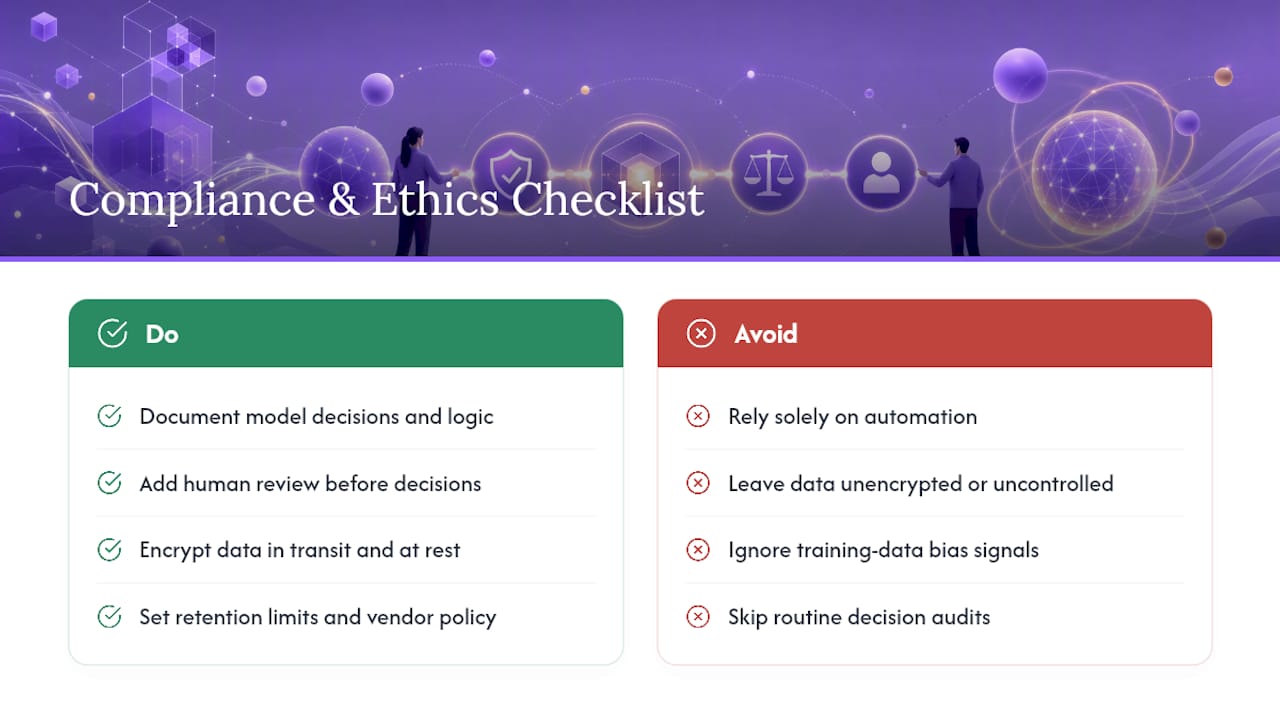
Automated decisions still carry legal weight, even when a human never touches the final output. If your workflow makes or influences decisions about employment, credit, healthcare, or anything else classified as high-risk under regulations like the EU’s AI Act or sector-specific US rules (HIPAA for health data, for instance), you need documentation showing how the model reached its output and a human review step before that decision takes effect. This isn’t optional in regulated industries. It’s the difference between a workflow you can defend in an audit and one that creates legal exposure.
Data handling deserves the same scrutiny. Every document an OCR step processes, every customer message an agent reads for triage, becomes data your organization is now responsible for protecting. That means encryption in transit and at rest, clear retention limits, and a documented policy for what happens to that data if you switch vendors.
Ethically, the bigger risk is often quieter than a data breach: workflows that quietly encode bias because nobody checked what the training data or decision logic actually rewards. A support triage agent that consistently deprioritizes certain phrasing or a screening workflow that penalizes nonstandard resume formats can run for months before anyone notices the pattern. Regular audits of workflow decisions, not just system uptime, catch this earlier. Build in a way for a human to review a sample of automated decisions on a set schedule, not just when something goes visibly wrong.
When Should You Actually Automate, and When Should You Wait?
Automate first where volume is high and the process is repeatable. That’s where returns show up fastest and verification is easiest. Be more cautious with anything touching sensitive personal data or heavy compliance obligations. There, the cost of a mistake outweighs the time saved. Leadership should confirm sponsorship, data ownership, and a rollback plan before greenlighting resources, not after the pilot is already running.
— Harsh
Try EasyFlow to Run Your First Pilot Workflow
If the pilot plan above sounds right for your team, EasyFlow gives you the fastest path to testing it without asking every collaborator to create an account first. That one detail, magic links instead of forced signups, is usually what determines whether external stakeholders actually engage with a new workflow or quietly ignore it.

EasyFlow executes the process instead of just tracking it: reminders go out automatically, blockers get flagged before they become delays, and handoffs move without someone chasing a status update. Whether you’re piloting onboarding, approvals, or client implementations, the structure maps directly to the scoping steps covered above. Before you build a custom pilot from scratch, it’s worth checking EasyFlow’s reusable workflow templates to see if your process is already mapped out. Ready to test it on a real process? Start your pilot with EasyFlow and see how much manual follow-up disappears in the first two weeks.
Where to Go Deeper on AI Workflow Automation
- IBM’s AI Workflow overview for component definitions and vendor framing
- UiPath’s Maestro Flow for orchestration and governance patterns
- Integrate for common production failure modes
Sources
FAQ
What Is the Best AI Workflow Automation Tool?
There’s no single best tool. It depends on whether you need a tool that tracks tasks or one that executes them. If your priority is running processes end to end with minimal manual follow-up, including handoffs to external collaborators, EasyFlow is built specifically for that job rather than for task tracking.
How Do You Automate Processes Using AI?
Start by mapping the current manual process in detail, then choose an authoring method that fits your team, natural-language builders for speed, visual editors for clarity, or code extension for control. Define success metrics before building, and add verifier loops to catch malformed data early.
How Do You Use AI in Your Workflow?
Introduce AI at the specific steps where judgment or unstructured data currently slows things down, document review, triage, or approval routing, rather than trying to automate an entire process at once. Pair it with human review for any decision with real consequences.
How Long Does an AI Workflow Automation Pilot Take?
A working prototype often takes days to a couple of weeks to build. Moving that prototype through staging into production usually adds several more weeks, depending on how many systems and integrations the workflow touches.
What’s the Difference Between Agentic and Deterministic Workflows?
A deterministic workflow follows a fixed set of rules and breaks when input doesn’t match the script. An agentic workflow uses an AI agent to interpret context and adapt its next step, which handles unpredictable input far better.