
How Businesses Collaborate Without Software Onboarding

Businesses collaborate without software onboarding by relying on four core methods: analog documentation, peer buddy systems, structured communication rhythms, and clear role frameworks like RACI. These approaches work because they address the real problem, which is unclear processes and misaligned expectations, not missing software. When you strip away the apps and platforms, what remains is what actually drives collaboration: people who know what to do, who to ask, and when to check in.
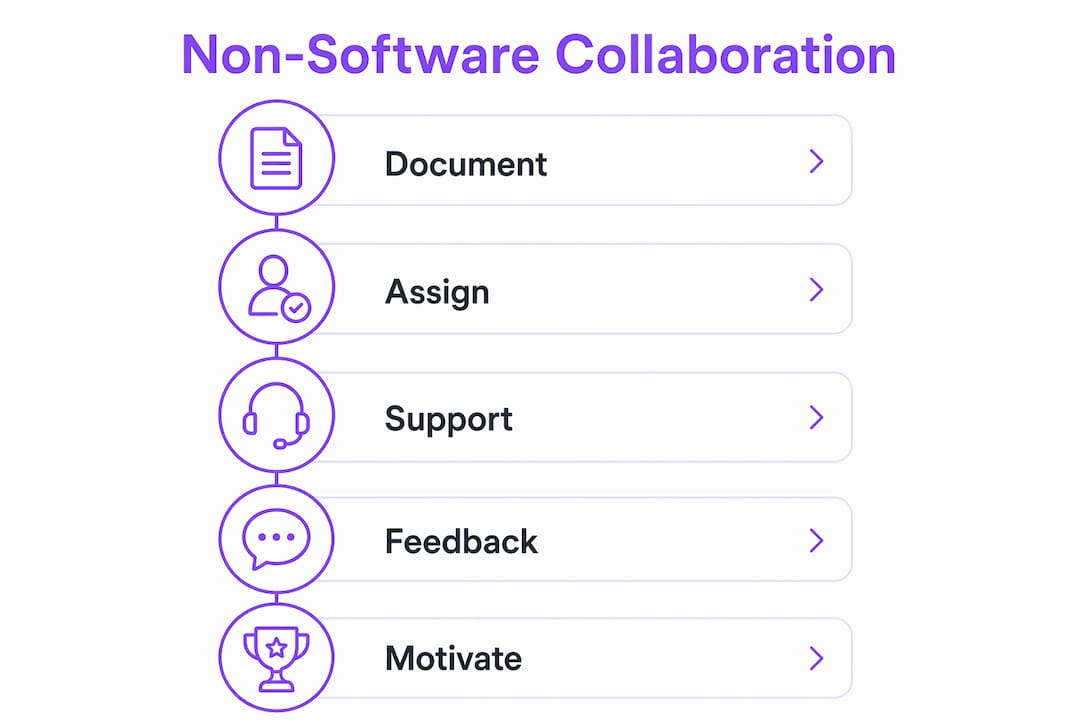
The most effective non-software collaboration strategies include:
- Analog documentation: Printed SOPs, physical process maps, and role checklists give new team members a reference they can hold and annotate
- Buddy systems: Pairing new hires with experienced colleagues for structured 30, 60, and 90-day check-ins reduces ramp-up time without any platform required
- Communication rhythms: Short daily or weekly stand-ups with written agendas replace the coordination work that most teams outsource to software
- Role clarity frameworks: RACI charts define who is Responsible, Accountable, Consulted, and Informed, cutting the friction that derails cross-functional work
- Feedback loops: Regular, brief check-ins catch misalignment before it compounds into a crisis
- Community and gamification: Peer recognition, low-tech challenges, and informal gatherings build the trust that makes collaboration stick
How businesses collaborate without software onboarding using existing tools
The most practical starting point is the tools your team already has. Email, shared drives, printed checklists, and whiteboards can carry a full onboarding and collaboration workflow when they are organized deliberately.
A one-page role SOP covering what the role does, what success looks like at 30 days, and who to contact for each type of help is fast to write and immediately useful. It replaces the orientation sessions that most teams repeat from scratch with every new hire. Load it into a shared folder or print it. Either works.
Physical visual controls are underused. A whiteboard with columns for “In Progress,” “Waiting,” and “Done” gives every team member a shared picture of work without logging into anything. A repair shop, a fulfillment team, or a client services group can all run this system with index cards and a marker. The key is assigning explicit update moments, such as on task start and task completion, so the board stays current.
| Tool | Best use | Requires accounts? |
|---|---|---|
| Printed SOP | Role clarity, day-one reference | No |
| Shared drive folder | Document storage, version control | Existing access only |
| Whiteboard or kanban board | Work visibility, status tracking | No |
| Email with agenda | Meeting prep, async updates | Existing access only |
| RACI chart (printed) | Role and decision clarity | No |
Assigning accountability without software comes down to one discipline: every task needs a named owner and a due date written somewhere visible. The RACI framework does this for cross-functional work by separating who executes from who approves, who advises, and who simply needs to know. Print it, post it, and review it at your weekly stand-up.
Pro Tip: Before your next project kicks off, spend 20 minutes filling out a RACI chart by hand. If you cannot name a single Responsible person for each task, that gap will cause delays regardless of what tools you use.
Setting up a buddy system to support new team members without software tools
A peer buddy system is one of the highest-return, lowest-cost onboarding investments a team can make. The buddy system pairs a new hire with an experienced colleague in a similar role and time zone, with the explicit job of clearing blockers and answering context questions during the first weeks.
The structure matters more than the relationship. Without scheduled milestones, buddy pairings drift into occasional check-ins that stop after week two. Set three fixed touchpoints:
- Day 30: Review role clarity, tool access, and first-week wins. Identify any gaps in the onboarding documentation.
- Day 60: Assess confidence on core tasks. Surface any recurring questions that should be added to the SOP.
- Day 90: Evaluate whether the new hire can complete critical tasks without supervision. Collect feedback on the buddy process itself.
The buddy’s job is not to explain everything. It is to make sure the new hire is not stuck on something avoidable for hours. Fifteen minutes of daily sync in week one builds momentum faster than any orientation deck. Keep a simple paper log of questions raised and answers given. That log becomes the raw material for improving your onboarding documentation over time.
Informal communication matters too. Encourage new hires to ask questions in the open, whether in a shared chat channel or a standing morning huddle, so answers benefit the whole team rather than staying buried in one-on-one emails.

How to build a feedback culture and supportive team community without software
Feedback loops do not require a platform. They require a habit. Schedule a brief, structured feedback moment at the end of every week, either a 10-minute team huddle or a written prompt left in a shared notebook. The question is simple: what worked, what did not, and what should change next week.
Physical suggestion boxes still work in office environments. More importantly, they signal that feedback is welcome from anyone, not just people who are comfortable speaking up in meetings. Rotate who facilitates the weekly review so the habit does not depend on one person.
Peer recognition is one of the fastest ways to build community without any technology. A “shout-out” moment at the start of a team meeting, where anyone can name a colleague who helped them that week, costs nothing and builds the kind of trust that makes collaboration easier. Teams that practice this consistently tend to surface problems earlier because people feel safe raising them.
Community-building events do not need to be elaborate. A monthly team lunch, a shared problem-solving session, or even a 30-minute informal coffee break creates the social fabric that makes daily collaboration feel less transactional. The World Café method, developed by Juanita Brown and David Isaacs in 1995, uses paper tablecloths, markers, and rotating small-group conversations to generate collective intelligence from a room full of people. It costs almost nothing and consistently produces ideas that structured meetings miss.
Applying gamification techniques to onboarding and collaboration without software
Low-tech gamification works because it makes progress visible and ties effort to recognition. You do not need an app for any of it.

Design milestones with small, tangible rewards. A new hire who completes their first week’s checklist gets a handwritten note from their manager. A team that hits a monthly goal gets to choose the next team lunch location. These gestures are inexpensive and more memorable than a digital badge.
Physical leaderboards on a whiteboard create friendly competition without the overhead of a points platform. Post weekly metrics where the team can see them, whether that is calls completed, tasks closed, or client responses sent. Keep the goals attainable and reset them monthly so the same people do not always win.
Role-playing and scenario exercises are among the most effective ways to build knowledge without passive training. Pair two team members and give them a realistic situation: a difficult client call, a process breakdown, a new hire’s first day question. Debrief as a group. The no-tech creative tools approach, using sticky notes, whiteboards, clay, and physical objects, turns abstract problems into tangible ones that teams can manipulate and discuss together. Knowledge sharing happens naturally when people are building something with their hands rather than watching a slide deck.
Establishing clear communication guidelines and role definitions for effective collaboration
Communication failures are rarely about the medium. They are about unclear expectations. Most teams do not need a new tool; they need an agreed answer to three questions: who decides, who needs to know, and when does the update happen.
Start by writing down your communication norms on a single page. Define which channel carries which type of message. Urgent operational issues go to a phone call or a direct message. Project updates go to the weekly stand-up. Non-urgent questions go to email with a 24-hour response expectation. Post this page where the team can see it.
Structured interruptions are more effective than long meetings. A team that checks in every 20 minutes on a fast project catches misalignment in real time instead of discovering it at the end of the week. For slower projects, a daily 10-minute stand-up and a weekly 30-minute review cover most coordination needs. Keep a written record of decisions and next steps on a flip chart or notebook near the workspace.
Role definitions belong in writing, not in people’s heads. Tribal knowledge, the unwritten expertise that lives in one person’s memory, is a hidden operational risk that causes onboarding delays no software can fix. When that person is out sick or leaves, the team loses the process with them. A printed role description and a simple process map on the wall eliminate that single point of failure.
Pro Tip: Run a “bus test” on your most critical processes: if the person who owns that task were unavailable tomorrow, could someone else complete it using only what is written down? If the answer is no, document it this week.
Research-backed strategies for effective non-software onboarding and collaboration
The evidence for non-software collaboration is practical, not theoretical. A case study of twelve subject-matter experts building a complex report in one week found that visibility of work on a shared physical board, combined with structured 20-minute check-ins, produced coherent output faster than isolated expert work ever had. The key insight: coherence emerges from repeated correction, not perfect planning.
Physical process mapping on a wall or large sheet reveals redundant handoffs and unclear ownership that software dashboards often obscure. Drawing each step from request to delivery, with named owners and approximate time stamps, forces decisions about sequence and responsibility that teams otherwise defer indefinitely.
Analog tools also address a real physiological problem. Low-tech collaboration methods reduce screen fatigue and digital noise, making it easier for teams to focus on the conversation rather than the interface. Sticky notes, whiteboards, and physical objects invite participation from everyone in the room without requiring login credentials or software training.
The World Café method demonstrates that collective intelligence emerges most reliably when conversations flow naturally, people can interrupt productively, and ideas connect visually on paper. Organizations that use it report breakthrough insights that structured digital sessions rarely produce, at a cost of tables, chairs, paper, and markers.
Clarifying workflows before adding any tools is the right sequence. Operational improvement starts with how work actually flows, who owns each step, and how people communicate, not with which platform to buy next. Software adopted on top of a broken process automates the confusion rather than fixing it.
Mentorship programs that go beyond the buddy system
A buddy system covers the first 90 days. Mentorship covers the next two years. The distinction matters because the skills a new hire needs in month one, such as where to find things and who to ask, are different from the judgment and context they need in month twelve.
Formal mentorship pairs a less experienced team member with a senior colleague outside their direct reporting line. That distance is intentional. A mentor who is not the new hire’s manager can give candid feedback about career direction, organizational dynamics, and skill gaps without the performance-review dynamic getting in the way.
Structure the relationship with a monthly one-hour meeting and a simple agenda: what the mentee is working on, what is going well, and where they feel stuck. Keep notes in a shared document or a paper journal. After six months, review the notes together to identify patterns. The mentee often sees their own growth more clearly when the evidence is written down.
Group mentoring circles, where four or five junior team members meet with one senior colleague monthly, scale the model without requiring a one-to-one ratio. The peer dynamic in these sessions generates its own value: team members learn from each other’s questions as much as from the mentor’s answers.
Structured face-to-face training sessions that actually stick
Face-to-face training outperforms written documentation for complex, judgment-heavy tasks. Research on shared sketches and collaborative problem-solving shows that co-present collaborators using a shared physical diagram produce better outcomes faster than remote partners working from separate materials. The shared focus of attention, the ability to point and trace, and the immediate feedback loop all contribute.
Design training sessions around doing, not watching. A 90-minute session where participants work through a real scenario, make decisions, and debrief together transfers more than a two-hour slide presentation. Use whiteboards, printed process maps, and role-playing exercises to make abstract procedures concrete.
Keep sessions short and frequent rather than long and rare. A 45-minute weekly training block over four weeks builds retention better than a single four-hour session. End each block with one written commitment: what the participant will do differently before the next session. Review those commitments at the start of the following session.
Cross-training, where one employee demonstrates a process to peers in a structured teach-back format, is one of the highest-return training investments available. It builds depth across the team, surfaces gaps in the documentation, and gives the demonstrator a chance to solidify their own understanding.
Documenting onboarding processes in formats everyone can actually use
Documentation fails when it lives in one person’s inbox or a folder no one can find. The goal is a reference that a new hire can use independently on day one without asking anyone for help.
Printed manuals still work. A spiral-bound role guide with tabbed sections for responsibilities, key contacts, common processes, and a first-week checklist gives new team members something they can annotate, carry to meetings, and reference without a screen. Update it quarterly and reprint it. The cost is negligible compared to the time saved in repeated explanations.
Process maps on physical media reveal handoff redundancies and bottlenecks that written procedures often hide. Draw the workflow on a large sheet, post it on the wall, and ask the newest team member to walk through it on their first day. Where they get confused is where the documentation needs work.
For teams that use shared drives, a single folder with a clear naming convention, such as “Role Name / Week 1 / SOP,” is enough. The discipline is keeping it current. Assign one person as the documentation owner and build a monthly 30-minute review into the calendar. Stale documentation is worse than no documentation because it sends new hires in the wrong direction with confidence.
Digital signatures can accelerate the document-acknowledgment step of onboarding without requiring a full software platform. For teams managing compliance paperwork or policy sign-offs, digital signature tools reduce the back-and-forth of printing, signing, and scanning without adding a complex system to learn.
Key Takeaways
Non-software collaboration works when processes are visible, roles are named, and check-ins are short and frequent rather than long and rare.
| Point | Details |
|---|---|
| Start with documentation | A one-page role SOP covering responsibilities, success metrics, and key contacts replaces most day-one confusion. |
| Use RACI for role clarity | Naming who is Responsible, Accountable, Consulted, and Informed prevents the friction that derails cross-functional work. |
| Buddy system needs milestones | Structured check-ins at Day 30, 60, and 90 keep peer support from fading after the first week. |
| Short check-ins beat long meetings | Frequent, brief interruptions catch misalignment in real time; infrequent long meetings discover it too late. |
| Document to eliminate tribal knowledge | Process maps and printed manuals remove single points of failure that cause onboarding delays no software can fix. |
FAQ
What are the four C’s of onboarding?
The four C’s are Compliance, Clarification, Culture, and Connection. Compliance covers legal and policy requirements; Clarification sets role expectations; Culture introduces team norms; Connection builds relationships with colleagues.
Do small businesses need a formal onboarding process?
Yes, even without an HR department. A one-page role SOP, a buddy assignment, and three milestone check-ins at Day 30, 60, and 90 give new hires the clarity they need to become productive contributors quickly.
What are the four phases of onboarding?
The four phases are pre-boarding (before day one), orientation (day one through week one), role integration (the first 30–90 days), and ongoing development (beyond 90 days). Each phase has distinct goals and can be managed without dedicated software.
How do you maintain collaboration without relying on software tools?
Clear communication norms, a printed RACI chart, regular short stand-ups, and physical work-visibility boards cover most coordination needs. The structure of conversations matters more than the medium they happen in.
Can gamification work in a non-digital onboarding process?
Yes. Physical leaderboards, milestone-based recognition, and role-playing exercises motivate participation and knowledge sharing without any platform. Tangible rewards tied to clear, attainable goals are often more memorable than digital badges.