
Cut Fixes to 15–30 Min With Blocker Detection Automation, Ops Playbook

Blocker detection automation automatically identifies stalled workflow steps and alerts the right owner so teams intervene before a process stops moving. It works by watching timestamps, queue depth, and task completion signals for anomalies, then routing a contextual alert instead of a raw error. Ops teams that pilot it typically move from multi-hour emergency clears to planned fixes that typically take under half an hour. The fastest path to results is a narrow, one-workflow pilot within a workflow automation platform rather than a company-wide rollout.
TL;DR:
- Automated blocker detection can flag issues 2 to 6 hours before they escalate, enabling planned fixes rather than emergency responses.
- Using signals like task timestamps, queue depth, and SLA breaches, detection systems can generate alerts in under 10 seconds after anomalies occur.
- Starting with rule-based thresholds is recommended, as they are simple to implement and require less historical data for initial setup.
- Proper alert routing—grouping signals, setting hold windows, and assigning owners—ensures notifications are actionable and reduce internal confusion.
- A pilot lasting 6 to 12 weeks, focusing on a single workflow and tracking key metrics like MTTD and MTTR, can demonstrate measurable operational improvements.
Table of Contents
- What Blocker Detection Automation Looks Like in Operations
- Why Blocker Detection Automation Matters for Ops Teams
- How Automated Blocker Detection Works
- Designing Alerts and Routing So Every Notification Is Actionable
- Implementation Checklist: Instrument, Pilot, Tune, Roll Out
- Measuring Success and Estimating ROI for Blocker Detection
- Practitioner Perspective: Quick Wins and Common Obstacles
- How EasyFlow Maps to the Checklist and a Call to Action
- Selected Research and Demos to Explore Next
- Sources
- FAQ
What Blocker Detection Automation Looks Like in Operations
Automated blocker detection isn’t a single feature. It’s a layer that watches signals already flowing through your tools and flags the moment one of them stops behaving normally.
The signals worth watching are usually already sitting in your systems:
- Task and step timestamps that reveal when work has gone quiet
- Queue depth and work-in-progress counts at each handoff point
- SLA breach thresholds tied to specific process steps
- Email reply hooks that confirm (or fail to confirm) external action
- Completion events from external collaborators working through magic links instead of a login
- Camera or vision feeds for physical material flow in warehouse or plant settings
Detection lead time and alert speed set the ceiling on how useful any system is. Predictive detection systems can flag developing blockages 2 to 6 hours before they hit a critical stage, and modern detection pipelines can push a notification in under 10 seconds once the anomaly registers. That gap between detection and notification matters more than most buyers realize.
The distinction that separates a useful alert from noise is context. A symptom alert says “step 4 is late.” A contextual alert says “step 4 is late because the approver hasn’t opened the request in 18 hours, and this is the third time this week.” Grouping symptoms into a root-cause alert is what actually gets acted on.
Why Blocker Detection Automation Matters for Ops Teams
The gap between an emergency clear and a planned intervention isn’t cosmetic. It’s the difference between pulling several people off other work for a significant part of the day and having one person spend a short, scheduled fix, a gap that is documented in predictive detection research.
Early detection changes what your team spends its day doing:
- Fewer unplanned downtime hours because issues surface while they’re still manageable
- Fewer escalations, since the right owner gets pulled in before a client or executive notices
- Better SLA adherence because interventions happen inside the window, not after it closes
- Less time spent on manual follow-up emails chasing status updates
The bigger shift is where your best people spend their attention. Instead of reacting to fires, they start noticing patterns. That’s the actual payoff, and it compounds every week the system runs.
How Automated Blocker Detection Works
Three technical approaches cover almost every ops environment, and picking the right one depends on how much history and signal variety you already have.
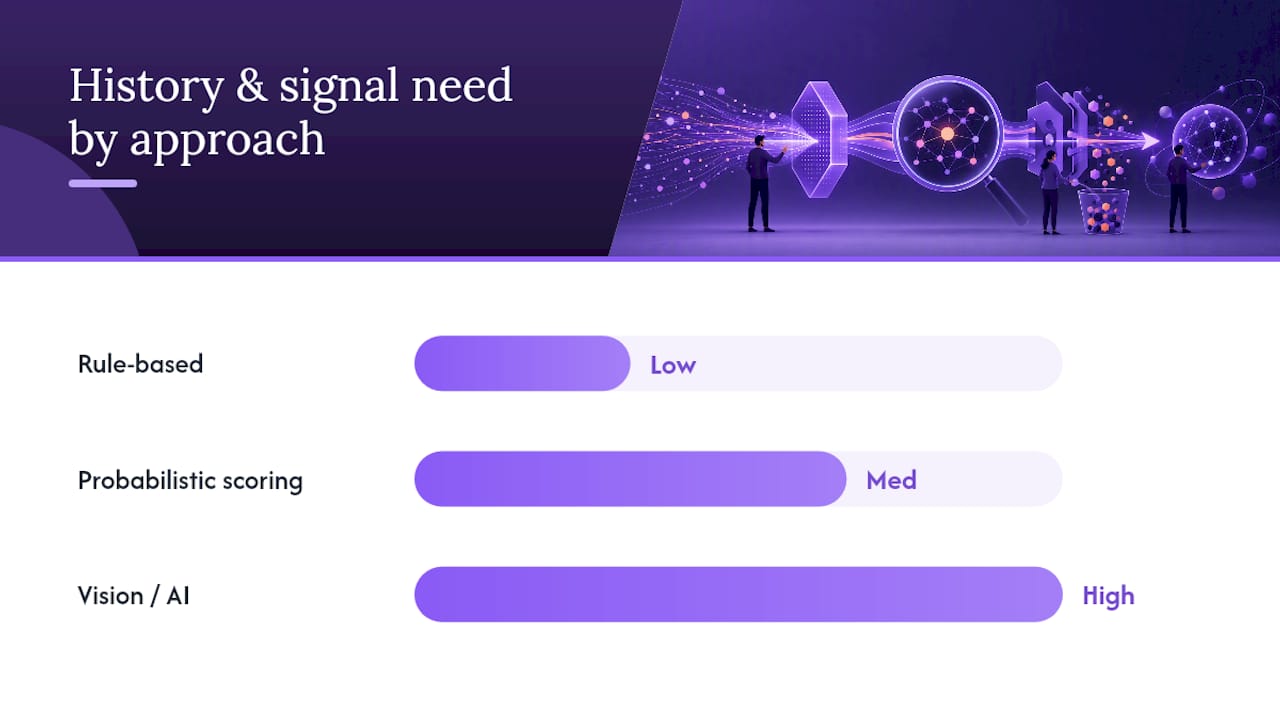
Rule-based thresholds work fine for simple, well-understood workflows. If a task sits untouched for more than four hours past its expected duration, fire an alert. No modeling required, and it’s the right starting point if you have fewer than a handful of process variations.
Multi-signal probabilistic scoring earns its complexity in workflows with more moving parts. Instead of one threshold, the system weighs several signals (queue depth, time since last update, historical resolution time for that task type) and assigns a probability band. This catches blockers that no single threshold would trigger, because the combination of “slightly late” and “queue growing” and “no reply on the last two emails” is more telling than any one signal alone.
AI and vision-based detection shows up in industrial and physical-flow contexts. Vision systems on conveyors can flag flow anomalies with under 10 seconds of latency and push that alert straight into a CMMS or PLC through edge inference, which keeps response times low without a round trip to the cloud.
- Rule-based: fast to set up, best for simple or low-volume processes
- Probabilistic scoring: better accuracy for complex, multi-step workflows
- Vision/AI: necessary when the blocker is physical, not just data-driven
Pro Tip: Start with rule-based thresholds even if you eventually want scoring. You need a few weeks of “normal” data before any probabilistic model has something real to compare against.
The trade-off across all three is the same one: tighter thresholds catch problems faster but generate more false positives, and every model needs a tuning cadence or it drifts out of sync with how your process actually runs.
Designing Alerts and Routing So Every Notification Is Actionable
An alert nobody owns is worse than no alert. Building a routing policy that actually gets used comes down to a few sequenced decisions.
- Set a “for” duration before anything pages. A task that’s been idle for 90 seconds isn’t a blocker. Give transient states a hold window matched to your process’s normal variance, then escalate only once that window passes.
- Split severity into tiers. Page-critical issues (client-facing SLA about to breach) go to a phone. Daytime warnings (internal task running long, no client impact yet) go to a Slack channel or email digest.
- Route to a named owner, not a channel. Alerting design should tie back to business-relevant workload health, which means the person getting pinged needs to be the person who can actually clear the blocker.
- Automate work-order creation for recurring events. If the same step blocks three times in a month, that pattern should generate a CMMS ticket or a workflow revision request automatically, not a fourth manual email.
Getting this sequence right is what separates a system that gets trusted from one that gets muted within a week.
Implementation Checklist: Instrument, Pilot, Tune, Roll Out
Rolling out blocker detection doesn’t require replacing your existing stack. It requires a disciplined order of operations.
- Inventory your signals first. Map every timestamp, queue count, and completion event you already capture to a potential detection rule. Quick wins here are queue-length monitoring and basic task-timestamp checks, both of which you likely already log somewhere.
- Pick one workflow for a staging pilot. Don’t instrument everything at once. Choose a single handoff, onboarding flow, or client-intake process with enough volume to generate meaningful data in a few weeks.
- Set conservative baseline thresholds and collect feedback. Expect false positives early. That’s normal, and it’s the input you use to retune sensitivity.
- Connect outputs to real notification targets. Route alerts into the tools people already check, and where relevant, into a CMMS or maintenance queue for closed-loop remediation instead of a dead-end alert.
- Review and tune every two weeks during the pilot. A staged rollout of a few weeks of ingestion followed by weeks of calibration is typically enough to move from noisy first alerts to something reliable.
Pro Tip: Pick the workflow with the most complaints attached to it, not the most “important” one. Visible wins on a painful process build the internal case for expanding the pilot faster than a technically impressive but invisible one.
A bottleneck identification checklist is worth running before you even start instrumenting, since the true chokepoint in a process often isn’t where people assume it is.
Measuring Success and Estimating ROI for Blocker Detection
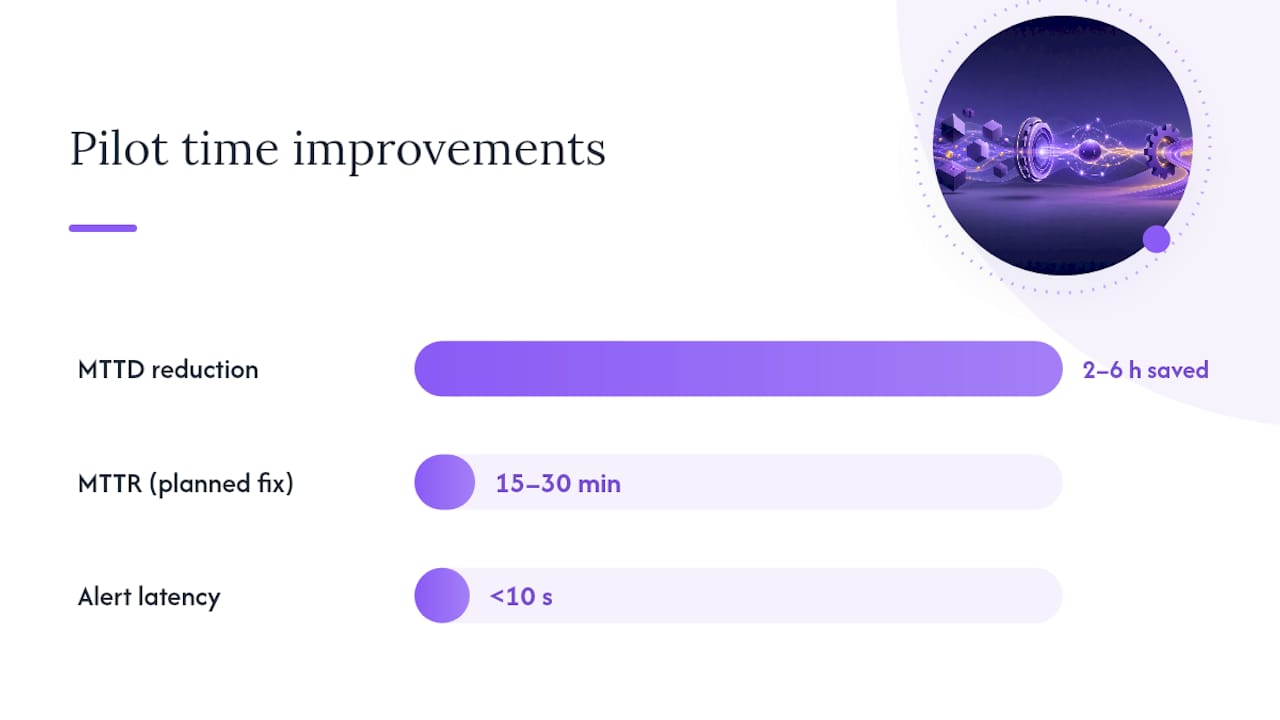
Four numbers tell you whether the pilot worked: mean time to detect (MTTD), mean time to resolve (MTTR), emergency clears per month, and total unplanned downtime hours. Multiply downtime hours by your cost per downtime hour and you have a number finance actually cares about.
The math is straightforward using the benchmarks already established. If detection moves 2 to 6 hours earlier and a planned fix runs 15 to 30 minutes against a multi-hour emergency clear, the savings per incident are substantial before you even factor in the reduced stress on whoever used to get the 2 a.m. page.
| Metric | Before automation | Target after pilot |
|---|---|---|
| MTTD | Hours to days | Minutes to hours |
| MTTR (planned fix) | Multi-hour emergency clear | 15 to 30 minutes |
| Alert latency | Manual discovery | Under 10 seconds |
| Emergency clears/month | Baseline count | Reduced, tracked weekly |
- Run the pilot for 6 to 12 weeks minimum
- Capture pre-pilot KPIs before you turn anything on
- Compare weekly, not just at the end, so tuning happens in real time
Practitioner Perspective: Quick Wins and Common Obstacles
The obstacle that kills most blocker detection rollouts isn’t technology. It’s ownership confusion. Teams instrument beautifully, get a clean alert firing, and then nobody knows whose job it is to act on it. Fix ownership before you fix sensitivity.
The second obstacle is data gaps. Plenty of ops teams assume they need a data warehouse before they can start. You don’t. You need timestamps on the two or three handoffs that actually cause pain, and you can get those from a workflow tool you’re likely already running.
This is exactly where a platform built around executing handoffs, not just tracking them, earns its keep. Tools that let external collaborators complete steps through a no-login magic link close one of the biggest blind spots in blocker detection: the step where you’re waiting on someone outside your own team.
Start with one handoff. Prove the 15 to 30 minute fix beats the four-hour scramble. Then expand.
— Harsh
How EasyFlow Maps to the Checklist and a Call to Action
Some workflow automation platforms go beyond tracking tasks to actually capturing events, notifying the right owner automatically, and letting external collaborators finish their step through a magic link with no account setup required, closing a common blind spot that causes most handoff delays.

Such platforms include features like event capture on every step, automatic notifications when a task stalls, email-based reply processing, and AI-executed step completion that keeps a workflow moving without a human chasing it down. If you’re weighing a broader rebuild, this guide to designing SaaS workflows that scale is a useful companion read for thinking through the architecture.
Run your pilot on one workflow, whether that’s new-hire onboarding or a client implementation step that keeps stalling, and see the detection lead time for yourself. Start a free trial and instrument your first handoff this week.
Selected Research and Demos to Explore Next
- Google SRE book on monitoring distributed systems for symptom-based alerting principles
- Datadog on pipeline telemetry for instrumentation standards
- iFactory’s vision-based conveyor detection for an industrial integration example
Sources
- Argus
- Microsoft Azure — observability and operational excellence
- iFactory — AI vision conveyor blockage detection
FAQ
What Is Blocker Detection Automation?
It’s a system that automatically identifies stalled or delayed steps in a business workflow, using signals like timestamps and queue depth, then alerts the responsible owner before the delay becomes a bigger problem.
How Fast Can Automated Systems Detect a Blocker?
Predictive systems can flag a developing blockage 2 to 6 hours before it becomes critical, and once an anomaly is flagged, alerts typically reach the operator in under 10 seconds.
What’s the Difference Between a Symptom Alert and a Contextual Alert?
A symptom alert reports a single metric crossing a threshold, while a contextual alert groups related signals into one notification that points toward the actual root cause.
Do I Need to Replace My Current Workflow Tools to Add Blocker Detection?
No. Most teams add detection on top of existing signals and tools, then route alerts into channels they already use, which is how platforms like EasyFlow layer in without a full system swap.
How Long Should a Blocker Detection Pilot Run?
Plan for 6 to 12 weeks, with pre-pilot KPIs captured before launch so you can measure the real change in MTTD, MTTR, and emergency clears per month.