
The Role of Approvals in Project Workflows Explained

Approval workflows in project management are structured checkpoints that authorize work to advance, ensuring quality and risk control at every stage. The role of approvals in project workflows goes far beyond rubber-stamping tasks. Done well, approvals prevent scope disputes, protect budgets, and keep teams aligned on what “done” actually means. Tools like Atlassian, Microsoft Power Automate, and EasyFlow have built entire product categories around this problem because the cost of getting it wrong is high. This article gives project managers and team leads a practical framework for designing approval processes that add control without killing speed.
What is the role of approvals in project workflows?
Approvals are gating checkpoints that validate work before resources, time, or budget move to the next phase. They exist at three distinct moments in a project’s life: initiation, execution, and closure. Project approval occurs at each of these lifecycle stages, evaluating risk and alignment before any resource commitment is made. That three-stage structure is not bureaucratic habit. It reflects where the real cost of a wrong decision is highest.
The importance of approvals becomes clearest when they are absent. Without structured sign-offs, teams make assumptions, stakeholders dispute scope, and no one can prove what was authorized. Informal approval processes create ambiguity and scope disputes mid-execution. Documented approvals prevent those costly misunderstandings by creating a traceable decision record.
Approval workflows also standardize how decisions get made across projects. A team that uses the same submission, review, and sign-off process every time builds institutional memory. That consistency reduces errors, shortens onboarding for new team members, and makes audits straightforward.
What are the typical workflow approval steps in a project?
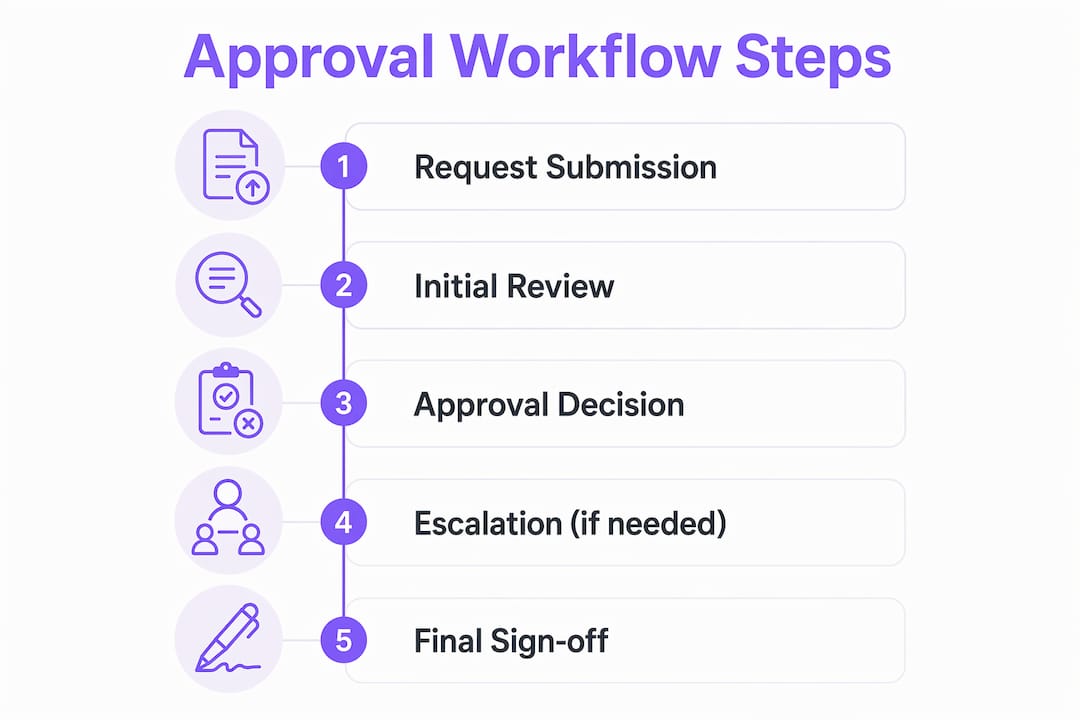
Most project approval processes follow five sequential steps, regardless of industry or team size.
- Submission. The requestor packages the work, deliverable, or proposal with all supporting context. Clear submission requirements prevent reviewers from chasing missing information.
- Review. The designated approver examines the submission against predefined criteria. This is where quality checks, compliance reviews, and risk assessments happen.
- Validation. The approver confirms the submission meets the criteria. For complex projects, this may involve a second reviewer or a subject matter expert.
- Decision. The approver approves, rejects, or requests revisions. The decision must be documented, not communicated verbally or through informal chat.
- Documentation and handoff. The decision is recorded in the project system, and the next stage or assignee is notified immediately. Skipping this step is where most teams lose time after an approval is granted.
Each step requires a clearly defined role. The requestor, the reviewer, and any backup approver must be named before the workflow begins, not assigned on the fly when a deadline is approaching.
Pro Tip: Write your approval criteria before you assign approvers. Criteria define what a “yes” looks like. Without them, every approval becomes a judgment call, and judgment calls slow everything down.
Milestone approvals during execution follow the same five steps but focus on whether the project is still on track against its original scope and budget. Final deliverable sign-offs add a client or executive layer, confirming the output meets the agreed standard before closure.
How do approvals affect project efficiency and risk management?
The design of your approval structure determines whether approvals protect your project or paralyze it. Risk-tiering in approval workflows prevents over-engineering and saves up to 50% of team velocity by eliminating unnecessary wait times. That figure reflects a real design choice: not every task carries the same risk, so not every task needs the same approval rigor.
The table below shows how risk-tiered approval design works in practice.

| Risk level | Approval model | Example |
|---|---|---|
| Low | Auto-approval or exception-triggered | Routine status updates, minor copy edits |
| Medium | Single approver with 24-hour SLA | Budget reallocations under threshold |
| High | Multi-stage, sequential approvers | Contract changes, scope expansions |
| Critical | Multi-stage with executive sign-off | New vendor onboarding, compliance decisions |
Over-engineered approvals create their own category of risk. When every task requires sign-off, teams build workarounds. They start treating approvals as formalities, rubber-stamping without review, which defeats the purpose entirely. More approvals do not equal more control. Approvals should sit only at consequential decision points.
Escalation paths are the other design element most teams neglect. Lack of escalation paths for unresponsive approvers causes significant project delays and bottlenecks. Every approval step needs a backup approver and a defined time limit before the request auto-escalates. Without that, one person’s vacation can stall an entire project.
Pro Tip: Set a 48-hour escalation rule for every approval step. If the primary approver has not responded, the request routes automatically to the backup. This one rule eliminates most approval-related delays without requiring any process redesign.
What are the common pitfalls in project management approvals?
The most damaging misconception about approvals is that getting one means the work is done. Approvals are gates, not finish lines. Failure to automate post-approval handoffs leaves work sitting idle despite full authorization. The approval happened, but no one told the next person in the chain.
Common pitfalls project managers encounter include:
- Treating verbal approvals as binding. Verbal sign-offs disappear from memory and create disputes. Every approval must be documented in the project system.
- Skipping post-approval handoffs. An approved task that sits in a queue is a bottleneck. Automated notifications to the next assignee must trigger the moment an approval is granted.
- Assigning approvers without authority. Approvers need delegated decision-making power, not just a title. Without clear authority thresholds, approvers escalate everything upward, creating a new bottleneck.
- Never auditing approval necessity. Audit approval necessity by asking what specific risk each step mitigates. Vague answers signal over-engineering. Non-critical approvals should move to exception-based triggers.
- Ignoring the human side of adoption. A new approval process that teams find confusing will be bypassed. Training and clear documentation are not optional extras.
The primary cause of approval-driven delays is system design, not approver behavior. That is a critical reframe for project managers. When approvals slow your team down, the instinct is to blame the approver. The real fix is almost always a process redesign, not a personnel conversation.
How can automation improve approval workflows for project teams?
Automation removes the manual work that makes approval processes fragile. When routing, notifications, and reminders run automatically, approvals move faster and the audit trail builds itself. Automation of routing, notifications, and reminders reduces manual work and improves team communication in approval workflows. Tools like EasyFlow and Power Automate make this practical for teams without dedicated IT resources.
The specific benefits automation delivers to project approval processes include:
- Automatic routing. Submissions go directly to the right approver based on predefined rules, eliminating manual forwarding and the errors that come with it.
- Deadline reminders. The system sends reminders to approvers before SLAs expire, reducing the need for project managers to chase sign-offs manually.
- Escalation enforcement. When an SLA expires, the request routes to the backup approver without any human intervention.
- Audit trails. Every decision, timestamp, and comment is logged automatically. This protects teams during disputes and simplifies compliance reviews.
- Post-approval handoffs. The moment an approval is granted, the next task or assignee is notified. Work does not sit idle waiting for someone to manually update a status.
EasyFlow takes this further by allowing external collaborators to participate in approval workflows via magic links, with no account creation required. That removes a significant friction point for client approvals and vendor sign-offs. Teams using EasyFlow for workflow automation report fewer follow-up messages and faster execution on approval-dependent tasks.
Pro Tip: Before selecting an automation tool, map your current approval workflow on paper first. Automating a broken process just makes the broken process run faster. Fix the design, then automate it.
What best practices should project managers follow for approvals?
A well-defined approval process includes clear submission requirements, defined approval criteria, designated approvers with backups, escalation rules, and audit trails. Those five elements are the non-negotiable foundation. Everything else is refinement.
Best practices for managing project approvals effectively:
- Define criteria before assigning approvers. Approvers need to know what a passing submission looks like. Criteria remove subjectivity and speed up decisions.
- Use risk-based design. Match approval rigor to task risk level. Low-risk tasks should not require the same process as high-stakes decisions.
- Build escalation rules into every step. Name backup approvers and set SLA timers before the workflow goes live.
- Document every decision. Approvals recorded only in email threads or chat messages are not auditable. Use a project management system or workflow tool that logs decisions automatically.
- Review your approval process quarterly. Workflows that made sense at project launch often become outdated as the project evolves. A quarterly audit catches unnecessary steps before they become entrenched habits.
- Separate approval from notification. Not every stakeholder who needs to know about a decision needs to approve it. Keeping approval lists short and notification lists separate prevents approval fatigue.
Balancing control with speed is the central challenge in project management approvals. The teams that get it right treat their approval process as a living document, not a policy set once and forgotten.
Key Takeaways
A well-designed approval workflow balances control with speed by placing checkpoints only at high-risk decision points, automating handoffs, and documenting every decision for full accountability.
| Point | Details |
|---|---|
| Three lifecycle stages | Approvals belong at initiation, execution milestones, and final closure, not at every task. |
| Risk-tiered design | Match approval rigor to task risk level to protect speed on low-risk work. |
| Escalation rules are non-negotiable | Every approval step needs a backup approver and an SLA timer to prevent bottlenecks. |
| Approvals are gates, not finish lines | Automate post-approval handoffs so work moves immediately after sign-off. |
| Audit approval necessity regularly | Ask what risk each step mitigates. Remove or convert steps that cannot answer that question. |
Approvals as a design problem, not a people problem
I have watched project managers spend months trying to fix slow approvals by replacing approvers, adding more sign-off layers, or sending increasingly urgent follow-up messages. None of it worked. The problem was never the people. It was the process design.
The most useful reframe I have seen is treating every approval step as a design decision with a cost. What risk does this step mitigate? What is the cost in time and friction if it stays? What happens if it is removed or made exception-triggered? Those three questions cut through most approval debates faster than any stakeholder meeting.
The other thing I have learned is that informal approvals feel efficient until they are not. A quick Slack message feels faster than a formal sign-off. It is, right up until a dispute arises six weeks later and no one can prove what was agreed. Structured approvals are not bureaucracy. They are insurance.
Automation is where the real gains are, but only after the process is clean. Teams that automate a poorly designed approval workflow just get faster at creating the same problems. Fix the design first. Then let tools like EasyFlow handle the routing, reminders, and handoffs so your team can focus on the actual work.
— Harsh
How EasyFlow handles approval workflows for project teams
Project teams that rely on manual follow-ups and email chains to manage approvals lose hours every week to coordination overhead. EasyFlow automates the entire approval chain, from submission routing to post-approval handoffs, without requiring external collaborators to create accounts.

EasyFlow’s magic link feature lets clients, vendors, and external reviewers complete approval steps directly from their inbox. No login friction, no onboarding delay. The platform logs every decision automatically, giving project managers a full audit trail without any manual documentation. Teams that want to see how this works in practice can start for free and build their first automated approval workflow in under an hour.
FAQ
What is the role of approvals in project workflows?
Approvals are structured checkpoints that authorize work to advance, ensuring quality, risk control, and stakeholder alignment at each project stage. They exist at initiation, execution milestones, and project closure.
Why do approval workflows cause project delays?
The primary cause of approval-driven delays is system design, not approver behavior. Missing escalation paths, undefined backup approvers, and manual handoffs are the most common culprits.
How many approval steps does a project need?
The number of approval steps should match the risk profile of the project. Low-risk tasks can use auto-approval or exception triggers, while high-risk decisions require multi-stage sign-offs with defined criteria.
What should a well-defined approval process include?
A well-defined approval process includes clear submission requirements, defined approval criteria, designated approvers with backups, escalation rules, and an audit trail for every decision.
How does automation improve the project approval process?
Automation handles routing, deadline reminders, escalation enforcement, and post-approval handoffs automatically. This removes manual coordination work and ensures work moves immediately after sign-off, with no idle time.